5.4 Firewalls
A firewall keeps remote users from connecting to your computer, while letting you connect to remote servers. A Mac OS X system includes a number of services, such as file sharing, that a remote attacker can potentially use to access your system. When you are on the road, you should enable Mac OS X's firewall, because other users on the wireless network will be able to access your computer if you don't.
To enable the firewall on your Mac OS X computer:
Open System Preferences.
Click on the Sharing icon under the Internet & Network group.
The Sharing window is displayed (see Figure 5-6). Click on the Firewall button.
Figure 5-6. Enabling Mac OS X's firewall
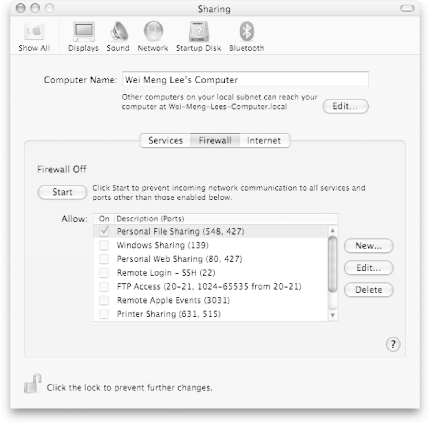
To start Mac OS X's firewall, click Start. Check the services you want to run so that Mac OS X's firewall can allow access to the corresponding ports. Any services that are not checked will have their access blocked.


