8.2 Setting Up Peer-to-Peer Networking
If you don't have a network available, you can set up a wireless peer-to-peer network to allow multiple computers to share services via Rendezvous. Use this method when you need to wirelessly collaborate but there is no available network to which you can connect.
Here is how you do it:
First, ensure that the AirPort in your Mac is configured to "create networks." You can verify this in the Network (AirPort section) section in System Preferences.
Create a peer-to-peer network by clicking on the AirPort menu at the top of the screen and selecting Create Network . . .
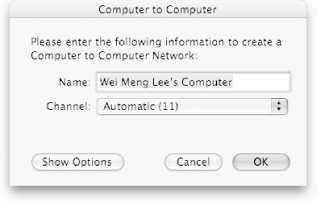
Give your new network a name and click OK (see Figure 8-1).
Figure 8-1. Creating a peer-to-peer network
Note that your AirPort icon has changed, as shown in Figure 8-2 (left).
Figure 8-2. The icon of the AirPort in peer-to-peer (left) and infrastructure mode (right)

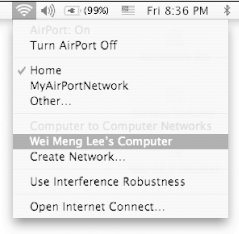
Other Mac users within range can see your network name by selecting the AirPort menu item (see Figure 8-3).
Figure 8-3. Selecting the peer-to-peer network
You don't need to use peer-to-peer networking in order to use Rendezvous messaging; it will still work when you are connected to a wireless network such as an AirPort Extreme base station. However, these instructions may come in handy if you find yourself in situations where you want to work with other users, but don't have an access point nearby.


