11.3 Spelling in Action
Now that you have a basic understanding of the Spelling API, consider the actual code that uses it. As in previous chapters, this code should address any questions you might have and detail the use of spelling from a Java application.
11.3.1 User-Requested Spellchecking
You'll now add the ability to spellcheck the JTextArea of the SimpleEdit application created in Chapter 4. This modification allows the user to select "Spelling" from the "Tools" menu and run a spellcheck on SimpleEdit application text.
The plug-in mechanism adds this functionality, implementing the SimpleEditPlugin interface again. This makes interaction with SimpleEdit a piece of cake. Example 11-1 is the source code for this plug-in.
Example 11-1. A spellchecking plug-in
package com.wiverson.macosbook.spelling;

import com.wiverson.macosbook.SimpleEdit;

public class SpellCheckPlugin implements
        com.wiverson.macosbook.SimpleEditPlugin
{

    public SpellCheckPlugin(  )
    {
    }

    public void doAction(SimpleEdit frame, java.awt.event.ActionEvent evt)
    {
        com.apple.spell.ui.JTxtCmpontDrvr mySpellchecker =
        new com.apple.spell.ui.JTxtCmpontDrvr(  );
        mySpellchecker.checkSpelling(frame.getJTextArea(  ));
    }

    public String getAction(  )
    {
        return "Check Spelling...";
    }

    public void init(SimpleEdit frame)
    {
    }

}
There's very little to this code; no initialization is required, so only the doAction( ) method and a short getAction( ) method body need to be implemented. getAction( ) is self-explanatory, and doAction( ) just loads a text-area spellchecker and uses it to check spelling in the SimpleEdit text box.
To use this plug-in, make sure the JavaSpellingFramework.jar is on the classpath when you start the SimpleEdit application. Then launch the application, passing in the name of the plug-in as an argument. To launch from the command line, use a command like this:
java -cp .:JavaSpellingFramework.jar
     com.wiverson.macosbook.SimpleEdit
     com.wiverson.macosbook.spelling.SpellCheckPlugin
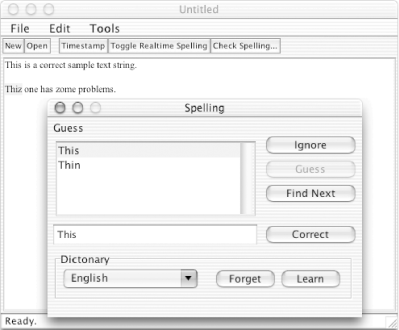
As shown in Figure 11-5, the spellchecking facility integrates seamlessly with the SimpleEdit application.
Figure 11-5. Interactive spellchecking
If more control over the modifications made by the spellchecker is needed, you can subclass the com.apple.spell.ui.JTxtCmpontDrvr class and override the methods handleFindNextEvent( ) , handleFoundMisspellingEvent( ), handleIgnoreEvent( ), and handleCorrectEvent( ) for notification as the user interacts with the dialog.
11.3.2 Real-Time Spellchecking
As computers have gotten faster, the ability to perform real-time spellchecking in word processors has become increasingly popular. Real-time spellchecking simply means that the application checks spelling as you type without you having to make a specific request for this behavior. This feature is most commonly implemented by underlining misspelled words in red as the user types them. The spelling toolkit that Apple provides is powerful enough to support this feature, and you'll want to implement it in any word-processing applications you produce.
Use SimpleEdit's plug-in mechanism to add this functionality again, and the code turns out to be as simple as user-requested spell checking. Example 11-2 is the relevant plug-in code.
Example 11-2. Real-time spellchecking plug-in
package com.wiverson.macosbook.spelling;

import com.wiverson.macosbook.SimpleEdit;

public class RuntimeSpellPlugin implements
    com.wiverson.macosbook.SimpleEditPlugin
{

    public RuntimeSpellPlugin(  )
    {
    }

    private boolean runtimespell = false;
    com.apple.spell.ui.JTxtCmpontDrvr mySpellchecker =
        new com.apple.spell.ui.JTxtCmpontDrvr(  );

    public void doAction(SimpleEdit frame, java.awt.event.ActionEvent evt)
    {
        if(!runtimespell)
        {
            mySpellchecker.startRealtimeChecking(frame.getJTextArea(  ));
        } else
        {
            mySpellchecker.stopRealtimeChecking(  );
        }
        runtimespell = !runtimespell;
    }

    public String getAction(  )
    {
        return "Toggle Realtime Spelling";
    }

    public void init(SimpleEdit frame)
    {
    }
}
The doAction( ) method handles the important work. It merely has to start and stop the interactive spellchecker based upon the state of the runtimespell flag. This step lets the user turn real-time spellchecking on and off easily without adding complexity to your plug-in code.
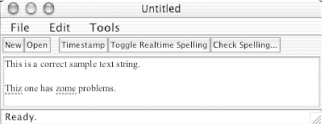
As shown in Figure 11-6, words that the user types are now highlighted with a dotted red underscore. If the user Control-clicks (or, if using a two-button mouse, right-clicks) on a word, a pop-up menu with suggestions appears. It's a lot of functionality for such a minor addition.
Figure 11-6. Real-time spellcheck
When you use the real-time spellcheck capability, new words that the user types are checked, but cut-and-pasted words are not, and words are not rechecked if the real-time checking is turned off and then back on. Fortunately, the Java source layer provided by Apple's toolkit controls this behavior, and you can customize it to add more functionality (for example, by integrating default language choices into your own preferences).
11.3.3 Custom Spellchecking
So far, you've dealt with spelling only in GUI applications. However, you might want to implement spellchecking in an application that doesn't use Swing controls or that operates at a lower level. In these cases, you should bypass the com.apple.spell.ui package and drop into the base spelling package, com.apple.spell. Here, you'll find several useful items that don't assume the existence of a user interface.
The com.apple.spell.SpellingChecker class provides lower-level access to the Mac OS X Spelling API. It's simple to use, as it's simply comprised of several static methods. The method signatures are shown here:
// Locates the first misspelled word in a String
MisspelledWord findMisspelledWordInString(String in, String language);

// Finds a misspelled word with an offset.
MisspelledWord findFirstMisspelledWord(String in, int startingAt, String langauge);

// Gives suggestions for a word, or use the method on MisspelledWord
String[] suggestGuessesForWord(String word, String language);

// Adds a custom word to the dictionary, useful for jargon.
boolean learnWord(String word, String language);

// Removes a custom word from the dictionary.
boolean forgetWord(String word, String language);
If you want to work with these APIs, first call SpellingChecker.getAvailableLanguages( ) to identify the installed languages on the system you're working with. Then the other static methods can be called; each is used by passing in a section of text and the preferred language to spell in.
These APIs work naturally with ordinary Java Strings. If you expect to deal with large quantities of text, develop a model in which spellchecking operates on another thread to avoid user interface deadlocks, passing in a paragraph or a fixed quantity of text to be checked.
Imagine using this API to provide a variety of interesting services, such as adding spellchecking capabilities to web applications via JSP or servlets?which would allow users of non-Mac OS X platforms to enjoy one of Mac OS X's most useful features. Familiarizing yourself with the Spelling API does more than just improve your Swing applications; it can make your programming more user-friendly.


