13.1 Apache Tomcat
To run JSPs and servlets, you'll need a container that takes the output of these components and displays it to the user. The ideal choice for this task is the Tomcat web container. Tomcat is the Apache-sponsored, open source, official reference servlet container implementation of the Java servlet and JavaServer Pages technologies. Those of you who know this topic well can skip to the next section. For those of you who are new to Tomcat, a few words are in order.
13.1.1 A Brief History of Tomcat
Originally, simple web servers delivered
static HTML documents to web browsers. An important legacy of this
era can be found on every Mac OS X machine: the web-sharing feature
under "System Preferences  Sharing
File & Web" is a full version
of the famous Apache httpd, one of the original
web servers. Apache is a robust, powerful, well-supported web server,
but on its own, its capabilities for serving dynamic content are
limited. A web page returned by Apache is (mostly) the static
document on disk.
Sharing
File & Web" is a full version
of the famous Apache httpd, one of the original
web servers. Apache is a robust, powerful, well-supported web server,
but on its own, its capabilities for serving dynamic content are
limited. A web page returned by Apache is (mostly) the static
document on disk.
To address the increasing need for dynamic content, a number of technologies were developed for Apache. They were integrated into the server as plug-ins, and allowed Apache to add to its feature set. These plug-ins ranged from support for Perl-based CGI scripts to the ability to run C++-based extensions. Many extensions were limited, however. They often introduced additional overhead, many times disproportional to the amount of functionality added. A growing number of common tasks were also of interest, such as standardized mechanisms for connecting to a database and presenting dynamically generated documents.
Further down the web-container timeline, developers began to notice that Java had several advantages for these sorts of tasks. The Java runtime environment had many desirable features, the most significant of which were integrated support for a rich threading model, a rich exception model for handling failure states, and an existing API for connection to relational databases (referred to as JDBC). The threading model reduced the large overhead that CGI scripts were creating on Apache, and the core Java API simplified common tasks such as database access and content generation. However, the core Java API still did not integrate tightly with HTML, and forced developers to handle a lot of common networking tasks on their own.
At this point, the Java Servlet specification entered the scene. In many ways, this specification developed as a standard way to write Java-based plug-ins for web servers. Today, these servlets are typically installed in their own specialized server, called an application server or web container. A servlet is essentially a lump of Java code that takes in a request (usually via HTTP) and writes out a response (usually delivered by HTTP). Generally, users would form their response with an output stream, as in the following Java code:
out.print("<A HREF='..\\index.jsp'>");
out.print("<IMG SRC='images\\titlebar.gif'>");
out.println("</A>");
for(int i = 0; i < 5; i++)
    out.println(i + "<BR>");
As you can see, this API hides all the details of network connection and buffering output formation; the developer simply spits out HTML, and the web container converts it to a graphical interface. However, Java was still largely a developer language. Web designers wanted the same ability to produce dynamic content, and Java and servlets were too complex for the typical HTML designer.
Additionally, developers using servlets soon noticed that they spent significant amounts of time massaging their HTML to fit in Java source, which was a poor way to encourage a division of labor between the HTML web monkeys and the Java coders. This (and the growing popularity of a similar technology from Microsoft, ASP) led to the development of JavaServer Pages. In a very real sense, JSP is an inverted version of a servlet. The code above written as a JSP fragment would look like this:
<A HREF='..\index.jsp'>
<IMG SRC='images\titlebar.gif'>
</A>
<%
for(int i = 0; i < 5; i++) {
%>
<%= i %>
<BR>
<% } %>
Note that you are now writing HTML, with the Java code broken out into script sections identified by <% ... %> and <%= ... %>.
At first, the advantage of this JSP syntax over the servlet code may not be obvious. However, the advantages can be significant, especially if you are doing a lot of web design and interface creation. One of the most important differences is that most web developers (as well as web design tools, such as Macromedia's Dreamweaver MX) are comfortable working with the bits of escaped Java source in a JSP page, but there is no such thing as a visual layout tool for servlets.
The final piece of this puzzle, and history, is the entry of Tomcat. Tomcat is an open source version of the code that was originally part of Sun's Java Web Server Development Kit. It has now moved far beyond those initial pieces of code and become a rich, complex web container within which servlets and JSP pages can run.
13.1.2 Installing and Starting Tomcat
To get started with Tomcat, download the latest stable release of Tomcat, currently Version 4.1.8, located at http://jakarta.apache.org/tomcat/. Click on the Binaries link under the Download section to visit another section, which describes the meanings of various builds and a list of other Apache projects. Click on the Tomcat link under Release Builds to see a list of the current builds, with links determined by the mirrored site you prefer.
You could encounter a bug in some implementations of the default Mac OS X un-tarring utility, so err on the side of caution and download the ZIP version rather than a TAR distribution. These instructions download the file http://www.rge.com/pub/infosystems/apache/jakarta/tomcat-4/binaries/tomcat-4.1.18.zip. Make sure you know where on your system the downloaded file is, and then unzip the archive to create an expanded directory structure.
|

Now move the properly unzipped directory structure into an appropriate location. The following directions assume that you have placed the resulting files into the directory /Developer/tomcat-4.1.18.
Open up an instance of Terminal and issue the commands shown here:
[Localhost:~] wiverson% cd /Developer/tomcat-4.1.18/bin/
[Localhost:/Developer/tomcat-4.1.18/bin] wiverson% ls -l
total 392
-rwxr-xr-x  1 wiverson  admin  24659 Dec 19 14:49 bootstrap.jar
-rwxr-xr-x  1 wiverson  admin   7400 Dec 19 14:49 catalina.bat
-rwxr-xr-x  1 wiverson  admin   8618 Dec 19 14:49 catalina.sh
-rwxr-xr-x  1 wiverson  admin   9034 Dec 19 14:49 commons-daemon.jar
-rwxr-xr-x  1 wiverson  admin    511 Dec 19 14:49 cpappend.bat
-rwxr-xr-x  1 wiverson  admin   1284 Dec 19 14:49 digest.bat
-rwxr-xr-x  1 wiverson  admin    848 Dec 19 14:49 digest.sh
-rwxr-xr-x  1 wiverson  admin   2546 Dec 19 14:49 jasper.bat
-rwxr-xr-x  1 wiverson  admin   2833 Dec 19 14:49 jasper.sh
-rwxr-xr-x  1 wiverson  admin   1199 Dec 19 14:49 jspc.bat
-rwxr-xr-x  1 wiverson  admin    795 Dec 19 14:49 jspc.sh
-rwxr-xr-x  1 wiverson  admin   1942 Dec 19 14:49 setclasspath.bat
-rwxr-xr-x  1 wiverson  admin   1661 Dec 19 14:49 setclasspath.sh
-rwxr-xr-x  1 wiverson  admin   1215 Dec 19 14:49 shutdown.bat
-rwxr-xr-x  1 wiverson  admin    787 Dec 19 14:49 shutdown.sh
-rwxr-xr-x  1 wiverson  admin   1216 Dec 19 14:49 startup.bat
-rwxr-xr-x  1 wiverson  admin    788 Dec 19 14:49 startup.sh
-rwxr-xr-x  1 wiverson  admin  10593 Dec 19 14:49 tomcat-jni.jar
-rwxr-xr-x  1 wiverson  admin  65536 Dec 19 14:50 tomcat.exe
-rwxr-xr-x  1 wiverson  admin   2168 Dec 19 14:49 tool-wrapper.bat
-rwxr-xr-x  1 wiverson  admin   2484 Dec 19 14:49 tool-wrapper.sh
[Localhost:/Developer/tomcat-4.1.18/bin] wiverson%
Your directory listing should look similar to this output. Note that all of these files are already set to be executable.
|
13.1.3 Starting Tomcat
Next, use the startup script in the bin directory to fire up Tomcat:
[Localhost:/Developer/tomcat-4.1.18/bin] wiverson% env
    JAVA_HOME=/Library/Java/Home ./startup.sh
Using CATALINA_BASE:   /Developer/tomcat-4.1.18
Using CATALINA_HOME:   /Developer/tomcat-4.1.18
Using CATALINA_TMPDIR: /Developer/tomcat-4.1.18/temp
Using JAVA_HOME:       /Library/Java/Home
[Localhost:/Developer/tomcat-4.1.18/bin] wiverson% ps -a
  PID  TT  STAT      TIME COMMAND
  601 std  Ss     0:00.78 login -pf wiverson
  602 std  S      0:00.05 -tcsh (tcsh)
  616 std  R      0:04.13 /Library/Java/Home/bin/java
  619 std  R+     0:00.01 ps -a
[Localhost:/Developer/tomcat-4.1.18/bin] wiverson%
The JAVA_HOME environment variable is specified in this execution; Tomcat will not run without this variable set properly. Note the use of the ps -a command to see the started server.
|
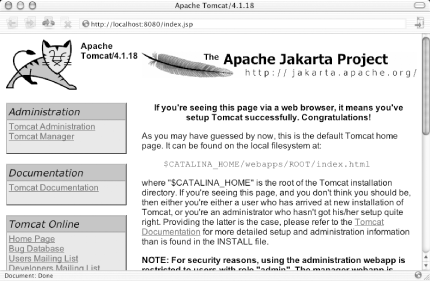
If all is well, launch your browser and point it at the URL http://localhost:8080/. Assuming Tomcat is running properly, you should see a cheery message like that illustrated in Figure 13-1.
Figure 13-1. Tomcat success screen
13.1.4 Shutting Tomcat Down
Tomcat expects a specific signal to shut down in an orderly fashion. You can tell Tomcat to shut down cleanly by executing the following command:
 [Localhost:/Developer/tomcat-4.1.18/bin] wiverson% env JAVA_HOME=/Library/
Java/Home ./shutdown.sh
This shutdown script ensures that Tomcat releases the resources it has tied up and stops all related processes.
|
13.1.5 Understanding JSP Compilation
Tomcat consists of two main architectural components: Catalina (a servlet container) and Jasper (a servlet that serves as the JSP compiler and default handler for JSP files).
When Catalina is launched, it waits for requests for resources in its webapps directory (or wherever the web content is located on your installation). If a request for a JSP is made, Catalina hands the request off to the servlet implementation of Jasper. If this is the first time the request is made, Jasper compiles the JSP into a Java source file, and then compiles this file by using the javac compiler in a binary Java class file. Finally, Jasper loads and executes this class file, returning the result. Future requests for the JSP page causes Jasper to compare the class file on disk to the JSP page on disk. If the timestamps don't match, Jasper recompiles the page dynamically and repeats the process.
It sounds a lot more complicated than it really is, but JSP compilation can make debugging JSP pages somewhat difficult. Because the original JSP is translated into Java source and then compiled into class files, the line numbers reported for errors sometimes correspond to the original JSP source. However, they usually map to the line numbers in the generated Java source. Be sure to fix bugs in the original JSP source, not in the Jasper-generated Java files.
13.1.6 Getting to Know Tomcat
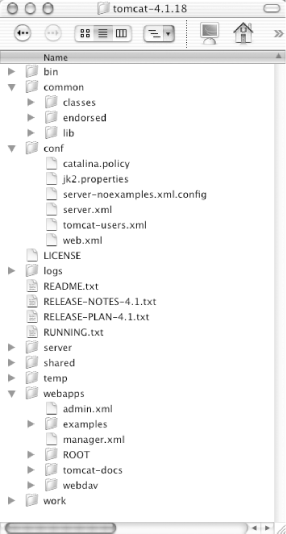
Tomcat has a specific set of directories and configuration files, as shown in Figure 13-2. Take the time to become familiar with the various files and directories and to understand what goes where (and why). The next several subsections list important directories in this structure and their contents and usage.
Figure 13-2. Tomcat installation layout
13.1.6.1 bin
The bin directory contains the scripts used to start and stop Tomcat, as well as scripts for the JSP precompiler (jasper/jspc). Under normal circumstances, you need only the startup.sh and shutdown.sh scripts.
13.1.6.2 common
The two subdirectories of the common directory contain code and libraries that are made available to all installed web applications. Place raw class files in the proper directories under the common/classes/ directory. For example, if your class file is MyNiftyObject.class in the package com.wiverson.utils, the path to the class file is common/classes/com/wiverson/utils/MyNiftyObject.class.
JAR libraries can be placed inside the common/lib/ directory. They will be added automatically to the classpath for all your web applications.
|
13.1.6.3 conf
Of most significant interest in this directory is a series of XML files that allow configuration of the Tomcat (Catalina) server. These files serve a function for Tomcat that is similar to the functions that the httpd.conf files serve for Apache.
- server.xml
-
This file contains basic root configuration options for Tomcat. Try to use a text editor other than TextEdit for viewing and editing these files to avoid the line feed problems discussed in previous chapters.
The default connector point for the non-SSL channel is one of the most important values in this file. If you decide to use Tomcat instead of Apache to handle all your web services, change the value 8080 to 80 and use root access to bind to that port.
Pay special attention to the Context elements, which describe what content directories to serve and what the permissions are for those directories. For a production server, strip out the example contexts as well.
- tomcat-users.xml
-
This file can manage users and roles for administration of the Tomcat server. In particular, if you wish to use the "manager" web application for remote administration, check the permissions listed here. As of this writing, the best (and only) place for documentation on this functionality is the official documentation on the Apache web site (http://jakarta.apache.org/tomcat/). However, I'm happy to report that O'Reilly's upcoming Tomcat: The Definitive Guide will clarify this topic once and for all.
- web.xml
-
This file is pretty significant, as it configures the core component of Tomcat (Catalina) and binds the JSP compilation engine (Jasper) as a servlet. You can look here to add support for CGI scripts, set the default timeout for user sessions, and define file extension and MIME mappings, for example. This file, however, is beyond the scope of this book?visit the Tomcat web site for more information (and to inspect the file itself).
13.1.6.4 lib
This directory stores Java libraries used by the jspc tool (JSP compiler) and Tomcat. It has very little impact on normal web-based JSP application development.
13.1.6.5 logs
Not surprisingly, this is where Tomcat's log data is stored. When the system has problems, look here to see what's going on; you can often find useful nuggets of information about exceptions and other problems, as well as an access log.
13.1.6.6 server/lib
The two subdirectories under the server/lib directory contain code and libraries that are accessible to the server but not to your web applications (assuming you're using the startup.sh script). Unless you are working on Tomcat, you probably won't need or want to place files in these directories.
13.1.6.7 webapps
This directory contains the web applications that Tomcat is currently publishing to the Web. Each of these web applications typically corresponds to a standard directory layout.
|
13.1.6.8 work
This directory is actually one of JSP's most important directories. It's where you put the intermediate files that handle a lot of the Tomcat work. The next section covers this topic in greater detail.


