5.1 The Mac OS X Finder
Virtually every desktop client platform provides a standard that specifies application icons, associates documents with the application, and notifies the application of user requests generated by the desktop shell, be it the Finder, Explorer, or some X Windows-based system. However, the standard Java environment lacks mechanisms and APIs to deal with many of these conventions. Instead, you are given a main( ) method and the assumption that users can figure out what to do on their own. The result is a Java program that looks like Java, instead of a seamlessly integrated part of the user's desktop experience.
This section examines Apple's extensions that provide APIs for this desktop shell integration and describes how to support them while maintaining cross-platform compatibility.
|

5.1.1 Finder Integration
When a Java application runs on Mac OS X, the system creates the default application menu shown in Figure 5-1. The default application name is the fully qualified class name of the launching main( ) class (which is really only acceptable during development, if at all).
Figure 5-1. Default application menu
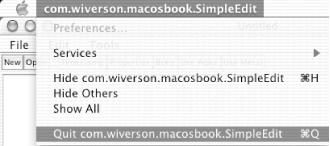
Each menu item needs to be accessible and integrated into the program so that code can respond to user actions. Apple provides hooks for integrating with these menu items via callbacks (or handlers). To implement these callbacks for the SimpleEdit application developed in Chapter 4, you will create a SimpleEditPlugin through the Java source file FinderIntegrationPlugin.java. This code, once compiled, will display the dialogs shown in Figure 5-2.
Figure 5-2. Menu callbacks trigger dialog boxes
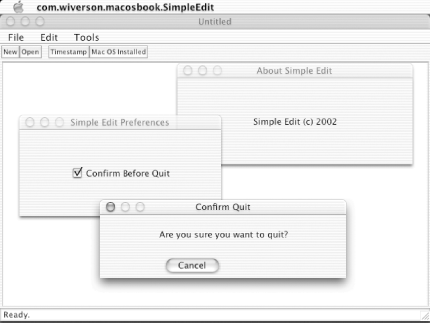
While this process isn't overly complex, it does begin to add some polish to the application.
5.1.2 The Finder Plug-in
Launch this application from the Terminal. Use the cd command to navigate to the application's root directory (which should be in your classpath) and launch this application with the command shown here:
java -Dcom.apple.mrj.application.apple.menu.about.name=SimpleEdit com.
wiverson.macosbook.SimpleEdit com.wiverson.macosbook.plugin.
FinderIntegrationPlugin
|
In addition to starting the program, this command sets and displays the name of the "About" menu item. You can do this for any OS X Swing application by using the com.apple.mrj.application.apple.menu.about.name property.
The plug-in shown in Example 5-1 interacts with the Mac OS X Finder, but it also introduces some important cross-platform considerations. Check out the source code, and soon you'll learn to handle non-Mac OS X platforms.
Example 5-1. The plug-in for Finder interaction
import com.wiverson.macosbook.SimpleEdit;

public class FinderIntegrationPlugin
    implements com.wiverson.macosbook.SimpleEditPlugin
{

    /** Creates a new instance of FinderIntegrationPlugin */
    public FinderIntegrationPlugin(  )
    {
    }

    // Does nothing useful in this context.
    public void doAction(SimpleEdit frame, java.awt.event.ActionEvent evt)
    {
        return;
    }

    // Returns a status string only.
    public String getAction(  )
    {
        if(isMacOS)
            return "Mac OS Installed";
        else
            return "Mac OS Not Available";
    }

    boolean isMacOS = false;

    /** Checks to see if Mac OS is available. If so,
     * goes ahead and loads the class by name that
     * actually performs the initialization. If not,
     * the class is never loaded. This helps prevent
     * classloader problems on non-Mac OS systems.
     */

    public void init(SimpleEdit frame)
    {
        if(System.getProperty("mrj.version") != null)
            isMacOS = true;

        if(isMacOS)
        {
            try
            {
               // This requests the classloader to find a
               // given class by name.  We are using this to
               // establish a firewall between the application
               // and Mac OS X dependencies.  This helps isolate
               // the application logic for organizational purposes,
               // as well as ensure that we won't try to drag Mac OS
               // references into our crossplatform code.
               Class myClass =
                Class.forName("com.wiverson.macosbook.plugin.FinderIntegration");

               Object myObject = myClass.getConstructor(null).newInstance(null);
               myClass.getDeclaredMethod("execute", null).invoke(myObject, null);;
            } catch (Exception e)
            {
               System.out.println("Unable to load FinderIntegration module.");
               e.printStackTrace(  );
            }
        }
    }
}
|
When reviewing the code for the plug-in shown in Example 5-1, you'll notice a lack of imports or references to Mac OS X-specific libraries; the code checks to see if it is running on a Mac OS system, and then loads the needed classes explicitly by name. This avoids ClassDefNotFound exceptions when running on platforms other than Mac OS X, as well as a miserable user experience.
|
Once the plug-in is sure that it is running on an OS X platform, it begins to deal with Finder integration. Instead of handling this itself, though, it loads up another class, FinderIntegration, which does all the heavy lifting.
5.1.3 The FinderIntegration Support Class
To actually support the integration, the FinderIntegration class is filled with platform-specific code for handling Apple extensions. Example 5-2 shows the source code for this class.
Example 5-2. OS X-specific Finder functionality
/** In order for this plugin to function properly,
 * it must be loaded by the SimpleEdit application
 * and the proper system properties set before execution.
 *
 * For example, the following command, entered on a single line,
 * invokes the JVM and tells the system to display the About menu item
 * in the Mac OS X application menu.
 *
 * java -Dcom.apple.mrj.application.apple.menu.about.name=SimpleEdit
 * com.wiverson.macosbook.plugin.FinderIntegrationPlugin
 */
package com.wiverson.macosbook.plugin;

import javax.swing.JDialog;
import javax.swing.JLabel;
import java.awt.Dimension;
import java.awt.event.ItemEvent;
import java.awt.event.ItemListener;

import com.apple.mrj.MRJApplicationUtils;

import com.apple.mrj.MRJOpenApplicationHandler;
import com.apple.mrj.MRJPrefsHandler;
import com.apple.mrj.MRJQuitHandler;
import com.apple.mrj.MRJOpenDocumentHandler;
import com.apple.mrj.MRJAboutHandler;

public class FinderIntegration
    implements  MRJOpenApplicationHandler,
                MRJQuitHandler,
                MRJPrefsHandler,
                MRJOpenDocumentHandler,
                MRJAboutHandler
{

    /** Creates a new instance of FinderIntegration */
    public FinderIntegration(  )
    {
    }

    // Only want to install this once per application
    // to avoid getting multiple event notifications
    private static boolean installed = false;

    public void execute(  )
    {
        if(!installed)
        {
           // Enables the menu item
           MRJApplicationUtils.registerPrefsHandler(this);

           // Overrides the default System.exit(  ) behavior.
           MRJApplicationUtils.registerQuitHandler(this);

           // Requires com.apple.mrj.application.apple.menu.about.name=Application
           // system property to be set to appear.
           MRJApplicationUtils.registerAboutHandler(this);

           // These require the application to be properly bundled for Mac OS X
           // for the events to be dispatched
           MRJApplicationUtils.registerOpenApplicationHandler(this);
           MRJApplicationUtils.registerOpenDocumentHandler(this);

           installed = true;
        }
    }

    // We only need one instance of the About dialog.
    static JDialog AboutDialog = null;

    public void handleAbout(  )
    {
        new DoAbout().start(  );
    }

    /** It may seem a bit strange to create a new Thread
     * just to display an about box.
     *
     * Unfortunately, due to the way the System interacts
     * between the native Carbon libraries and the JVM,
     * displaying a dialog will lock the user interface,
     * leaving kill to terminate the app.
     *
     * This simple thread just hangs on to a singleton
     * dialog, creating a new dialog if it's the first
     * time the dialog is displayed, hiding and reshowing
     * the dialog as needed.
     *
     * This isn't needed in the later Apple JVM's (including
     * JDK 1.4), but some earlier releases required this.
     *
     */
    class DoAbout extends Thread
    {
        public void run(  )
        {
            if(AboutDialog == null)
            {
                AboutDialog = new JDialog(  );
                AboutDialog.setResizable(false);
                AboutDialog.setTitle("About Simple Edit");
                AboutDialog.setSize(350, 150);
                Dimension screensize =
                   java.awt.Toolkit.getDefaultToolkit().getScreenSize(  );
                int width =
                   new Double((screensize.getWidth() - 350) / 2).intValue(  );
                int height =
                   new Double((screensize.getHeight() / 2) - 150).intValue(  );
                AboutDialog.move(width, height);
                JLabel myAppTitle = new JLabel(  );
                myAppTitle.setHorizontalAlignment(myAppTitle.CENTER);
                myAppTitle.setText("Simple Edit (c) 2002");
                AboutDialog.getContentPane(  ).add(myAppTitle);
            }
            AboutDialog.show(  );
        }
    }

    /** Note that the application requires Mac OS X bundling
     * (as described in a later chapter) to be enabled.
     * The techniques for writing these handlers are similar
     * to the rest of the add-ons.
     *
     * Typically, you will want to use these handlers to call
     * your standard File -> Open... routines, simply bypassing
     * the standard file dialogs.
     * /
    public void handleOpenApplication(  )
    {
        new DoOpenApplication().start(  );
    }

    class DoOpenApplication extends Thread
    {
        public void run(  )
        {
            System.out.println("Open Application");
        }
    }

    public void handleOpenFile(java.io.File file)
    {
        DoOpenFile myHandler = new DoOpenFile(  );
        myHandler.setFile(file);
        myHandler.start(  );
    }

    class DoOpenFile extends Thread
    {
        private java.io.File theFile = null;
        public void setFile(java.io.File inFile)
        {
            theFile = inFile;
        }

        public void run(  )
        {
            if(theFile == null)
                return;

            JDialog openedFileDialog = new JDialog(  );
            openedFileDialog.setResizable(false);
            openedFileDialog.setTitle("File Open Request...");
            openedFileDialog.setSize(350, 150);
            Dimension screensize =
                 java.awt.Toolkit.getDefaultToolkit().getScreenSize(  );
            int width =
            int height =
            openedFileDialog.move(width, height);

            JLabel myFileName = new JLabel(  );
            myFileName.setHorizontalAlignment(JLabel.CENTER);
            myFileName.setText("File name: " + theFile.getName(  ));
            openedFileDialog.getContentPane(  ).add(myFileName);

            JLabel myFilePath = new JLabel(  );
            myFilePath.setHorizontalAlignment(JLabel.CENTER);
            myFilePath.setText("File path: " + theFile.getPath(  ));
            openedFileDialog.getContentPane(  ).add(myFilePath);

            openedFileDialog.show(  );
        }
    }

     public void handlePrefs(  ) throws java.lang.IllegalStateException
    {
        new com.wiverson.macosbook.plugin.FinderIntegration.DoPrefs().start(  );
    }

    // This is the one preference we are tracking, which
    // only relates to Mac OS X specific behavior anyways.
    // Note that we aren't persisting the user's preferences.
    public static boolean pref_askToClose = true;

    static JDialog PrefsDialog = null;
    class DoPrefs extends Thread
    {
        public void run(  )
        {
            if(PrefsDialog == null)
            {
                PrefsDialog = new JDialog(  );
                PrefsDialog.setResizable(false);
                PrefsDialog.setTitle("Simple Edit Preferences");
                PrefsDialog.setSize(300, 150);
                Dimension screensize =
                     java.awt.Toolkit.getDefaultToolkit().getScreenSize(  );
                int width =
                     new Double((screensize.getWidth()  - 300) / 2).intValue(  );
                int height =
                     new Double((screensize.getHeight() / 2) - 150).intValue(  );
                PrefsDialog.move(width, height);

                javax.swing.JCheckBox myQuitPrefButton =
                     new javax.swing.JCheckBox("Confirm Before Quit");
                myQuitPrefButton.setHorizontalAlignment(
                     javax.swing.SwingConstants.CENTER);
                myQuitPrefButton.setSelected(true);
                myQuitPrefButton.addItemListener(new ItemListener(  )
                {
                    public void itemStateChanged(ItemEvent evt)
                    {
                        pref_askToClose =
                             (evt.getStateChange(  ) == ItemEvent.SELECTED);
                    }
                });
                PrefsDialog.getContentPane(  ).add(myQuitPrefButton);
            }

            PrefsDialog.show(  );
        }
    }

    /* Note that the Quit thread is slightly more complex
     * than the other threads.
     *
     * There is a bug which manifests as of Mac OS X 10.1, JDK 1.3.1
     * Update 1 which causes it to generate multiple events
     * for a single selection of the Quit menu item on the native
     * application menu.
     *
     * If you know you'll only be running on JDK 1.4 or later, this
     * isn't necessary.
     *
     * Therefore, to avoid a deadlock, a new thread is created,
     * tracked, and communicated with.  It's arguably overkill for
     * what is supposed to be a modal quit confirmation dialog...
     * but it works.
     */
    com.wiverson.macosbook.plugin.FinderIntegration.DoQuit quitThread = null;

    public void handleQuit(  ) throws java.lang.IllegalStateException
    {
        if(pref_askToClose)
        {
            if(quitThread == null)
            {
                quitThread = new DoQuit(  );
                // Make sure the application doesn't hang around
                // waiting for this thread.
                quitThread.setDaemon(true);
                quitThread.start(  );
            }
            else
                quitThread.show(  );
        } else
        {
            // If the user set a preference not to be
            // prompted, go ahead and bail out.
            System.exit(0);
        }
    }

    class DoQuit extends Thread
    {
        private  QuitConfirmJDialog myQuitDialog = null;
        // Operations on ints are inherently atomic,
        // and we aren't doing anything too fancy
        // requires fancier semaphores & locking.
        int showDialog = 0;
        public void show(  )
        {
            showDialog = 1;
        }

        public void run(  )
        {
            if(myQuitDialog == null)
                myQuitDialog =
                     new QuitConfirmJDialog(new javax.swing.JFrame(  ), true);

            showDialog = 1;
            // Now that the Quit dialog is ready, go ahead and sit
            // around waiting for a semaphore notification to redisplay.
            while(true)
            {
                if(showDialog == 1)
                {
                    myQuitDialog.show(  );
                    showDialog = 0;
                }
            };
        }
    }
}
You'll notice several Apple-specific imports. Each imported handler describes specific methods that must be implemented and ensures that the class can be cast properly. Additionally, Apple provides a lot of "out-of-the-box" functionality for working with GUIs, so it makes no sense to reinvent these pieces of code when you can simply implement some standard interfaces.
5.1.3.1 Registering handlers
The class uses the Apple-supplied MRJApplicationUtils class to register this class as an implementation of the various handlers:
// Enables the menu item
MRJApplicationUtils.registerPrefsHandler(this);

// Overrides the default System.exit(  ) behavior.
MRJApplicationUtils.registerQuitHandler(this);

// Requires com.apple.mrj.application.apple.menu.about.name=Application
// system property to be set to appear.
MRJApplicationUtils.registerAboutHandler(this);

// These require the application to be properly bundled for Mac OS X
// for the events to be dispatched
MRJApplicationUtils.registerOpenApplicationHandler(this);
MRJApplicationUtils.registerOpenDocumentHandler(this);
This class lets any other application using standard Apple controls know that the application can work seamlessly with this class (and the plug-in that uses it).
5.1.3.2 The "About" dialog box
Like other menu items that have event handlers associated with them, you can use a simple callback method to deal with the "About" dialog box. One of its unusual features, though, is the creation of a new thread that displays the dialog box:
public void handleAbout(  )
{
    new DoAbout().start(  );
}

class DoAbout extends Thread
{
    public void run(  )
    {
        if(AboutDialog == null)
        {
            AboutDialog = new JDialog(  );
            AboutDialog.setResizable(false);
            AboutDialog.setTitle("About Simple Edit");
            AboutDialog.setSize(350, 150);
            Dimension screensize =
               java.awt.Toolkit.getDefaultToolkit().getScreenSize(  );
            int width =
               new Double((screensize.getWidth() - 350) / 2).intValue(  );
            int height =
               new Double((screensize.getHeight(  ) / 2) - 150).intValue(  );
            AboutDialog.move(width, height);
            JLabel myAppTitle = new JLabel(  );
            myAppTitle.setHorizontalAlignment(myAppTitle.CENTER);
            myAppTitle.setText("Simple Edit (c) 2002");
            AboutDialog.getContentPane(  ).add(myAppTitle);
        }
        AboutDialog.show(  );
    }
}
This use of threading is a result of interactions with Mac OS X's native libraries. Threading is not necessary when using Apple's JDK 1.4 implementation, but the limitation does exist on JDK 1.3, and the required overhead is relatively trivial. If your "About" box does perform more sophisticated work across threads, however, you might need to pay attention to synchronization and other threading issues. Of course, getting your system upgraded to JDK 1.4 takes care of this problem, so these threading concerns will only be a legacy issue for most Mac OS X developers.
5.1.3.3 The "Open" and "Preferences" handlers
Once you've gotten the "About" box handled, you can move on to more standard handlers such as the "Open" and "Preferences" menu items. In each, the same basic threading principles are applied: the handler starts a thread, and then the thread handles the actual actions associated with the requested action.
|
The preferences dialog created by the DoPrefs thread is very basic and doesn't actually do much. In fact, the settings it allows are not persisted, so they would have to be reset each time the application is restarted. Several strategies are available for persisting user preferences, from the Preferences API included in JDK 1.4 to Java serialization and JDBC. The actual selected mechanism depends on the overall use of the application. Regardless of the mechanism, options available from this dialog should be global to the application, not specific to the current running instance.
5.1.3.4 The "Quit" handler
The "Quit" handler shown in Example 5-2 is perhaps the most complex example of a "Quit" dialog you'll see, but it's necessary in applications that are backward-compatible with Apple's JDK 1.3 implementation.
|
Consider this unusual bit of code:
if(pref_askToClose)
{
    if(quitThread == null)
    {
        quitThread = new DoQuit(  );
        // Make sure the application doesn't hang around
        // waiting for this thread.
        quitThread.setDaemon(true);
        quitThread.start(  );
    }
    else
        quitThread.show(  );
} else
{
    // If the user set a preference not to be
    // prompted, go ahead and bail out.
    System.exit(0);
}
A bug in Mac OS X 10.1 and JDK 1.3.1 (including Update 1) requires a lot of extra work. On those platforms and JDKs, multiple events are fired off for a single selection of the "Quit" menu item. Consequently, multiple threads can be created and deadlocked, resulting in an apparently frozen application. This turns out to be a lot of work for such a simple task, but if anything annoys a user, it is the thought that his or her application has locked up (even if the user was just trying to quit).
|

To make things easier, a dialog pops up to ensure that the user wants to quit:
if(myQuitDialog == null)
    myQuitDialog = new QuitConfirmJDialog(new javax.swing.JFrame(  ), true);
Example 5-3 is the code for the "Quit" confirmation dialog.
Example 5-3. The "Quit" confirmation dialog box
package com.wiverson.macosbook.plugin;

import javax.swing.JDialog;
import javax.swing.JFrame;
import java.awt.Frame;

public class QuitConfirmJDialog extends JDialog
{

    /** Creates new form QuitConfirmJDialog */
    public QuitConfirmJDialog(Frame parent, boolean modal)
    {
        super(parent, modal);
        initComponents(  );
    }

    private void initComponents(  )
    {
        buttonPanel = new javax.swing.JPanel(  );
        cancelButton = new javax.swing.JButton(  );
        okButton = new javax.swing.JButton(  );
        jLabel1 = new javax.swing.JLabel(  );

        setTitle("Confirm Quit");
        setModal(true);
        setResizable(false);
        addFocusListener(new java.awt.event.FocusAdapter(  )
        {
            public void focusGained(java.awt.event.FocusEvent evt)
            {
                formFocusHandler(evt);
            }
        });

        addWindowListener(new java.awt.event.WindowAdapter(  )
        {
            public void windowClosing(java.awt.event.WindowEvent evt)
            {
                closeDialog(evt);
            }
        });

        cancelButton.setText("Cancel");
        cancelButton.addActionListener(new java.awt.event.ActionListener(  )
        {
            public void actionPerformed(java.awt.event.ActionEvent evt)
            {
                cancelButtonHandler(evt);
            }
        });

        buttonPanel.add(cancelButton);

        okButton.setText("OK");
        this.getRootPane(  ).setDefaultButton(okButton);
        okButton.addActionListener(new java.awt.event.ActionListener(  )
        {
            public void actionPerformed(java.awt.event.ActionEvent evt)
            {
                okButtonHandler(evt);
            }
        });

        buttonPanel.add(okButton);

        getContentPane(  ).add(buttonPanel, java.awt.BorderLayout.SOUTH);

        jLabel1.setText("Are you sure you want to quit?");
        jLabel1.setHorizontalAlignment(javax.swing.SwingConstants.CENTER);
        jLabel1.setHorizontalTextPosition(javax.swing.SwingConstants.CENTER);
        getContentPane(  ).add(jLabel1, java.awt.BorderLayout.CENTER);

        pack(  );
        java.awt.Dimension screenSize =
        java.awt.Toolkit.getDefaultToolkit().getScreenSize(  );
        setSize(new java.awt.Dimension(366, 116));
        setLocation((screenSize.width-366)/2,(screenSize.height-116)/2);
    }

    private void formFocusHandler(java.awt.event.FocusEvent evt)
    {
        okButton.requestFocus(  );
    }

    private void cancelButtonHandler(java.awt.event.ActionEvent evt)
    {
        okButton.requestFocus(  );
        this.hide(  );
    }

    private void okButtonHandler(java.awt.event.ActionEvent evt)
    {
        System.exit(0);
    }

    private void closeDialog(java.awt.event.WindowEvent evt)
    {
        this.hide(  );
    }

    public static void main(String args[])
    {
        new QuitConfirmJDialog(new JFrame(), false).show(  );
    }

    private javax.swing.JPanel buttonPanel;
    private javax.swing.JButton okButton;
    private javax.swing.JButton cancelButton;
    private javax.swing.JLabel jLabel1;

}
It should be fairly easy to adapt these classes to your own application, providing Mac OS X-specific features while maintaining seamless cross-platform compatibility. As long as you use the FinderIntegrationPlugin or something similar, you can check for the existence of a Mac OS X platform and respond to it quickly and efficiently.


