7.5 MRJAppBuilder
MRJAppBuilder is a utility that packages already-compiled Java applications to run as Mac OS X applications. When you first convert your application to Mac OS X, it may be useful to create a skeleton application with MRJAppBuilder rather than creating one from scratch, as described in the last section. However, MRJAppBuilder has a serious limitation?once you've used the utility to generate your application wrapper and quit MRJAppBuilder, you'll have to make changes by hand or re-enter everything.
|

MRJAppBuilder can be found in your /Developer/Applications directory. When you launch the application, you'll see the interface shown in Figure 7-9.
Figure 7-9. MRJAppBuilder main properties
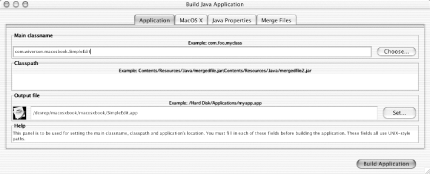
Technically, the information in the "Application" pane is all you need to make a Mac OS X application. All three fields are required. The "Main classname" field lets you specify the fully qualified class that contains the main( ) method you want executed on application startup. This field represents the value of the property com.apple.mrj.application.main (in effect, it sets the MainClass key). Whatever JAR file you select when you follow the dialog is added to the "Classpath" field automatically.
If you want to use JAR or class files that will not be included in the resulting application bundle, add the following classpath entry:
$APP_PACKAGE/../SimpleEdit.jar
$APP_PACKAGE is a special path string that represents the application bundle directory.
The last required field is the "Output file" field. This specifies the directory where the resulting application bundle will be built. You can also set the application icon in this pane, which is optional (but recommended). Click the icon in the "Output file" section to bring up a file chooser dialog for selecting an .icns file.
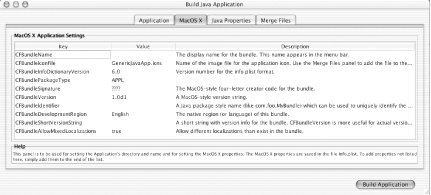
Settings in the "Mac OS X," "Java Properties," and "Merge Files" panes are all optional. The "Mac OS X" pane, shown in Figure 7-10, lets you set values specific to the Mac OS X application bundle format. If you do not specify CFBundleExecutable or CFBundleName, they are set based on the name of the output file you choose.
Figure 7-10. MRJAppBuilder application properties
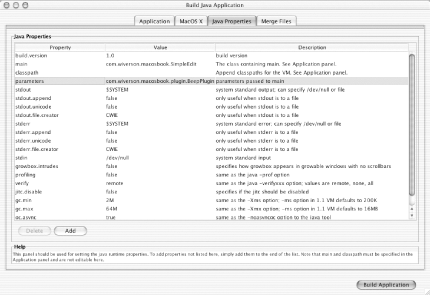
The "Java Properties" pane, shown in Figure 7-11, lets you set specific runtime properties as described earlier in this chapter.
Figure 7-11. MRJAppBuilder Java properties
The "Merge Files" pane provides a way to add files, such as ZIP or JAR files, to the application bundle. Each item added to the merge list is copied into the application's Contents/Resources/Java directory. Each item you add to the merge list is automatically added to the classpath. Since .class files aren't supported here, you'll need to package your class files as a ZIP or JAR for inclusion.
When you finish making your selections, click "Build Application." MRJAppBuilder does not provide an import mechanism or other ability to save your choices; once you build your application and quit, you'll need to make all your selections in MRJAppBuilder again, or modify the Info.plist and MRJApp.properties files by hand.


