Changing Text Alignment
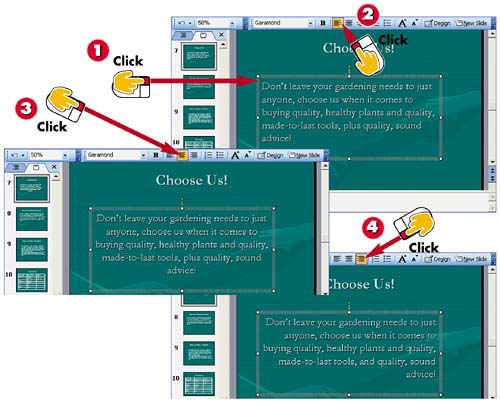

Click the text box whose alignment you want to change.

Click the Align Left button in the Formatting toolbar to align text to the left.

Click the Center button to center text in the text box.

Click the Align Right button to align text to the right.
INTRODUCTIONYou can control the alignment of text within a text box. By default, text aligns to the left of any new text boxes you add. Other text objects, like titles, automatically center the text. You can use the alignment buttons on the toolbar to quickly change text alignment in a slide. |
TIPUsing the Format Menu You can also find the alignment commands listed on the Format menu. Open the Format menu, choose Alignment, and then click the alignment you want to apply. |


