8.1 Database Inserts, Updates, and Deletes
Simple database modifications are much the same as queries. We begin this section with a simple case study similar to the querying examples we presented in the previous two chapters. However, inserting, updating, and deleting data does require some additional care. After this first example, we show you why it suffers from the reload problem and discuss a solution. After that, we return to further, richer examples of writing to a database and discuss more complex problems and solutions.
For this case study, we won't use the winestore database because it doesn't make use of MySQL's auto_increment feature that we want to use in this section. Instead, let's assume you need to maintain a list of names (surnames and first names) of people and their phone numbers, and that you want to write a script to add new data to the database. To begin, let's create a new telephone database and a phonebook table to store the details. Start the MySQL command interpreter and login as the root user. Then, type the following SQL statements into the command interpreter:
mysql> CREATE DATABASE telephone;

Query OK, 1 row affected (0.01 sec)


mysql> use telephone

Database changed

mysql> CREATE TABLE phonebook (

    -> phonebook_id int(6) NOT NULL auto_increment,

    -> surname CHAR(50) NOT NULL,

    -> firstname CHAR(50) NOT NULL,

    -> phone CHAR(20) NOT NULL,

    -> PRIMARY KEY (phonebook_id)

    -> ) type=MyISAM;

Query OK, 0 rows affected (0.00 sec)
We've created a phonebook_id attribute that is the primary key to uniquely identify each row in the table and we've used the auto_increment modifier with it. As we discussed in Chapter 5, inserting NULL into an auto_increment PRIMARY KEY attribute allocates the next available key value, and we use this feature in our script.
We also need a new user who can access the new database. To set one up with the right privileges, you can use the same approach used in Appendix A through Appendix C to configure MySQL. In the MySQL command interpreter, type:
mysql> GRANT SELECT, INSERT, UPDATE, DELETE, LOCK TABLES ON telephone.* TO

    -> fred@127.0.0.1 IDENTIFIED BY 'shhh';

Query OK, 0 rows affected (0.00 sec)
Replace fred and shhh with the username and password you want to use (and do the same later in all of the PHP scripts in this chapter).
Now we need an HTML form that allows users to provide the details to create a new row in the phonebook table. Example 8-1 shows such a form that's laid out for presentation using a table element. It collects three values into three input elements with the names surname, firstname, and phone, and it uses the GET method to pass values to the script example.8-2.php.
Example 8-1. An HTML form to capture the name of a new region
<!DOCTYPE HTML PUBLIC

                 "-//W3C//DTD HTML 4.01 Transitional//EN"

                 "http://www.w3.org/TR/html401/loose.dtd">

<html>

<head>

  <meta http-equiv="Content-Type" content="text/html; charset=iso-8859-1">

  <title>Add a Phonebook Entry</title>

</head>

<body>

<h1>Add a Phonebook Entry</h1>

<form method="GET" action="example.8-2.php">

<table>

<tr>

  <td>Surname:

  <td><input type="text" name="surname" size=50>

</tr>

<tr>

  <td>First name:

  <td><input type="text" name="firstname" size=50>

</tr>

<tr>

  <td>Phone number:

  <td><input type="text" name="phone" size=20>

</tr>

</table>

<br><input type="submit">

</form>

</body>

</html>
Example 8-2 shows the script that adds the new data to the phonebook table. It works as follows: if a surname, first name, and phone number are supplied by the user, an INSERT SQL statement is prepared to insert the new row; the mysqlclean( ) function (and the db.inc include file where it's stored) are discussed in Chapter 6. As described in Chapter 5, inserting NULL results in the auto_increment modifier allocating the next available key value. If any of the values are missing, it redirects back to the form using the header( ) function that's discussed in Chapter 6.
Example 8-2. A script to insert a new phonebook entry
<?php

require "db.inc";

require_once "HTML/Template/ITX.php";


// Test for user input

if (!empty($_GET["surname"]) &&

    !empty($_GET["firstname"]) &&

    !empty($_GET["phone"]))

{

  if (!($connection = @ mysql_connect("localhost", "fred", "shhh")))

     die("Could not connect to database");


  $surname = mysqlclean($_GET, "surname", 50, $connection);

  $firstname = mysqlclean($_GET, "firstname", 50, $connection);

  $phone = mysqlclean($_GET, "phone", 20, $connection);


  if (!mysql_select_db("telephone", $connection))

     showerror( );


  // Insert the new phonebook entry

  $query = "INSERT INTO phonebook VALUES

            (NULL, '{$surname}', '{$firstname}', '{$phone}')";


  if (!(@mysql_query ($query, $connection)))

    showerror( );


  $template = new HTML_Template_ITX("./templates");

  $template->loadTemplatefile("example.8-3.tpl", true, true);

  $template->setCurrentBlock( );

  $template->setVariable("SURNAME", $surname);

  $template->setVariable("FIRSTNAME", $firstname);

  $template->setVariable("PHONE", $phone);

  $template->parseCurrentBlock( );


  $template->show( );

} // if empty( )

else

  // Missing data: Go back to the <form>

  header("Location: example.8-1.html");

?>
If the query is successful, then a template that shows the results is loaded and displayed (this is discussed next). If an error occurs, error handling using the methods described in Chapter 6 is used.
We use a PEAR IT template file in Example 8-2. The template file is stored as example.8-3.tpl and shown in Example 8-3. This template has three placeholders to show the details of the new row. The PEAR template package is explained in Chapter 7.
Example 8-3. The template file used in Example 8-2
<!DOCTYPE HTML PUBLIC

                 "-//W3C//DTD HTML 4.01 Transitional//EN"

                 "http://www.w3.org/TR/html401/loose.dtd">

<html>

<head>

  <meta http-equiv="Content-Type" content="text/html; charset=iso-8859-1">

  <title>Added a Phonebook Entry</title>

</head>

<body>

<h1>Added a Phonebook Entry</h1>

<table>

<tr>

  <td>Surname:

  <td>{SURNAME}

</tr>

<tr>

  <td>First name:

  <td>{FIRSTNAME}

</tr>

<tr>

  <td>Phone number:

  <td>{PHONE}

</tr>

</table>

</body>

</html>
Most write operations can use a format similar to that of Example 8-2. In particular, where database changes are reasonably infrequent and can be performed in one step, most of the more complex issues we describe later in Section 8.2 can be ignored. However, as noted earlier, Example 8-2 does have one undesirable side effect that is common in web database applications. The problem isn't really related to modifying the database but rather to the statelessness of the HTTP protocol. We discuss this side effect, the reload problem, and an effective solution in the next section.
8.1.1 Reloading Data and Relocation Techniques
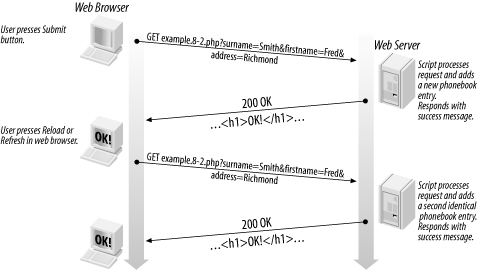
Simple updates using the approach shown in Example 8-2 are susceptible to a common problem of the stateless HTTP protocol that we call the reload problem . Consider what happens when a user successfully enters a new phonebook entry, and clicks the Submit button. The code in Example 8-2 is executed, a new row is inserted in the phonebook table, and a success message is displayed. So far, everything is going according to plan.
Consider now what happens if the user reloads the success message page with the Reload or Refresh button in the browser. The variables and values are resubmitted to the same script, and another identical row (except for the phonebook_id value, which is automatically incremented) is added to the phonebook table. There is no way in this example that the first click of the Submit button to add the first row can be distinguished from a second action that sends the same variables and values to the script. A representation of the reload problem is shown in Figure 8-1.
Figure 8-1. The reload problem
|

The reload problem isn't always a significant problem. For example, if you use the SQL UPDATE statement to update phonebook details, and the values are amended with the same correct values repeatedly, there is no data duplication. Similarly, if a row is deleted and the user repeats the operation, the row can't be deleted twice. However, while some UPDATE and DELETE operations are less susceptible to the reload problem, a well-designed system avoids the problem altogether. Avoidance prevents user confusion and unnecessary DBMS activity. We discuss a solution in a moment.
The HTTP POST method is a little less susceptible to the reload problem than the GET method. If a user again retrieves the script after the first database change, the browser should ask the user is they're sure they want to repeat the action. Most of the time, this will prevent the problem because the user will click Cancel. However, if the user does click OK, the database operation will be repeated and cause the reload problem.
A solution to the reload problem is shown in Figure 8-2. It is based on the HTTP Location: header, the same header used for one-component querying in Chapter 6.
Figure 8-2. Solving the reload problem with a redirection to a receipt page
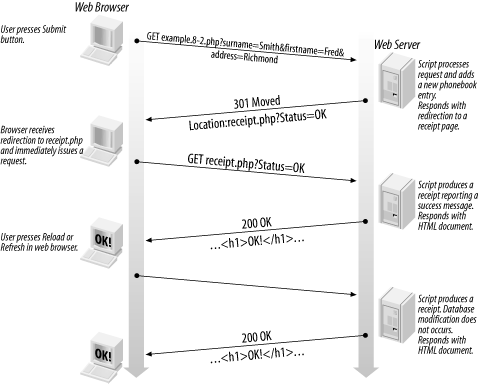
The reload solution works as follows:
The user submits the form with the variables and values for a database write operation (an SQL INSERT, UPDATE, or DELETE).
The SQL write operation is attempted.
Whether or not the modification is successful, an HTTP Location: header is sent to the browser to redirect the browser to a new, receipt page.
HTTP GET encoded variables and values are usually included with the Location: header to indicate whether the action was successful. Additionally, text to display might be sent as part of the redirection URL.
An informative receipt page is displayed to the user, including a success or failure message, and other appropriate text. The script that displays the message doesn't perform any database writes.
The HTTP redirection solves the reload problem. If the user reloads the receipt page, he sees the receipt again, and no database write operations occur. Moreover, because the receipt page receives information about the write operation encoded in the URL, the receipt page URL can be saved and reloaded in the future without any undesirable effect.
8.1.1.1 Solving the reload problem in practice
A modified version of Example 8-2 with the redirect functionality is shown in Example 8-4. The code that works with the database is identical to that of Example 8-2. A template is no longer used in the script because it doesn't produce any output and, regardless of whether the database insert succeeds or fails, the header( ) function is called. This redirects the browser to the script shown in Example 8-5 by sending a Location: example.8-5.php HTTP header.
The difference between the success and failure cases is what is appended to the URL as a query string. When it works, status=T and the value of the phonebook_id attribute are sent. A value of status=F is sent on failure. On success, the value for phonebook_id (which is created using the auto_increment feature) is found by calling mysql_insert_id( ); the function is described in Chapter 6.
Example 8-4. A modified insertion script that solves the reload problem
<?php

require "db.inc";


// Test for user input

if (!empty($_GET["surname"]) &&

    !empty($_GET["firstname"]) &&

    !empty($_GET["phone"]))

{

  if (!($connection = @ mysql_connect("localhost", "fred", "shhh")))

     die("Could not connect to database");


  $surname = mysqlclean($_GET, "surname", 50, $connection);

  $firstname = mysqlclean($_GET, "firstname", 50, $connection);

  $phone = mysqlclean($_GET, "phone", 20, $connection);


  if (!mysql_select_db("telephone", $connection))

     showerror( );


  // Insert the new phonebook entry

  $query = "INSERT INTO phonebook VALUES

            (NULL, '{$surname}', '{$firstname}', '{$phone}')";


  if (@mysql_query ($query, $connection))

  {

    header("Location: example.8-5.php?status=T&" .

           "phonebook_id=". mysql_insert_id($connection));

    exit;

  }

} // if empty( )


header("Location: example.8-5.php?status=F");

?>
The script in Example 8-5 produces the receipt page. Its accompanying template is shown in Example 8-6. When requested with a parameter status=T, the script queries the database and displays the details of the newly inserted phonebook entry. The entry is identified by the value of the query string variable phonebook_id. On failure, where status=F, the script displays a database failure message. If the script is unexpectedly called without a status parameter, an error message is displayed.
Example 8-5. The phonebook receipt script
<?php

require "db.inc";

require_once "HTML/Template/ITX.php";


if (!($connection = @ mysql_connect("localhost", "fred", "shhh")))

   die("Could not connect to database");


$status = mysqlclean($_GET, "status", 1, $connection);


$template = new HTML_Template_ITX("./templates");

$template->loadTemplatefile("example.8-6.tpl", true, true);


switch ($status)

{

  case "T":

    $phonebook_id = mysqlclean($_GET, "phonebook_id", 5, $connection);


    if (!empty($phonebook_id))

    {

      if (!mysql_select_db("telephone", $connection))

         showerror( );


      $query = "SELECT * FROM phonebook WHERE

                phonebook_id = {$phonebook_id}";


      if (!($result = @mysql_query ($query, $connection)))

        showerror( );


      $row = @ mysql_fetch_array($result);


      $template->setCurrentBlock("success");

      $template->setVariable("SURNAME", $row["surname"]);

      $template->setVariable("FIRSTNAME", $row["firstname"]);

      $template->setVariable("PHONE", $row["phone"]);

      $template->parseCurrentBlock( );

      break;

    }


  case "F":

    $template->setCurrentBlock("failure");

    $template->setVariable("MESSAGE", "A database error occurred.");

    $template->parseCurrentBlock( );

    break;


  default:

    $template->setCurrentBlock("failure");

    $template->setVariable("MESSAGE", "You arrived here unexpectedly.");

    $template->parseCurrentBlock( );

    break;

}


$template->show( );

?>
Example 8-6. The redirection receipt template
<!DOCTYPE HTML PUBLIC

                 "-//W3C//DTD HTML 4.01 Transitional//EN"

                 "http://www.w3.org/TR/html401/loose.dtd">

<html>

<head>

  <meta http-equiv="Content-Type" content="text/html; charset=iso-8859-1">

  <title>Phonebook Entry Receipt</title>

</head>

<body>

<!-- BEGIN success -->

<h1>Added a Phonebook Entry</h1>

<table>

<tr>

  <td>Surname:

  <td>{SURNAME}

</tr>

<tr>

  <td>First name:

  <td>{FIRSTNAME}

</tr>

<tr>

  <td>Phone number:

  <td>{PHONE}

</tr>

</table>

<!-- END success -->

<!-- BEGIN failure -->

<h1>{MESSAGE}</h1>

<!-- END failure -->

</body>

</html>
8.1.2 Inserting, Updating, and Deleting Data
In this section, we complete our discussion of the basics of modifying data by individually considering inserting, updating, and deleting data. We illustrate the principles of each technique in PHP through introductory case study examples; longer examples are presented in Chapter 16 through Chapter 20.
8.1.2.1 Inserting data
We have already illustrated a worked example of inserting data. In this section, we discuss the principles of insertion and expand our example to use a template to create a form. Inserting data is a three-step process:
Data is entered by the user into a form.
The data is validated and, if it passes the tests, written into the database using an SQL INSERT statement. A key value is usually created during this process. If the validation fails, then error information is displayed and the third step doesn't occur.
The user is shown a receipt page, which is generally used to display the inserted data using the key value passed from the second step. If the insert operation fails, an error message is displayed.
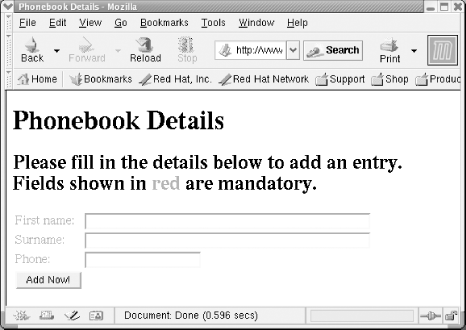
Stage one of the insertion process is data entry. Example 8-7 shows a script that creates an HTML form for capturing data to be inserted into the phonebook table we created in the previous section. The form allows details to be entered into text input controls and is shown rendered in a Mozilla browser in Figure 8-3. A more sophisticated form using the same techniques is used to gather customer details for our online winestore in Chapter 17.
The script makes extensive use of the template shown in Example 8-8. The template has three configurable components:
Placeholders for a MESSAGE that gives the user instructions on how to fill out the form and for a SUBMITVALUE on the submit button widget. For the customer insertion in Example 8-7 the message asks the user to Please fill in the details below to add an entry. and the button says Add Now!.
A hiddeninput block for creating hidden form input widgets. We don't use this for insertion, and we discuss it later when we introduce updates.
A mandatoryinput block for creating mandatory text input widgets. The block has placeholders for the text that the user sees and for the input's name, its size, and its initial value.
The template isn't complicated and just uses the techniques we discussed in Chapter 6. It allows you to create text inputs as you need by repeatedly selecting the mandatoryinput block, assigning values to it, and parsing it. This makes the template very useful: it allows us to dynamically create different forms at runtime, and it can easily be adapted for other applications. We extend this template in Chapter 17 to support optional inputs, select inputs, and other components.
Example 8-7. A script to collect phonebook data
<?php

require 'db.inc';

require_once "HTML/Template/ITX.php";


$template = new HTML_Template_ITX("./templates");

$template->loadTemplatefile("example.8-8.tpl", true, true);


$template->setVariable("MESSAGE",

                     "Please fill in the details below to add an entry");

$template->setVariable("SUBMITVALUE", "Add Now!");


$template->setCurrentBlock("mandatoryinput");

$template->setVariable("MINPUTTEXT", "First name");

$template->setVariable("MINPUTNAME", "firstname");

$template->setVariable("MINPUTVALUE", "");

$template->setVariable("MINPUTSIZE", 50);

$template->parseCurrentBlock("mandatoryinput");


$template->setCurrentBlock("mandatoryinput");

$template->setVariable("MINPUTTEXT", "Surname");

$template->setVariable("MINPUTNAME", "surname");

$template->setVariable("MINPUTVALUE", "");

$template->setVariable("MINPUTSIZE", 50);

$template->parseCurrentBlock("mandatoryinput");


$template->setCurrentBlock("mandatoryinput");

$template->setVariable("MINPUTTEXT", "Phone");

$template->setVariable("MINPUTNAME", "phone");

$template->setVariable("MINPUTVALUE", "");

$template->setVariable("MINPUTSIZE", 20);

$template->parseCurrentBlock("mandatoryinput");


$template->parseCurrentBlock( );

$template->show( );

?>
Example 8-8. The PEAR IT template that collects phonebook data
<!DOCTYPE HTML PUBLIC

                 "-//W3C//DTD HTML 4.01 Transitional//EN"

                 "http://www.w3.org/TR/html401/loose.dtd">

<html>

<head>

  <meta http-equiv="Content-Type" content="text/html; charset=iso-8859-1">

  <title>Phonebook Details</title>

</head>

<body bgcolor="white">

<form method="post" action="example.8-9.php">

<h1>Phonebook Details</h1>

<h2>{MESSAGE}.

    Fields shown in <font color="red">red</font> are mandatory.</h2>

<table>

<!-- BEGIN hiddeninput -->

<tr>

 <td><input type="hidden" name="{HINPUTNAME}" value="{HINPUTVALUE}"></td>

</tr>

<!-- END hiddeninput -->

<!-- BEGIN mandatoryinput -->

<tr>

  <td><font color="red">{MINPUTTEXT}:</font></td>

  <td>

  <input type="text" name="{MINPUTNAME}" value="{MINPUTVALUE}"

         size={MINPUTSIZE}>

  </td>

</tr>

<!-- END mandatoryinput -->

<tr>

   <td><input type="submit" value="{SUBMITVALUE}"></td>

</tr>

</table>

</form>

</body>

</html>
Figure 8-3 shows the forms created in Examples Example 8-7 and Example 8-8.
Figure 8-3. The phonebook entry form from Examples Example 8-7 and Example 8-8 rendered in a Mozilla browser
The second phase of insertion is data validation, followed by the database operation itself. Example 8-9 shows the PHP script to validate and insert a new phonebook entry. The script has a simple structure, with naive validation that tests only whether values have been supplied for the fields. If an error occurs, the function formerror( ) is called that flags the error by setting the $errors variable and populates an error template placeholder with a message.
Example 8-9. A validation example that tests for mandatory fields and then stores data in the customer table
<?php

require 'db.inc';

require_once "HTML/Template/ITX.php";


function formerror(&$template, $message, &$errors)

{

  $errors = true;

  $template->setCurrentBlock("error");

  $template->setVariable("ERROR", $message);

  $template->parseCurrentBlock("error");

}


if (!($connection = @ mysql_connect("localhost", "fred", "shhh")))

   die("Could not connect to database");


$firstname = mysqlclean($_POST, "firstname", 50, $connection);

$surname = mysqlclean($_POST, "surname", 50, $connection);

$phone = mysqlclean($_POST, "phone", 20, $connection);


$template = new HTML_Template_ITX("./templates");

$template->loadTemplatefile("example.8-10.tpl", true, true);


$errors = false;


if (empty($firstname))

  formerror($template, "The first name field cannot be blank.", $errors);


if (empty($surname))

  formerror($template, "The surname field cannot be blank.", $errors);


if (empty($phone))

  formerror($template, "The phone field cannot be blank", $errors);


// Now the script has finished the validation, show any errors

if ($errors)

{

  $template->show( );

  exit;

}


// If we made it here, then the data is valid

if (!mysql_select_db("telephone", $connection))

  showerror( );


// Insert the new phonebook entry

$query = "INSERT INTO phonebook VALUES

          (NULL, '{$surname}', '{$firstname}', '{$phone}')";


if (!(@ mysql_query ($query, $connection)))

   showerror( );


// Find out the phonebook_id of the new entry

$phonebook_id = mysql_insert_id( );


// Show the phonebook receipt

header("Location: example.8-5.php?status=T&phonebook_id={$phonebook_id}");

?>
After all validation is complete, all errors are displayed using the template in Example 8-10. After the error messages are output to the browser, an embedded link is shown to allow the user to return to the form in Example 8-8. Unfortunately, if the user does click on this link (instead of pressing the Back button) she is returned to an empty form. A solution to this problem is presented in Chapter 10.
Example 8-10. The error display template
<!DOCTYPE HTML PUBLIC

                 "-//W3C//DTD HTML 4.01 Transitional//EN"

                 "http://www.w3.org/TR/html401/loose.dtd">

<html>

<head>

  <meta http-equiv="Content-Type" content="text/html; charset=iso-8859-1">

  <title>Phonebook Details Error</title>

</head>

<body bgcolor="white">

<h1>Phonebook Data Errors</h1>

<!-- BEGIN error -->

<br><font color="font">{ERROR}</font>

<!-- END error -->

<br>

<a href="example.8-7.php">Return to the form</a>

</body>

</html>
If the validation succeeds, the second phase of the insertion process continues. The INSERT query is executed and NULL is inserted as the phonebook_id attribute to use the auto_increment feature. Using auto_increment avoids the problems discussed later in section "Issues in Writing Data to Databases."
If the query succeeds, the third phase of the insertion process occurs when the script redirects to a receipt page that reports the results. As part of the redirection, the new phonebook_id is passed to the receipt as a URL query string parameter and the status of the operation is set to T (for True). The receipt script then queries the database and displays the phonebook details that match the phonebook_id. For this step, we reuse the receipt script shown in Example 8-5 and its template in Example 8-6.
8.1.2.2 Updating data
Updating data is usually a more complex process than inserting it. A four-step process that extends the insertion process is used in most web database applications:
Using a key value, matching data is read from the database.
The data is presented to the user in a form for modification.
Once the user submits the form, the data is validated and, if that succeeds, the database is updated using an SQL UPDATE statement. The key value from the first step is used in the WHERE clause.
The user is redirected to a receipt page. If the update was successful, the page displays the modified data. If the update fails, an error message is displayed.
The first step of this process is usually user-driven: the user provides information that identifies the data to be updated. The information to identify the data (for example, a primary key value such as a phonebook_id) might be gathered in one of several ways:
It may be entered into a form by the user. For example, the user may be asked to type in or select from a list the phonebook identifier of the entry he wishes to modify.
It may be determined from another user-driven query. For example, the user might provide a phone number through a form, and a SELECT query can then retrieve the unique identifier of the entry from the database (assuming the phone number is unique).
It may be formatted into an embedded link by a script. For example, a list of phonebook entries might be produced, where each entry in the list is a hypertext link that has the unique phonebook_id identifier encoded as a query string.
These methods of gathering data from the user are discussed in Chapter 6. Let's assume here that a primary key is provided through one of these techniques, and the value of the primary key has been encoded in an HTTP request that can be processed by the update script. The first phase is then completed by retrieving the data that matches the primary key value provided by the user.
Phase two is to present the data to the user. To achieve this, a form is usually created that contains the values of each attribute that can be modified. In some cases, some attributes may not be presented to the user. For example, the primary key is usually hidden because you don't want the user to change it.
In addition to presenting the data to the user, a method is required to store the primary key value associated with the data, because it is needed in phases three and four. There are several approaches to maintaining this key across the update process, and one simple approach is presented in the next section. Better solutions are the subject of Chapter 10.
Phase two is complete when the user submits the form containing the modified data. Phase three validates the data and updates the database, and phase four shows a receipt; these phases use the same techniques as inserting new data.
8.1.2.3 Case study: updates in practice
Example 8-11 shows a modified version of Example 8-7 that supports database updates and uses a copy of the template shown in Example 8-8 (that's modified so it requests example.8-12.php). The script implements the first two phases of the update process described in the previous section. We discuss the third and fourth phases later in this section.
Example 8-11. Updating and adding new phonebook details
<?php

require 'db.inc';

require_once "HTML/Template/ITX.php";


if (!($connection = @ mysql_connect("localhost", "fred", "shhh")))

   die("Could not connect to database");


$phonebook_id = mysqlclean($_GET, "phonebook_id", 5, $connection);


// Has a phonebook_id been provided?

if (empty($phonebook_id))

  die("You must provide a phonebook_id in the URL.");


$template = new HTML_Template_ITX("./templates");

$template->loadTemplatefile("example.8-8b.tpl", true, true);


// Retrieve details for editing

if (!mysql_select_db("telephone", $connection))

   showerror( );


$query = "SELECT * FROM phonebook WHERE phonebook_id = {$phonebook_id}";


if (!($result = @ mysql_query($query, $connection)))

   showerror( );


$row = mysql_fetch_array($result);


$template->setVariable("MESSAGE",

                       "Please amend the details below");

$template->setVariable("SUBMITVALUE", "Update Details");


$template->setCurrentBlock("hiddeninput");

$template->setVariable("HINPUTNAME", "phonebook_id");

$template->setVariable("HINPUTVALUE", $row["phonebook_id"]);

$template->parseCurrentBlock("hiddeninput");


$template->setCurrentBlock("mandatoryinput");

$template->setVariable("MINPUTTEXT", "First name");

$template->setVariable("MINPUTNAME", "firstname");

$template->setVariable("MINPUTVALUE", $row["firstname"]);

$template->setVariable("MINPUTSIZE", 50);

$template->parseCurrentBlock("mandatoryinput");


$template->setCurrentBlock("mandatoryinput");

$template->setVariable("MINPUTTEXT", "Surname");

$template->setVariable("MINPUTNAME", "surname");

$template->setVariable("MINPUTVALUE", $row["surname"]);

$template->setVariable("MINPUTSIZE", 50);

$template->parseCurrentBlock("mandatoryinput");


$template->setCurrentBlock("mandatoryinput");

$template->setVariable("MINPUTTEXT", "Phone");

$template->setVariable("MINPUTNAME", "phone");

$template->setVariable("MINPUTVALUE", $row["phone"]);

$template->setVariable("MINPUTSIZE", 20);

$template->parseCurrentBlock("mandatoryinput");


$template->parseCurrentBlock( );

$template->show( );

?>
Phase one of the update process works as follows. The script in Example 8-11 processes a phonebook_id passed through with an HTTP request. If it is set, the script queries the database for the matching phonebook row and stores it in the variable $row. If it isn't set, the script reports an error and stops. Because there's only one row of results that match the unique primary key value, we don't need a loop to retrieve the data.
The second phase, displaying the retrieved data for modification by the user, is achieved by initializing template placeholders with the results of the query. For example, when a surname is retrieved for an entry, the placeholder MINPUTVALUE is initialized using:
$template->setVariable("MINPUTVALUE", $row["surname"]);This allows the user to edit the database surname in the surname text input widget.
The second phase of the process also embeds the value of $phonebook_id in the form as a hidden input element that the user can't see or edit. The $phonebook_id is embedded so it is passed to the next script and used to construct the SQL query to perform the update operation. We use the hiddeninput placeholder for this purpose and initialize it using the following fragment:
$template->setCurrentBlock("hiddeninput");

$template->setVariable("HINPUTNAME", "phonebook_id");

$template->setVariable("HINPUTVALUE", $row["phonebook_id"]);

$template->parseCurrentBlock("hiddeninput");
There are other ways this value can be passed throughout the update process; these techniques are the subject of Chapter 10.
Example 8-12 implements the third phase. The process is the same as inserting new data, with the exception of the SQL query that uses the phonebook_id from the form to identify the row to be updated. As previously, after the database operation, the browser is redirected to a receipt page to avoid the reload problem. However, the update process is now susceptible to other problems that are described in Section 8.2.
Example 8-12. Updating existing and inserting new phonebook rows
<?php

require 'db.inc';

require_once "HTML/Template/ITX.php";


function formerror(&$template, $message, &$errors)

{

  $errors = true;

  $template->setCurrentBlock("error");

  $template->setVariable("ERROR", $message);

  $template->parseCurrentBlock("error");

}


if (!($connection = @ mysql_connect("localhost", "fred", "shhh")))

   die("Could not connect to database");


$phonebook_id = mysqlclean($_POST, "phonebook_id", 5, $connection);

$firstname = mysqlclean($_POST, "firstname", 50, $connection);

$surname = mysqlclean($_POST, "surname", 50, $connection);

$phone = mysqlclean($_POST, "phone", 20, $connection);


$template = new HTML_Template_ITX("./templates");

$template->loadTemplatefile("example.8-10.tpl", true, true);


$errors = false;


if (empty($firstname))

  formerror($template, "The first name field cannot be blank.", $errors);


if (empty($surname))

  formerror($template, "The surname field cannot be blank.", $errors);


if (empty($phone))

  formerror($template, "The phone field cannot be blank", $errors);


// Now the script has finished the validation, show any errors

if ($errors)

{

  $template->show( );

  exit;

}


// If we made it here, then the data is valid

if (!mysql_select_db("telephone", $connection))

  showerror( );


// Update the phonebook entry

$query = "UPDATE phonebook SET surname = '{$surname}',

         firstname = '{$firstname}',

         phone = '{$phone}'

         WHERE phonebook_id = {$phonebook_id}";


if (!(@ mysql_query ($query, $connection)))

   showerror( );


// Show the phonebook receipt

header("Location: example.8-5.php?status=T&phonebook_id={$phonebook_id}");

?>
8.1.2.4 Deleting data
Deletion is a straightforward two-step process:
Using a key value, data is removed with an SQL DELETE statement.
On success, the user is redirected to a receipt page that displays a confirmation message. On failure, an error is reported.
As with updates, the first phase requires a key value be provided, and any technique used for capturing keys in updates can be used.
Deleting rows using a primary key value is very similar to the update process. First, a phonebook_id key value is pre-processed using mysqlclean( ), validated, and assigned to $phonebook_id. Then, the following fragment uses a query to delete the customer identified by the value of $phonebook_id:
  // We have a phonebook_id. Set up a delete query

  $query = "DELETE FROM phonebook WHERE phonebook_id = {$phonebook_id}";


  if ( (@ mysql_query ($query, $connection)) &&

        @ mysql_affected_rows( ) == 1)

    // Query succeeded and one row was deleted

    header("Location: delete_receipt.php?status=T");

  else

    // Query failed or one row wasn't deleted

    header("Location: delete_receipt.php?status=F");
The function mysql_affected_rows( ) reports how many rows were modified by the query and, if everything is successful, this should be 1; the function is described in Chapter 6. The delete receipt lets the user know that the operation succeeded or failed.


