Remote Access Overview
When a Pocket PC device connects to a server over dial-up networking, it is referred to as a RAS client. On Windows CE, RAS clients use the point-to-point protocol (PPP) to establish a connection, set up communication parameters, and transfer data between the client, the server, and the network. Note that because you are using a dial-up connection, data transmission over RAS is typically much slower than using a network card.
Because PPP is an industry-standard framing and authentication protocol, you can use your Pocket PC device as a remote client of any PPP server, regardless of which operating system the server is running (for example, your device could be a client to either a Windows .NET server or a Unix box that provides a PPP server). Note that although a PPP connection can be established by using a modem, a direct serial connection, or the infrared port, Pocket PC only supports using the TCP/IP protocol over a RAS session.
PPP is generally considered an improvement over the older Serial Line Internet Protocol (SLIP) that was traditionally used for dial-up connections, as PPP supports error correction and is capable of handling either synchronous or asynchronous communications. When a connection is being established, PPP enables both devices that are linking to negotiate various features that will be available to the client, such as the maximum size for datagram packets.
Pocket PC devices support the following standard authentication schemes for a dial-up PPP connection:
Password Authentication Protocol (PAP): A server that requests the username and password is returned a response in an unencrypted form. PAP is generally considered not secure.
Challenge Handshake Authentication Protocol (CHAP) using MD5: When a server requests authentication over CHAP, it sends a challenge and a session ID to the client. The client then uses an MD5 hash to encrypt the challenge, session ID, and client password, and sends the result?with the unhashed username?back to the server for authentication.
Microsoft Challenge Handshake Authentication Protocol (Microsoft CHAP): The Microsoft CHAP authentication scheme sends a challenge string and session ID to the client, similar to the CHAP method. The client must respond with the username, the MD4 hash value of the challenge, the session ID, and a password. The server stores hashed passwords, rather than the clear passwords that standard CHAP uses.
Microsoft Challenge Handshake Authentication Protocol (Microsoft CHAP) version 2.0: Microsoft CHAP 2.0 provides increased security features, including server authentication methods.
Extensible Authentication Protocol-Transport Level Security (EAP-TLS): A series of extensions to PPP that provide authentication with PPP itself through the transport level.
A PPP connection on Pocket PC also supports either 128-bit or 40-bit encryption. You can find more information about how the point-to-point protocol operates in RFC 1134. Be aware that while PPP is the preferred connection protocol for dial-up connections, SLIP is also supported by Pocket PC.
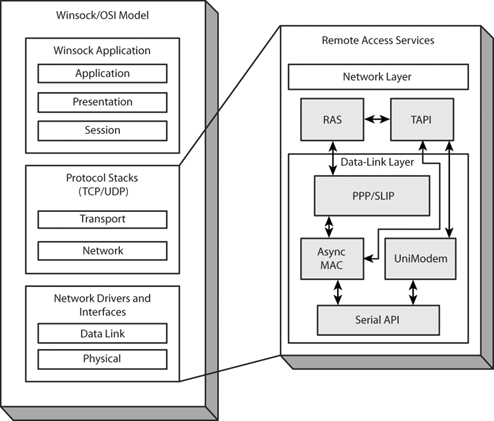
As you might have guessed, RAS is built on top of TCP/IP. Figure 6.1 shows how the Pocket PC Remote Access client sits within the TCP/IP OSI model.
Figure 6.1. Pocket PC Remote Access Service and the TCP/IP OSI model
While establishing a dial-up connection on a Pocket PC device is typically done automatically through the Connection Manager (see Chapter 7) or Remote Network Access dialer (see the section "The Remote Network Access (RNA) Dialer"), it is sometime necessary (or useful) to write applications that programmatically dial and establish a remote connection, and that are capable of manipulating data in the remote access phonebook.
In order to use the Remote Access Service API functions within your application, you need to include the headers ras.h and raserror.h, and link with the coredll.lib library.
Differences between Windows and Pocket PC PPP
You should be aware of the following differences between Pocket PC and desktop implementations of the point-to-point protocol:
Pocket PC does not support multilink PPP.
Pocket PC does not support either the NetBEUI or IPX protocols over a dial-up connection.
Pocket PC implements PPP as an NDIS (Network Driver Interface Specification) driver. PPP communicates through the NDIS layer to the AsyncMAC miniport to perform asynchronous framing, and forwards it to the TAPI device over the serial APIs. If a packet is received over the network, AsyncMAC strips any asynchronous frames from the packet, performs a CRC check, and sends the packet to PPP through NDIS.
The RAS phonebook on Pocket PC is stored in the registry, instead of a phonebook file.
RasDial() on Pocket PC does not support the RASDIALEXTENSIONS parameter.
Pocket PC does not support multistage connections such as X.25 PAD.
There is no support for changing passwords if they have expired on a Pocket PC device.


