New Moon Canaveral iQ
New Moon Canaveral iQ
Canaveral iQ by New Moon (http://www.newmoon.com) offers an environment for distributing and managing central Windows applications. This is done by extending the RDP protocol and providing a portal environment for application access and central system configuration. Canaveral iQ therefore competes against Citrix products, even though the two producers’ technical approaches differ considerably.
| Note? |
New Moon was taken over by Tarantella (http://www.tarantella.com) in May 2003. Tarantella was created in 2001 in the wake of the spinoff of Santa Cruz Operation (SCO), a company that is particularly well known in the UNIX world. Tarantella Enterprise is a middleware product that translates different standard protocols into the proprietary Adaptive Internet Protocol (AIP). Through a Unix server running Tarantella Enterprise, computer platforms with an appropriate AIP client software can use the applications of terminal servers (via RDP), Web servers (via HTTP), UNIX servers (via Telnet and SSH), mainframe computers (via 3270), and AS/400 hosts (via 5250). With regard to a terminal server, Tarantella Enterprise acts like a client with several RDP connection instances. However, the output is not displayed, but converted into an AIP data stream. User interaction goes from the AIP client via the Tarantella server to the terminal server. The acquisition of New Moon has made it possible for Tarantella to offer a complete solution for managing centralized terminal server applications in a pure Windows environment, too. |
Architecture
New Moon Canaveral iQ comprises two groups of components, with one responsible for the server side and the other responsible for the client side. We will look at the server side first. Servers can be grouped into what New Moon calls teams. Within a team, the individual servers can take on one or more roles:
-
Web servers The aim of this server role is to provide a Web-based user interface for the end users and administrators of Canaveral iQ. In addition, DCOM components for linking and managing applications, domains, licenses, and database access are established on a server with this role. A Web server in Canaveral iQ is roughly comparable with the Citrix Web Interface for MetaFrame XP combined with the Management Console for MetaFrame XP.
-
Load balancers These components handle the sharing of the available resources when a client accesses the terminal servers. This role can be assumed by several servers to raise scalability and failure safety. A comparable component is also installed on the Citrix MetaFrame XP Presentation Server.
-
Relay servers The Canaveral iQ Single Port Relay bundles and secures RDP connections via SSL port 443. This prevents other ports on the firewall from having to be opened in cases where RDP communication with Canaveral clients beyond the intranet needs to be enabled. The SSL connection requires certificates, which might originate from New Moon, another certificate service, or an official certifying authority. Establishing this role is not absolutely necessary to operate a Canaveral environment. The role can, however, be assumed by several servers in parallel to account for load or redundancy considerations. In this case, some of the functions are similar to those of the Citrix Secure Gateway.
-
Application servers The components that belong to this role allow Canaveral iQ to control terminal servers and the applications installed upon them. To fulfill this task, the New Moon solution does not modify the terminal servers as much as Citrix does with its MetaFrame XP Presentation Server; however, it also does not achieve quite the same performance level.
The Canaveral administration console on the Web server allows an administrator with the requisite permissions to control the application servers. This also involves identifying the installed applications and providing them, when required, as published applications to defined user groups. It is also possible, of course, to share entire desktops in this way. How, though, can users access these desktops and applications? First of all, the relevant icons are placed on an application access portal that has the capacity to be personalized. A normal RDP client, however, does not understand these links. For this reason, New Moon supplies Canaveral iQ with a special RDP client with extended functionality.
The name of this extended client is Canaveral Connection Center. It incorporates the RDP client components with standard functions and adds a kind of shell containing additional features. These include the potential to display published applications in seamless windows on the client desktop. Furthermore, the Canaveral Connection Center is able to place the application icons on the desktop and in the Start menu of the client platform. Additional functions include assigning document types on the client to remote applications on terminal servers by means of their file type and providing a universal print driver based on exchanging print data in EMF format (Enhanced Meta File). New Moon uses the virtual channels of the RDP protocol for all of these extended functions.
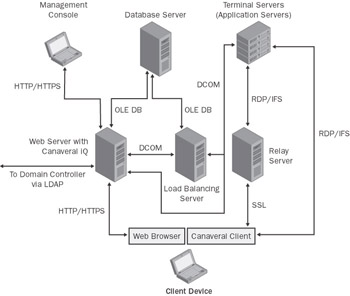
Figure 13-11: The architecture of a Canaveral environment where all roles are assumed by dedicated servers. The combination of several server roles on one platform simplifies the architecture considerably.
Communication between the different servers and the clients in a Canaveral environment takes place via a number of ports. These are listed in Table 13.1.
|
Description of the Communication Channels |
TCP/IP Port(s) |
|---|---|
|
Transmission of Web pages, downloading software via the HTTP protocol, and queries to the load-balancing servers. |
80 (TCP) |
|
Communication with the Microsoft SQL Server. |
139, 443, 1433 |
|
Access to a domain controller’s information via the Microsoft Active Directory Service Interface (ADSI) or the lightweight directory access protocol (LDAP). |
389 (TCP) |
|
SSL and HTTPS communication via the Web server and the relay server. |
443 (TCP) |
|
Connections via the RDP protocol. The Iqtsachost.exe and Mstscax.dll client components communicate with the terminal servers via RDP. The relay server can pack this protocol into an SSL tunnel. |
3389 (TCP) |
|
The Canaveral IFS protocol for integrating client hard drives and printers. In particular, the Iqclntmgr.exe program uses IFS to communicate with the terminal servers. The relay server can pack this protocol into an SSL tunnel. |
4660 (TCP) |
|
Communication via DCOM. No predetermined port is used here, which is why this type of communication cannot take place beyond the boundaries of a firewall. All servers that communicate with each other via DCOM must therefore be located in a common security zone. |
many |
| Note? |
With Canaveral iQ, the connection properties of RDP sessions are not saved in RDP files. Instead, both the general RDP parameters and the specific Canaveral features of a user session are stored in the database, making them available centrally. |
Installation
A Canaveral iQ environment usually consists of a server team and a group of client platforms that are linked through a network. When the Canaveral software is installed on the first team server, some of the fundamental features of the environment are determined using the installation wizard. This includes, in particular, the configuration of the database and the name of the team. The first server always has the role of Web server and load balancer at least. It can therefore be used as the administrative instance for the server team.
When the first server is established, an administrator can install the Canaveral software on further servers or distribute it there using the administration console. When a new server is installed, only the basic Canaveral base component is set up if the server is being added to an existing team. However, the role of the new server has not yet been determined. An administrator still needs to assign the role using the administration console.
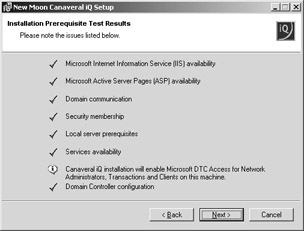
Figure 13-12: New Moon Canaveral iQ installation wizard dialog box, checking whether all of the installation prerequisites have been met on the target platform.
The following conditions must be in place for the successful installation of Canaveral iQ on Windows Server 2003 and for the assignment of servers to roles:
-
The target platform should be located in an existing domain based on Microsoft Windows NT 4.0 or Microsoft Active Directory. Another option is installing Canaveral iQ on an independent server, but in this case, all components would necessarily be on a single server, which does not provide any opportunity for extension or load balancing.
-
Internet Information Services must be installed on the platforms for the Web server role with Active Server Pages enabled.
-
As a database system, either Microsoft SQL Server 2000, Microsoft SQL Server 7, or Microsoft SQL Server Desktop Engine (MSDE) is required. MDAC 2.6 or MDAC 2.7 must be installed on all Canaveral servers to ensure access to the database.
-
To set up the Canaveral software on platforms that will take on the role of application server, Windows Server 2003 Terminal Services will naturally be required.
The Web server role is, of course, of great importance for Canaveral iQ. The Web server is responsible for supplying the application access portal pages (/LaunchPad">http://<Webserver>/LaunchPad) and the administration environment (/Console">http://<Webserver>/Console). Moreover, it also provides a depot containing all the files required for the installation of Canaveral functions on other client or server platforms. These files are accessed from the application access portal and the administration environment.
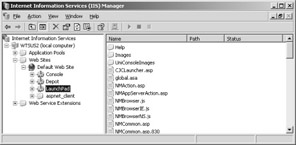
Figure 13-13: Structure of the New Moon Canaveral iQ Web site in the Internet Information Services Manager.
Administration
Canaveral iQ’s administration console facilitates the configuration of all major parameters via the start page /Console">http://<Webserver>/Console. The following tabs are available for grouping and subgrouping administration functions:
-
Home Provides an overview of the configuration and product licenses, provides the logon screen and options for downloading components, and displays administrative messages.
-
Manage Options for managing applications, servers, groups, organizational units, users, domains, client groups, connection settings, and administrator roles. Most of the activities that administrators perform in an environment with Canaveral iQ can be handled centrally on the Manage tab.
-
Monitor Monitors all session parameters relevant for operating Canaveral iQ. These include the current values for connections, load balancing, the database server, and other system components. In this view, the administrator console regularly requests updated information from the components that it is monitoring.
-
Reports Compiling reports on sessions, applications, users, clients, servers, and product licenses. This enables the subsequent analysis of all activities on the system.
-
Options Options for changing the default settings for the user interface, load balancing, backing up the database, connection security, and general system properties. This is where the administrator decides how the system should act and look in a target environment.
The most important tasks executed with the help of the administration console following installation consist mostly of published applications, defining default values for user sessions, and grouping users in an appropriate way. During the operation of a server environment with Canaveral iQ, frequent activities include the setting of thresholds and time limits that use certain criteria to determine when sessions should no longer be permitted or should be ended. Managing active sessions and logged-on users, as well as controlling the load balancing, are other frequent tasks.
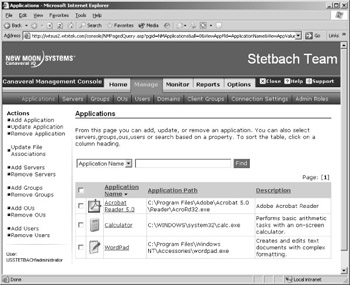
Figure 13-14: The New Moon Canaveral iQ Management Console in the process of configuring published applications.
These activities differ only slightly from those carried out for Terminal Services configuration and Terminal Services administration in a conventional terminal server environment. The tasks for managing the specific functions relating to published applications, for instance, are quite similar. It is therefore not surprising that a number of the relevant administration options can also be found in the Citrix Management Console for MetaFrame XP with only slight modifications.
User Access and Client Environment
The Canaveral client software has two different tasks to fulfill to meet the requirements for supporting seamless published applications via the RDP protocol. First, the available application resources of the integrated terminal servers must be positioned on the client desktop or in the client Start menu to offer alternative access possibilities in addition to the Web pages of the application access portal. This also involves linking locally managed document types with the remote published applications on the terminal servers. Diverting client resources to the Terminal Services session of the user who is logged on also comprises one of the tasks of this Canaveral client component. New Moon calls this component the Canaveral Connection Manager (Iqclntmgr.exe). The Canaveral Connection Manager receives all necessary information through a link to the Canaveral database whose data sets are determined by an administrator using the administration console described earlier. A small icon to the right of the task bar on the client desktop indicates that the Canaveral Connection Manager has been launched and allows access to its current settings via the context menu.
The actual Canaveral client with the extended RDP functions is a signed ActiveX control (Iqtsachost.exe), which in turn incorporates the Microsoft ActiveX control with the normal RDP client (Mstscax.dll). The Canaveral client is opened either from the application access portal with the start page /LaunchPad">http://<Webserver>/LaunchPad or from the Canaveral Connection Manager. If the Canaveral client is not yet available on the client platform when the initial access is made, it can be downloaded and installed via the Web server. The complete installation package for the client environment is about 5 MB in size.
So how does the personalized Web environment for accessing the application icons that New Moon calls Canaveral Application Launch Pad appear to a user who has successfully logged on? The user sees a relatively simply structured Web site with the icons of the available applications and some links to additional Web sites. Depending on the configuration by the administration console, these links are either enabled (visible) or disabled (not visible):
-
Favorites Page with the application icons that the user needs most frequently. The link to this page can be enabled or disabled under the user options located in the Management Console.
-
Applications Page with a list of all application icons available to the user currently logged on.
-
Connections Displays the current user’s active and terminated connections. The link to this page can be enabled or disabled under the user options located in the Management Console.
-
Options Options for individually modifying the parameters that determine how the application icons are displayed, what the link settings are, and which application icons are located in the Favorites window, on the desktop, or in the Start menu. The user’s access to the individual options can be enabled or disabled in the Management Console.
-
Download Client Page with a link to the installation package of the Canaveral client environment on the Web server.
-
About Information about the product and the manufacturer, New Moon.
When the first application is launched with default settings from the Canaveral Application Launch Pad, a window opens up that shows the connection as well as the logon procedure on the terminal server selected by the load-balancing mechanism. The RDP session is displayed in full-screen resolution of the client platform. When the logon procedure is completed, the RDP session is no longer displayed on the client desktop and the launched application appears in a seamless window. Simultaneously, an icon for this application is created in the task bar on the client desktop, and the Canaveral Connection Manager is informed of the current status of the session. At this point, it is not as easy to distinguish between the published application of the RDP session and a local application.
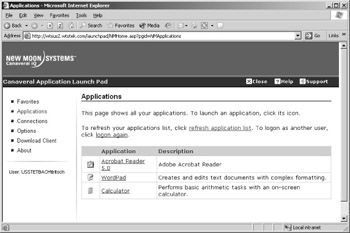
Figure 13-15: User view of the New Moon Canaveral iQ application access portal. The view shows the window with the list of all applications that have been published for the current user.
If you look at the RDP connection in the Terminal Services Manager, you will notice that, regardless of the number of published applications that have been launched, only one session is visible per user. The corresponding information shows that the initial RDP window determines the parameters. The now “invisible” session in the background serves to manage the individual applications, thereby replacing the corresponding desktop functions of the Windows Manager on the terminal server.
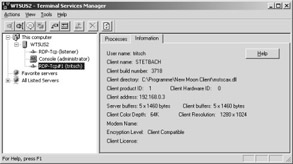
Figure 13-16: Displaying the connection to an RDP client in Canaveral iQ.


