Other SQL99 and Implementation-Specific Objects
Other SQL99 and Implementation-Specific Objects
By now you probably realize that SQL standards exist more in theory than in real life. SQL99 defines many objects that are implemented in none of our three major databases. In its turn, every vendor has its own unique set of database object types not used in other RDBMS implementations and/or not described in SQL99 standards.
Domains (SQL99)
A domain is a database object that can be used as an alternative to a data type when defining table columns. In addition to a data type, it can optionally specify a default value, a collation, and a set of constraints. The syntax is
CREATE DOMAIN
		  <domain_name> [AS] <datatype> [DEFAULT <default_value>]
		  [<constraint_definition>,...] [COLLATE
		  <collation_name>]
As we mentioned before, domains are not implemented by Oracle, DB2, or MS SQL Server, though they all have some kind of functionality to achieve similar goals. (For example, CREATE DISTINCT TYPE in DB2, CREATE RULE in MS SQL Server, and so on. See examples in Chapter 3.)
| Note |
Domains are implemented in Sybase, PostgreSQL, InterBase, Borland, and some other RDBMS vendors. |
Tablespaces and filegroups
We already mentioned tablespaces while discussing the process of creating tables and indexes. The concept of tablespace is not particularly intuitive — it's a logical structure for physical storage. In other words, tablespace is something you refer in your SQL code when you want to specify a physical location of a database object. Tablespace can consist of one or more datafiles — special system files where table, index, or any other physical data is stored in binary form. One datafile can only belong to one tablespace. Figure 4-8 shows the relationship between tablespace and datafile.
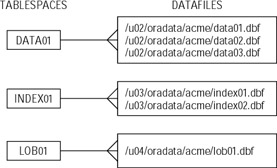 Figure 4-8: Relationship between
tablespace and datafile (one-to-many).
Figure 4-8: Relationship between
tablespace and datafile (one-to-many).
When users create tables in, say, the DATA01 tablespace, they have no control over which datafile this table's rows will physically reside: data01, data02, data03, or spread across all three of them. RDBMS will manage that by itself. (Actually, in most cases, users do not need to specify even the tablespace; objects are created in their default tablespaces, i.e., tablespaces assigned to them by the database administrator.)
| Note |
Note that datafiles are binary files, you can't edit them manually or open them to see table data. Only the RDBMS "knows" their internal proprietary structure and can work with those files. |
Oracle 9i
Tablespaces in Oracle are created using the CREATE TABLESPACE command. The simplified syntax is
CREATE TABLESPACE
			 <tablespace_name> DATAFILE <file_path_and_name> SIZE
			 <size>[K|M] [REUSE] [<default_storage_clause>]
SIZE is an integer concatenated with letter K (for kilobytes) or M (for megabytes). The default storage specifies the default physical characteristics for objects created in this particular tablespace.
| Note |
Creating tablespaces in Oracle is not a simple task and is usually handled by the database administrator. They have many optional clauses that are beyond the scope of this book. |
The following example creates tablespace DATA01 with one datafile of size one megabyte (assuming standard Oracle9i installation on Windows):
CREATE TABLESPACE DATA01
			 DATAFILE 'C:\oracle\ora92\oradata\acme\data01.dbf' SIZE 1M;
Oracle creates file data01.dbf in directory C:\oracle\ora92\oradata\acme formatted in Oracle blocks. You will get an error if the file already exists unless the REUSE clause is specified. Now you can try the example from the beginning of this chapter that creates table PHONE in tablespace DATA01.
DB2 UDB 8.1
The CREATE TABLESPACE statement in DB2 is also fairly complex and is normally used by DBA only. The basic syntax is
CREATE
			 [REGULAR | LONG] TABLESPACE <tablespace_name> MANAGED BY [SYSTEM |
			 DATABASE] USING
			 ([FILE | DEVICE] <file_or_device_name> [<size> K|M|G], ...)
			 [<storage_clause>]
The REGULAR clause is the default; you would only create LONG tablespace to store LOB objects.
| Note |
System-managed tablespace requires less maintenance than database-managed tablespace. Database-managed tablespace in its turn gives more flexibility to an experienced DBA. You cannot use FILE | DEVICE or specify size when creating a system-managed tablespace. |
The following code creates regular system-managed tablespace USERDATA01 in directory C:\DB2\DATA01 (assuming the default installation):
CREATE TABLESPACE USERDATA01
			 MANAGED BY SYSTEM USING ('C:\DB2\DATA01')
MS SQL Server 2000
There is no such thing as tablespace in MS SQL Server, but you can create filegroups and add files to them, which is exactly the same concept as using tablespaces in Oracle and DB2. This is simply different terminology and slightly different syntax: you actually use the ALTER DATABASE statement to add filegroups and/or files to a database.
Here is the syntax:
ALTER DATABASE ADD FILEGROUP
			 <filegroup_name>
ALTER DATABASE ADD FILE (
			 NAME = <logical_file_name> [, FILENAME = <os_file_name>] [, SIZE =
			 <size> KB|MB|GB|TG] [, <other_physical_parameters>]), ... [ TO
			 FILEGROUP <filegroup_name> ]
As you can see, the idea is not much different from what you already learned: MS SQL Server filegroup is a logical structure, just like tablespace in Oracle and DB2, and a file is an element of physical storage.
Few minor variations to mention here: you can create logical names that are different from their physical OS names; size can be indicated in terabytes in addition to kilobytes, megabytes, and gigabytes, and so on. The following code creates filegroup DATA01 and then adds a file with logical name DATA0101 to it of size 1M:
ALTER
			 DATABASE acme ADD FILEGROUP DATA01 GO ALTER DATABASE acme ADD FILE ( NAME =
			 DATA0101, FILENAME ='C:\Program Files\Microsoft SQL
			 Server\MSSQL\Data\data0101.ndf', SIZE = 1MB ) TO FILEGROUP
			 DATA01
Sequences
A sequence is a database object with functionality similar to that of identity (discussed previously in this chapter). The main difference is that identity is tied to a table column, and sequence is totally independent from other database objects; thus, multiple users can generate unique numeric values from a sequence and use them for different purposes. The most typical use is to generate primary key values for a table (or for multiple tables).
| Note |
You can use one sequence to generate primary keys for two or more tables. If you employ the concept of meaningless primary keys, then you don't really care that out of integers from 1 to 10 numbers 1, 2, and 5 will be used to populate primary keys in TABLE1; 3, 7, and 10 will be used for TABLE2; 4, 6, and 8 will become primary key values for TABLE3, and 9 is not used at all as illustrated on Figure 4-9. Still, a more typical approach would be to create a separate sequence for each table's primary key. |
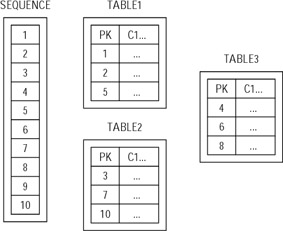
Figure 4-9: Using sequence-generated numbers to populate primary keys in multiple tables
In general, a sequence is more flexible than an identity column because it is an independent database object, whereas an identity column is a part of a table definition. For example, sequences can be much more convenient than identity columns when used in a procedural program (C, Java, COBOL, etc.) that populates records for parent/child tables.
Sequences in Oracle 9i
The syntax to create a sequence in Oracle is
CREATE SEQUENCE
			 [<schema>.]<sequence_name> [START WITH <start_value>]
			 [INCREMENT BY <increment_value>] [MAXVALUE <max_value> |
			 NOMAXVALUE] [MINVALUE <min_value> | NOMINVALUE] [CYCLE | NOCYCLE ] [CACHE
			 <value> | NOCACHE] [ORDER | NOORDER]
As you probably noticed, most clauses in the CREATE SEQUENCE statement are optional. If you just want to create a sequence that starts with 1 and generates sequential values (2, 3, 4,...) all the way until it reaches the largest possible integer in Oracle (1027), this statement will do:
CREATE SEQUENCE
			 my_sequence1;
If you need something more complicated, here is what you can do:
Creating ascending and descending sequences
You can create a sequence that starts with a certain value (START WITH clause) and then each next sequence value gets populated according to the value specified in the INCREMENT BY clause. To create a descending sequence, use a negative increment. You would also have to specify the maximum and the minimum sequence values:
CREATE SEQUENCE
				my_sequence2 START WITH 500 INCREMENT BY -10 MAXVALUE 500 MINVALUE
				0;
Creating cycling sequences
In the previous example, my_sequence2 will generate values 500, 490, 480, 470,...0. After that, you will get an error saying that your sequence goes below the MINVALUE and cannot be instantiated. What you can do is to create a sequence that cycles; that is, after it reaches its maximum (or minimum in the case with a descending sequence), it will simply start over. In the next example sequence, my_sequence3 will restart with 500 again after reaching its minimum value:
CREATE SEQUENCE
				my_sequence3 START WITH 1000 INCREMENT BY -10 MAXVALUE 1000 MINVALUE 0
				CYCLE;
It's often difficult to understand the difference between START WITH and MINVALUE (or MAXVALUE for descending sequences) clauses. Actually, the difference is only important for cycling sequences. For example, you may want your sequence to start with 100 and then when it reaches its maximum value (for example, 10,000) start over again, but this time not with 100, but rather with 10. In this case, you specify 100 for the START WITH clause and 10 for the MINVALUE clause:
CREATE SEQUENCE
				my_sequence4 START WITH 100 INCREMENT BY 1 MINVALUE 10 MAXVALUE 10000
				CYCLE;
Caching sequence values
By default, Oracle caches 20 consecutive sequence values in memory for faster access. You can override the default behavior either by specifying a different number of values to cache (10, 100, 1000, or whatever you prefer) or by using the NOCACHE clause that guarantees you sequential values every time you generate values using the sequence. Otherwise the values in memory would be wiped out if, for example, the davabase has been restarted.
| Tip |
For sequences that cycle, the number of values to cache must be less than the number of values in the cycle. |
Guaranteeing the order of sequence values
You may want to guarantee that sequence numbers are generated in order (for example, if you are using them as timestamps) by specifying an ORDER clause. The default is NOORDER.
| Note |
Oracle does not have identity columns, so sequences are the only option to generate sequential numbers. |
Accessing sequences in Oracle
You can generate new sequence values by using SEQUENCE_NAME.NEXTVAL in your SQL code. To access the current sequence value (i.e., the last generated sequence number) use SEQUENCE_NAME.CURRVAL:
SQL> SELECT
				my_sequence4.NEXTVAL 2 FROM dual; NEXTVAL ---------- 102 SQL> SELECT
				my_sequence4.CURRVAL 2 FROM dual; CURRVAL ---------- 102 SQL> SELECT
				my_sequence4.CURRVAL 2 FROM dual; CURRVAL ---------- 102
| Cross-References |
The example above uses a dummy table DUAL that is used in Oracle to select values from "nothing." For more information, see Chapter 10. |
| Note |
To be able to access CURRVAL, you have to generate the sequence value at least once during the current session, or an error will be generated. In a sense, DB2's PREVVAL name is more accurate — you are actually accessing the previously generated value. |
DB2 UDB 8.1
The syntax to create a sequence in DB2 is
CREATE SEQUENCE
			 <sequence_name> [AS SMALLINT | INTEGER | BIGINT | DECIMAL ] [START WITH
			 <start_value>] [INCREMENT BY <increment_value>] [MAXVALUE
			 <max_value> | NOMAXVALUE] [MINVALUE <min_value> | NOMINVALUE]
			 [CYCLE | NOCYCLE] [CACHE <value> | NOCACHE] [ORDER |
			 NOORDER]
As you can see, it's almost identical to the Oracle syntax; all examples from the previous section would work in DB2. There are a couple of minor differences:
-
You can specify the data type you want the sequence values to be populated of — it's mainly the precision metter. The default is INTEGER; if you specify DECIMAL data type, the scale must be zero. Oracle always assumes the NUMBER data type.
-
In DB2, you can create static sequences that would always populate the same value (it's very difficult to imagine why you would need something like that) either by specifying INCREMENT BY 0 or by using same values for MINVALUE and MAXVALUE. Oracle requires that INCREMENT TO be a positive or a negative integer, zero is not permitted; MAXVALUE must be greater than MINVALUE.
Accessing sequences in DB2
You can retrieve either current or previous sequence value using the NEXTVAL and PREVVAL keywords. NEXTVAL is not different from NEXTVAL in Oracle; PREVVAL is an equivalent to Oracle's CURRVAL. The access to the sequence values is slightly different:
db2 => SELECT NEXTVAL
				FOR my_sequence4 AS NETVAL \ db2 (cont.) FROM SYSIBM.SYSDUMMY1 NEXTVAL
				----------- 102 1 record(s) selected. db2 => SELECT PREVVAL FOR
				my_sequence4 AS PREVVAL \ db2 (cont.) FROM SYSIBM.SYSDUMMY1 PREVVAL -----------
				102 1 record(s) selected. db2 => SELECT PREVVAL FOR my_sequence4 AS PREVVAL
				\ db2 (cont.) FROM SYSIBM.SYSDUMMY1 PREVVAL ----------- 102 1 record(s)
				selected.
| Cross-References |
The SYSIBM.SYSDUMMY1 table in DB2 is an equivalent to Oracle's DUAL. See Chapter 10 for more details. |
Materialized views (Oracle 9i)
A MATERIALIZED VIEW is yet another Oracle object that contains data and occupies physical space. The name is a bit confusing — you already know that a view is just a compiled query, but the materialized views are more like tables — they have actual rows with data that could be updated dynamically. The closest analogy is summary tables in DB2; although in addition to data aggregation materialized views can be used in many different ways (data warehousing, data replication, and more). In addition to that, materialized views have fewer limitations than DB2 summary tables — most select statements that work with the CREATE VIEW statement can be used to create a materialized view.
The CREATE MATERIALIZED VIEW syntax is quite complex; most clauses are of the database administrator's concern only and require special database security privileges most users don't have. For example, the CREATE MATERIALIZED VIEW privilege allows users to create materialized views; QUERY REWRITE permits users to create materialized views used in query rewrites by optimizer, and so on.
| Tip |
QUERY REWRITE transforms a SQL statement expressed in terms of tables or views into a statement accessing one or more materialized views that are defined on the detail tables. This feature can significantly improve database performance when used properly. |
The following examples illustrate a few possible uses for materialized views.
Materialized view refreshed on demand
Materialized view VRM_ORDERLINE_SUMMARY is analogous to the DB2 ORDERLINE_SUMMARY summary table we talked about earlier in the chapter. It summarizes ordered and shipped product quantities by order on demand:
CREATE MATERIALIZED VIEW
			 vrm_orderline_summary BUILD IMMEDIATE REFRESH FAST ON DEMAND AS ( SELECT
			 ordline_ordhdrid_fn, SUM(ordline_ordqty_n) AS ord_qty_summary,
			 SUM(ordline_shipqty_n) AS ship_qty_summary, COUNT (*) AS rowcount FROM
			 order_line GROUP BY ordline_ordhdrid_fn );
Materialized view refreshed periodically with no user interaction
Materialized view VRM_CONTACT_LIST uses the same select_statement as V_CONTACT_LIST view. The snapshot of records is taken at the moment of the materialized view creation and is refreshed daily at 6 AM:
CREATE MATERIALIZED VIEW
			 TEST2 REFRESH START WITH SYSDATE NEXT (TRUNC(SYSDATE + 1)) + 6/24 AS SELECT
			 cust_name_s, phone_phonenum_s, 'CUSTOMER' CONTACT FROM customer, phone WHERE
			 cust_id_n = phone_custid_fn AND phone_type_s = 'PHONE' UNION SELECT
			 salesman_name_s, phone_phonenum_s, 'SALESPERSON' FROM salesman, phone WHERE
			 salesman_id_n = phone_salesmanid_fn AND phone_type_s = 'PHONE';
| Cross-References |
The statement NEXT (TRUNC(SYSDATE + 1)) + 6/24 in the previous statement adds one day to SYSDATE, truncates the result to get "12 AM tomorrow," and adds 6 hours to it which gives us 6 AM of the following day. More information about the TRUNCATE function and date arithmetic is in Chapter 10. |
This materialized view can be used in situations when the use of a regular view is inappropriate, for example, when underlying tables are too large and data retrieval becomes too slow; or when tables used in the select_statement physically reside on a remote database and must be transferred over a network; a materialized view can refresh data during off-load time.
| Note |
The previous examples assume you have the CREATE MATERIALIZED VIEW privilege granted to you by a database administrator with the following statement: GRANT CREATE [ANY] MATERIALIZED VIEW TO user_name; More about privileges in Chapter 12. |
Database links (Oracle 9i)
A database link is an object in the local database that enables you to access remote database objects. The remote database does not have to be an Oracle database — you can directly connect to DB2, MS SQL Server, Sybase, or any other RDBMS that supports ODBC or OLE DB protocols. You can refer to a remote table or view in a SQL statement by appending @<dblink> to the table or view name (where <dblink> is the name of a previously created database link).
CREATE DATABASE LINK statement
The syntax for CREATE DATABASE LINK is
CREATE [SHARED] [PUBLIC]
			 DATABASE LINK <dblink> CONNECT TO {[CURRENT_USER | <user_name>
			 IDENTIFIED BY <password>] } USING
			 '<connect_string>';
The SHARED keyword specifies that a single network connection can be used by multiple users; PUBLIC means the database link is available to all users, not only to its creator. CURRENT_USER can be specified if the remote database user and password are identical to those of whoever is using the database link; otherwise, remote user name and password have to be specified.
The connect_string parameter must be a valid service name. (See Oracle's Net Services Administrator's Guide for setting service names.) It has to be enclosed by single quotes.
The following command creates database link named DBL_SALES assuming you have a valid service name SALES and pointing to a database where user SALES_MANAGER exists:
CREATE DATABASE LINK
			 dbl_sales CONNECT TO sales_manager IDENTIFIED BY sales123 USING
			 'SALES';
| Note |
Both DB2 and MS SQL Server also allow you to connect to remote databases. DB2 uses NICKNAMES, and MS SQL Server features Linked Servers and Remote Servers. See vendor-specific documentation for details. |


