Introduction
To the layperson, the title of this chapter may seem like a hodgepodge of unrelated terms. For the seasoned Active Directory administrator, however, these terms represent the most fundamental and, perhaps, most important concepts within Active Directory. In simple terms, a forest is a collection of data partitions and domains; a domain is a hierarchy of objects that is replicated between one or more domain controllers; a trust is an agreement between two domains to allow security principals (i.e., users, groups, and computers) to access resources in either domain.
Active Directory domains are named using the Domain Name Service (DNS) namespace. The domains that are part of a common DNS namespace are considered to be in the same domain tree. For example, the amer.rallencorp.com, emea.rallencorp.com, and rallencorp.com domains are part of the rallencorp.com domain tree. A single domain tree is sufficient for most implementations, but one example when multiple domain trees are necessary is with large conglomerate corporations. Conglomerates are made up of multiple individual companies. Each company typically wants to maintain its own identity and, therefore, its own namespace. Describing the conglomerate scenario is a good way to show the relationships between forests, domains, domain trees, and trusts.
Assuming each company within the conglomerate wants its Active Directory domain name to be based on its company name, you have two choices for setting up this type of environment. You could either make each company's domain(s) a domain tree within a single forest or you could implement multiple forests. One of the biggest differences between the two options is that all the domains within the forest trust each other, whereas separate forests by default do not trust each other. Without the trust relationships, users from one forest cannot access resources in the domains of the other forest. If you want users to be able to access resources within each company's domains, using separate domain trees is an easier approach than separate forests. Transitive trusts are established between the root domains of each domain tree within a forest. As a result, every domain within a forest, regardless of which domain tree they are in, is trusted. Figure 2-1 illustrates an example with three domain trees in a forest called rallencorp.com.
Figure 2-1. Multiple domain trees in a forest
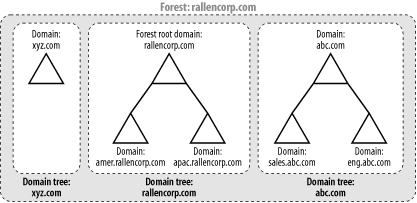
If you implement the alternative approach and create multiple Windows 2000 Active Directory forests, to create the fully trusted model you would have to create individual trusts between the domains in every forest. This can get out of hand pretty quickly if there are numerous domains. Fortunately, with Windows Server 2003 Active Directory, you can use the new trust type called forest trust to create a single transitive trust between two forest root domains. This single trust causes all of the domains in both forests to trust each other.
There are many more issues to consider when deciding how many forests, domains and domain trees to implement. For a thorough explanation of Active Directory design considerations, I recommend reading Part II of Active Directory, Second Edition (O'Reilly).
In this chapter, I cover the most common tasks that you would need to do with forests, domains, and trusts. First, I'm going to review how each is represented in Active Directory.
The Anatomy of a Domain
Domains are represented in Active Directory by domainDNS objects. The distinguished name (DN) of a domainDNS object directly corresponds to the fully qualified DNS name of the domain. For example, the amer.rallencorp.com domain would have a DN of dc=amer,dc=rallencorp,dc=com. Table 2-1 contains a list of some of the interesting attributes that are available on domainDNS objects.
|
Attribute |
Description |
|---|---|
|
dc |
Relative distinguished name of the domain (e.g., amer). |
|
fSMORoleOwner |
The NTDS Settings object DN of the domain controller that is the PDC Emulator FSMO role owner for the domain. See Recipe 3.25 for more information. |
|
gPLink |
List of GPOs that have been applied to the domain. By default it will contain a reference to the Domain Security Policy GPO. |
|
lockoutDuration |
A 64-bit integer representing the time an account will be locked out before being automatically unlocked. See Recipe 6.11 for more information. |
|
lockoutObservationWindow |
A 64-bit integer representing the time after a failed logon attempt that the failed logon counter for the account will be reset to 0. See Recipe 6.11 for more information. |
|
lockoutThreshold |
Number of failed logon attempts after which an account will be locked. See Recipe 6.11 for more information. |
|
masteredBy |
List of NTDS Settings objects for each domain controller in the domain. |
|
maxPwdAge |
A 64-bit integer representing the maximum number of days a password can be used before a user must change it. See Recipe 6.11 for more information. |
|
minPwdAge |
A 64-bit integer representing the minimum number of days a password must be used before it can be changed. See Recipe 6.11 for more information. |
|
minPwdLength |
Minimum number of characters allowed in a password. See Recipe 6.11 for more information. |
|
msDS-Behavior-Version |
Number that represents the functional level of the domain. This attribute is new in Windows Server 2003. See Recipe 2.13 for more information. |
|
ms-DS-MachineAccountQuota |
The number of computer accounts a non-administrator user account can join to the domain. See Recipe 8.9 for more information. |
|
nTMixedDomain |
Number that represents the mode of a domain. See Recipe 2.9 for more information. |
|
pwdHistoryLength |
Number of passwords to remember before a user can reuse a previous password. See Recipe 6.11 for more information. |
|
pwdProperties |
Bit flag that represents different options that can be configured for passwords used in the domain, including password complexity and storing passwords with reversible encryption. See Recipe 6.11 for more information. |
|
subRefs |
Multivalue attribute containing the list of subordinate naming contexts and application partitions. |
|
wellKnownObjects |
GUIDs for well-known objects, such as the default computer container. See Recipe 8.11 for more information. |
In Active Directory, domains are naming contexts (NCs) and are also represented under the Partitions container in the Configuration NC as crossRef objects. In this case, the relative distinguished name (RDN) of the crossRef object is the NetBIOS name of the domain as defined by the netBIOSName attribute of the domain object. In our previous example of amer.rallencorp.com, the corresponding crossRef object for the domain (assuming the forest name was rallencorp.com) would be located at cn=AMER,cn=Partitions,cn=Configuration,dc=rallencorp,dc=com. Table 2-2 contains some interesting attributes of crossRef objects.
|

|
Attribute |
Description |
|---|---|
|
cn |
Relative distinguished name of the object. For domains, this will be the NetBIOS name of the domain. |
|
dnsRoot |
Fully qualified DNS name of the domain. |
|
nCName |
Distinguished name of the corresponding domainDNS object. |
|
netBIOSName |
NetBIOS name of the domain. See Recipe 2.7 for more information. |
|
trustParent |
Distinguished name of the crossRef object representing the parent domain (if applicable). |
The Anatomy of a Trust
Trusts are stored as trustedDomain objects within the System container of a domain. Table 2-3 lists some of the important attributes of trustedDomain objects.
|
Attribute |
Description |
|---|---|
|
cn |
Relative distinguished name of the trust. This is the name of the target domain that is trusted. For Windows NT domains, it is the NetBIOS name. For Active Directory domains, it will be the DNS name. |
|
trustDirection |
Flag that indicates whether the trust is disabled, inbound, outbound, or both inbound and outbound. See Recipe 2.19 and Recipe 2.20 for more information. |
|
trustType |
Flag that indicates if the trust is to a down-level (NT4), up-level (Windows 2000 or above), or Kerberos (e.g., MIT) domain. See Recipe 2.19 for more information. |
|
trustAttributes |
Contain miscellaneous properties that can be enabled for a trust. See Recipe 2.19 for more information. |
|
trustPartner |
The name of the trust partner. See Recipe 2.19 for more information. |
A trust also has a corresponding user object in the Users container of a domain. This is where the trust password is stored. The RDN of this user object is the same as the cn attribute for the corresponding trustedDomain object with a $ appended.
The Anatomy of a Forest
A forest is a logical structure that is a collection of domains, plus the configuration and schema naming contexts, and application partitions. Forests are considered the primary security boundary in Active Directory. By that I mean, if you need to definitively restrict access to a domain such that administrators from other domains do not have access, you need to implement a separate forest (and subsequently a domain in that forest), instead of using a domain within the current forest. This is due to the transitive trust relationship between all domains in a forest and the extensive permissions that members of the Domain Admins group have. Unlike domains and trusts, a forest is not represented by a container or any other type of object in Active Directory. At a minimum, a forest consists of three naming contexts: the forest root domain, the Configuration NC, and the Schema NC. The Partitions container in the Configuration NC contains the complete list of partitions that are associated with a forest. Here is a description of the type of partitions that can be part of a forest:
- Configuration NC
-
Contains data that is applicable across all of the domains and, thus, is replicated to all domain controllers in the forest. Some of this data includes the site topology, list of partitions, published services, display specifiers, and extended rights.
- Schema NC
-
Contains the objects that describe how data can be structured and stored in Active Directory. The classSchema objects in the Schema NC represent class definitions for objects. The attributeSchema objects describe what data can be stored with classes. The Schema NC is replicated to all domain controllers in a forest.
- Domain NC
-
As described earlier, a domain is a naming context that holds domain-specific data including user, group, and computer objects.
- Application partitions
-
Configurable partitions that can be rooted anywhere in the forest and can be replicated to any domain controller in the forest. These are not available with Windows 2000.


