Recipe 2.17 Creating a Shortcut Trust Between Two AD Domains
2.17.1 Problem
You want to create a shortcut trust between two AD domains in the same forest or in different forests. Shortcut trusts can make the authentication process more efficient between two domains in a forest.
2.17.2 Solution
2.17.2.1 Using a graphical user interface
Open the Active Directory Domains and Trusts snap-in.
In the left pane, right-click the domain you want to add a trust for, and select Properties.
Click on the Trusts tab.
Click the New Trust button.
After the New Trust Wizard opens, click Next.
Type the DNS name of the AD domain and click Next.
Assuming the AD domain was resolvable via DNS, the next screen will ask for the Direction of Trust. Select Two-way and click Next.
For the Outgoing Trust Properties, select all resources to be authenticated and click Next.
Enter and retype the trust password and click Next.
Click Next twice.
2.17.2.2 Using a command-line interface
> netdom trust <Domain1DNSName> /Domain:<Domain2DNSName> /Twoway /ADD[RETURN]
         [/UserD:<Domain2AdminUser> /PasswordD:*][RETURN]
         [/UserO:<Domain1AdminUser> /PasswordO:*]
To create a shortcut trust from the emea.rallencorp.com domain to the apac.rallencorp.com domain, use the following netdom command:
> netdom trust emea.rallencorp.com /Domain:apac.rallencorp.com /Twoway /ADD[RETURN]
         /UserD:administrator@apac.rallencorp.com /PasswordD:*[RETURN]
         /UserO:administrator@emea.rallencorp.com /PasswordO:*
2.17.3 Discussion
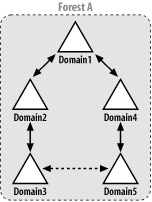
Consider the forest in Figure 2-6. It has five domains in a single domain tree. In order for authentication requests for Domain 3 to be processed by Domain 5, the request must traverse the path from Domain 3 to Domain 2 to Domain 1 to Domain 4 to Domain 5. If you create a shortcut trust between Domain 3 and Domain 5, the authentication path is just a single hop from Domain 3 to Domain 5. To create a shortcut trust, you must be a member of the Domain Admins group in both domains, or a member of the Enterprise Admins group.
Figure 2-6. Shortcut trust