1.6 Hello World
An introduction to any technology would not be complete without a "Hello World" example. This will give you some hands-on experience with the client-side and server-side code before diving into details. It also provides a sound basis for exploring Flash Remoting on your own.
First, we will look at the Flash code necessary to call the remote service, which is virtually the same regardless of which server-side technology implements the service. We will then look at the server-side code implemented in ColdFusion, Server-Side ActionScript, Java, ASP.NET, PHP, and as a SOAP-based web service.
|

1.6.1 Flash ActionScript Code
The client-side ActionScript is virtually the same for each server-side service example. The only things that change are the path to the remote service when it is implemented as a web service and the path to the Flash Remoting gateway, which varies depending on the server implementation.
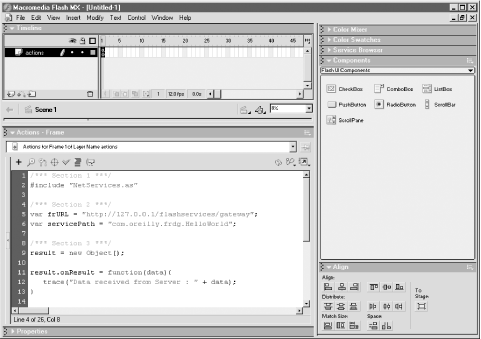
The client-side ActionScript code shown in Example 1-1 should be inserted on the first frame of the main timeline of a Flash movie, as shown in Figure 1-4.
Figure 1-4. Flash timeline with attached client-side ActionScript
Example 1-1. Client-side ActionScript code (HelloWorld.fla)
/*** Section 1 ***/
#include "NetServices.as"

/*** Section 2 ***/
// Assign myURL so it points to your Flash Remoting installation.
var myURL = "http://localhost/flashservices/gateway";
var myServicePath = "com.oreilly.frdg.HelloWorld";

/*** Section 3 ***/
myResult = new Object( );

myResult.onResult = function (data) {
  trace("Data received from Server : " + data);
};

myResult.onStatus = function (info) {
  trace("An error occurred : " + info.description);
};

System.onStatus = myResult.onStatus;

/*** Section 4 ***/
var myServer = NetServices.createGatewayConnection(myURL);
var myService = myServer.getService(myServicePath, myResult);

myService.sayHello( );
Section 1 of Example 1-1 includes the NetServices.as library, which contains the code necessary to connect to a Flash Remoting-enabled server from Flash. If you do not include NetServices.as, the example will not work, but you will not receive any errors within the authoring environment.
Section 2 initializes two variables: myURL and myServicePath. The myURL variable will be used to create a NetConnection object that points to the server. The myServicePath variable will be used to create a service object that points to the service that will be called.
The myURL variable specifies the URL to the Flash Remoting gateway installed on the server. If the Flash Remoting gateway is installed on a Microsoft .NET server, the URL will point to the .aspx file for the gateway. Similarly, if you are using AMFPHP, the URL will point to a gateway.php file on your server.
The myServicePath variable specifies the path on the server to the remote service that will be called. The naming convention is similar to a Java package, with each section representing a directory on the server and the last section pointing to the actual service. If the remote service is a Microsoft .NET DLL, myServicePath should refer to the DLL's namespace and class name. Similarly, if the remote service is a Java class, the myServicePath variable will refer to the package name and class name of the Java class. If the remote service is a web service, myServicePath should contain the path to the web service's WSDL file.
Calls from the Flash Player to the application server via the Flash Remoting gateway are asynchronous. Code execution within the Flash Player continues while data is being loaded, which is similar to loading XML into the Flash Player. You must define callback functions, which will be called automatically when the data loads from the server.
|
In ActionScript, callback functions can be attached as properties to a generic object (instantiated from the Object class). The functions are used to catch data and messages sent back from the server.
Section 3 of Example 1-1 creates an object and attaches two callback functions to it. The onResult( ) callback function is called when data is returned from the remote service, and the onStatus( ) callback function is called if an error occurs. An object used to receive results from a remote service is called a responder object (or sometimes called a response object).
|
The System.onStatus property specifies the function to be called if the Flash Player cannot connect to the server, as these types of errors are not handled by the onStatus( ) callback function for the remote service call. Example 1-1 sets System.onStatus to execute our object's onStatus( ) function. Once we have created an object and the callback functions to receive and process the data returned from the server, we are ready to call the remote service.
Section 4 of Example 1-1 makes a connection to the server by passing in myURL (initialized earlier) to the NetServices.createGatewayConnection( ) function. The server connection information is stored in the myServer variable. The example then gets a reference to the remote service, which we store in the variable myService, by calling the getService( ) method on the myServer variable initialized in the previous step. In the call to getService( ), we pass myServicePath to access the desired service and pass our myResult object to catch the data or status when the operation completes. We can then use myService (the reference to the remote service) to call methods on the service, such as the sayHello( ) method.
|
Save the Flash movie as HelloWorld.fla. Before the movie can be tested, we need to create the server-side code that implements the sayHello( ) function, as described in subsequent sections.
Example 1-1 utilizes the trace( ) command to display the data in the Output window in the Flash authoring environment. Therefore, the output is visible only when the movie is tested in the authoring environment and not when tested in a browser.
1.6.2 Server-Side Code
In the next section, you'll create
the remote service required by this simple Flash movie. Once you have
created the remote service, you can test the Flash movie using
Control  Test Movie. You should get the following output
displayed in the Output window:
Test Movie. You should get the following output
displayed in the Output window:
Data received from Server : Hello World from servertype
If you do not get this result:
Set the Output window to verbose mode (Window
Output
Options Debug Level Verbose).Make sure that the server where the Flash Remoting gateway is installed is running and accessible.
Make sure that there are no syntax errors in your client-side ActionScript code or server-side code.
1.6.2.1 ColdFusion MX
For the ColdFusion MX example, we will implement the remote service as a ColdFusion Component (CFC). CFCs are new to ColdFusion MX and provide an object-based approach to ColdFusion development. They are ideally suited to Flash Remoting. CFCs are discussed in depth in Chapter 5.
Create a file named HelloWorld.cfc and place it into the following directory, where webroot is the root of your web server and com\oreilly\frdg\ matches the service path specified by the initial portion of the myServicePath variable in Example 1-1:
- webroot\com\oreilly\frdg
Example 1-2 shows the code that must be added to your HelloWorld.cfc component:
Example 1-2. ColdFusion code for HelloWorld.cfc
<cfcomponent>
  <cffunction name="sayHello" access="remote" returntype="string">
    <cfreturn "Hello World from ColdFusion Component" />
  </cffunction>
</cfcomponent>
This is a simple component that contains one function, sayHello( ), which returns a string. Notice that we set the access to "remote", which is necessary to allow the component to be called remotely, either by Flash or as a web service.
Save the component. If you have access to the ColdFusion administrative interface (which you should if you have a local installation) browse to it through your browser with the following URL:
- http://yourservername/com/oreilly/frdg/HelloWorld.cfc/
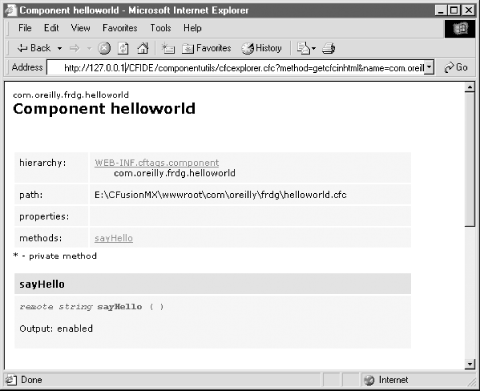
After entering your ColdFusion administrative password, you should see a description of the component, similar to Figure 1-5.
Figure 1-5. ColdFusion MX component description autogenerated by ColdFusion MX
If you do not see the description, or if you get an error, check and fix any syntax errors and try again.
Once you have verified that the ColdFusion component works via the browser, switch back to Flash and test the HelloWorld.fla movie created in Example 1-1. You should see "Hello World from ColdFusion Component" in Flash's Output window.
1.6.2.2 Server-Side ActionScript
ColdFusion MX and JRun 4 application servers allow developers to create remote services in Server-Side ActionScript (SSAS). Server-Side ActionScript is a scripting language that a Flash MX developer can use to create remote services without needing to know a server-side language such as ColdFusion Markup Language (CFML) or Java. Client-side JavaScript and ActionScript programmers may find SSAS easier than learning a new language. Using SSAS, simple services can be written that access databases or utilize the HTTP functionality of ColdFusion or JRun 4. Code written in SSAS can be consumed by Flash via Flash Remoting only and cannot be used to create other types of output such as HTML.
The SSAS mechanism of ColdFusion MX and JRun 4 is actually a server-side implementation of the Rhino JavaScript parser, with some server-specific objects and methods added that allow the developer access to the functionality of <cfquery> and <cfhttp> tags of ColdFusion (found in the ActionScript CF object). Methods of the CF object can be accessed as CF.methodName( ). You can find a complete discussion of SSAS in Chapter 6. See http://www.mozilla.org/rhino/ for details on the Rhino project.
To implement the Hello World example in SSAS, create a plain text file named HelloWorld.asr using any text editor, and place it into the following directory, where webroot is the root of your web server:
- webroot/com/oreilly/frdg/
|
Since ColdFusion can process CFCs, ColdFusion pages, and SSAS files, you need to make sure there are no name conflicts. If you created the ColdFusion component example file earlier, rename HelloWorld.cfc to SomethingElse.cfc to ensure that the SSAS (.asr) file, and not the ColdFusion file, is processed. You may also need to restart the ColdFusion MX server, as the .cfc file may have been cached. The exact order in which services are located varies with the application server on which the Flash Remoting gateway is installed. See the appropriate server chapters later in the book for details.
Example 1-3 shows the code that should be added to HelloWorld.asr; it creates a simple function called sayHello( ) that returns a string to the client.
Example 1-3. Server-Side ActionScript code for HelloWorld.asr
function sayHello ( ) {
  return "Hello World from Server-Side ActionScript";
}
Save the file in plain text format and switch back to Flash. Test the Flash movie and you should see the output from the SSAS function.
If you get an error saying that the service cannot be found, check the service path, and make sure that there are no syntax errors in the .asr file.
1.6.2.3 Java using JRun 4 or other J2EE servers
For the Java example, we will implement our remote service as a simple Java class. Using Java as a remote service requires that the Flash Remoting gateway be installed on a Java application server such as Macromedia's JRun 4 or IBM's WebSphere. The Java version will not work with ColdFusion MX or Microsoft .NET servers.
Create a new plain text file in any text editor, name it HelloWorld.java, and enter the code shown in Example 1-4.
Example 1-4. Java code for HelloWorld.java
package com.oreilly.frdg;

public class HelloWorld {
  public String sayHello ( ) {
    return "Hello World from Java";
  }
}
Compile the class into your web server's classpath. This may vary from server to server, but the server's WEB-INF (or SERVER-INF in the case of JRun) directory is usually included within the server's classpath. For example, to compile it using JRun 4, you would use (from a command prompt):
c:\jrun4\servers\myservername\server-inf\classes\com\oreilly\frdg\>javac
HelloWorld.java
If you are using JRun 4 and created the SSAS example earlier, rename HelloWorld.asr to SomethingElse.asr to ensure that the Java class is used instead.
Once the class has been successfully compiled, place it in the classpath\com\oreilly\frdg\ directory and switch to Flash and test your movie. You should see the output from the sayHello( ) method of the HelloWorld Java class. If you get an error that the service cannot be found, make sure that you have compiled the class into the server's classpath.
1.6.2.4 Microsoft .NET server
ASP.NET services can be written in several languages, including VB.NET and C#. This Microsoft .NET service example is implemented as a .NET DLL written in C#.
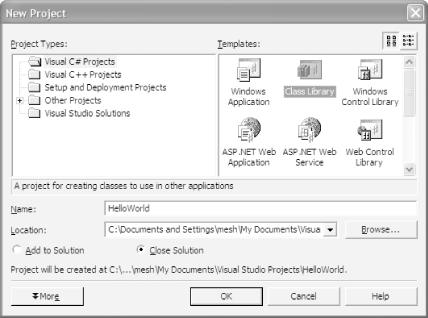
Open Microsoft's Visual Studio .NET (VS.NET) and create a new project. From the Project Types window, select Visual C# Projects; then, from the Templates window, select Class Library. Set the name of the project to HelloWorld, as shown in Figure 1-6. Rename the class file that appears from Class1.cs to HelloWorld.cs. The code will work even if you do not rename the class file, but renaming it makes it easier to organize the files.
Figure 1-6. Visual Studio .NET project setup screen with settings for HelloWorld DLL
Example 1-5 shows the server-side C# code to implement the example as a Windows .NET service.
Example 1-5. C# code for HelloWorld.cs
using System;

namespace com.oreilly.frdg {
  public class HelloWorld {
    public String sayHello ( ) {
      return "Hello World from ASP.NET DLL";
    }
  }
}
Enter the code shown in Example 1-5 and compile the
DLL using VS.NET's Build Build Solution
option, which creates HelloWorld.dll in the
following directory:
- projectpath/bin/Debug
Copy HelloWorld.dll into the flashservices/bin directory on your .NET web server at:
- webroot/flashservices/bin/
The DLL contains a class with one function, sayHello( ), which returns a string. The service path within Flash is determined by the DLL's namespace plus the class containing the method being called. By setting the namespace to the same as the directory structure for our other examples, we will not have to change the myServicePath variable within our client-side ActionScript. Using a unique namespace also protects your DLL from namespace collisions with other DLLs.
Switch back to the Flash movie and change the myURL variable in Example 1-1 to point to the .NET version of the Flash Remoting gateway, such as:
var myURL = "http://yourservername/flashremoting/gateway.aspx";
This is the only change that has to be made to the Flash movie. It is necessary because the .NET version of the Flash Remoting gateway is implemented differently than the Java and ColdFusion MX versions.
Save the Flash movie and test it. You should see the output from the DLL ("Hello World from ASP.NET DLL") in Flash's Output window.
1.6.2.5 PHP
The Hello World application (and other applications) must be set up a bit differently in PHP than in other environments. Flash Remoting with PHP is class-based, due to requirements of the AMFPHP library. That is to say, all Flash Remoting services must be written as classes in PHP. To install the AMFPHP library, simply download the source release package and copy its flashservices directory to your web server's document root (see Chapter 9 for additional details). Because the class is named com.oreilly.frdg.HelloWorld, AMFPHP searches in the services path for a HelloWorld.php file. The main flashservices directory resides under the web root, with the AMFPHP classes in that directory. The services directory resides in this flashservices directory as well.
When building PHP remote services, you should include a gateway.php file in your server-side application in the directory for your current project. This creates the Flash Remoting gateway and includes the necessary files. The gateway.php file (shown in Example 1-6) for the Hello World example should be saved in the webroot\com\oreilly\frdg directory.
Example 1-6. PHP Remoting gateway.php file contents
<?php
  /* File: gateway.php
     Instantiates the Gateway for the HelloWorld Application */
  require_once '/app/Gateway.php';   /* Require files */
  $gateway = new Gateway( );          /* Create the gateway */
  $gateway->setBaseClassPath('/services/com/oreilly/frdg');
                                     /* Set the path to where the service lives */
  $gateway->service( );               /* Start the service */
?>
Create a file named HelloWorld.php and place it into the following directory, where webroot is the root of your web server and com\oreilly\frdg\ matches the service path specified by the initial portion of the myServicePath variable in Example 1-1:
- webroot\flashservices\services\com\oreilly\frdg
Add the code shown in Example 1-7 to your HelloWorld.php page.
Example 1-7. PHP code for HelloWorld.php
<?php
  /* File: {SERVICES_CLASS_PATH}/com/oreilly/frdg/HelloWorld.php
     provides the HelloWorld class used in Chapter 1. */
  class HelloWorld {
    function HelloWorld ( ) {
      $this->methodTable = array(
                'sayHello' => array(
                    'description' => 'Says Hello from PHP',
                    'access' => 'remote',
                    'arguments' => array ('arg1')
                )
            );
    }
    function sayHello ( ) {
      return 'Hello World from PHP';
    }
  }
?>
Example 1-7 implements a simple class named HelloWorld that contains one method, sayHello( ), which returns a string. The class is named the same as the file. The methodTable array is used by AMFPHP to look up functions to invoke and to provide a pseudoimplementation of ColdFusion's CFCExplorer utility, which documents the class, methods, properties, arguments, return types, and so forth.
Switch back to the Flash movie and change the myURL variable in Example 1-1 to point to the AMFPHP gateway:
var myURL = "http://yourservername/com/oreilly/frdg/gateway.php";
This is the only change that has to be made to the Flash movie, and it is necessary because the PHP implementation utilizes PHP pages to handle the functionality of the gateway.
If you run the movie in the test environment, you should see the phrase "Hello World from PHP" in the Output window. If you don't see it, verify that you have correctly installed the AMFPHP classes and verify your code.
1.6.2.6 Web service
For the web service example, we will create a web service using ColdFusion MX. However, any web service containing a sayHello( ) method that returns a string works just as well.
Creating a web service in ColdFusion MX is extremely simple; we simply pass the URL to our CFC, adding ?wsdl to the query string, which tells ColdFusion to generate a web service from the component. We'll use the CFC that we created in Example 1-2, HelloWorld.cfc, saved in the directory specified earlier.
Browse to the component with a web browser, and add the ?wsdl query string to the URL that points to the component:
- http://localhost/com/oreilly/frdg/HelloWorld.cfc?wsdl
The browser should display the WSDL XML for the web service, as follows:
<?xml version="1.0" encoding="UTF-8"?>
<wsdl:definitions targetNamespace="http://frdg.oreilly.com"
xmlns:wsdl="http://schemas.xmlsoap.org/wsdl/"
xmlns:xsd="http://www.w3.org/2001/XMLSchema"
xmlns:wsdlsoap="http://schemas.xmlsoap.org/wsdl/soap/"
xmlns:intf="http://frdg.oreilly.com" xmlns:impl="http://frdg.oreilly.com-impl"
xmlns:SOAP-ENC="http://schemas.xmlsoap.org/soap/encoding/"
xmlns="http://schemas.xmlsoap.org/wsdl/">
  <wsdl:message name="CFCInvocationException">
  </wsdl:message>
  <wsdl:message name="sayHelloResponse">
    <wsdl:part name="return" type="SOAP-ENC:string"/>
  </wsdl:message>
  <wsdl:message name="sayHelloRequest">
    <wsdl:part name="username" type="SOAP-ENC:string"/>
  </wsdl:message>
  <wsdl:portType name="hellouser">
    <wsdl:operation name="sayHello" parameterOrder="username">
      <wsdl:input message="intf:sayHelloRequest"/>
      <wsdl:output message="intf:sayHelloResponse"/>
      <wsdl:fault name="CFCInvocationException"
message="intf:CFCInvocationException"/>
    </wsdl:operation>
  </wsdl:portType>
  <wsdl:binding name="hellouser.cfcSoapBinding" type="intf:hellouser">
    <wsdlsoap:binding style="rpc"
transport="http://schemas.xmlsoap.org/soap/http"/>
    <wsdl:operation name="sayHello">
      <wsdlsoap:operation soapAction=""/>
      <wsdl:input>
        <wsdlsoap:body use="encoded"
encodingStyle="http://schemas.xmlsoap.org/soap/encoding/"
namespace="http://frdg.oreilly.com"/>
      </wsdl:input>
      <wsdl:output>
        <wsdlsoap:body use="encoded" encodingStyle="http://schemas.xmlsoap.org/soap/
encoding/"
namespace="http://frdg.oreilly.com"/>
      </wsdl:output>
    </wsdl:operation>
  </wsdl:binding>
  <wsdl:service name="hellouserService">
    <wsdl:port name="hellouser.cfc" binding="intf:hellouser.cfcSoapBinding">
      <wsdlsoap:address
location="http://127.0.0.1/com/oreilly/frdg/hellouser.cfc"/>
    </wsdl:port>
  </wsdl:service>
</wsdl:definitions>
If you see only a blank screen, view the page's
source in your browser (using View Source in Internet
Explorer, for example). If you receive an error, correct any errors
identified by the error message and try again. Like any URL, the web
service URL may be cached depending on the browser settings, so you
should reload/refresh the page to make sure the browser
isn't using the cached version. This web service can
also be seen at the author's site at:
- http://www.flash-remoting.com/oreilly/com/helloworld.cfc?wsdl
Switch to Flash and change the myServicePath variable to point to the web service's WSDL file. If you are using the CFC to create the web service, the path will be:
var myServicePath = "http://yourservername/com/oreilly/frdg/HelloWorld.cfc?wsdl";
Test your movie, and you should see the output from the sayHello( ) method of the web service. Although our web service is on the same server as the Flash Remoting gateway, Flash Remoting is simply acting as a gateway when accessing an XML-based (SOAP-compliant) web service. The web service can be on any computer accessible via the network or the Internet.
When working with Flash Remoting and web services, you are not limited to ASP.NET, ColdFusion, PHP, and J2EE. Web services can be implemented in:
Python or Perl
C or C++
Any other language that has a SOAP library implementation
More information on web services can be found at:
- http://www.xml.com/webservices
1.6.3 Overview
The Hello World example, while simple, illustrates the power of using Flash Remoting. The core client-side ActionScript code is the same, regardless of the language or server model that the remote service is written in. At most, only the path to the Flash Remoting gateway or remote service is different.
Furthermore, none of the server-side code is Flash-specific. This means that you can create libraries of functions that work from the server-side languages, for use without Flash, which can also be called directly from Flash. In many cases, you will be able to integrate a Flash front end with existing server-side code and libraries with little or no changes on the server. (Details and exceptions are covered throughout the rest of the book.)
Isolation between server-side and client-side code allows for a clean division of labor. Server-side developers need not worry about what is calling their code; if there is a well-defined API on the server, Flash developers can seamlessly hook into the server-side code. Similarly, the Flash developer need not worry about the details of the server-side implementation. He need only know the API for the remote services he intends to call. If he is using web services, he can query the .wsdl file on the server to discover the methods. This allows both the server-side code and the Flash application to be developed simultaneously, reducing production time and making testing and debugging easier.
Even if one developer writes both the Flash and server-side code, the multitiered architecture is still advantageous. It allows you to define an API, implement it on the server, and then hook the Flash movie into it. This makes it possible to test each component on its own before connecting Flash to the server, ensuring that bugs are less frequent and easier to isolate.
Our example may seem simple, because we are only passing a string from the server to Flash. However, if you think of a string as just another type of object or datatype, you can begin to see the power of Flash Remoting. Try passing more complex datatypes, such as an array, from the server-side service to Flash, and see what is returned to the Flash movie. Modify the onResult( ) callback function from Example 1-1 to do something more interesting with the data than display it in the Output window.


