4.4 RecordSet Object
The one class that truly separates Flash Remoting from other techniques for dealing with remote data in Flash is the RecordSet class. The RecordSet.as file is installed as part of the Flash Remoting authoring components, which makes available the RecordSet class. We introduced the RecordSet class in the Chapter 3, but let's examine it further and describe some of its available methods. For more information, refer to Chapter 15, which documents the RecordSet class, among others. For brevity in the following sections, I use the term "recordset" interchangeably with "client-side RecordSet object" where the equivalence is clear from context.
Anyone who works with databases every day, like I do, will tell you that the recordset is king. Everything you can do with data?from displaying lists of products to summarizing account information, analyzing web traffic, totaling a shopping cart, or viewing threads in a forum?ultimately depends on recordsets. A recordset is simply a way of organizing data, usually into rows and columns. The Flash RecordSet class offers a way to pass this organized data from the server to the client and manipulate it on the client with simple, intuitive methods. The following sections explain the methods of the RecordSet class. The lines of code can be typed in consecutively to follow along with the results that are obtained.
When working with RecordSet objects, it is handy to be able to examine the contents of the object. For that reason, I've created a custom RecordSet.showData( ) method that displays the contents of a RecordSet object in the Output window. Put the code from Example 4-2 into a file named RecordSetDebug.as and save it in your Flash Configuration\Include folder.
Example 4-2. The RecordSet.showData( ) method
/////////////////////////////////////////
// RecordSet.showData
// Purpose: trace the contents of a RecordSet object in the Output window
/////////////////////////////////////////

RecordSet.prototype.showData = function ( ) {
  var fields = this.getColumnNames( );
  var i, j, tempfield="", temprow="", temprec="";
  trace("--Recordset Properties--");
  trace("Recordset length: " + this.getLength( ));
  trace("Fields: " + fields);
  trace("Begin records...");
  var tempLength = this.getLength( );
  for (var i = 0; i < tempLength; i++) {
    temprec = this.getItemAt(i);
    for (var j=0; j < fields.length; j++) {
      tempfield = fields[j];
      temprow += tempfield + ': "' + temprec[tempfield] + '"; ';
    }
    trace(temprow);
    temprow="";
  }
  trace("End records...");
  trace("--End Recordset Properties--");
};
Now you can include this extension to the RecordSet class by adding this line to a Flash movie during debugging:
#include "RecordSetDebug.as"
You can invoke the showData( ) method on a RecordSet object that you want to display:
myRecordset_rs.showData( );
This dumps the contents of the RecordSet object to your Output window. Use this method when typing in the examples in subsequent sections. Later in the chapter, we'll add to the RecordSetDebug.as file to make it more versatile.
4.4.1 The RecordSet Constructor
RecordSet objects must be instantiated from the RecordSet class, as is common for ActionScript objects. You need to include the RecordSet.as file or the NetServices.as file, which includes RecordSet.as, in your Flash movie in order to use the RecordSet class. To create a new, empty RecordSet object, use the new keyword and pass an array of field names to the constructor:
var myRecordset_rs = new RecordSet(["First", "Last", "Email"]);
This creates a client-side recordset with three fields. Recordsets created in this way don't interact with the server, but they can be useful for client-side storage and manipulation of data. The recordsetname_rs naming convention activates code hinting in the Flash and Dreamweaver authoring environments.
When a remote method call returns a recordset, a RecordSet object is automatically created on the client side (there is no need to create one manually). The fields from the database query become the field names of the client-side RecordSet object. Of course, once a recordset is returned, you can use any of the client-side RecordSet class methods on it.
|

4.4.2 The addItem( ) Method
A recordset is essentially a two-dimensional array. Each record in the recordset can be represented as an associative array of field names and values:
var tempRecord = {First:"Tom", Last:"Muck", Email:"tom@tom-muck.com"};
A record can be added to a recordset with the RecordSet.addItem( ) method:
myRecordset_rs.addItem(tempRecord);
This adds the new record to the end of the recordset and increases the length of the recordset by 1.
4.4.3 The addItemAt( ) Method
The addItemAt( ) method is similar to the addItem( ) method, except you specify the position at which to insert the item by passing an index number as the first argument:
recordsetname.addItemAt(index, record)
For example:
tempRecord = {First:"John", Last:"Jehosephat", Email:"john@jehosephatlodge.com"};
myRecordset_rs.addItemAt(0,tempRecord);
This adds the record into the first position (index 0) of the recordset and pushes all other records down. If you use an index number less than 0, the record is not inserted. If you use an index number greater than the total number of records in the recordset, the record is added to the end of the recordset at the position specified, and blank records are added before the newly inserted record, as in this example:
tempRecord = {First:"Adam", Last:"Susquhanna", Email:"adam@susquehannahats.com"};
myRecordset_rs.addItemAt(10,tempRecord);
The newly added record appears at index 10. Given that only indexes 0 and 1 contain records from the previous examples, records 2 through 9 are empty (undefined). You can verify this with the custom showData( ) method from Example 4-2:
myRecordset_rs.showData( );
When using addItemAt( ), be careful about possible error conditions. For example, an error occurs if you try to call addItemAt( ) when a server-side recordset is not fully loaded into the client-side RecordSet object. Therefore, you should wait until the recordset is loaded before reading or writing to the RecordSet object. For example, if you invoke a remote function that returns a recordset, you should wait until the responder function, such as onResult( ), is called, at which point you know that the recordset is fully loaded. However, refer to the RecordSet.isFullyPopulated( ) method in Chapter 15 for more information about loading pageable recordsets in ColdFusion (see also Chapter 5).
4.4.4 The getLength( ) Method
You can count the number of records in a recordset with the RecordSet.getLength( ) method:
var myRecordsetLength = myRecordset_rs.getLength( );
trace(myRecordsetLength);
The length is always 1 greater than the index of the last record, because the index is zero-based. The length of this particular recordset is 11 because there is a record at index 10.
4.4.5 The getItemAt( ) Method
It is often convenient to retrieve a record by its index number using the RecordSet.getItemAt( ) method:
var myRecord = myRecordset_rs.getItemAt(0);
|
Once your variable contains a copy of a record (a row of the recordset), you can access individual fields by name:
var tempFirst = myRecord.First;
var tempLast = myRecord.Last;
trace(tempFirst + ' ' + tempLast);
The preceding example should output "John Jehosephat" if you've been typing in the code examples as we go along.
Fields can also be addressed using associative array notation:
var tempFirst = myRecord["First"];
var tempLast = myRecord["Last"];
The index of the last element of a recordset is 1 less than the recordset's length:
var tempLength = myRecordset_rs.getLength( );
var myRecord = myRecordset_rs.getItemAt(tempLength - 1);
4.4.6 The removeItemAt( ) Method
The removeItemAt( ) method removes the record at the specified index number:
recordsetname.removeItemAt(index)
Removing a record moves up the subsequent elements of the recordset to fill in the vacated index. The fact that removing a record decreases a recordset's length by 1 can cause confusion within a loop. To demonstrate, we'll loop through the RecordSet object created earlier and attempt to remove empty elements:
var tempLength = myRecordset_rs.getLength( );
for (var i=0; i < tempLength; i++) {
  trace("i=" + i + ": current record=" + myRecordset_rs.getItemAt(i));
  if (myRecordset_rs.getItemAt(i) == undefined) {
    myRecordset_rs.removeItemAt(i);
  }
}
trace(myRecordset_rs.getLength( ));
Figure 4-1 shows the results in the Output window.
Figure 4-1. The Output window after running the script
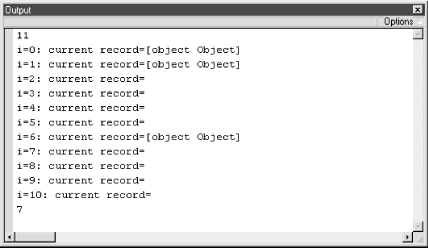
You might expect the recordset's length to be 3 after removing the eight empty elements, but the recordset is getting shorter after each iteration of the loop. The code doesn't properly account for the fact that when a record is removed, the index number of each subsequent record is decremented by 1. As the example is written, when a record is removed (and replaced by the next record) the next record is never tested. Therefore, by the time the loop reaches record 6 (the seventh element) there are no more records to test. To remove empty elements properly, you can iterate through the records in reverse:
trace(myRecordset_rs.getLength( ))
var tempLength = myRecordset_rs.getLength( )-1;
for (var i=tempLength; i >= 0; i--) {
  trace("i=" + i + ": current record=" + myRecordset_rs.getItemAt(i));
  if (myRecordset_rs.getItemAt(i) == undefined) {
    myRecordset_rs.removeItemAt(i);
  }
}
trace(myRecordset_rs.getLength( ));
This gives you the expected length of 3 when finished, because the individual empty records are removed from the end of the recordset.
4.4.7 The replaceItemAt( ) Method
Use the replaceItemAt( ) method to replace the contents of a given record:
recordsetname.replaceItemAt(index, record)
For example:
var newRecord = {First:"Jim", Last:"Zatoichi", Email:"jim@theblindswordsman.com"};
myRecordset_rs.replaceItemAt(1, newRecord);
After running this code, the record with name "Tom Muck" in element 1 of the recordset is replaced with "Jim Zatoichi." You can verify this change with the custom showData( ) method.
4.4.8 The getItemID( ) Method
The getItemID( ) method returns the internal ID that Flash uses to keep track of the recordset records. This is different from the index number, as explained in Section 3.6.1. The ID number is assigned by Flash when the record is created, and it doesn't change.
4.4.9 The setField( ) Method
The setField( ) method is useful for changing the value of a given field in a record. Invoke it with the index number of the record, the field to set, and the new value of the field:
recordsetname.setField(index, field, newValue)
For example, if Jim Zatoichi from the previous example changed his email address, you could update the recordset as follows:
myRecordset_rs.setField(1, "Email", "jz@somenewemailaddress.com");
Again, I must reiterate that changing a client-side RecordSet object has no effect on the database that resides on your remote server. You have to specifically create code to update the remote database, as shown in Section 5.7.
4.4.10 The getColumnNames( ) Method
The extremely useful RecordSet.getColumnNames( ) method returns a comma-separated list of the field names in a RecordSet object. This can be handy for creating generic classes, methods, or functions that work with different remote recordsets. After the recordset is loaded into the Flash movie, the getColumnNames( ) method can be used to determine exactly what is in the recordset so that you can work with individual fields. You can call it like this:
var myFieldNames = myRecordset_rs.getColumnNames( );
trace(myFieldNames);
The Output window displays "First, Last, Email", the three fields in the recordset.
4.4.11 The filter( ) Method
The filter( ) method filters the recordset by predefined criteria and returns a new RecordSet object. This method works a little differently than you might expect if you're coming from a server-side programming background.
The filter method requires that you define a function to determine how the recordset is filtered. You pass a function name to the method and a value to filter by:
recordsetname.filter(function, value)
For example, to filter a recordset by its last name field, create a function called filterByLastName( ) that accepts two arguments: the record and the last name to filter by:
function filterByLastName (theRecord, theLastName) {
  return (theRecord.Last != theLastName);
}
The filter( ) method cycles through each record of the recordset and calls the filtering function. If the callback function returns true, the record is included in the filtered output. If it returns false, the record is removed.
If you don't store the return value of the filter( ) method as follows, the return value is discarded:
myRecordset_rs.filter(filterByLastName,"Zatoichi");
Regardless, the filter( ) method does not affect the original recordset; instead, it returns an entirely new RecordSet object. Therefore, you can maintain the original recordset while creating a filtered version as well by simply specifying a new variable to contain the filtered recordset:
var theNewRecordset_rs = myRecordset_rs.filter(filterByLastName,"Zatoichi");
After executing this code, theNewRecordset_rs contains the filtered recordset and myRecordset_rs contains the original recordset.
|
To change the original recordset permanently, you can store the return value of the filter( ) method in the variable holding the original RecordSet object:
myRecordset_rs = myRecordset_rs.filter(filterByLastName,"Zatoichi");
Refer to Section 4.4.14 later in this chapter for sorting recordsets without filtering them.
4.4.12 The getNumberAvailable( ) Method
The getNumberAvailable( ) method is used only with RecordSet objects that are retrieved from a remote server via Flash Remoting. It indicates how many records have been downloaded up until that point. You can use this method to determine whether it is safe to call other methods of the RecordSet class that depend on the entire RecordSet object being loaded into memory. If the number returned by getLength( ) matches the number returned by getNumberAvailable( ), the entire recordset has been downloaded:
if (myRecordset_rs.getLength( ) == myRecordset_rs.getNumberAvailable( )) {
  // Do something
}
This method pertains to pageable recordsets in ColdFusion (see Chapter 5).
4.4.13 The setDeliveryMode( ) Method
The setDeliveryMode( ) method allows you to create pageable server-side recordsets that relate to a RecordSet object in a Flash movie. You pass the method a mode, page size, and number of records:
recordsetname.setDeliveryMode(mode, pagesize, number)
The first argument specifies one of three possible modes of operation?"ondemand" (the default), "fetchall", or "page".
If the delivery mode is not specified via setDeliveryMode( ), the default mode is "ondemand", which returns all records from the remote server. The "fetchall" and "page" modes tell the server to hold records in memory and deliver only the needed pages of records. For example, if your remote recordset includes 1,000 records, you can group them into pages of 20 records each:
myRecordset_rs.setDeliveryMode("page", 20, 5);
That allows your Flash movie to download 5 pages at a time, with 20 records on each page. Using "fetchall" mode, records are delivered when available (like "ondemand" mode), but they are delivered as pages so that you can use the results as they come in. Pageable recordsets are available only in ColdFusion MX. See Section 5.5.1 for more details.
4.4.14 The sortItemsBy( ) and sort( ) Methods
There are two ways to sort a RecordSet object in Flash: by field or by defining a custom sort function. When you sort by field using the sortItemsBy( ) method, you are in effect sorting a multidimensional array. The individual records (rows) of the RecordSet object are reordered by the values within the field name passed to the sortItemsBy( ) method. You can pass a second argument to specify ascending or descending order:
recordsetname.sortItemsBy(field, direction)
If the second argument is "desc", the sort will be in descending order; otherwise, the sort is ascending.
For example, to sort the recordset created earlier in this chapter by last name, you can use:
myRecordset_rs.sortItemsBy("Last");
myRecordset_rs.showData( );
The first element in the sorted recordset will be John Jehosephat.
The sort( ) method allows you to specify a user-defined sort function:
recordsetname.sort(function)
This method is much slower than the sortItemsby( ) method, so it should be used sparingly, such as when you need to sort the recordset by two fields. In the following example, sortByFirstAndLast( ) is a custom sorting function:
function sortByFirstAndLast (rec1, rec2) {
  if (rec1.Last  < rec2.Last)  return -1;
  if (rec1.Last  > rec2.Last)  return 1;
  if (rec1.First < rec2.First) return -1;
  if (rec1.First > rec2.First) return 1;
  return 0;
}

// Perform the sort
myRecordset_rs.sort(sortByFirstAndLast);

// Display the results
for (var i=0; i<myRecordset_rs.getLength( ); i++) {
  trace(myRecordset_rs.getItemAt(i).Last + ", " +
        myRecordset_rs.getItemAt(i).First);
}
The sort( ) method uses a custom function, sortByFirstAndLast( ) in this example, to compare rows of your RecordSet object. The function is called repeatedly to compare two records and must return a value indicating how the two records should be ordered. The function returns 1 if the first record is greater than the second record, -1 if the second record is greater, and 0 otherwise. Likewise, your sort function should return a positive number if the first record should precede the second, a negative number if the second record should precede the first (i.e., swap the records), and 0 if the order doesn't matter.
Refer to Section 4.4.11 earlier in this chapter for filtering recordsets based on a particular criterion.
4.4.15 The addView( ) Method
The addView( ) method allows you to specify the callback function to be executed when something changes in the RecordSet object, such as when a user edits an item in a DataGrid, sorts the results, or deletes a record. Changes made via the following methods can be tracked:
- sort( )
- updateAll( )
- addRows( )
- updateRows( )
- allRows( )
- fetchrows( )
- deleteRows( )
The object passed to the addView( ) method must define a modelChanged( ) method:
var myObject = new Object( );
myObject.prototype.modelChanged = function (myInformationObject) {
  trace(myInformationObject.event);
};
When modelChanged( ) is called, it receives as an argument an information object whose event property indicates the triggering event. For example, this code detects when the recordset is sorted:
// Create a generic object
var myObject = new Object( );
// Define a modelChanged( ) handler for the object
myObject.prototype.modelChanged = function (myInformationObject) {
  if (myInformationObject.event == "sort") {
    trace("The recordset was sorted");
  }
};
// Call addView( ) to set myObject.modelChanged( ) as the callback function,
myRecordset_rs.addView(myObject);
To demonstrate the functionality, add the code in Example 4-3 to the RecordSetDebug.as file that was created earlier. The showData( ) method from Example 4-2 remains unchanged and should be included in the same RecordSetDebug.as file. Example 4-3 traces any change made to the recordset in the Output window (works in the authoring tool only).
Example 4-3. RecordSetDebug.as
/////////////////////////////////////////
// RecordSet.debug
// Purpose: Trace all changes to the recordset or its properties
/////////////////////////////////////////

// Main public method to debug the recordset. Activate it like this:
//   myRecordset_rs.debug(true);
// Turn it off like this:
//   myRecordset_rs.debug(false);

RecordSet.prototype.debug = function (enabled) {
  if (enabled) {
    if (!this.debugObject)
      this.debugObject = new RecordSetDebugObject(this);
  } else {
    this.debugObject.modelChanged = null;
    this.debugObject = null;
  }
};

// Create a new object that debugs a recordset passed to it
function RecordSetDebugObject (rs) {
  this.init(rs);
}

// Class initialization, including the addView( ) method
RecordSetDebugObject.prototype.init = function (rs) {
  this.rs = rs;
  this.rs.addView(this);
};

// This method is called whenever a change is made in a recordset.
// It displays the event and start/end rows affected, as
// well as the RecordSet.showData( ) information
RecordSetDebugObject.prototype.modelChanged = function (info) {
  trace("");
  trace("--Recordset event occurred--");
  trace("Event: " + info.event);
  switch info.event) {
    case("sort"):
      trace("The RecordSet has been sorted.");
      break;
    case("updateAll"):
      trace("The RecordSet has changed in some way")
      break;
    case("addRows"):
      trace("firstRow:" + info.firstRow);
      trace("lastRow:" + info.lastRow);
      trace("Row numbers " + info.firstRow +
        " through " + info.lastRow + " have been added.");
      break;
    case("updateRows"):
      trace("firstRow:" + info.firstRow);
      trace("lastRow:" + info.lastRow);
      trace("Row numbers " + info.firstRow + " through " +
        info.lastRow + " have been changed.");
      break;
    case("deleteRows"):
      trace("firstRow:" + info.firstRow);
      trace("lastRow:" + info.lastRow);
      trace("Row numbers " + info.firstRow + " through " +
         info.lastRow + " have been deleted.");
      break;
    case("allRows"):
      trace("All records have arrived from the server.");
      break;
    case("fetchrows"):
      trace("firstRow:" + info.firstRow);
      trace("lastRow:" + info.lastRow);
      trace("Row numbers " + info.firstRow + " through " +
        info.lastRow + " have been requested from the server.");
      break;
  }
  this.rs.showData( ); // Call showData( ) to display the contents
  trace("--End recordset event--");
};
You can see that each RecordSet event is traced in the modelChanged( ) method after it occurs. The argument passed to modelChanged( ) is an object that contains three possible properties:
- event
-
Name of the event that triggered the handler
- firstRow
-
First row of the recordset that has changed
- lastRow
-
Last row of the recordset that has changed
To use the custom debug( ) and showData( ) methods, include RecordSetDebug.as in your Flash movie:
#include "RecordSetDebug.as"
Then you can activate debug mode for a RecordSet object like this:
myRecordset_rs.debug(true);
Try it out on some of the earlier examples and you'll see that it traces the changes made to the recordset as well as its contents. For example, upon adding a row to a new empty recordset, like this:
var tempRecord = {First:"Tom", Last:"Muck", Email:"tom@tom-muck.com"};
myRecordset_rs.addItem(tempRecord);
the Output window displays:
--Recordset event occurred--
Event: addRows
firstRow:0
lastRow:0
Row numbers 0 through 0 have been added.
  --Recordset Properties--
Recordset length: 1
Fields: First,Last,Email
Begin records...
First: "Tom"; Last: "Muck"; Email: "tom@tom-muck.com";
End records...
  --End Recordset Properties--
--End recordset event--
4.4.16 The removeAll( ) Method
The removeAll( ) method clears out a RecordSet object, leaving a length of 0. The RecordSet object still exists with the field name structure in place but with no items in the array. If you use the custom debug( ) method on the recordset, you can see the length is zero but the field names still exist. To destroy a RecordSet object completely, set it equal to null:
myRecordset_rs = null;


