2.1 Introducing PHP
The current version of PHP is PHP4 (Version 4.3.4). PHP5 is available for beta testing at the time of writing as Version 5.0.0b3. We discuss both versions in this chapter.
PHP is a recursive acronym that stands for PHP: Hypertext Preprocessor; this is in the naming style of GNU, which stands for GNU's Not Unix and which began this odd trend. The name isn't a particularly good description of what PHP is and what it's commonly used for. PHP is a scripting language that's usually embedded or combined with the HTML of a web page. When the page is requested, the web server executes the PHP script and substitutes in the result back into the page. PHP has many excellent libraries that provide fast, customized access to DBMSs and is an ideal tool for developing application logic in the middle tier of a three-tier application.
2.1.1 PHP Basics
Example 2-1 shows the first PHP script in this book, the ubiquitous "Hello, world." It's actually mostly HTML; the PHP is embedded near the end.
Example 2-1. The ubiquitous Hello, world in PHP
<!DOCTYPE HTML PUBLIC "-//W3C//DTD HTML 4.01 Transitional//EN"

                      "http://www.w3.org/TR/html401/loose.dtd">

<html>

<head>

  <meta http-equiv="Content-Type" content="text/html; charset=iso-8859-1">

  <title>Hello, world</title>

</head>

<body bgcolor="#ffffff">

  <h1>

  <?php

    print "Hello, world";

  ?>

  </h1>

</body>

</html>
When requested by a web browser, the script is run on the web server and the resulting HTML document sent back to the browser and rendered as shown in Figure 2-1.
Figure 2-1. The output of Example 2-1 shown in the Netscape browser
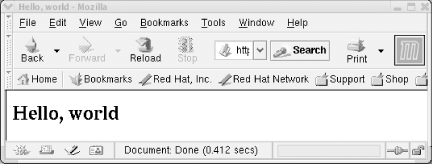
Example 2-1 illustrates the basic features of a PHP script. It's a mixture of HTML?in this case it's mostly HTML?and PHP code. The PHP code in this example:
<?php

  print "Hello, world";

?>
simply prints the greeting, "Hello, world."
The PHP script shown in Example 2-1 is rather pointless: we could simply have authored the HTML to include the greeting directly. Because PHP integrates so well with HTML, using PHP to produce static sequence of characters is far less complicated and less interesting than using other high-level languages. However, the example does illustrate several features of PHP:
A block of PHP code is embedded within HTML using the begin and end tags <?php and ?>. Other begin and end tag styles can also be used, such as the HTML style that is used with JavaScript or other embedded scripts: <script language="PHP"> and </script>. There's also a shorter style <? and ?>. For consistency, we use only the <?php and ?> style in this book.
Whitespace has no effect, except to aid readability for the developer. For example, the PHP could have been written succinctly as <?php print "Hello, world";?> with the same effect. Any mix of whitespace characters?spaces, tabs, carriage returns, and so on?can be used to separate PHP statements.
A PHP script is a series of statements, each terminated with a semicolon. Our simple example has only one statement: print "Hello, world";. PHP script can be anywhere in a file and interleaved with any HTML fragment. While Example 2-1 contains only one statement within one set of <?php and ?> tags, statements can be distribute code across multiple blocks of code.
When PHP script is run, each block of code, including the start and end script tags <?php and ?> is replaced with the output of the block.
|

The point of learning PHP, of course, is to create pages that change, pages that contain dynamic content derived from user input or a database. The first step toward that goal is to introduce a variable , which is something that can change from run to run. In this chapter, we don't use dynamic content. But we can show how to set a variable to a string as follows:
<?php $outputString = "Hello, world"; ?>
And then rewrite our script as follows:
<?php print $outputString; ?>
Because $outputString has been set to Hello, world, that string is printed as part of the surrounding HTML page.
The freedom to interleave blocks of PHP statements with HTML is one of the most powerful features of PHP. A short example is shown in Example 2-2; the variable $outputString is initialized before the start of the HTML document, and later this variable is output twice, as part of the <title> and <body> elements. We discuss more about variables and how to use them later in this chapter.
Example 2-2. Embedding three blocks of code in a single document
<?php $outputString = "Hello, world"; ?>

<!DOCTYPE HTML PUBLIC "-//W3C//DTD HTML 4.01 Transitional//EN"

                      "http://www.w3.org/TR/html401/loose.dtd">

<html>

<head>

  <meta http-equiv="Content-Type" content="text/html; charset=iso-8859-1">

  <title><?php print $outputString; ?></title>

</head>

<body bgcolor="#ffffff">

  <h1><?php print $outputString; ?></h1>

</body>

</html>
The flexibility to add multiple blocks of PHP to HTML can also lead to unwieldy, hard-to-maintain code. Care should be taken in modularizing code and HTML; we discuss how to separate code and HTML using templates in Chapter 7.
2.1.1.1 Creating PHP scripts
A PHP script can be written using plain text and can be created with any text editor, such as the Unix editors joe, vi, nedit, Emacs, or pico, or a Microsoft Windows editor such as Notepad or WordPad. There are also several special-purpose PHP programming editors available, and a well-maintained list of these can be found at http://phpeditors.linuxbackup.co.uk/.
If you save a PHP script in a file with a .php extension under the directory configured as Apache's document root, Apache executes the script when a request is made for the resource. Following the installation instructions given in Appendix A through Appendix C, the document root on a Unix machine is:
/usr/local/apache/htdocs/
and in a Microsoft Windows environment:
C:\Program Files\EasyPHP1-7\www\
Consider what happens when the script shown in Example 2-1 is saved in the file example.2-1.php in the document root directory and you view the file in a Web browser on the same machine. Apache?when configured with the PHP module?executes the script when requests to the URL http://localhost/example.2-1.php are made.
If you are working on a Unix host, and directory permissions don't permit creation of files in the document root, it's also possible to work in your user home directory. If the installation instructions in Appendix A through Appendix C have been followed, a directory can be created beneath your Unix home directory and the permissions set so that the directory is readable by the web server. You can do this by running a terminal window and typing the following after the shell prompt (shown here as a %):
% mkdir ~/public_html

% chmod a+rx ~/public_html
The example file can then be created with the filename:
~/public_html/example.2-1.php
The file can then be retrieved with the URL http://localhost/~user/example.2-1.php, where user is the user login name.
You can insert any of the code in this chapter into that file, or another one of your choice, and see what's displayed by calling it up in a browser as we have shown.
2.1.1.2 Comments
Comments can be included in code using several styles used by high-level programming languages. This includes the following styles:
// This is a one-line comment


#  This is another one-line comment style


/* This is how you

   can create a multi-line

   comment */
2.1.1.3 Outputting data with echo and print
The print statement used in Example 2-1 and Example 2-2 is frequently used and can output any type of data. The echo statement can be used for the same purpose. Consider some examples:
print "Hello, world";


// echo works just the same

echo "Hello, world";


// numbers can be printed with echo too

echo 123;


// So can the contents of variables

$outputString = "Hi!";

echo $outputString;
The difference between print and echo is that echo can output more than one parameter, each separated by a comma. For example, echo can print a string and an integer together in the one message:
// prints "The answer is 42"

echo "The answer is ", 42;
The print and echo statements are also often seen with parentheses:
echo "hello";


// is the same as

echo ("hello");
Parentheses make no difference to the behavior of print. However, when they are used with echo, only one output parameter can be provided.
The echo and print statements can be used for most tasks and can output any combination of static strings, numbers, arrays, and other variable types discussed later in this chapter. We discuss more complex output with printf( ) in the next chapter.
2.1.2 String Literals
One of the most common tasks in a PHP script is to output literal sequences of characters to create messages, headings, and other text that appear on HTML pages. A literal sequence of characters?a string literal or simply a string? can be included in a PHP script using quotation characters. PHP can create double- and single-quoted string literals:
print 'This works';

print "just like this.";
Because quotation marks are used to mark the start and end of strings, a quotation mark that is actually part of a string must be marked in some way. Marking a character so that it is treated as a normal character, instead of being part of the PHP syntax, is called escaping . Quotation marks can be escaped by putting a backslash before them:
print "This string has a \": a double quote!";

print 'This string has a \': a single quote!';
A simple alternative to including quotation marks in a string is to switch to the single-quotation style:
// And here are some strings that contain quotes

print "This string has a ': a single quote!";

print 'This string has a ": a double quote!';
To include a backslash character in a double-quoted string, use the escaped sequence \\. Tab, newline (line break), and carriage-return characters can be included in a double-quoted string using the escape sequences \t, \n, and \r, respectively. Inserting the white space characters \t, \n, and \r is often useful to make output more readable, however as HTML, white space is generally disregarded.
Unlike many other languages, PHP allows newline characters to be included directly in a string literal. The following example shows the variable $var assigned with a string that contains a newline character:
// This is Ok. $var contains a newline character

$var = 'The quick brown fox

        jumps over the lazy dog';
This feature is used in later chapters to construct SQL statements that are easier to read in the PHP source code, for example:
$query = "SELECT max(order_id)

            FROM orders

           WHERE cust_id = $custID";
2.1.2.1 Variable substitution
Variable substitution provides a convenient way to embed data held in a variable directly into string literals. PHP examines, or parses , double-quoted strings and replaces variable names with the variable's value. The following example shows how:
$number = 45;

$vehicle = "bus";

$message = "This $vehicle holds $number people";


// prints "This bus holds 45 people"

print $message;
PHP interprets the $ and the following non-space characters as the name of a variable to insert. To include the dollar signs in a double-quoted string you need to escape the variable substitution meaning with the backslash sequence \$.
When the name of the variable is ambiguous, braces {} can delimit the name as shown in the following example:
$memory = 256;


// No variable called $memoryMbytes

// Sets $message to "My computer has  of RAM"

$message = "My computer has $memoryMbytes of RAM";


// Works: braces are used delimit variable name

// Sets $message to "My computer has 256Mbytes of RAM"

$message = "My computer has {$memory}Mbytes of RAM";
When the string literal containing the characters $memoryMbytes is parsed, PHP tries to substitute the value of the nonexisting variable $memoryMbytes. Braces are also used for more complex variables, such as arrays and objects:
print "The array element is {$array["element"]}.";

print "Mars is {$planets['Mars']['dia']} times the diameter of the Earth";

print "There are {$order->count} green bottles ...";
We explain arrays in the next chapter and objects in Chapter 4.
We recommend using the braces syntax when including variables in string literals. It makes your code more readable, and saves you the trouble of remembering to escape characters.
Single-quoted strings aren't parsed in the same way as double-quoted strings for variable substitution. For example, the characters $vehicle and $number aren't substituted in the following fragment of code:
$number = 45;

$vehicle = "bus";


// prints "This $vehicle holds $number people"

print 'This $vehicle holds $number people';
2.1.2.2 Character encoding
When a PHP script is executed, the PHP engine starts by reading the script from a file. A file is simply a sequence of characters than are interpreted by PHP as statements, variable identifiers, literal strings, HTML, and so on. To correctly interpret these characters, PHP needs to know the character encoding of the file. Put more simply, PHP needs to know what each 8-bit sequence that makes up a character means.
In many cases, you won't need to worry about character encoding. By default PHP reads the characters encoded to the ISO-8859-1 standard?a standard that is equivalent to 7-bit ASCII for the first 127 characters. The ISO-8859-1 encoding standard?also known as Latin-1 encoding?uses the next 128 characters to represent characters used in Western European languages. By default PHP scripts can include ISO-8859-1 characters directly, as the following fragment demonstrates:
$gesprächsnotiz =

    "von Paulus Esterházy und Markus Hoff-Holtmannus";
The ä and á characters in the previous example are represented by the 8-bit sequences 11100100 and 11100001?the 228th and 225th characters from ISO-8859-1.
Sometimes, it's not convenient to work with non-7-bit ASCII characters in an editor environment. Indeed, some programs can only handle 7-bit ASCII and ignore high-bit characters?characters with a leading "1". You can include high-bit characters using an escape sequence to specify either a hexadecimal or octal value. Hexadecimal sequences start with \x and are followed by two digits?00 to ff?to represent 256 characters. For example, the á character can be represented in a string literal with the hexadecimal sequence \xe1 since e1 is the hexadecimal equivalent of 11100100:
$translation =

    "von Paulus Esterh\xe1zy und Markus Hoff-Holtmannus";
Escape sequence can only be used in string literals?PHP does not allow us to represent the variable $gesprächsnotiz as $gespr\xe4chsnotiz.
Like PHP's Zend engine, browsers need to know the character encoding of a page before the page can be correctly displayed. In this book we assume the default ISO-8859-1 character encoding, and accordingly we instruct browsers to use this encoding by including the mark-up as follows:
<meta http-equiv="Content-Type" content="text/html; charset=iso-8859-1">
Other ISO-8859-x character encoding standards allow Cyrillic, Arabic, Greek, and Hebrew characters to be encoded, and a full description of these encoding standards can be found at http://en.wikipedia.org/wiki/ISO_8859.
PHP can be configured to support UTF-8; an 8-bit encoding method that can represent Unicode characters. The Unicode Standard describes a universal character encoding that defines over 49,000 characters from the world's scripts. Unicode characters can also be encoded using UTF-16, a 16-bit encoding, however PHP does not support 16-bit characters. More information about the Unicode standard can be found at http://www.unicode.org.
2.1.3 Variables
Variables in PHP are identified by a dollar sign followed by the variable name. Variables don't need to be declared before you use them; normally you just assign them a value to create them. The following code fragment shows a variable $var assigned the integer 15. Therefore, $var is defined as being of type integer.
$var = 15;
Variables in PHP are simple: when they are used, the type is implicitly defined?or redefined?and the variable implicitly declared.
Variable names are case-sensitive in PHP, so $Variable, $variable, $VAriable, and $VARIABLE are all different variables.
|

2.1.4 Types
Data exists in different types so that appropriate operations can be performed on it. For instance, numeric values can be manipulated with arithmetic operators such as addition and subtraction; whereas strings of characters can be manipulated by operations such as converting to uppercase. In this section, we introduce the basic types; their importance will become clear as we use data in more and more complex operations.
PHP has four scalar types?boolean, float, integer, and string?and two compound types, array and object. PHP also supports null? a special type that is used when a variable doesn't have a value.
Variables of a scalar type contain a single value. Variables of a compound type?array or object?are made up of multiple scalar values or other compound values. Arrays are discussed in detail in the next chapter, and objects are discussed in Chapter 4. Other aspects of variables?including global variables and scope?are discussed later in this chapter.
Boolean variables are as simple as they get: they can be assigned either true or false. Here are two example assignments of a Boolean variable:
$variable = false;

$test = true;
An integer is a whole number, while a float is a number that has an exponent and mantissa. The number 123.01 is a float, and so is 123.0, while the number 123 is an integer. Consider the following two examples:
// This is an integer

$var1 = 6;


// This is a float

$var2 = 6.0;
A float can also be represented using an exponential notation:
// This is a float that equals 1120

$var3 = 1.12e3;


// This is a float that equals 0.02

$var4 = 2e-2
You've already seen examples of strings earlier in the chapter. Here are two more example string variables:
$variable = "This is a string";

$test = 'This is also a string';
Along with the value, the type of a variable can change over the lifetime of the variable. Consider an example:
$var = 15;

$var = "Sarah the Cat";
This fragment is acceptable in PHP. The type of $var changes from integer to string as the variable is reassigned. Letting PHP change the type of a variable as the context changes is very flexible and a little dangerous. Later in Working with Types, we show ways to avoid problems that can arise with loosely typed variables.
2.1.5 Constants
Constants associate a name with a scalar value. For example, the Boolean values true and false are constants associated with the values 1 and 0, respectively. It's also common to declare constants in a script. Consider this example constant declaration:
define("PI", 3.14159);


// This outputs 3.14159

print PI;
Constants aren't preceded by a $ character. They can't be changed once they have been defined and they can be accessed anywhere in a script (regardless of where they are declared).
Constants are useful because they allow parameters internal to the script to be grouped. When one parameter changes?for example, if you define a new maximum number of lines per web page?you can alter this constant parameter in only one place and not throughout the code.
PHP has a large number of built-in constants that a script can use. For example, the library of mathematical functions already include a definition of M_PI to hold the constant pi:
// This outputs 3.14159265358979323846

print M_PI;
By convention, constant names use uppercase characters, and predefined constants are often named to indicate the associated library. For example the constants defined for the mathematical functions library all start with M_. We introduce predefined constants as needed throughout this book.
2.1.6 Expressions, Operators, and Variable Assignment
We've already described simple examples of assignment, in which a variable is assigned the value of an integer, string, or value of some other data type. The value on the right side of the equal sign is actually the simplest example of an expression .
An expression is anything that can be reduced to a single value, for example the sum 1 + 2 is an expression with an integer value of 3. Expressions can be complex combinations of operators and values, just as in mathematics. Examples of expressions (the first involving integers, the second involving integers and one floating point number) are:
6 + 3 - 2

( 255.0 / 2 ) + 1
The basic syntax for expressions in PHP is taken from the C language and is familiar to someone who has worked in almost any high-level programming language. Here are some examples:
// Assign a value to a variable

$var = 1;


// Sum integers to produce an integer

$var = 4 + 7;


// Subtraction, multiplication, and division might have

// a result that is a float or an integer, depending on

// the initial value of $var

$var = (($var - 5) * 2) / 3;


// These all add 1 to $var

$var = $var + 1;

$var += 1;

$var++;


// And these all subtract 1 from $var

$var = $var - 1;

$var -= 1;

$var--;


// Double a value

$var = $var * 2;

$var *= 2;


// Halve a value

$var = $var / 2;

$var /= 2;


// These work with float types too

$var = 123.45 * 28.2;
There are many mathematical functions available in the math library of PHP for more complex tasks. We introduce some of these in the next chapter.
String expressions can be created using the dot-operator (.) to concatenate two strings:
// Assign a string value to a variable

$var = "test string";


// Concatenate two strings using the

// dot operator to produce "test string"

$var = "test" . " string";


// Add a string to the end of another

// to produce "test string"

$var = "test";

$var = $var . " string";


// Here is a shortcut to add a string to

// the end of another

$var .= " test";
The following are all equivalent. The syntax you use is a matter of taste.
echo "test string";

echo "test " . "string";

echo "test ", "string";
The first contains a single string. The second contains an expression combining two strings, while the third contains two arguments to the echo command.
The values returned from functions and many statements can be used as expressions including a variable assignment. In the following example, the assignment ($x = 42) is used as an integer expression with the value of 42:
// assign both $y and $x the value 42

$y = ($x = 42);
The parentheses are not needed in the example above; however, they highlight the fact that $x = 42 is an expression.
PHP automatically converts types when combining values in an expression. For example, the expression 4 + 7.0 contains an integer and a float; in this case, PHP considers the integer as a floating-point number, and the result is of type float. The type conversions are largely straightforward; however, there are some traps, which are discussed later in this chapter.
2.1.6.1 Operator precedence
The term precedence in mathematics and programming refers to the decision concerning which operator is evaluated first. For instance, in the following expression, by convention, the multiplication operator is evaluated first, leading to a value of 32:
2 + 5 * 6
PHP defines the precedence of operators in an expression similar to how it is done in other languages. Multiplication and division occur before subtraction and addition, and so on. However, reliance on evaluation order leads to unreadable, confusing code. Rather than memorize the rules, we recommend you construct unambiguous expressions with parentheses, because parentheses have the highest precedence in evaluation.
For example, in the following fragment $variable is assigned a value of 32 because of the precedence of multiplication over addition:
$variable = 2 + 5 * 6;
But the result is much clearer if parentheses are used:
$variable = 2 + (5 * 6);


