6.1 Querying a MySQL Database Using PHP
In PHP, library functions are provided for executing SQL statements, as well as for managing result sets returned from queries, error handling, and controlling how data is passed from the database server to the PHP engine. We overview these functions here and show how they can be combined to access the MySQL server.
At the time of writing, PHP4.3 and MySQL 4.0 were the stable releases. The MySQL library functions that are discussed here work with those versions. The PHP5 MySQL library functions also work with MySQL 4.0.
However, the MySQL functions discussed here do not work with the alpha release of MySQL 4.1. Instead, a new improved library is being developed for MySQL 4.1, and it is intended to be part of PHP5 in addition to the regular library. An introduction to this library is included as Appendix H.
6.1.1 Opening and Using a Database Connection
In this section, we introduce the basic PHP scripting techniques to query a MySQL server and produce HTML for display in a web browser.
Connecting to and querying a MySQL server with PHP is a five-step process. Example 6-1 shows a script that connects to the MySQL server, uses the winestore database, issues a query to select all the records from the wine table, and reports the results as pre-formatted HTML text. The example illustrates four of the key functions for connecting to and querying a MySQL database with PHP. Each function is prefixed with the string mysql_.
Example 6-1. Connecting to a MySQL database with PHP
<!DOCTYPE HTML PUBLIC

                 "-//W3C//DTD HTML 4.01 Transitional//EN"

                 "http://www.w3.org/TR/html401/loose.dtd">

<html>

<head>

  <meta http-equiv="Content-Type" content="text/html; charset=iso-8859-1">

  <title>Wines</title>

</head>

<body>

<pre>

<?php

   // (1) Open the database connection

   $connection = mysql_connect("localhost","fred","shhh");


   // (2) Select the winestore database

   mysql_select_db("winestore", $connection);


   // (3) Run the query on the winestore through the connection

   $result = mysql_query ("SELECT * FROM

                          wine", $connection);


   // (4) While there are still rows in the result set, fetch the current

   // row into the array $row

   while ($row = mysql_fetch_array($result, MYSQL_NUM))

   {

     // (5) Print out each element in $row, that is, print the values of

     // the attributes

      foreach ($row as $attribute)

         print "{$attribute} ";


      // Print a carriage return to neaten the output

      print "\n";

   }

?>

</pre>

</body>

</html>
The five steps of querying a database are numbered in the comments in Example 6-1, and they are as follows:
Connect to the server with the MySQL function mysql_connect( ) .We use three parameters here: the hostname of the database server, a username, and a password. Let's assume here that MySQL is installed on the same server as the scripting engine and, therefore, localhost is the hostname. If the servers are on different machines, you can replace localhost with the domain name of the machine that hosts the database server.
The function mysql_connect( ) returns a connection resource that is used later to work with the server. Many server functions return resources that you pass to further calls. In most cases, the variable type and value of the resource isn't important: the resource is simply stored after it's created and used as required. In Step 3, running a query also returns a resource that's used to access results.
To test this example?and all other examples in this book that connect to the MySQL server?replace the username fred and the password shhh with those you selected when MySQL was installed following the instructions in Appendix A through Appendix C. This should be the same username and password you used throughout Chapter 5.
Select the database. Once you connect, you can select a database to use through the connection with the mysql_select_db( ) function. In this example, we select the winestore database.
Run the query on the winestore database using mysql_query( ) . The function takes two parameters: the SQL query itself and the server connection resource to use. The connection resource is the value returned from connecting in the first step. The function mysql_query( ) returns a result set resource , a value that can retrieve the result set from the query in the next step.
Retrieve a row of results. The function mysql_fetch_array( ) retrieves one row of the result set, taking the result set resource from the third step as the first parameter. Each row is stored in an array $row, and the attribute values in the array are extracted in Step 5. The second parameter is a PHP constant that tells the function to return a numerically accessed array; we explain how array indexing affects query processing later in this section.
A while loop is used to retrieve rows of database results and, each time the loop executes, the variable $row is overwritten with a new row of database results. When there are no more rows to fetch, the function mysql_fetch_array( ) returns false and the loop ends.
Process the attribute values. For each retrieved row, a foreach loop is used with a print statement to display each of the attribute values in the current row. For the wine table, there are six attributes in each row: wine_id, wine_name, type, year, winery_id, and description.
The script prints each row on a line, separating each attribute value with a single space character. Each line is terminated with a carriage return using print "\n" and Steps 4 and 5 are repeated.
The first ten wine rows produced by the script in Example 6-1 are shown in Example 6-2. The results are shown marked up as HTML.
Example 6-2. Marked-up HTML output from the code shown in Example 6-1
<!DOCTYPE HTML PUBLIC

                 "-//W3C//DTD HTML 4.01 Transitional//EN"

                 "http://www.w3.org/TR/html401/loose.dtd">

<html>

<head>

  <meta http-equiv="Content-Type" content="text/html; charset=iso-8859-1">

  <title>Wines</title>

</head>

<body><pre>

1 Archibald Sparkling 1997 1

2 Pattendon Fortified 1975 1

3 Lombardi Sweet 1985 2

4 Tonkin Sparkling 1984 2

5 Titshall White 1986 2

6 Serrong Red 1995 2

7 Mettaxus White 1996 2

8 Titshall Sweet 1987 3

9 Serrong Fortified 1981 3

10 Chester White 1999 3

...

</pre>

</body>

</html>
PHP does programmatically what you have done by hand in Chapter 5 with the MySQL command line interpreter. The function mysql_connect( ) performs the equivalent function to running the interpreter. The mysql_select_db( ) function provides the use database command, and mysql_query( ) permits an SQL statement to be executed. The mysql_fetch_array( ) function manually retrieves a result set that's automatically output by the interpreter.
The basic principles and practice of using MySQL with PHP are shown in the four functions we've used. These key functions and all others are described in detail in "MySQL Function Reference."
6.1.2 Using mysql_fetch_array( )
In our first example, we accessed attributes in order using the foreach loop statement. In many cases, you'll also want to access the attributes in another way, and this is usually best achieved by using the attribute names themselves. It's much easier to remember that you want to show the user the vintage year, the wine's name, the varieties, and the price, than to remember you want to show attributes four, two, six, and one from the SELECT statement. It's also a much better programming methodology because your code will be independent of the structure of the SQL statement and it'll be more readable. What's more, it's faster to access only the values you need.
Consider a fragment of PHP that displays information about wineries:
$result = mysql_query("SELECT winery_name, phone, fax FROM winery");


while($row = mysql_fetch_array($result))

{

   print "The {$row["winery_name"]} winery's fax is {$row["fax"]}".

   print "Their phone is {$row["phone"]}.\n";

}
The array $row contains one row of the results, and each of the attributes of the winery table is accessible using its attribute name as the associative key. We've used the curly brace style discussed in Chapter 2 to output variables within a double-quoted string: you can see its usefulness here!
There are four tricks to using mysql_fetch_array( ):
Table names aren't used to access values in the array. Even though an attribute might be referenced as customer.name in the SELECT statement, it must be referenced as $row["name"] in the associative array.
Because table names are not used to access an array, if two attributes from different tables are used in the query and have the same name, only the last-listed attribute in the SQL statement can be accessed associatively. This is a good reason to design databases so that attribute names are unique across tables, or to use attribute aliases. We discuss aliases later in "MySQL Function Reference," and you'll find a discussion from a MySQL perspective in Chapter 15.
Aggregates fetched with mysql_fetch_array( ) are associatively referenced using their function name. So, for example, SUM(cost) is referenced as $row["SUM(cost)"].
In versions of PHP prior to 4.0.5, NULL values are ignored when creating the returned array. This changes the numbering of the array elements for numeric access. Even if you're using a recent version of PHP, this is a good reason to avoid NULL values by declaring a DEFAULT value for each attribute.
6.1.3 Error Handling of MySQL Database Functions
Database functions can fail. There are several possible classes of failure, ranging from critical?the server is inaccessible or a fixed parameter is incorrect?to recoverable, such as a password being entered incorrectly by the user. In this section, we show you how to detect and handle these errors during code development. Chapter 12 discusses how to develop a professional error handler that you can use when your application is deployed.
PHP has two error-handling functions, mysql_error( ) and mysql_errno( ) , for detecting and reporting errors. Example 6-3 shows the script illustrated earlier in Example 6-1 with additional error handling: it does exactly the same thing, but we've added error handling. In addition, we've deliberately included an error so that you can see what happens when one occurs: the keyword SELECT is misspelled as SELEC. The error handler is a function, showerror( ) , that prints a phrase in the format:
Error 1064 : You have an error in your SQL syntax near

  'SELEC * FROM wine' at line 1
(Error messages often change between MySQL versions, so the error message might be worded differently when you run the example on your system.)
The error message shows both the numeric output of mysql_errorno( ) and the string output of mysql_error( ). The die( ) function outputs the message and then gracefully ends the script. Ending the script is often useful?it prevents the PHP engine from outputting several warnings as consecutive database functions fail; for example, if a connection can't be established, the PHP engine will issue a warning, and this will be followed by warnings as each subsequent database function is attempted and fails.
|

Example 6-3. Querying a database with error handling
<!DOCTYPE HTML PUBLIC

                 "-//W3C//DTD HTML 4.01 Transitional//EN"

                 "http://www.w3.org/TR/html401/loose.dtd">

<html>

<head>

  <meta http-equiv="Content-Type" content="text/html; charset=iso-8859-1">

  <title>Wines</title>

</head>

<body><pre>

<?php


   function showerror( )

   {

      die("Error " . mysql_errno( ) . " : " . mysql_error( ));

   }


   // (1) Open the database connection

   if (!($connection = @ mysql_connect("localhost","fred","shhh")))

      die("Could not connect");


   // (2) Select the winestore database

   if (!(@ mysql_select_db("winestore", $connection)))

      showerror( );


   // (3) Run the query on the winestore through the connection

   // NOTE : 'SELECT' is deliberately misspelt to cause an error

   if (!($result = @ mysql_query ("SELEC * FROM wine", $connection)))

      showerror( );


   // (4) While there are still rows in the result set,

   // fetch the current row into the array $row

   while ($row = @ mysql_fetch_array($result, MYSQL_NUM))

   {

     // (5) Print out each element in $row, that is, print the values of

     // the attributes

      foreach ($row as $attribute)

         print "{$attribute} ";


      // Print a carriage return to neaten the output

      print "\n";

   }

?>

</pre>

</body>

</html>
MySQL functions should be used with the @ operator that suppresses default output of error messages by the PHP script engine. Omitting the @ operator produces messages that contain both the custom error message and the default error message produced by PHP. Consider an example where the string localhost is misspelled, and the @ operator is omitted:
if (!($connection = mysql_connect("localhos",

                                  "fred",:"shhh") ))

   die("Could not connect");
This fragment outputs the following error message that includes first the PHP error and second the custom error message:
Warning: mysql_connect( ) [function.mysql-connect]:

  Unknown MySQL Server Host 'localhos' (2) in bug.php on line 42


Could not connect.
The error handling approach we've described here works well when you're developing and testing an application. However, when your application is finished and in production, it isn't a good approach: the error messages that are output interrupt the look and feel of the application, and stopping the processing with the die( ) function is likely to result in non-compliant HTML. We show you how to build a production error handler in Chapter 12.
6.1.4 Working with Table Structures
Example 6-4 is a script that uses the mysql_fetch_field( ) function to discover information about attributes in a table; field is another way of saying attribute, and you'll also find some database users call it a column . The script emulates most of the behavior of the SHOW COLUMNS or DESCRIBE commands discussed in Chapter 15. The code uses the same five-step query process discussed earlier, with the exception that mysql_fetch_field( ) is used in place of mysql_fetch_array( ). Sample output for the table wine is shown in Example 6-5.
Example 6-4. Using mysql_fetch_field( ) to describe the structure of a table
<!DOCTYPE HTML PUBLIC

                 "-//W3C//DTD HTML 4.01 Transitional//EN"

                 "http://www.w3.org/TR/html401/loose.dtd">

<html>

<head>

  <meta http-equiv="Content-Type" content="text/html; charset=iso-8859-1">

  <title>Wine Table Structure</title>

</head>

<body><pre>

<?php

   // Open a connection to the server and USE the winestore

   $connection = mysql_connect("localhost","fred","shhh");

   mysql_select_db("winestore", $connection);


   // Run a query on the wine table in the winestore database to retrieve

   // one row

   $result = mysql_query ("SELECT * FROM wine LIMIT 1", $connection);


   // Output a header, with headers spaced by padding

   print str_pad("Field", 20) .

         str_pad("Type", 14) .

         str_pad("Null", 6) .

         str_pad("Key", 5) .

         str_pad("Extra", 12) . "\n";


   // How many attributes are there?

   $x = mysql_num_fields($result);


   // for each of the attributes in the result set

   for($y=0;$y<$x;$y++)

   {

      // Get the meta-data for the attribute

      $info = mysql_fetch_field ($result);


      // Print the attribute name

      print str_pad($info->name, 20);


      // Print the data type

      print str_pad($info->type, 6);


      // Print the field length in brackets e.g.(2)

      print str_pad("({$info->max_length})", 8);


      // Print out YES if attribute can be NULL

      if ($info->not_null != 1)

          print " YES ";

      else

          print "     ";


      // Print out selected index information

      if ($info->primary_key == 1)

         print " PRI ";

      elseif ($info->multiple_key == 1)

         print " MUL ";

      elseif ($info->unique_key == 1)

         print " UNI ";


      // If zero-filled, print this

      if ($info->zerofill)

         print " Zero filled";


      // Start a new line

      print "\n";

   }

?>

</pre>

</body>

</html>
Example 6-5. HTML output of the DESCRIBE WINE emulation script in Example 6-4
<!DOCTYPE HTML PUBLIC

                 "-//W3C//DTD HTML 4.01 Transitional//EN"

                 "http://www.w3.org/TR/html401/loose.dtd">

<html>

<head>

  <meta http-equiv="Content-Type" content="text/html; charset=iso-8859-1">

  <title>Wine Table Structure</title>

</head>

<body><pre>

Field               Type          Null  Key  Extra

wine_id             int   (1)           PRI

wine_name           string(9)           MUL

type                string(9)

year                int   (4)

winery_id           int   (1)           MUL

description         blob  (0)      YES

</pre>

</body>

</html>
6.1.5 Formatting Results
So far we've shown you the basic techniques for connecting to and querying a MySQL server using PHP. In this section, we extend this to produce results with embedded HTML that have better structure and presentation. We extend this further in Chapter 7, where we show you how to separate HTML from PHP code using templates.
Let's consider an example that presents results in an HTML table environment. Example 6-6 shows a script to query the winestore database and present the details of wines. Previously, in Example 6-1 and Example 6-3, the details of wines were displayed by wrapping the output in HTML <pre> tags. The script in Example 6-6 uses the function displayWines( ) to present the results as an HTML table. The main body of the script has a similar structure to previous examples, with the exceptions that the query is stored in a variable, and the username, password, and the showerror( ) function are stored in separate files and included in the script with the require directive. We introduced the require directive in Chapter 2 and discuss it in more detail later in this section.
The displayWines( ) function first outputs a <table> tag, followed by a table row <tr> tag with six <th> header tags and descriptions matching the six attributes of the wine table. We could have output these using mysql_fetch_field( ) to return the attribute names rather than hard-coding the heading names. However, in most cases, the headers are hard-coded because attribute names aren't meaningful to users. Also, as we discuss later, giving users details about your database design can contribute to a security problem.
Example 6-6. Producing simple table output with MySQL
<!DOCTYPE HTML PUBLIC

                 "-//W3C//DTD HTML 4.01 Transitional//EN"

                 "http://www.w3.org/TR/html401/loose.dtd">

<html>

<head>

  <meta http-equiv="Content-Type" content="text/html; charset=iso-8859-1">

  <title>Wines</title>

</head>

<body>

<?php

  require 'db.inc';


  // Show the wines in an HTML <table>

  function displayWines($result)

  {


     print "<h1>Our Wines</h1>\n";


     // Start a table, with column headers

     print "\n<table>\n<tr>\n" .

          "\n\t<th>Wine ID</th>" .

          "\n\t<th>Wine Name</th>" .

          "\n\t<th>Type</th>" .

          "\n\t<th>Year</th>" .

          "\n\t<th>Winery ID</th>" .

          "\n\t<th>Description</th>" .

          "\n</tr>";


     // Until there are no rows in the result set, fetch a row into

     // the $row array and ...

     while ($row = @ mysql_fetch_row($result))

     {

        // ... start a TABLE row ...

        print "\n<tr>";


        // ... and print out each of the attributes in that row as a

        // separate TD (Table Data).

        foreach($row as $data)

           print "\n\t<td> {$data} </td>";


        // Finish the row

        print "\n</tr>";

     }


     // Then, finish the table

     print "\n</table>\n";

  }


  $query = "SELECT * FROM wine";


  // Connect to the MySQL server

  if (!($connection = @ mysql_connect($hostname, $username, $password)))

     die("Cannot connect");


  if (!(mysql_select_db($databaseName, $connection)))

     showerror( );


  // Run the query on the connection

  if (!($result = @ mysql_query ($query, $connection)))

     showerror( );


  // Display the results

  displayWines($result);

?>

</body>

</html>
After producing the HTML <table> open tag, the displayWines( ) function retrieves the rows in the result set, showing each row as a separate table row using the <tr> tag. Each attribute value for each wine, where the attributes match the headings, is displayed within the row as table data using the <td> tag. Carriage returns and tab characters are used to lay out the HTML for readability; this has no effect on the presentation of the document by a web browser, but it makes the HTML much more readable if the user views the HTML source. It also makes debugging your HTML easier.
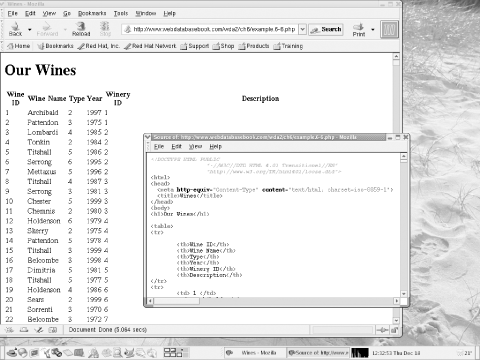
The results of using a table environment instead of <pre> tags are more structured and more visually pleasing. The output in the Mozilla browser is shown in Figure 6-1, along with a window showing part of the HTML source generated by the script.
The downside of the approach we've shown is that the HTML is embedded in the script, making it difficult to work with the presentation and the code separately. In our simple example, this isn't a huge problem. In a larger application such as our online winestore, it makes changing the overall look and feel of the application difficult, and it can also make the code harder to modify. In Chapter 7, we show you how to solve this problem using templates.
Figure 6-1. Presenting wines from the winestore in an HTML table environment
6.1.6 Using Require Files in Practice
Example 6-7 shows the file included with the require directive in Example 6-6. As discussed in Chapter 2, the require directive allows common functions, variables, and constants in other files to be accessible from within the body of a script without directly adding the functions to the code.
Example 6-7. The db.inc require file
<?php

   $hostName = "localhost";

   $databaseName = "winestore";

   $username = "fred";

   $password = "shhh";


   function showerror( )

   {

      die("Error " . mysql_errno( ) . " : " . mysql_error( ));

   }

?>
A require file is usually referenced by all code developed for an application and, in this case, allows easy adjustment of the database server name, database name, and server username and password. The flexibility to adjust these parameters in a central location allows testing of the system on a backup or remote copy of the data, by changing the database name or hostname in one file. This approach also allows the use of different username and password combinations with different privileges, for testing purposes.
We have chosen to name our include files with the .inc extension. This presents a minor security problem. If the user requests the file, the source of the file is shown in the browser. This may expose the username and password for the server, the source code, the database structure, and other details that should be secure.
There are three ways to address this problem:
You can store the require files outside the document tree of the Apache web server installation. For example, store the require files in the directory /usr/local/include/php on a Unix system or in C:\winnt\php or C:\windows\php on a Microsoft Windows system and use the complete path in the include directive.
You can configure Apache so that files with the extension .inc are forbidden to be retrieved.
You can use the extension .php instead of .inc. In this case, the require file is processed by the PHP script engine and produces no output because it contains no main body.
All three approaches to securing require files work effectively in practice. Using the extension .php for require files is the simplest solution but has the disadvantage that require files can't be easily distinguished from other files; however, this is the best approach if you're in a shared hosting environment and can't change Apache's configuration.
In the online winestore, we have configured Apache to disallow retrieval of files with the extension .inc. We did this by adding the following lines to Apache's httpd.conf file, and restarting the web server:
<Files ~ "\.inc$">

  Order allow,deny

  Deny from all

</Files>
6.1.7 Case Study: Producing a Select List
To conclude this section, we present a longer case study of dynamically producing values for an HTML select input type in a form. The example shows you how the PHP MySQL functions can be put to use to develop one of the components of an application. You'll find this a useful tool when you want the user to choose an item from a list of values stored in the database.
Consider an example where we want our users to be able to choose one of the wine regions from a drop-down list so that we can display the wineries in the area. For the wine regions, the select input might have the following structure:
<select name="regionName">

  <option value="All">All</option>

  <option value="Barossa Valley">Barossa Valley</option>

  <option value="Coonawarra">Coonawarra</option>

  <option value="Goulburn Valley">Goulburn Valley</option>

  <option value="Lower Hunter Valley">Lower Hunter Valley</option>

  <option value="Margaret River">Margaret River</option>

  <option value="Riverland">Riverland</option>

  <option value="Rutherglen">Rutherglen</option>

  <option value="Swan Valley">Swan Valley</option>

  <option value="Upper Hunter Valley">Upper Hunter Valley</option>

</select>
With only a small number of wine regions, it's tempting to develop a static HTML page with an embedded list of region names. However, this is poor design. If the region database table changes because you add, delete, or change a region_name value, you have to remember to update the HTML page. Moreover, a spelling mistake or an extra space when creating the HTML page renders a select option useless, because it no longer matches the values in the database when used in a query. A better approach is to dynamically query the database and produce a select element using the region_name values stored in the region table.
Let's consider dynamically producing HTML. First, the set of different values of the region_name attribute in the region table need to be retrieved. Then, the values need to be formatted as HTML option elements and presented as an HTML form to the user. When the user chooses a region and submits the form, a query needs to be run that uses the region name the user selected as one of the query parameters to match against data in the database and to produce a result set. Because the values chosen by the user in the form are compared against database values, it makes sense that the list values should originate from the database. We show you how to incorporate user data in a query in the next section.
In this section, we develop a component that can be reused to produce select lists in different modules of a web database application. An example fragment that uses this new component is shown in Example 6-8. The selectDistinct( ) function that produces the drop-down list isn't shown and we show you it in the next section.
Example 6-8. Producing an HTML form that contains a database-driven select list
<!DOCTYPE HTML PUBLIC

                 "-//W3C//DTD HTML 4.01 Transitional//EN"

                 "http://www.w3.org/TR/html401/loose.dtd">

<html>

<head>

  <meta http-equiv="Content-Type" content="text/html; charset=iso-8859-1">

  <title>Wines</title>

</head>

<body>

<form action="example.6-14.php" method="GET">

<?php

  require "db.inc";


  // selectDistinct( ) function shown in Example 6-9 goes here

  require "example.6-9.php";


  // Connect to the server

  if (!($connection = @ mysql_connect($hostName, $username, $password)))

     showerror( );


  if (!mysql_select_db($databaseName, $connection))

     showerror( );


  print "\nRegion: ";


  // Produce the select list

  // Parameters:

  // 1: Database connection

  // 2. Table that contains values

  // 3. Attribute that contains values

  // 4. <SELECT> element name

  // 5. Optional <OPTION SELECTED>

  selectDistinct($connection, "region", "region_name", "regionName",

                 "All");

?>

<br>

<input type="submit" value="Show Wines">

</form>

</body>

</html>
The component itself is discussed later but is encapsulated in the function selectDistinct( ), which takes the following parameters:
A database connection handle, in this case, a connection opened with mysql_connect( ) and stored in $connection. The database that contains the values that are used in the list must have been selected on the connection using a call to mysql_select_db( ).
The database table from which to produce the list. In this case, the table region contains the region name data.
The database table attribute with the values to be used as the text for each option shown to the user in the list. In this example, it's region_name from the region table.
The name of the HTML <select> tag. We use regionName, but this can be anything and isn't dependent on the underlying database.
An optional default value to output as the selected option in the list; this option is shown as selected when the user accesses the page. All is used as a default here.
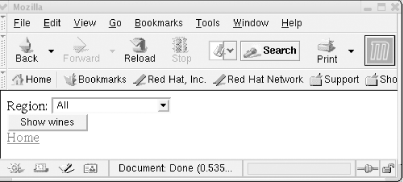
The output of the function for the parameters used in Example 6-8 is shown in Figure 6-2.
Figure 6-2. The selectDistinct( ) function in action
The remainder of the script fragment in Example 6-8 produces the other required tags in the HTML document.
6.1.7.1 Implementing the selectDistinct( ) function
This section details the implementation of the general-purpose selectDistinct( ) function. The function produces a select list, with an optional selected item, using attribute values retrieved from a database table. The body of the function is shown in Example 6-9.
Example 6-9. The body of the selectDistinct( ) function for producing select lists
<?php

  function selectDistinct ($connection, $tableName, $attributeName,

                           $pulldownName, $defaultValue)

  {

     $defaultWithinResultSet = FALSE;


     // Query to find distinct values of $attributeName in $tableName

     $distinctQuery = "SELECT DISTINCT {$attributeName} FROM

                       {$tableName}";


     // Run the distinctQuery on the databaseName

     if (!($resultId = @ mysql_query ($distinctQuery, $connection)))

        showerror( );


     // Start the select widget

     print "\n<select name=\"{$pulldownName}\">";


     // Retrieve each row from the query

     while ($row = @ mysql_fetch_array($resultId))

     {

       // Get the value for the attribute to be displayed

       $result = $row[$attributeName];


       // Check if a defaultValue is set and, if so, is it the

       // current database value?

       if (isset($defaultvalue) && $result == $defaultValue)

          // Yes, show as selected

          print "\n\t<option selected value=\"{$result}\">{$result}";

       else

          // No, just show as an option

          print "\n\t<option value=\"{$result}\">{$result}";

       print "</option>";

     }

     print "\n</select>";

  } // end of function

?>
The implementation of selectDistinct( ) is useful for most cases in which a select list needs to be produced. The first section of the code queries the table $tableName passed as a parameter and produces a select element with the name attribute $pulldownName.
The second part of the function retrieves the database results row by row using a while loop. Inside the while loop, the value of the attribute to be displayed is saved in $result and then an option element is printed using that value. If a $defaultValue is passed through as a parameter and the current value in $result is equal to the default, the code produces the option as the selected option. If there's no default value or the current value doesn't match the default value, the current value is output without the selected attribute.
General-purpose, database-independent or table-independent code is a useful addition to a web database application. Similar functions to selectDistinct( ) can be developed to produce radio buttons, checkboxes, multiple-select lists, or even complete form pages based on a database table. As we discussed in the previous section, the code can be improved with the use of templates that we show you in Chapter 7, and you'll find a template version of the code in this section on our book's web site http://www.webdatabasebook.com/.


