Locking/Unlocking a Server
The easiest way to keep something secure it is to never grant people access to it unless they absolutely need it. You don't go around giving your front door key to everybody; the same basic rules apply to Windows Server 2003 and its approach to IIS.
There are three main steps between the unavailability of IIS when Windows Server 2003 is first installed to a running, functional, but still secure state:
Installing IIS (including upgrading from IIS 4/5)
Unlocking Static Content
Unlocking Web Services Extensions
We're going to have a look at these steps, with a minor detour as we look at the issues when upgrading from a previous version of IIS, and how they both affect and protect the way in which you share and serve your Web sites.
Installing IIS
This has already been covered in Chapter 1, "Introducing IIS 6," but at the risk of repeating myself, it's worth mentioning that this is absolutely the best and most fundamental way of securing your servers from an attack through the IIS service.
To add IIS to an existing system, you need to use the Configure Your Server Wizard, available through the Administrative Tools folder in your Start menu.
INSTALLING EXTENSIONS
Remember that when you install IIS, you need to confirm whether you want to include FrontPage Extensions or ASP.NET functionality.
If you've already installed IIS (or any of the other roles) and you want to remove the role from your server, using the same wizard, select the role you want to remove (IIS is part of the Application server role), and click Next.
You will be prompted to confirm the removal of IIS and the disabling of the ASP.NET service if you installed it. Note that it won't remove any of your Web sites or documents?just the application and services used to support the service.
The removal of the application is complete and absolute?if you later choose to add IIS to your server again, you will need the CD to install it. The removal really does purge the necessary components from the installation.
Upgrading from IIS 4/5
When you upgrade from Windows 2000 and IIS 5, or from Windows NT and IIS 4, Windows Server 2003 should automatically pick up any of the sites you've configured on these machines and server just as if you'd set them up on a new machine.
However, if you upgrade a machine from either of these two platforms and you have not modified the basic setup of IIS, Windows Server 2003 disables the service. This affords the same level of protection as installing Windows Server 2003?IIS is not installed unless you ask it to be.
Unlocking Static Content
Once IIS has been installed and enabled through the Server Roles Wizard, it's still more secure than a base IIS 4 or 5 installation. In its default state, IIS is only capable of serving static Web pages. All dynamic content, including CGI and ASP based content, is not enabled.
FRONTPAGE EXTENSIONS
If you elected to install FrontPage extensions when you were running the Configure Your Server Wizard, the FrontPage ISAPI filter is already installed and configured on your IIS sites.
Static content is therefore unlocked as soon as you install IIS, but IIS still has some additional tricks to prevent users from downloading files they shouldn't have access to.
 WEB RESOURCE
For a tutorial on setting basic directory based authentication, go to the Delta Guide series Web site at www.deltaguideseries.com and enter article ID# A020302.
 UNLOCK AT YOUR OWN RISK
Don't unlock any IIS functionality that you don't absolutely need. Every piece of functionality?FrontPage Server Extensions, ASP.NET, or whatever?is another "moving part" that hackers can attempt to exploit. Leaving IIS locked down will help make it as secure and safe as possible.
Recognized File Extensions
In addition to only serving static Web content, IIS also extends its restrictions on what it serves from a site. One problem with previous versions is that IIS would blindly supply any file that happened to be in a directory shared through IIS, whether or not the file is officially listed. This made it possible to download applications, scripts, components, password files?you name it?from a directory if a user accidentally or deliberately entered the correct URL.
IIS 6 will only accept requests for files with extensions that it recognizes. The accepted file types that IIS will provide as static content are controlled through the MIME types settings. Note that it doesn't affect dynamic content, which is controlled through two separate mechanisms in the form of the Web service extensions manager and the file verification system.
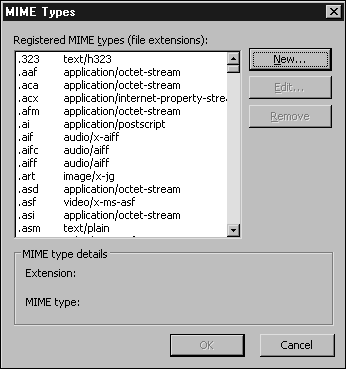
You can manage the accepted MIME types that IIS will serve in two different places?at a server level and a Web site/directory level. You can see an example of the default settings, configured at the server level, shown in Figure 3.1.
Figure 3.1. Default MIME types configured in IIS.
MIME TYPES
The MIME type is sent back to the client when it requests a file, and it's used by the client to determine how the file should be handled. Remember that when adding a MIME type (and therefore an extension) setting, you should configure the right MIME type. Although most browsers have built-in mappings, most use the server derived information if it's supplied.
The Web site/directory level settings augment the settings at the server level; they are not mutually exclusive. For example, if you have enabled Word documents (.doc) at a server level, all Web sites on that server will enable Word documents to be downloaded.
Unfortunately, this means that you have to control the system very carefully. If you have a need to supply specific document types?for example, Word, Excel, Acrobat, and so on?I recommend removing any setting from a server level and instead enabling the settings at the Web site, or better still, directory level.
FOR THE ABSOLUTE BEST IN PROTECTION
I prefer to disable all the file types from the MIME list and then only specifically enable the types that I know I've added to the site or server.
This can also work in your favor if you use the IIS folders to hold additional material about a project or item. For example, you might keep a Word document of a report in the same directory as the HTML version that you are serving. With the default settings, the Word document would be downloadable; with only the HTML files enabled, you can keep the files in the same folder.
Protected Web Content
Most malicious attempts to access and use your IIS server rely on the ability to write files and to update and overwrite configuration files and others through the IIS service.
Within IIS 6, anonymous Web users are blocked from writing to the server, preventing them from making any changes, no matter what tricks they try.
Unlocking Web Services Extensions
Dynamic Web content is supported through the Web services extensions?a new, separate component of the IIS configuration process. Web services extensions include the ISAPI filters and other dynamic content solutions, including ASP, CGI wrappers, and Server Side Includes.
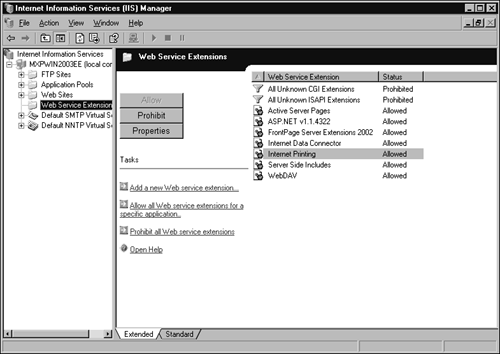
IIS can allow or deny ISAPI filters to execute, improving your security by reducing the risk from the supported?but otherwise uncontrollable?extensions supported under previous versions. They are managed through the Web Services Extensions Manager portion of the IIS Manager, as seen in Figure 3.2.
Figure 3.2. The Web Services Extensions Manager.
The two settings for each of the extensions that IIS knows about are as follows:
Prohibit? Prevents the ISAPI DLL from loading (and therefore executing).
Allow? Allows all documents destined for use with the ISAPI filter to be processed.
In either case, the enablement or disablement covers the entire server, so it should be used with caution on multi-host servers.
PROHIBITING EXTENSIONS
You should be careful when prohibiting an extension that is actually in use by a current Web site. Usually IIS can identify the sites that use the extension by looking at the application configurations for different Web sites and directories, but it doesn't always work. Make sure that you know which of your applications (and Web sites) need which extensions.
In general, you should leave all the extensions in their default prohibited state unless you need them. Remember that you still have to enable applications (and if necessary, a corresponding application pool) to actually allow these extensions to be used, but that doesn't mean you can be careless. A list of the default Web Service Extensions and their security settings are given in Table 3.1.
Web Service Extension | Notes |
|---|---|
All Unknown ISAPI Extensions | You should leave this set to prohibited. Allowing unknown ISAPI extensions will make your system more susceptible to worm and virus attacks, such as the NIMDA/Code Red. |
All Unknown CGI Extensions | You should leave this to prohibited and then only allow CGI extensions that you have specifically allowed. |
Active Server Pages | Used to support the old ASP standard. |
ASP.NET | Used to support the new ASP.NET standard and pages developed within the .NET Framework. |
FrontPage Server Extensions | Used to support FrontPage extensions. You must enable this if you want users to administer and publish Web sites from a client computer, especially through tools such as FrontPage. |
Internet Data Connector | Used to support simpler dynamic Web pages that display data from a database. If you are using ASP for your dynamic sites, you can usually leave this as prohibited. |
Server Side Includes (SSI) | Used to support the SSI system and best left prohibited unless you specifically need the SSI system. If you are using ASP and SSI together, consider moving your templates entirely to ASP and disabling SSI support. |
WebDAV | Used for the Web Distributed Authoring and Versioning System, which can be used to allow authenticated users to publish, lock, and manage files and resources on a Web site. WebDAV is generally more practical than FrontPage, but it's also a more open security risk if not properly managed, so make sure that it's prohibited unless required. |
Adding a New Web Service Extension
The Web Service Extension Manager only allows or prohibits the use of the extensions it knows about. If you've got an ISAPI filter that you've added to the system and are merely using it directly from within the application configuration, the extension manager can't control it.
This means that if you want to be able to arbitrarily deny access to a given filter, you should add it to the Web Service Extension Manager.
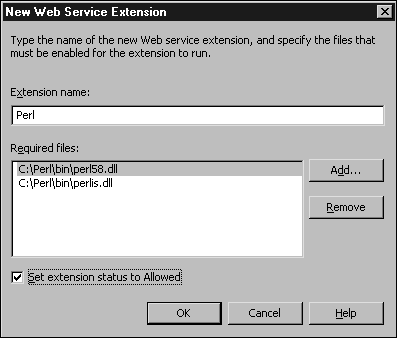
To do this, right-click on the Web Service Extensions folder and choose Add New Web Service Extension. You will see the window as shown in Figure 3.3. You will need to give the extension a name and then list the DLLs that make up the filter.
Figure 3.3. Adding a new Web service extension.
Prohibiting All Access
You can switch off all the Web service extensions by right-clicking the Web Service Extensions object within IIS manager and selecting Prohibit All Web Service Extensions.
The obvious time you might find this useful is if you suspect that an attack is currently taking place and you want to disable dynamic content while leaving static content in place. It can also be useful if you are upgrading or updating a site and need to provide a placeholder page to indicate the status while the site is upgraded.
File Verification
Before IIS 6 processes a request for some dynamic content that has to be processed by an ISAPI filter, it checks that the requested content actually exists. This prevents users from using exploits that execute or trigger a response in an ISAPID filter, regardless of the actual document they are asking for.
With this system in place, it should be impossible to make use of an exploit in an ISAPI?even one that has somehow been installed maliciously?unless the filter itself is compatible with, and able to access, a file in the first place.


