The Macromedia Flash Communication UI Components
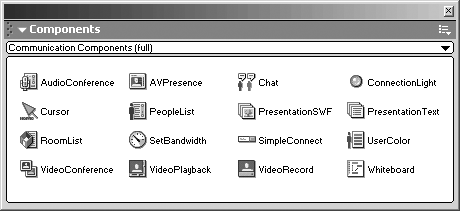
The Flash Communication UI components (Figure 12.6) were designed by Macromedia to offer solutions to build communication applications very quickly and, in most cases, without ActionScript. They are available from the Components panel (Ctrl+F7). Macromedia will be updating the Communication UI component library periodically. To acquire the most recent library, visit: http://www.macromedia.com/go/flashcom/.
Figure 12.6. The Flash Communication UI components can be downloaded from Macromedia.com (http://www.macromedia.com/go/flashcom/).
As demonstrated in Chapters 1 through 10, you can achieve some great results with these Communication components. However, as you have learned, you will reach a point where your requirements are outside the abilities of the UI components. When you reach that threshold, there are two options: You could "roll your own" solution or you could access the UI components' ActionScript objects and build on top of the foundation provided by the components.
Communication Components ActionScript Objects
Each Flash Communication UI component has an associated ActionScript object. If you choose not to use the SimpleConnect UI component, then you must use the ActionScript methods to connect components to the NetConnection object.
It is imperative that each UI component placed on the stage has an instance name. This is how you will access it using ActionScript. Assign the instance name in the Properties panel (see Figure 12.7) when the component is selected on the Flash stage. Flash UI components do not have ActionScript code hinting, but are actually just MovieClips on the stage. Use the suffix _mc to enable MovieClip code hinting in the ActionScript Editor.
Figure 12.7. You must ensure that each component has an instance name in the Properties panel before you can control it with ActionScript.

Only ActionScript classes associated with components available on your Flash stage will be accessible. For example, you cannot use methods in the Chat component if you are not using it.
The Flash UI components are built on top of the Communication objects in Flash MX. They are often confused as a standard part of the Communication Server. They are not. Classes are available only when the UI component exists in the application. SSAS classes are available for all UI components when using the load("components.asc") command in the main.asc file.
Each component (except simpleConnect) has at least two methods: .connect() and .close(). These methods are responsible for associating a UI component to the RTMP connection.
Most components also use the method .setUsername(). This method is required by components that handle user-specific operations, such as the Chat or PeopleList components. .setUsername() is normally invoked automatically with the .connect() method, but you can invoke it separately to change the username or enter the user into Lurker mode.
Lurker Mode
Lurker mode is a mode that is specific to the operation of some Flash Communication Components. Setting a user in this mode is the process of "hiding" them. They will not be able to publish streams or interact in a chat session. When in this mode, the client's username is not accessible.
If you use simpleConnect with the UI components, a user can enter Lurker mode by connecting with an empty username. If you are connecting the user with ActionScript, each UI component must be set to Lurker mode manually using their .setUsername() method. The following script will set the PeopleList, Chat, and AVPresence components to Lurker mode:
peopleList_mc.setUserName();
chat_mc.setUserName();
avPresence_mc.setUserName();
Additional Component Functionality
Communication components may have additional properties beyond.connect(), .close(), and .setUsername(). For a detailed list of the methods, properties, and events available in each component class, refer to Appendix D,"Macromedia Flash UI Component Object Quick Reference."
Extending the UI Component Class
When you explore the Communication UI component library, be sure to double-click the first asset. Frame 1 of the Actions layer contains the prototype of the Component object. You can overwrite these prototypes (extend the class) in your ActionScript. It is not recommended that you tamper with scripts in this frame, but you can certainly use them as a foundation to extend the functionality of the UI component by adding new methods and properties. For example, you could write a method that would let you set a ClickHandler property for the PeopleList component. This would let you use the PeopleList to trigger ActionScript events instead of it being a viewer component.
This process was demonstrated in Chapter 10, "STEP 10: Lobby Applications." In that chapter, the RoomList component's prototype method, joinRoom, was overwritten to extend the native functionality of the component.
Skinning the Components
Skinning is the way you customize how the Communication UI components look. To maintain a consistent look and feel to your users, you must consider how these components will fit into a custom layout. Remember, presentation is key, and now that Flash Communication Server takes care of the plumbing for you, more attention can be applied to the visual interaction of interface elements. The default Communication UI components are actually reskinned versions of the components shipped with Flash MX. The PushButton in the Chat window is the same button found in the Flash UI Components panel?it just looks different.
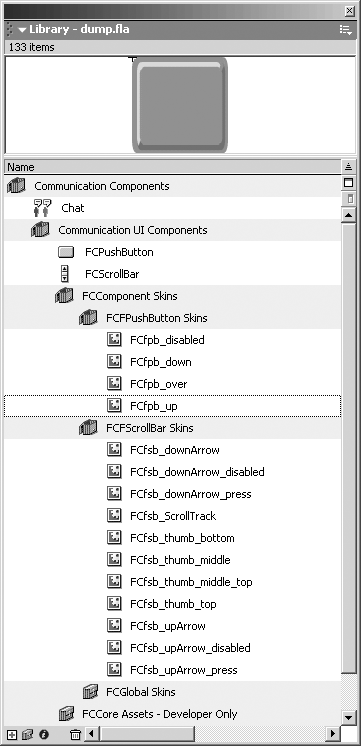
When a Communication UI component is dragged to the Flash stage, the assets it requires are copied into the Library folder called FlashCom UI components. Figure 12.8 shows the assets of the Chat component.
Figure 12.8. Flash Communication component assets will display in the Library in the Communication Components folder.
Flash UI components are built within the framework way as the traditional UI components. That means, if you are familiar with changing the skin of a UI component, this will be the same process.
This process is well documented in several books, including the Flash MX manual and Jody Keating's Inside Flash MX (New Riders Publishing).


