8.2 A Quick Example
To give you a good overview of the whole process, let us take a look at a short, quick example. This humble XML document will be the source:
<mydoc>
  <title>Hello world!</title>
  <message>I am <emphasis>so</emphasis> clever.</message>
</mydoc>
The first step in using XSL-FO is to write an XSLT stylesheet that will generate a formatting object tree. Example 8-1 is a very simple (for XSL-FO) stylesheet. There are five templates in all. The first creates a page master, an archetype of real pages that will be created as text is poured in, setting up the geometry of content regions. The second template associates a flow object with the page master. The flow is like a baggage handler, throwing suitcases into a compact space that fits the geometry set up in the page master. The rest of the templates create blocks and inlines to be stacked inside the flow.
Example 8-1. An XSLT stylesheet to turn mydoc into a formatting object tree
<?xml version="1.0"?>
<xsl:stylesheet xmlns:xsl="http://www.w3.org/1999/XSL/Transform"
                xmlns:fo="http://www.w3.org/1999/XSL/Format"
                version="1.0"
>
<xsl:output method="xml"/>

<!-- The root node, where we set up a page with a single
     region. <layout-master-set> may contain many page masters, but
     here we have defined only one. <simple-page-master> sets up a
     basic page type with width and height dimensions, margins, and a
     name to reference later with a flow.
-->

<xsl:template match="/">
  <fo:root>
    <fo:layout-master-set>
      <fo:simple-page-master
            master-name="the-only-page-type"
            page-height="4in" page-width="4in"
            margin-top="0.5in" margin-bottom="0.5in"
            margin-left="0.5in" margin-right="0.5in">
        <fo:region-body/>
      </fo:simple-page-master>
    </fo:layout-master-set>
    <xsl:apply-templates/>
  </fo:root>
</xsl:template>

<!-- The first block element, where we insert the document flow.
     <page-sequence> sets up an instance of the page type we defined
     above. <flow> contains all the stackable block objects, shaping
     them so they fit in the page region we defined. The flow contains
     a block that defines font name, size, text alignment, and
     surrounds its content in a 0.25 inch buffer of padding.
-->

<xsl:template match="mydoc">
  <fo:page-sequence master-reference="the-only-page-type">
    <fo:flow flow-name="xsl-region-body">
      <fo:block
        font-family="helvetica, sans-serif"
        font-size="24pt"
        text-align="center"
        padding="0.25in"
     >
        <xsl:apply-templates/>
      </fo:block>
    </fo:flow>
  </fo:page-sequence>
</xsl:template>

<!-- The second block element, a title, is bold, 10 point type, and
     inserts 1 em of space below itself.
-->

<xsl:template match="title">
  <fo:block
    font-weight="bold"
    font-size="10pt"
    space-after="1em"
 >
    <xsl:apply-templates/>
  </fo:block>
</xsl:template>

<!-- The last block element, a message body element. The padding is
     set to 0.25 inches and the border is visible.
-->

<xsl:template match="message">
  <fo:block
    padding="0.25in"
    border="solid 1pt black"
 >
    <xsl:apply-templates/>
  </fo:block>
</xsl:template>

<!-- The inline emphasis element is set to be italic. -->

<xsl:template match="emphasis">
  <fo:inline
    font-style="italic"
 >
    <xsl:apply-templates/>
  </fo:inline>
</xsl:template>

</xsl:stylesheet>
Many of the elements created by this stylesheet have attributes that define properties you may recognize from CSS. Names like font-style and border should be familiar to you already. If you remember the display-type property from CSS, you will understand what the block and inline elements do. They are containers that shape their contents, either to fit a rectangular area in a flow, or to follow the inline progression of lines in a block.
Run the transformation on the source document and you will generate this formatting object tree:
<?xml version="1.0"?>
<fo:root xmlns:fo="http://www.w3.org/1999/XSL/Format">
  <fo:layout-master-set>
    <fo:simple-page-master master-name="the-only-page-type"
      page-height="3in" page-width="4in" margin-top="0.5in"
      margin-bottom="0.5in" margin-left="0.5in" margin-right="0.5in">
    <fo:region-body/>
    </fo:simple-page-master>
  </fo:layout-master-set>
  <fo:page-sequence master-reference="the-only-page-type">
    <fo:flow flow-name="xsl-region-body">
      <fo:block font-family="helvetica, sans-serif" font-size="24pt"
        text-align="center" padding="0.25in">
      <fo:block font-weight="bold" font-size="10pt"
        space-after="1em">Hello world!</fo:block>
      <fo:block padding="0.25in" border="solid 1pt black">I am
        <fo:inline font-style="italic">so</fo:inline> clever.</fo:block>
      </fo:block>
    </fo:flow>
  </fo:page-sequence>
</fo:root>
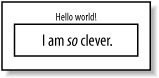
Import this into an XSL formatter and it will generate output shown in Figure 8-1.
Figure 8-2. The message formatted