2.2 CLR Executables
Microsoft .NET executables are different from typical Windows executables in that they carry not only code and data, but also metadata (see Section 2.3 and Section 2.5 later in this chapter). In this section, we start off with the code for several .NET applications, and discuss the .NET PE format.
2.2.1 Hello, World: Managed C++
Let's start off by examining a simple Hello, World application written in Managed C++, a Microsoft .NET extension to the C++ language. Managed C++ includes a number of new CLR-specific keywords that permit C++ programs to take advantage of CLR features, including garbage collection. Here's the Managed C++ version of our program:
#using <mscorlib.dll>

using namespace System;

void main(  )
{
  Console::WriteLine(L"C++ Hello, World!");
}
As you can see, this is a simple C++ program with an additional directive, #using (shown in bold). If you have worked with the Microsoft Visual C++ compiler support features for COM, you may be familiar with the #import directive. While #import reverse-engineers type information to generate wrapper classes for COM interfaces, #using makes all types accessible from the specified DLL, similar to a #include directive in C or C++. However, unlike #include, which imports C or C++ types, #using imports types for any .NET assembly, written in any .NET language.
The one and only statement within the main( ) method is self-explanatoryit means that we are invoking a static or class-level method, WriteLine( ), on the Console class. The L that prefixes the literal string tells the C++ compiler to convert the literal into a Unicode string. You may have already guessed that the Console class is a type hosted by mscorlib.dll, and the WriteLine( ) method takes one string parameter.
One thing that you should also notice is that this code signals to the compiler that we're using the types in the System namespace, as indicated by the using namespace statement. This allows us to refer to Console instead of having to fully qualify this class as System::Console.
Given this simple program, compile it using the new C++ command-line compiler shipped with the .NET SDK:
cl hello.cpp /CLR /link /entry:main
The /CLR command-line option is extremely important, because it tells the C++ compiler to generate a .NET PE file instead of a normal Windows PE file.
When this statement is executed, the C++ compiler generates an executable called hello.exe. When you run hello.exe, the CLR loads, verifies, and executes it.
2.2.2 Hello, World: C#
Because .NET is serious about language integration, we'll illustrate this same program using C#, a language especially designed for .NET. Borrowing from Java and C++ syntax, C# is a simple and object-oriented language that Microsoft has used to write the bulk of the .NET base classes and tools. If you are a Java (or C++) programmer, you should have no problem understanding C# code. Here's Hello, World in C#:
using System;

public class MainApp
{
  public static void Main(  )
  {
    Console.WriteLine("C# Hello, World!");
  }
}
C# is similar to Java in that it doesn't have the concept of a header file: class definitions and implementations are stored in the same .cs file. Another similarity to Java is that Main( ) is a public, static function of a particular class, as you can see from the code. This is different from C++, where main( ) itself is a global function.
The using keyword here functions similar to using namespace in the previous example, in that it signals to the C# compiler that we want to use types within the System namespace. Here's how to compile this C# program:
csc hello.cs
In this command, csc is the C# compiler that comes with the .NET SDK. Again, the result of executing this command is an executable called hello.exe, which you can execute like a normal EXE but it's managed by the CLR.
2.2.3 Hello, World: VB.NET
Here is the same program in Visual Basic .NET (VB.NET):
Imports System

Public Module MainApp
  Public Sub Main(  )
    Console.WriteLine ("VB Hello, World!")
  End Sub
End Module
If you are a VB programmer, you may be in for a surprise. The syntax of the language has changed quite a bit, but luckily these changes make the language mirror other object-oriented languages, such as C# and C++. Look carefully at this code snippet, and you will see that you can translate each line of code here into an equivalent in C#. Whereas C# uses the keywords using and class, VB.NET uses the keywords Import and Module, respectively. Here's how to compile this program:
vbc /t:exe /out:hello.exe hello.vb
Microsoft now provides a command-line compiler, vbc, for VB.NET. The /t option specifies the type of PE file to be created. In this case, since we have specified an EXE, hello.exe will be the output of this command.
2.2.4 Hello, World: J#
And since Microsoft has added the Visual J# compiler, which allows programmers to write Java code that targets the CLR, we'll show the same program in J# for completeness:
import System.*;

public class MainApp
{
  public static void main(  )
  {
    Console.WriteLine("J# hello world!");
  }
}
If you carefully compare this simple J# program with the previously shown C# program, you'll notice that the two languages are very similar. For example, the only difference (other than the obvious literal string) is that the J# version uses the import directive, instead of the using directive. Here's how to compile this program:
vjc hello.jsl
In this command, vjc is the J# compiler that comes with the .NET SDK. The result of executing this command is an executable called hello.exe, targeting the CLR.
|

2.2.5 .NET Portable Executable File
A Windows executable, EXE or DLL, must conform to a file format called the PE file format, which is a derivative of the Common Object File Format (COFF). Both of these formats are fully specified and publicly available. The Windows OS knows how to load and execute DLLs and EXEs because it understands the format of a PE file. As a result, any compiler that wants to generate Windows executables must obey the PE/COFF specification.
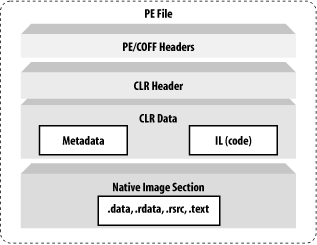
A standard Windows PE file is divided into a number of sections, starting off with an MS-DOS header, followed by a PE header, followed by an optional header, and finally followed by a number of native image sections, including the .text, .data, .rdata, and .rsrc sections. These are the standard sections of a typical Windows executable, but Microsoft's C/C++ compiler allows you to add your own custom sections into the PE file using a compiler #pragma directive. For example, you can create your own data section to hold encrypted data that only you can read.
To support the CLR, Microsoft has extended the PE/COFF file format to include metadata and IL code. The CLR uses metadata to determine how to load classes and uses the IL code to turn it into native code for execution. As shown in Figure 2-2, the extensions that Microsoft has added to the normal PE format include the CLR header and CLR data. The CLR header mainly stores relative virtual addresses (RVA) to locations that hold pertinent information to help the CLR manage program execution. The CLR data portion contains metadata and IL code, both of which determine how the program will be executed. Compilers that target the CLR must emit both the CLR header and data information into the generated PE file, otherwise the resulting PE file will not run under the CLR.
Figure 2-2. The format of a .NET PE file
If you want to prove to yourself that a .NET executable contains this information, use the dumpbin.exe utility, which dumps the content of a Windows executable in readable text.[1]
[1] Note that you can dump the same information, in a more readable format, using the ildasm.exe utility, to be discussed later in this chapter.
For example, running the following command on the command prompt:
dumpbin.exe hello.exe /all
generates the following data (for brevity, we have shown only the main elements that we want to illustrate):
Microsoft (R) COFF/PE Dumper Version 7.10.2292
Copyright (C) Microsoft Corporation.  All rights reserved.

Dump of file hello.exe

PE signature found

File Type: EXECUTABLE IMAGE

FILE HEADER VALUES      /* 128-BYTE MS-DOS/COFF HEADER */
    14C machine (x86)
     . . .

OPTIONAL HEADER VALUES  /* FOLLOWED BY PE AND OPTIONAL HEADERS */
       10B magic # (PE32)
        . . .

SECTION HEADER #1       /* CODE SECTION */
   .text name

    . . .
Looking at this text dump of a .NET PE file, you can see that a PE file starts off with the MS-DOS/COFF header, which all Windows programs must include. Following this header, you will find the PE header that supports Windows 32-bit programs. Immediately after the PE headers, you can find the code section for this program. The raw data (RAW DATA #1) of this section stores the CLR header, as follows:
RAW DATA #1
   . . .

  clr Header:           /* CLR HEADER */
         48 cb
       2.00 runtime version
       207C [     214] RVA [size] of MetaData Directory
          1 flags
    6000001 entry point token
          0 [       0] RVA [size] of Resources Directory
          0 [       0] RVA [size] of StrongNameSignature Directory
          0 [       0] RVA [size] of CodeManagerTable Directory
          0 [       0] RVA [size] of VTableFixups Directory
          0 [       0] RVA [size] of ExportAddressTableJumps Directory

  Section contains the following imports:
    mscoree.dll
         . . .
        0 _CorExeMain
 . . .
As mentioned earlier, the CLR header holds a number of pertinent details required by the runtime, including:
- Runtime version
-
Indicates the runtime version that is required to run this program
- MetaData directory
-
Is important because it indicates the location of the metadata needed by the CLR at runtime
- Entry point token
-
Is even more important because, for a single file assembly, this is the token that signifies the entry point, such as Main( ), that the CLR executes
Below the CLR Header, note that there is an imported function called _CorExeMain, which is implemented by mscoree.dll, the core execution engine of the CLR.[2] At the time of this writing, Windows 98, 2000, and Me have an OS loader that knows how to load standard PE files. To prevent massive changes to these operating systems and still allow .NET applications to run on them, Microsoft has updated the OS loaders for all these platforms. The updated loaders know how to check for the CLR header, and, if this header exists, it executes _CorExeMain, thus not only jumpstarting the CLR but also surrendering to it. You can then guess that the CLR will call Main( ), since it can find the entry point token within the CLR header.[3]
[2] We invite you to run dumpbin.exe and view the exports of mscoree.dll at your convenience. You will also find _CorDllMain, _CorExeMain, _CorImageUnloading, and other interesting exports. It's interesting to note that this DLL is an in-process COM server, attesting that .NET is created using COM techniques.
[3] For brevity, we've covered only the important content of this header. If you want to learn the meanings of the rest, see this chapter's example code, which you can download from http://www.oreilly.com/catalog/dotnetfrmess3/.
Now that we've looked at the contents of the CLR header, let's examine the contents of the CLR data, including metadata and code, which are arguably the most important elements in .NET.


