4.4 Message Queuing
In addition to providing support for COM+ Services, .NET also supports message queuing. If you've used Microsoft Message Queuing (MSMQ) services before, you'll note that the basic programming model is the same but the classes in the System.Messaging namespace make it extremely easy to develop message-queuing applications. The System.Messaging namespace provides support for basic functionality, such as connecting to a queue, opening a queue, sending messages to a queue, receiving messages from a queue, and peeking for messages on the queue. To demonstrate how easy it is to use the classes in System.Messaging, let's build two simple applications: one to enqueue messages onto a private queue on the local computer and another to dequeue these messages from the same queue.[13]
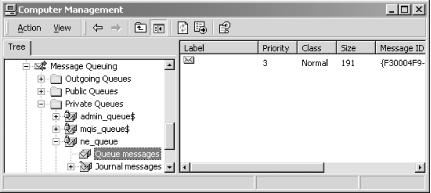
[13] To execute these programs, you must have MessageQueuing installed on your system. You can verify this by launching the ComputerManagement console, as shown in Figure 4-9.
4.4.1 Enqueue
Here's a simple program that enqueues a Customer object onto a private queue on the local computer. Notice first that we need to include the System.Messaging namespace because it contains the classes that we want to use:
using System;
using System.Messaging;
While the following Customer structure is very simple, it can be as complex as you want because it will be serialized into an XML-formatted buffer by default before it's placed into the queue:
public struct Customer
{
  public string Last;
  public string First;
}
Our program first checks whether a private queue on the local computer exists. If this queue is missing, the program will create it. Next, we instantiate a MessageQueue class, passing in the target queue name. Once we have this MessageQueue object, we invoke its Send( ) method, passing in the Customer object, as shown in the following code. This will put our customer object into our private queue:
public class Enqueue
{
  public static void Main(  )
  {
    try
    {
      string path = ".\\PRIVATE$\\NFE_queue";
      if(!MessageQueue.Exists(path))
      {
        // Create our private queue.
        MessageQueue.Create(path);
      }

      // Initialize the queue.
      MessageQueue q = new MessageQueue(path);

      // Create our object.
      Customer c = new Customer(  );
      c.Last = "Osborn";
      c.First = "John";

      // Send it to the queue.
      q.Send(c);
    }
    catch(Exception e)
    {
      Console.WriteLine(e.ToString(  ));
    }
  }
}
Use the following command to build this program:
csc /t:exe /out:enqueue.exe enqueue.cs
Execute this program, examine the Computer Management console, and you will see your message in the private queue called nfe_queue, as shown in Figure 4-9.
Figure 4-9. Our private queue, ne_queue, with a message
4.4.2 Dequeue
Now that there's a message in our private message queue, let's write a program to dequeue and examine the message. After ensuring that the private queue we want exists, we initialize it by instantiating a MessageQueue class, passing in the path to our private queue. Next, we tell the MessageQueue object that the type of object we want to dequeue is Customer. To actually dequeue the object, we need to invoke the Receive( ) method, passing in a timeout in terms of a TimeSpan object, whose parameters stand for hours, minutes, and seconds, respectively. Finally, we cast the body of the received Message object into a Customer object and output its contents:
using System;
using System.Messaging;
using System.Runtime.Serialization;

public struct Customer
{
  public string Last;
  public string First;
}

public class Dequeue
{
  public static void Main(  )
  {
    try
    {
      string strQueuePath = ".\\PRIVATE$\\NFE_queue";

      // Ensure that the queue exists.
      if (!MessageQueue.Exists(strQueuePath))
      {
        throw new Exception(strQueuePath + " doesn't exist!");
      }

      // Initialize the queue.
      MessageQueue q = new MessageQueue(strQueuePath);

      // Specify the types we want to get back.
      string[] types = {"Customer, dequeue"};
      ((XmlMessageFormatter)q.Formatter).TargetTypeNames = types;

      // Receive the message (5-second timeout).
      Message m = q.Receive(new TimeSpan(0,0,5));

      // Convert the body into the type we want.
      Customer c = (Customer) m.Body;

      Console.WriteLine("Customer: {0}, {1}", c.Last, c.First);
    }
    catch(Exception e)
    {
      Console.WriteLine(e.ToString(  ));
    }
  }
}
Compile and execute this program, look at the Computer Management console, press F5 to refresh the screen, and you will realize that the previous message is no longer there.


