5.5 XML in the .NET Framework
XML has rapidly gained popularity. Enterprise applications are using XML as the main data format for data exchanges.
ADO.NET breaks away from the COM-based recordset and employs XML as its transport data format. Because XML is platform independent, ADO.NET extends the reach to include anyone who is able to encode/decode XML. This is a big advantage over ADO because a COM-based recordset is not platform independent.
5.5.1 XML Parsers
Even though XML is text-based and readable by humans, you still should have some way of programmatically reading, inspecting, and changing XML. This is the job of XML parsers. There are two kinds of XML parsers: tree-based and stream-based. Depending on your needs, these two types of parsers should complement each other and serve you well.
Tree-based XML parsers read the XML file (or stream) in its entirety to construct a tree of XML nodes. Think of these XML nodes as your XML tag:
<car>
  <vin>VI00000383148374</vin>
  <make>Acura</make>
  <model>Integra</model>
  <year>1995</year>
</car>
When parsed into a tree, this information would have one root node: car; under car, there are four nodes: vin, make, model, and year. As you might have suspected, if the XML stream is very large in nature, then a tree-based XML parser might not be a good idea. The tree would be too large and consume a lot of memory.
A Stream-based XML parser reads the XML stream as it goes. SAX (Simple API for XML) is a specification for this kind of parsing. The parser raises events as it reads the data, notifying the application of the tag or text the parser just read. It does not attempt to create the complete tree of all XML nodes as does the tree-based parser. Therefore, memory consumption is minimal. This kind of XML parser is ideal for going through large XML files to look for small pieces of data. The .NET framework introduces another stream-based XML parser: the XmlReader. While SAX pushes events at the application as it reads the data, the XmlReader allows the application to pull data from the stream.
Microsoft implements both types of parsers in its XML parser. Because XML is so powerful, Microsoft, among other industry leaders, incorporates XML usage in almost all the things they do. That includes, but is not limited to, the following areas:
XML+HTTP in SOAP
XML+SQL in SQL2000
XML in BizTalk
XML+DataSet in ADO.NET
XML in web services and Web Services Discovery (DISCO) (see Chapter 6)
In this chapter, we will discuss XML+Dataset in ADO.NET, and XML in web services will be examined in the next chapter. Because XML is used everywhere in the .NET architecture, we also provide a high-level survey of the XML classes.
5.5.2 XML Classes
To understand the tree-based Microsoft XML parser, which supports the Document Object Model (DOM Level 2 Core standard), there are only a handful of objects you should know:
XmlNode and its derivatives
XmlNodeList, as collection XmlNode
XmlNamedNodeMap, as a collection of XmlAttribute
We will walk through a simple XML example to see how XML nodes are mapped into these objects in the XML DOM.
5.5.2.1 XmlNode and its derivatives
XmlNode is a base class that represents a single node in the XML document. In the object model, almost everything derives from XmlNode (directly or indirectly). This includes: XmlAttribute, XmlDocument, XmlElement, and XmlText, among other XML node types.
The following XML excerpt demonstrates mapping of XML tags to the node types in the DOM tree:
<books>
 <book category="How To">
  <title>How to drive in DC metropolitan</title>
  <author>Jack Daniel</author>
  <price>19.95</price>
 </book>
 <book category="Fiction">
  <title>Bring down the fence</title>
  <author>Jack Smith</author>
  <price>9.95</price>
 </book>
</books>
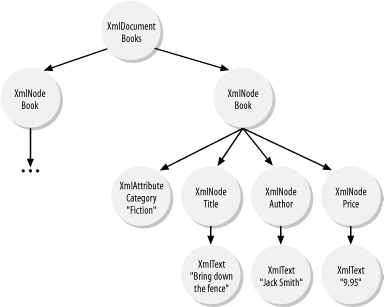
After parsing this XML stream, you end up with the tree depicted in Figure 5-6. It contains one root node, which is just a derivative of XmlNode. This root node is of type XmlDocument. Under this books root node, you have two children, also derivatives of XmlNode. This time, they are of type XmlElement. Under each book element node, there are four children. The first child is category. This category node is of type XmlAttribute, a derivative of XmlNode. The next three children are of type XmlElement: title, author, and price. Each of these elements has one child of type XmlText.
Figure 5-6. Tree representation of an XML document
As a base class, XmlNode supports a number of methods that aid in the constructing of the XML document tree. These methods include AppendChild( ), PrependChild( ), InsertBefore( ), InsertAfter( ), and Clone( ).
XmlNode also supports a group of properties that aid in navigation within the XML document tree. These properties include FirstChild, NextSibling, PreviousSibling, LastChild, ChildNodes, and ParentNode. You can use the ChildNodes property to navigate down from the root of the tree. For traversing backward, use the ParentNode property from any node on the tree.
5.5.2.2 XmlNodeList
Just as an XmlNode represents a single XML element, XmlNodeList represents a collection of zero or more XmlNodes. The ChildNodes property of the XmlNode is of type XmlNodeList. Looking at the root node books, we see that its ChildNodes property would be a collection of two XmlNodes. XmlNodeList supports enumeration, so we can iterate over the collection to get to each of the XmlNode objects. We can also index into the collection through a zero-based index.
Each of the book XmlElement objects would have a ChildNodes collection that iterates over title, author, and price XmlElements.
5.5.2.3 XmlNamedNodeMap
Similar to XmlNodeList, XmlNamedNodeMap is also a collection object. XmlNamedNodeMap is a collection of XmlAttribute objects that enable both enumeration and indexing of attributes by name. Each XmlNode has a property named Attributes. In the case of the book elements, these collections contain only one attribute, which is category.
5.5.2.4 XmlDocument
In addition to all methods and properties supported by XmlNode, this derivative of XmlNode adds or restricts methods and properties. Here, we inspect only XmlDocument as an example of a derivative of XmlNode.
XmlDocument extends XmlNode and adds a number of helper functions. These helper functions are used to create other types of XmlNodes, such as XmlAttribute, XmlComment, XmlElement, and XmlText. In addition to allowing for the creation of other XML node types, XmlDocument also provides the mechanism to load and save XML contents.
The following code demonstrates how an XmlDocument is programmatically generated with DOM:
using System;
using System.Xml;

public class XmlDemo {

  public static void Main(  ) {

    // Code that demonstrates how to create XmlDocument programmatically
    XmlDocument xmlDom = new XmlDocument(  );
    xmlDom.AppendChild(xmlDom.CreateElement("", "books", ""));
    XmlElement xmlRoot = xmlDom.DocumentElement;
    XmlElement xmlBook;
    XmlElement xmlTitle, xmlAuthor, xmlPrice;
    XmlText xmlText;

    xmlBook= xmlDom.CreateElement("", "book", "");
    xmlBook.SetAttribute("category", "", "How To");

    xmlTitle = xmlDom.CreateElement("", "title", "");
    xmlText = xmlDom.CreateTextNode("How to drive in DC metropolitan");
    xmlTitle.AppendChild(xmlText);
    xmlBook.AppendChild(xmlTitle);

    xmlAuthor = xmlDom.CreateElement("", "author", "");
    xmlText = xmlDom.CreateTextNode("Jack Daniel");
    xmlAuthor.AppendChild(xmlText);
    xmlBook.AppendChild(xmlAuthor);

    xmlPrice = xmlDom.CreateElement("", "price", "");
    xmlText = xmlDom.CreateTextNode("19.95");
    xmlPrice.AppendChild(xmlText);
    xmlBook.AppendChild(xmlPrice);

    xmlRoot.AppendChild(xmlBook);

    xmlBook= xmlDom.CreateElement("", "book", "");
    xmlBook.SetAttribute("category", "", "Fiction");

    xmlTitle = xmlDom.CreateElement("", "title", "");
    xmlText = xmlDom.CreateTextNode("Bring down the fence");
    xmlTitle.AppendChild(xmlText);
    xmlBook.AppendChild(xmlTitle);

    xmlAuthor = xmlDom.CreateElement("", "author", "");
    xmlText = xmlDom.CreateTextNode("Jack Smith");
    xmlAuthor.AppendChild(xmlText);
    xmlBook.AppendChild(xmlAuthor);

    xmlPrice = xmlDom.CreateElement("", "price", "");
    xmlText = xmlDom.CreateTextNode("9.95");
    xmlPrice.AppendChild(xmlText);
    xmlBook.AppendChild(xmlPrice);

    xmlRoot.AppendChild(xmlBook);

    Console.WriteLine(xmlDom.InnerXml);

  }

}
The XmlDocument also supports LoadXml and Load methods, which build the whole XML tree from the input parameter. LoadXml takes a string in XML format, whereas Load can take a stream, a filename or a URL, a TextReader, or an XmlReader. The following example continues where the previous one left off. The XML tree is saved to a file named books.xml. Then this file is loaded back into a different XML tree. This new tree outputs the same XML stream as the previous one:
 . . .
xmlDom.Save("books.xml");
XmlDocument xmlDom2 = new XmlDocument(  );
xmlDom2.Load("books.xml");
Console.WriteLine(xmlDom2.InnerXml);
5.5.2.5 XmlReader
The XmlReader object is a fast, noncached, forward-only way of accessing streamed XML data. There are two derivatives of XmlReader: XmlTextReader and XmlNodeReader. Both of these readers read XML one tag at a time. The only difference between the two is the input to each reader. As the name implies, XmlTextReader reads a stream of pure XML text. XmlNodeReader reads a stream of nodes from an XmlDocument. The stream can start at the beginning of the XML file for the whole XmlDocument or only at a specific node of the XmlDocument for partial reading.
Consider the following XML excerpt for order processing. If this file is large, it is not reasonable to load it into an XmlDocument and perform parsing on it. Instead, we should read only nodes or attributes we are interesting in and ignore the rest. We can use XmlReader derived classes to do so:
<Orders>
<Order id="ABC001"  . . . >
<Item code="101" qty="3" price="299.00"  . . . >17in Monitor</Item>
<Item code="102" qty="1" price="15.99"  . . . >Keyboard</Item>
<Item code="103" qty="2" price="395.95"  . . . >CPU</Item>
</Order>
<Order id="ABC002"  . . . >
<Item code="101b" qty="1" price="499.00"  . . . >21in Monitor</Item>
<Item code="102" qty="1" price="15.99"  . . . >Keyboard</Item>
</Order>
< . . . >
</Orders>
The following block of code traverses and processes each order from the large Orders.xml input file:
using System;
using System.IO;
using System.Xml;

class TestXMLReader
{

static void Main(string[] args)
{
    TestXMLReader tstObj = new TestXMLReader(  );
    StreamReader myStream = new StreamReader("Orders.xml");
    XmlTextReader xmlTxtRdr = new XmlTextReader(myStream);
    while(xmlTxtRdr.Read(  ))
    {
        if(xmlTxtRdr.NodeType == XmlNodeType.Element
           && xmlTxtRdr.Name == "Order")
        {
            tstObj.ProcessOrder(xmlTxtRdr);
        }
    }
}

public void ProcessOrder(XmlTextReader reader)
{
    Console.WriteLine("Start processing order: " +
                      reader.GetAttribute("id"));
    while(!(reader.NodeType == XmlNodeType.EndElement
          && reader.Name == "Order")
          && reader.Read(  ))
    {
        // Process Content of Order
        if(reader.NodeType == XmlNodeType.Element
           && reader.Name == "Item")
        {
            Console.WriteLine("itemcode:" + reader.GetAttribute("code") +
                              ". Qty: " + reader.GetAttribute("qty"));
        }
    }
}

}
Let's take a closer look at what is going on. Once we have established the XmlTextReader object with the stream of data from the string, all we have to do is loop through and perform a Read( ) operation until there is nothing else to read. While we are reading, we start to process the order only when we come across a node of type XmlElement and a node named Order. Inside the ProcessOrder function, we read and process all items inside an order until we encounter the end tag of Order. In this case, we return from the function and go back to looking for the next Order tag to process the next order.
XmlNodeReader is similar to XmlTextReader because they both allow processing of XML sequentially. However, XmlNodeReader reads XML nodes from a complete or fragment of an XML tree. This means XmlNodeReader is not helpful when processing large XML files.
5.5.2.6 XmlWriter
The XmlWriter object is a fast, noncached way of writing streamed XML data. It also supports namespaces. The only derivative of XmlWriter is XmlTextWriter.
XmlWriter supports namespaces by providing a number of overloaded functions that take a namespace to associate with the element. If this namespace is already defined and there is an existing prefix, XmlWriter automatically writes the element name with the defined prefix. Almost all element-writing methods are overloaded to support namespaces.
The following code shows how to use an XmlTextWriter object to write a valid XML file:
XmlTextWriter writer =
  new XmlTextWriter("test.xml", new System.Text.ASCIIEncoding(  ));
writer.Formatting = Formatting.Indented;
writer.Indentation = 4;
writer.WriteStartDocument(  );
writer.WriteComment("Comment");
writer.WriteStartElement("ElementName", "myns");
writer.WriteStartAttribute("prefix", "attrName", "myns");
writer.WriteEndAttribute(  );
writer.WriteElementString("ElementName", "myns", "value");
writer.WriteEndElement(  );
writer.WriteEndDocument(  );
writer.Flush(  );
writer.Close(  );
This produces the following XML document in test.xml:
<?xml version="1.0" encoding="us-ascii"?>
<!--Comment-->
<ElementName prefix:attrName="" xmlns:prefix="myns" xmlns="myns">
    <prefix:ElementName>value</prefix:ElementName>
</ElementName>
5.5.2.7 XslTransform
XslTransform converts XML from one format to another. It is typically used in data-conversion programs or to convert XML to HTML for the purpose of presenting XML data in a browser. The following code demonstrates how such a conversion takes place:
using System;
using System.Xml;           // XmlTextWriter
using System.Xml.Xsl;       // XslTransform
using System.Xml.XPath;     // XPathDocument
using System.IO;            // StreamReader

public class XSLDemo {
  public static void Main(  ) {
    XslTransform xslt = new XslTransform(  );
    xslt.Load("XSLTemplate.xsl");
    XPathDocument xDoc = new XPathDocument("Books.xml");
    XmlTextWriter writer = new XmlTextWriter("Books.html", null);
    xslt.Transform(xDoc, null, writer, new XmlUrlResolver(  ));
    writer.Close(  );
    StreamReader stream = new StreamReader("Books.html");
    Console.Write(stream.ReadToEnd(  ));
  }
}
The code basically transforms the XML in the Books.xml file, which we've seen earlier, into HTML to be displayed in a browser. Even though you can replace the XPathDocument with XmlDocument in the previous code, XPathDocument is the preferred class in this case because it is optimized for XSLT processing.[9]
[9] XPathDocument loads data faster than XmlDocument because it does not maintain node identity and it does not perform rule checking. One catch to this advantage is that the content is read-only.
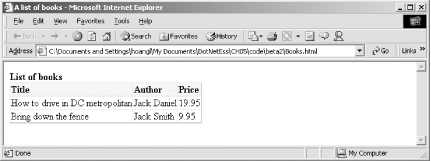
Figure 5-7 and Figure 5-8 show the source XML and the output HTML when viewed in a browser.
Figure 5-7. Books.xml shown in IE
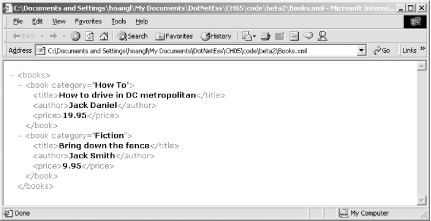
Figure 5-8. Books.html shown in IE
The template XSL file that was used to transform the XML is:
<xsl:stylesheet version="1.0"
  xmlns:xsl="http://www.w3.org/1999/XSL/Transform">
<xsl:template match = "/" >

<html>
<head><title>A list of books</title></head>
<style>
.hdr { background-color=#ffeedd; font-weight=bold; }
</style>
<body>
<B>List of books</B>
<table style="border-collapse:collapse" border="1">
<tr>
  <td class="hdr">Title</td>
  <td class="hdr">Author</td>
  <td class="hdr">Price</td>
</tr>
<xsl:for-each select="//books/book">
<tr>
  <td><xsl:value-of select="title"/></td>
  <td><xsl:value-of select="author"/></td>
  <td><xsl:value-of select="price"/></td>
</tr>
</xsl:for-each>
</table>
</body>
</html>

</xsl:template>
</xsl:stylesheet>
5.5.2.8 XmlDataDocument
One of the most important points in ADO.NET is the tight integration of DataSet with XML. DataSet can easily be streamed into XML and vice versa, making it easy to exchange data with any other components in the enterprise system. The schema of the DataSet can be loaded and saved as XML Schema Definition (XSD), as described earlier.
XmlDataDocument can be associated with DataSet. The following code excerpt illustrates how such an association takes place:
using System;
using System.Data;
using System.Data.OleDb;
using System.Xml;

class TestXMLDataDocument
{

static void Main(string[] args)
{
    TestXMLDataDocument tstObj = new TestXMLDataDocument(  );

    // Construct the XmlDataDocument with the DataSet.
    XmlDataDocument doc = tstObj.GenerateXmlDataDocument(  );

    XmlNodeReader myXMLReader = new XmlNodeReader(doc);
    while (myXMLReader.Read(  ))
    {
        if(myXMLReader.NodeType == XmlNodeType.Element
            && myXMLReader.Name == "Orders")
        {
            tstObj.ProcessOrder(myXMLReader);
        }
    }
}

public void ProcessOrder(XmlNodeReader reader)
{
    Console.Write("Start processing order: ");
    while(!(reader.NodeType == XmlNodeType.EndElement
        && reader.Name == "Orders")
        && reader.Read(  ))
    {
        if(reader.NodeType == XmlNodeType.Element
            && reader.Name == "OrderID")
        {
            reader.Read(  );
            Console.WriteLine(reader.Value);
        }
        if(reader.NodeType == XmlNodeType.Element
            && reader.Name == "OrderDetails")
        {
            ProcessLine(reader);
        }
    }
}

public void ProcessLine(XmlNodeReader reader)
{
    while(!(reader.NodeType == XmlNodeType.EndElement
        && reader.Name == "OrderDetails")
        && reader.Read(  ))
    {
        if(reader.NodeType == XmlNodeType.Element && reader.Name == "ProductID")
        {
            reader.Read(  );
            Console.Write(".  ItemCode: " + reader.Value);
        }
        if(reader.NodeType == XmlNodeType.Element && reader.Name == "Quantity")
        {
            reader.Read(  );
            Console.WriteLine(".  Quantity: " + reader.Value);
        }
    }
}
public XmlDataDocument GenerateXmlDataDocument(  )
{
    /* Create the DataSet object. */
    DataSet ds = new DataSet("DBDataSet");
    String sConn =
        "provider=SQLOLEDB;server=(local);database=NorthWind;Integrated Security=SSPI";

    /* Create the DataSet adapters. */
    OleDbDataAdapter dsAdapter1 =
        new OleDbDataAdapter("select * from Orders", sConn);

    OleDbDataAdapter dsAdapter2 =
        new OleDbDataAdapter("select * from [Order Details]", sConn);

    /* Fill the data set with three tables. */
    dsAdapter1.Fill(ds, "Orders");
    dsAdapter2.Fill(ds, "OrderDetails");

    DataColumn[] keys = new DataColumn[1];
    keys[0] = ds.Tables["Orders"].Columns["OrderID"];
    ds.Tables["Orders"].PrimaryKey = keys;


    // Add the two relations between the three tables. */
    ds.Relations.Add("Orders_OrderDetails",
        ds.Tables["Orders"].Columns["OrderID"],
        ds.Tables["OrderDetails"].Columns["OrderID"]);

    ds.Relations["Orders_OrderDetails"].Nested = true;
    //ds.WriteXml("NorthWindOrders.xml");

    return new XmlDataDocument(ds);

}

}
The previous section describing DataSet has already shown you that once we have a DataSet, we can persist the data inside the DataSet into an XML string or file. This time, we demonstrated how to convert the DataSet into an XmlDataDocument that we can manipulate in memory.


