5.4 .NET Framework Data Providers
.NET Framework Data Provider (a.k.a. Managed Provider) is a term used for a group of .NET components that implement a fixed set of functionality put forth by the ADO.NET architecture. This enforces a common interface for accessing data. In order to build our own data provider, we must provide our own implementation of System.Data.Common.DbDataAdapter objects and implement interfaces such as IDbCommand, IDbConnection, and IDataReader. We are not building our own data provider here;[5] however, we do dive into each of these classes and interfaces in this section.
[5] There is a reference implementation of a .NET Framework Data Provider included in the .NET Framework documentation for any other type of data. In the near future, we are sure that the list of .NET Framework Data Providers will grow to cover even more different data sources.
Most of the time, developers don't have to know how to implement data providers, even though this might increase their productivity with regard to ADO.NET. Understanding how to use the stock data providers alone is sufficient to develop your enterprise application. Microsoft provides the following data providers in its current release of ADO.NET: OLE DB and SQL (Version 1 of .NET Framework) and ODBC, Oracle, SQL CE. The OLE DB data provider comes with OleDbConnection, OleDbCommand, OleDbParameter, and OleDbDataReader. The SQL Server data provider comes with a similar set of objects, whose names start with SqlClient instead of OleDb, and so on, as illustrated in Figure 5-3. The implementation of this core function set for data providers is packaged in the System.Data namespace. The assemblies are: System.Data.{Odbc, OleDb, OracleClient SqlClient, SqlServerCe}.
Figure 5-3. Data provider framework class hierarchy
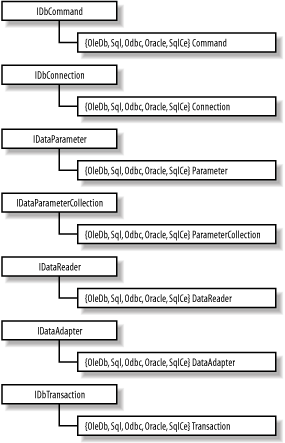
All of the included data providers implement a set of interfaces that access the appropriate data store. The OLE DB provider relies on OLE DB as an access layer to a broad variety of data sources, including Microsoft SQL Server. For performance reasons, the SQL data provider uses a proprietary protocol to communicate directly with SQL Server. In Version 1.1 of the .NET framework, ODBC, Oracle, and SQL CE data providers are added to provide better performance for these data store. Regardless of how the data is obtained, the resulting dataset remains the same. This clean separation of data providers and the XML-based dataset helps ADO.NET achieve portable data.
Figure 5-3 shows the base classes and the all implementations of data provider. Because all data providers, adhere to a fixed, common set of interfaces (IDbCommand, IDbConnection, IDataParameterCollection, IDataReader, and IDataAdapter), you can easily adapt your application to switch data providers as the need arises.
5.4.1 Connection
All Connection classes implement System.Data.IDbConnection and, thus, inherit properties such as the connection string and the state of the connection. They implement the core set of methods specified by IDbConnection, including Open and Close.
Unlike the ADO Connection object, transaction support for the ADO.NET connection object has been moved to a Transaction object (such as OleDbTransaction and SqlTransaction). The reason for this is that we cannot assume that all data providers implement transaction the same way, so it's better for the Connection object not to have transaction-related functionalities. To create a new transaction, execute the BeginTransaction( ) method of the Connection object. This returns an IDbTransaction implementation that supports transaction-oriented functionality such as Commit and Rollback. The SqlTransaction is currently the only provider that also supports saving checkpoints so that we can rollback to a specific checkpoint instead of rolling back the whole transaction. Again, if you examine the list of methods that any Connection class (such as OleDbConnection and SqlConnection) supports, you will find that the functionality is very much the same as the old ADO Connection object's. However, none of the Connection classes allows SQL statements or provider-specific text statements to be executed directly any more. In other words, Execute( ) is no longer supported by the Connection object. This is a better way for distributing functionality between classes. All execution is done through the Command object, which is discussed in the next section along with how to initiate a connection.
5.4.2 The Command and Data Reader Objects
Fortunately for ADO developers, ADO.NET's Command objects behave like ADO's Command object; however, the Command objects are the only way we can make execution requests to insert, update, and delete data in ADO.NET. This makes it easier to learn the object model. Developers are not faced with as many ways of doing the same things, as in the case (with ADO) of whether to execute the query through a Connection, Command, or even a Recordset object.
5.4.2.1 Command execution
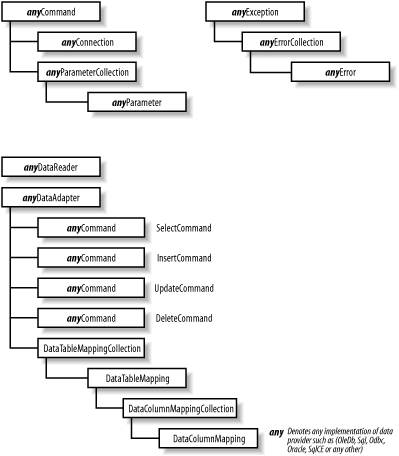
All commands are associated with a connection object through the Command's Connection property. Think of the connection object as the pipeline between the data-reading component and the database back end. In order to execute a command, the active connection has to be opened. The command object also accepts parameters to execute a stored procedure at the back end. The top left of Figure 5-5 shows the relationships between command, connection, and parameters objects.
There are two types of execution. The first type is a query command, which returns an IDataReader implementation. It is implemented by the ExecuteReader( ) method. The second type of command typically performs an update, insert, or deletion of rows in a database table. This type of execution is implemented by the ExecuteNonQuery( ) method.
One of the main differences between ADO.NET's Command objects and ADO's Command object is the return data. In ADO, the result of executing a query command is a recordset, which contains the return data in tabular form.[6] In ADO.NET, however, recordsets are no longer supported. The result of executing a query command is now a data reader object (see the following section). This data reader object can be an OleDbDataReader for OLE DB, SqlDataReader for SQL Server (as of v.1 of .NET Framework), or any class implementing the IDataReader for custom reading needs. Once you've obtained a valid data reader object, you can perform a Read operation on it to get to your data.
[6] Disconnected record set.
Employing the command, connection, and data reader objects is a low-level, direct way to work with the data provider. As you will find out a little later, the data adapter encapsulates all this low-level plumbing as a more direct way to get the data from the data source to your disconnected dataset.
5.4.2.2 The data reader object
The data reader is a brand new concept to ADO developers, but it is straightforward. A data reader is similar to a stream object in object-oriented programming (OOP). If you need to access records in a forward-only, sequential order, use a data reader because it is very efficient. Since this is a server-side cursor, the connection to the server is open throughout the reading of data. Because of this continually open connection, we recommend that you exercise this option with care and not have the data reader linger around longer than it should. Otherwise, it might affect the scalability of your application.
The following code demonstrates basic use of OleDbConnection, OleDbCommand, and OleDbDataReader. Though we're using the OLE DB data provider here, the connection string is identical to the one we used earlier for ADO:[7]
[7] In addition, you can create a Command object from the current connection by using this instead: oCmd = oConn.CreateCommand( );.
using System;
using System.Data;
using System.Data.OleDb;

public class pubsdemo {

  public static void Main(  ) {

    /* An OLE DB connection string. */
    String sConn =
      "provider=sqloledb;server=(local);database=pubs; Integrated Security=SSPI";

    /* An SQL statement. */
    String sSQL = "select au_fname, au_lname, phone from authors";

    /* Create and open a new connection. */
    OleDbConnection oConn = new OleDbConnection(sConn);
    oConn.Open(  );

    /* Create a new command and execute the SQL statement. */
    OleDbCommand oCmd = new OleDbCommand(sSQL, oConn);
    OleDbDataReader oReader = oCmd.ExecuteReader(  );

    /* Find the index of the columns we're interested in. */
    int idxFirstName = oReader.GetOrdinal("au_fname");
    int idxLastName = oReader.GetOrdinal("au_lname");
    int idxPhone = oReader.GetOrdinal("phone");

    /* Retrieve and display each column using their column index. */
    while(oReader.Read(  )) {
      Console.WriteLine("{0} {1} {2}",
                        oReader.GetValue(idxFirstName),
                        oReader.GetValue(idxLastName),
                        oReader.GetValue(idxPhone));
    }

  }
}
The code opens a connection to the local SQL Server (using integrated security)[8] and issues a query for first name, last name, and phone number from the authors table in the pubs database.
[8] Please be aware that database connection pooling relies on the uniqueness of the connection strings. When using the integrated security model of SQL Server, if you make the data access code run under the security context of each of the logged-in users, database connection pooling will suffer. You must create a small set of Windows accounts to overcome this problem; we don't discuss security in great depth in this book, due to its compact size.
If you don't have the pubs database installed on your system, you can load and run instpubs.sql in Query Analyzer (instpubs.sql can be found under the MSSQL\Install directory on your machine). For those that install the VS.NET Quickstart examples, change the server parameter of the connection string to server=(local)\\NetSDK because the Quickstart examples installation lays down the NetSDK SQL Server instance that also include the infamous Pubs database. The following example uses SqlClient to get the same information. This time, instead of obtaining the indices for the columns and getting the values based on the indices, this example indexes the column directly using the column names:
using System;
using System.Data;
using System.Data.SqlClient;

public class pubsdemo {

  public static void Main(  ) {

    /* A SQL Server connection string. */
    String sConn = "server=(local);database=pubs;Integrated Security=SSPI";

    /* An SQL statement. */
    String sSQL = "select au_fname, au_lname, phone from authors";

    /* Create and open a new connection. */
    SqlConnection oConn = new SqlConnection(sConn);
    oConn.Open(  );

    /* Create a new command and execute the SQL statement. */
    SqlCommand oCmd = new SqlCommand(sSQL, oConn);
    SqlDataReader oReader = oCmd.ExecuteReader(  );

    /* Retrieve and display each column using the column names. */
    while(oReader.Read(  )) {
      Console.WriteLine("{0} {1} {2}",
                        oReader["au_fname"],
                        oReader["au_lname"],
                        oReader["phone"]);
    }

  }
}
We leave the example code utilizing other data providers to the readers as an exercise.
5.4.3 The DataAdapter Object
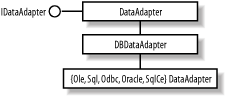
Along with the introduction of data reader, ADO.NET also brings the DataAdapter object, which acts as the bridge between the data source and the disconnected DataSet. It contains a connection and a number of commands for retrieving the data from the data store into one DataTable in the DataSet and updating the data in the data store with the changes currently cached in the DataSet. Although each DataAdapter maps only one DataTable in the DataSet, you can have multiple adapters to fill the DataSet object with multiple DataTables. The class hierarchy of DataAdapter is shown in Figure 5-4. All Data Adapters are derived from DbDataAdapter, which in turn is derived from the DataAdapter abstract class. This DataAdapter abstract class implements the IDataAdapter interface, which specifies that it supports Fill and Update. IDataAdapter is specified in the System.Data namespace, as is the DataSet itself.
Figure 5-4. DataSetCommand class hierarchy
The data adapter can fill a DataSet with rows and update the data source when you make changes to the dataset. For example, you can use OleDbAdapter to move data from an OLE DB provider into a DataSet using the OleDbDataAdapter.Fill( ) method. Then you can modify the DataSet and commit the changes you made to the underlying database using the OleDbDataAdapter.Update( ) method. These adapters act as the middleman bridging the data between the database back end and the disconnected DataSet.
For data retrieval, a data adapter uses the SQL SELECT command (exposed as the SelectCommand property). This SELECT command is used in the implementation of the IDataAdapter interface's Fill method. For updating data, a data adapter uses the SQL UPDATE, INSERT, and DELETE commands (exposed as the UpdateCommand, InsertCommand, and DeleteCommand properties).
Along with the Fill and Update methods from DbDataAdapter class, All data adapters also inherit the TableMappings property, a collection of TableMapping objects that enable the mapping of actual database column names to user-friendly column names. This further isolates the DataSet from the source where the actual data comes from. Even table names and column names can be mapped to more readable names, making it easier to use the DataSet. The application developer can be more productive at what he does best, which is to implement business logic and not to decipher cryptic database column names. Figure 5-5 shows the relationship between data provider components.
Figure 5-5. Data adapter and supporting classes
Out of the four commands in the IDbDataAdapter object, only the SELECT command is required. The rest of the commands are optional since they can be generated automatically by the system. However, the auto-generation of these commands only works when certain conditions are met. For example, if your data adapter fills the data set from some database view that includes more than one table, you will have to explicitly define all four commands. Another example is when your adapter does not return key fields from the table, the system won't be able to generate the insert, update, or delete command. A typical usage of the data adapter involves the following steps:
Create a data-adapter object.
Set up the query string for the internal SelectCommand object.
Set up the connection string for the SelectCommand's Connection object.
Set up the InsertCommand, UpdateCommand, or DeleteCommand query strings and connections (Recommended).
Call Fill( ) to fill the given dataset with the results from the query string.
Make changes and call the adapter's Update( ) method with the changed DataSet (Optional).
The following block of code demonstrates these steps:
static DataSet GenerateDS(  ) {

  /* Create the DataSet object. */
  DataSet ds = new DataSet("DBDataSet");
  String sConn =
      "provider=SQLOLEDB;server=(local);database=pubs; Integrated Security=SSPI ";

  /* Create the DataSet adapters. */
  OleDbDataAdapter dsAdapter1 =
      new OleDbDataAdapter("select * from authors", sConn);

  OleDbDataAdapter dsAdapter2 =
      new OleDbDataAdapter("select * from titles", sConn);

  OleDbDataAdapter dsAdapter3 =
      new OleDbDataAdapter("select * from titleauthor", sConn);

  /* Fill the data set with three tables. */
  dsAdapter1.Fill(ds, "authors");
  dsAdapter2.Fill(ds, "titles");
  dsAdapter3.Fill(ds, "titleauthor");

  // Add the two relations between the three tables. */
  ds.Relations.Add("authors2titleauthor",
                   ds.Tables["authors"].Columns["au_id"],
                   ds.Tables["titleauthor"].Columns["au_id"]);

  ds.Relations.Add("titles2titleauthor",
                   ds.Tables["titles"].Columns["title_id"],
                   ds.Tables["titleauthor"].Columns["title_id"]);

  // Return the DataSet.
  return ds;

}
This is a demonstration of constructing a dataset with three tables from the sample pubs database. The DataSet also contains two relationships that tie the three tables together. Let's take a look at the dataset in XML by trying out the next couple lines of code:
DataSet ds = GenerateDS(  );
ds.WriteXml("DBDataSet.xml", XmlWriteMode.WriteSchema);
The content of DBDataSet.xml (with some omission for brevity) is shown next:
<?xml version="1.0" standalone="yes"?>
<DBDataSet>
  <xsd:schema id="DBDataSet" targetNamespace="" xmlns=""
              xmlns:xsd="http://www.w3.org/2001/XMLSchema"
              xmlns:msdata="urn:schemas-microsoft-com:xml-msdata">
    <xsd:element name="DBDataSet" msdata:IsDataSet="true">
      <xsd:complexType>
        <xsd:choice maxOccurs="unbounded">

          <xsd:element name="authors">
            <xsd:complexType>
              <xsd:sequence>
                <!-- columns simplified for brevity -->
                <xsd:element name="au_id" type="xsd:string" />
                <xsd:element name="au_lname" type="xsd:string" />
                <xsd:element name="au_fname" type="xsd:string" />
                <xsd:element name="phone" type="xsd:string" />
                <xsd:element name="address" type="xsd:string" />
                <xsd:element name="city" type="xsd:string" />
                <xsd:element name="state" type="xsd:string" />
                <xsd:element name="zip" type="xsd:string" />
                <xsd:element name="contract" type="xsd:boolean" />
              </xsd:sequence>
            </xsd:complexType>
          </xsd:element>

          <!-- titles and titleauthor omitted for brevity -->

        </xsd:choice>
      </xsd:complexType>

      <xsd:unique name="Constraint1">
        <xsd:selector xpath=".//authors" />
        <xsd:field xpath="au_id" />
      </xsd:unique>

      <xsd:unique name="titles_Constraint1"
                  msdata:ConstraintName="Constraint1">
        <xsd:selector xpath=".//titles" />
        <xsd:field xpath="title_id" />
      </xsd:unique>

      <xsd:keyref name="titles2titleauthor"
                  refer="titles_Constraint1">
        <xsd:selector xpath=".//titleauthor" />
        <xsd:field xpath="title_id" />
      </xsd:keyref>

      <xsd:keyref name="authors2titleauthor"
                  refer="Constraint1">
        <xsd:selector xpath=".//titleauthor" />
        <xsd:field xpath="au_id" />
      </xsd:keyref>

    </xsd:element>
  </xsd:schema>

  <!-- Most rows removed for brevity -->

  <authors>
    <au_id>899-46-2035</au_id>
    <au_lname>Ringer</au_lname>
    <au_fname>Anne</au_fname>
    <phone>801 826-0752</phone>
    <address>67 Seventh Av.</address>
    <city>Salt Lake City</city>
    <state>UT</state>
    <zip>84152</zip>
    <contract>true</contract>
  </authors>

  <titles>
    <title_id>PS2091</title_id>
    <title>Is Anger the Enemy?</title>
    <type>psychology  </type>
    <pub_id>0736</pub_id>
    <price>10.95</price>
    <advance>2275</advance>
    <royalty>12</royalty>
    <ytd_sales>2045</ytd_sales>
    <notes>Carefully researched study of the effects of strong
    emotions on the body. Metabolic charts included.</notes>
    <pubdate>1991-06-15T00:00:00.0000</pubdate>
  </titles>
    <title_id>MC3021</title_id>
    <title>The Gourmet Microwave</title>
    <type>mod_cook</type>
    <pub_id>0877</pub_id>
    <price>2.99</price>
    <advance>15000</advance>
    <royalty>24</royalty>
    <ytd_sales>22246</ytd_sales>
    <notes>Traditional French gourmet recipes adapted for modern
    microwave cooking.</notes>
    <pubdate>1991-06-18T00:00:00.0000</pubdate>
  </titles>

  <titleauthor>
    <au_id>899-46-2035</au_id>
    <title_id>MC3021</title_id>
    <au_ord>2</au_ord>
    <royaltyper>25</royaltyper>
  </titleauthor>
  <titleauthor>
    <au_id>899-46-2035</au_id>
    <title_id>PS2091</title_id>
    <au_ord>2</au_ord>
    <royaltyper>50</royaltyper>
  </titleauthor>

</DBDataSet>
The tables are represented as <xsd:element name="table name"> . . . </xsd:element> tag pairs that contain column definitions. In addition to one xsd:element for each table, we have one xsd:unique for each key and one xsd:keyref for each relationship. The xsd:unique specifies the key of the parent table in a relationship. The tag xsd:keyref is used for child tables in a relationship. This xsd:keyref serves as the foreign key and refers to the key in the parent table.
For brevity, we've stripped down the data portion of the XML to contain just one author, Anne Ringer, and two books she authored.
We can have many different DataAdapters populating the DataSet. Each of these DataAdapters can be going against a completely different data source or data server. In other words, you can construct a DataSet object filled with data that is distributed across multiple servers. In the previous example, we have three different DataAdapters; however, all of them are going to the same server.


