7.5 ASP.NET Application Development
In conventional ASP programming, developers typically access the Request object to get the parameters needed to render the page and render the content of the page through either the Response object or code-rendering blocks. We also use other ASP objects such as the Application, Session, and Server objects to manage application variables, session variables, server settings, and so on.
As mentioned earlier, ASP.NET is intended to change all this spaghetti madness by introducing a much cleaner approach to server-side scripting framework: Web Forms, or programmable pages, and server controls.
In the following sections, we cover the components of a Web Form, its life cycles, the server controls that the Web Form contains, event-handling for these server controls, as well as how to create your own server controls.
7.5.1 Web Form Components
Similar to VB Forms, a Web Form consists of two components: the form with its controls, and the code behind it that handles events associated with the form's controls. A Web Form has the file extension .aspx and contains HTML elements, as well as server controls. The code behind the form is usually located in a separate class file. Note that while it is possible to have both the form and the code in one file, it is better to have separate files. This separation of user interface and application code helps improve the spaghetti-code symptom that most ASP-based applications are plagued with.
ASP.NET provides the Page class in the System.Web.UI namespace. This class encapsulates all common properties and methods associated with web pages. The code behind the class derives from this Page class to provide extensions specific to the page we're implementing. The aspx file provides the form layout and control declarations. Figure 7-4 illustrates the relationship between the Page base class, the Web Form code behind the class, and the Web Form user interface (UI).
Figure 7-4. Web Form components
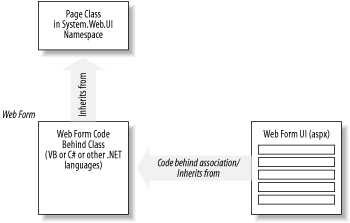
As a Web Form developer, you will have to provide the latter two. The Web Form UI is where you declare server controls with appropriate IDs. The code behind the class is where you programmatically access server controls declared in the Web Form UI, as well as handle events from these controls. The following simple example shows the aspx page, the code behind source file, and how they work together. The aspx file (TestEvent.aspx) contains only HTML tags and a directive that links to the code behind:
<%@ Page language="c#" codebehind="TestEvents.cs" inherits="CTestEvents"%>
<html>
  <head><title>Testing Page Events with codebehind</title></head>
  <body>
    <form runat=server>
      Init Time: <asp:Label id=labelInit runat=server/><br/>
      Load Time: <asp:Label id=labelLoad runat=server/><br/>
      <input type=submit />
    </form>
  </body>
</html>
The code-behind, TestEvents.cs, contains the class CTestEvents to which the aspx page is referring:
using System;

public class CTestEvents : System.Web.UI.Page {
  protected System.Web.UI.WebControls.Label labelInit;
  protected System.Web.UI.WebControls.Label labelLoad;

  public CTestEvents(  ) {
    labelInit = new System.Web.UI.WebControls.Label(  );
    labelLoad = new System.Web.UI.WebControls.Label(  );
  }

  public void Page_Init(Object oSender, EventArgs oEvent) {
    labelInit.Text = DateTime.Now.ToString(  );
  }

  public void Page_Load(Object oSender, EventArgs oEvent) {
    labelLoad.Text = DateTime.Now.ToString(  );
    if(IsPostBack) {
      labelLoad.Text += "(PostBack)";
    }
  }
}
You must compile TestEvents.cs and place the DLL in the /bin directory under your web application's virtual directory before trying to access the aspx page.[4]
[4] The Web Application directory is the root virtual directory where your web application resides. To set up the virtual directory, use the IIS Administration Tool.
The command to compile this C# file is:
csc /t:library TestEvents.cs
ASP.NET parses the Web Form files to generate a tree of programmable objects, where the root is the Page-derived object representing the current Web Form. This is similar to how the IE browser parses the HTML file and generates a tree of scriptable objects to be used in DHTML; however, the tree of objects for the Web Form files resides on the server side.
As you are already aware from our survey of the System.Web.UI namespace, the Page class actually derives from the Control class. In a sense, a Web Form is a hierarchy of Control-derived objects. These objects establish the parent-child relationship through the Parent and Controls properties.
Besides the Controls and Parent properties, the Page class also provides other useful properties, which are familiar to ASP developerssuch as the Request, Response, Application, Session, and Server properties.
Because the Web Form is nothing but a programmable page object, using this object-oriented model is much more intuitive and cleaner than the conventional ASP development. As opposed to the linear execution of server-side scripts on an ASP page, ASP.NET enables an event-based object-oriented programming model.
Let's take an example of a web page that contains a form with numerous fields. One or more of these fields display list information from a database. Naturally, we have code in the ASP page to populate these fields so that when a user requests this ASP page, the generated page would have the content ready. As soon as the last line of data is written to the browser, the ASP page is done. This means that if there were errors when the user submits the form, we will have to repopulate all the database-driven form fields, as well as programmatically reselect values that the user chose prior to submitting the form. In ASP.NET, we don't have to repopulate the database-driven fields if we know that the page has already been populated. Furthermore, selected values stay selected with no manual handling. The next couple of sections describe the concept in more detail.
7.5.1.1 Web Form events
The Page class exposes events such as Init, Load, PreRender, and Unload. Your job as a developer is to handle these events and perform the appropriate task for each of these stages. This is much better than the linear execution model in ASP programming because you don't have to worry about the location of your initialization scripts.
The first event that happens in the life of a Web Form is the Init event. This is raised so that we can have initialization code for the page. Please note that because the controls on the page are not yet created at this point, this initialization should only contain code that does not rely on any controls. This event is raised once for each user of the page.
Most developers are more familiar with the Load event that follows the Init event. Subsequently, it is raised each time the page is requested. When this event is raised, all child controls of the Web Form are loaded and accessible. You should be able to retrieve data and populate the controls so that they can render themselves on the page when sent back to the client.
The following example shows the how the Init and Load events can be handled in ASP.NET. In this example, we show both the HTML and its code together in one file to make it simpler:
<html>
  <head><title>Testing Page Events</title></head>
  <body>

    <script language="C#" runat="server">
      void Page_Init(Object oSender, EventArgs oEvent) {
        labelInit.Text = DateTime.Now.ToString(  );
      }

      void Page_Load(Object oSender, EventArgs oEvent) {
        labelLoad.Text = DateTime.Now.ToString(  );
        if(IsPostBack) {
          labelLoad.Text += "(PostBack)";
        }
      }
    </script>

    <form runat="server">
      Init Time: <asp:Label id="labelInit" runat="server"/><br />
      Load Time: <asp:Label id="labelLoad" runat="server"/><br />
      <input type="submit" />
    </form>
  </body>
</html>
The first time you access this page, the Init event happens, followed by the Load event. Because these events happen quickly, both the Init Time and Load Time will probably show the same time. When you click on the submit button to cause the page to reload, you can see that the Init Time stays what it was, but the Load Time changes each time the page is reloaded.
The PreRender event happens just before the page is rendered and sent back to the client. We don't often handle this event; however, it depends on the situation. You might want to alter the state of some of the "server-side" objects before rendering the page content.
The last event in the life of a Web Form is the Unload event. This happens when the page is unloaded from memory. Final cleanup should be done here. For example, while unloading you should free the unmanaged resources that you've allocated at the Init event.
Beside these page-level events, controls on the page can raise events such as ServerClick and ServerChange for HtmlControls, as well as Click, Command, CheckedChanged, SelectedIndexChanged, and TextChanged events for WebControls. It is the handling of these events that makes ASP.NET truly dynamic and interactive.
7.5.2 The Life Cycle of a Web Form
In ASP, the web page starts its life when a client requests a particular page. IIS parses and runs the scripts on the ASP page to render HTML content. As soon as the page rendering is complete, the page's life ceases. If you have forms that pass data back to the ASP page to be processed, the ASP page runs as a new request, not knowing anything about its previous states. Passing data back to the original page for processing is also referred to as postback.
In ASP.NET, things are a little different. The page still starts at the client's request; however, it appears to stay around for as long as the client is still interacting with the page. For simplicity's sake, we say that the page stays around, but in fact, only the view states of the page persist between requests to the page. These view states allow the controls on the server to appear as if they are still present to handle server events. We can detect this postback state of the page via the IsPostBack property of the Page object and forego certain costly reinitialization. The handling of events during these postbacks is what makes ASP.NET so much different than conventional ASP development.
In the following example, we extend the previous example to handle the postback. When the Load event is handled for the first time, we populate the drop-down list box with data. Subsequently, we indicate only the time the event is raised without reloading the data. This example also demonstrates the server event handler handleButtonClick that was bound to the ServerClick event of the button:
<html>
  <head><title>Testing Page Events</title></head>
  <body>

    <script language="C#" runat="server">
      void Page_Init(Object oSender, EventArgs oEvent) {
        labelInit.Text = DateTime.Now.ToString(  );
      }

      void Page_Load(Object oSender, EventArgs oEvent) {
        labelLoad.Text = DateTime.Now.ToString(  );
        if(!IsPostBack) {
          selectCtrl.Items.Add("Acura");
          selectCtrl.Items.Add("BMW");
          selectCtrl.Items.Add("Cadillac");
          selectCtrl.Items.Add("Mercedes");
          selectCtrl.Items.Add("Porche");
        } else {
          labelLoad.Text += " (Postback)";
        }
      }

      void handleButtonClick(Object oSender, EventArgs oEvent) {
        labelOutput.Text = "You've selected: " + selectCtrl.Value;
        labelEvent.Text = DateTime.Now.ToString(  );
      }
    </script>

    <form runat="server">
      Init Time: <asp:Label id="labelInit" runat="server"/><br/>
      Load Time: <asp:Label id="labelLoad" runat="server"/><br/>
      Event Time: <asp:Label id="labelEvent" runat="server"/><br/>
      Choice: <select id="selectCtrl" runat="server"></select><br/>
      <asp:Label id="labelOutput" runat="server"/><br/>
      <input type=button value="update"
             OnServerClick="handleButtonClick" runat="server" />
    </form>

  </body>
</html>
The life cycle of a Web Form consists of three main stages: Configuration, Event Handling, and Termination. As mentioned earlier, these stages span across many requests to the same page, as opposed to the serving-one-page-at-a-time policy found in ASP.
Init and Load events map to the configuration stage (i.e., when the page is first requested and each time the page is reloaded via postbacks). Events such as Button.Click and ListControl.SelectedIndexChanged map to the Event Handling stage, where user interactions with the page are handled via postbacks. The Termination stage involves the Dispose method and the Unload event. The postbacks allow the ASP.NET web page to appear like a continuous thread of execution while spanning multiple, full round-trips. In the old ASP world, each round-trip is a brand new request to the page unless the developer has built in a custom and elaborated framework similar to that of ASP.NET.
7.5.2.1 Configuration
In the Configuration stage, the page's Load event is raised. It is your job to handle this event to set up your page. Because the Load event is raised when all the controls are already up and ready, your job is now to read and update control properties as part of setting up the page. In the previous code example, we handled the Load event to populate the drop-down list with some data. We also updated the labelLoad control's Text to display the time the Load event happens. In your application, you will probably load the data from a database and initialize form fields with default values.
The page's IsPostBack property indicates whether this is the first time the page is loaded or if it is a postback. For example, if you have a control that contains a list of information, you will only want to load this control the first time the page is loaded by checking the IsPostBack property of the page. When IsPostBack is true, you know that the list control object is already loaded with information. There is no need to repopulate the list. In the previous code example, we skipped over the population of the drop-down and just displayed a string "(Postback)".
You might need to perform data binding and re-evaluate data-binding expressions on the first and subsequent round trips to this page.
7.5.2.2 Event handling
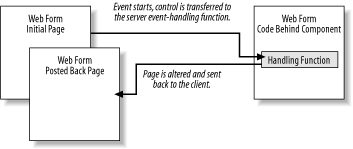
In this middle stage, the page's server event-handling functions are being called as the result of some events being triggered from the client side. These events are from the controls you've placed on the Web Form. Figure 7-5 depicts the life cycle of an event.
Figure 7-5. The Web Form event life cycle
7.5.2.3 Termination
At this stage, the page has finished rendering and is ready to be discarded. You are responsible for cleaning up file handles, releasing database connections, and freeing objects. Although you can rely on the CLR to perform garbage collection of managed resources for you, we strongly advise you to clean up after yourself because garbage collection only happens periodically. On heavily loaded systems, if the garbage-collection cycle is not optimal, the unfreed resources can still exhaust memory and bring your system to a halt.[5]
[5] These so-called logical memory leaks equate to areas where large blocks of memory (managed or unmanaged) were allocated and used for a brief amount of time but won't be free automatically until it is out of scope. Because in ASP.NET the scope from the configuration phase to the termination phase is rather small, this problem does not appear to be that bad. For Windows Form applications or Windows Services, this problem, if undetected, could be catastrophic. The way to expedite the deallocation of objects is to set long-lived objects to null (or nothing in VB). If the object implements the IDisposable interface, call its Dispose method as soon as you can. The garbage collector won't pick up this kind of unintentional memory usage if you have references to objects that are unused, yet remain in scope throughout the life of the application.
We can perform the cleanup for the previous example with the Unload event handler shown as follows. Because there is nothing to clean up in this simple example, we just show you the function as a template:
 void Page_Unload(Object oSender, EventArgs oEvent) {
   // Cleaning up code here
 }
7.5.3 Server Controls
As we saw from the System.Web.UI.HtmlControls and System.Web.UI. WebControls namespaces, server controls are programmable controls that run on the server before the page is rendered by ASP.NET. They manage their own states between requests to the same page on the server by inserting a hidden field that stores the view state of the form. This eliminates the need to repopulate the value of form fields with the posted value before sending the page back the client.
Server controls are also browser-independent. Because they are run on the server side, they can rely on the Request.Browser property to get the client's capability and render appropriate HTML.
Since the server controls are just instantiations of .NET classes, programming the server controls yields easy-to-maintain code. Especially when you have custom server controls that encapsulate other controls, web application programming becomes nothing more than gluing these blocks together.
All HTML controls and web controls mentioned in System.Web.UI.HtmlControls and System.Web.UI.WebControls are server controls shipped with ASP.NET.
7.5.4 Custom Server Controls
As you become more familiar with the ASP.NET framework and the use of server controls on your Web Form, you will eventually need to know how to develop these server controls yourself. In ASP.NET, there are two ways of creating custom server controls: the pagelet approach, which is easy to do but rather limited in functionality, and the Control base class (or UserControl) derivative approach, which is more complicated but also more powerful and flexible.
7.5.4.1 Pagelets
Until recently, code reuse in ASP development has been in the form of server-side includes. If you have common UI blocks or scripts, you can factor them into an include file. Use the syntax <!-- #include file="url" --> to include the common file into the main page to return to the browser. This approach is fine, but it has serious limitations. The main thing is to make sure the HTML tag IDs and script variable names are unique. This is because IIS does nothing more than merge the include file when it parses server-side includes. The include file ends up being in the same scope with the container file. You cannot include the same file twice because there will be tag ID and script conflicts.
With ASP.NET, you can factor out common HTML and scripts into what is currently called a pagelet and reuse it without worrying about the ID conflicts. A pagelet is a Web Form without a body or a form tag, accompanied by scripts. The HTML portion of the pagelet is responsible for the layout and the user interface, while the scripts provide the pagelet with programmability by exposing properties and methods. Because the pagelet is considered a user control, it provides an independent scope. You can insert more than one instance of the user control without any problem.
The container Web Form must register the pagelet as a user control with the @Register directive and include it on the page with the <prefix:tagname> syntax. If more than one copy of the pagelet is used in a container page, each of them should be given different IDs for the container page's script to work correctly. The script on the container Web Form can access and manipulate the pagelet the same way it does any other server controls. The next example shows how an address form is reused as a pagelet. You might display this address form to allow the web user to register with your application or to display the shipping and billing addresses when the web user checks out:
<table>
  <tr>
    <td><asp:Label id="labelName" runat="server">Name</asp:Label></td>
    <td><asp:TextBox id="txtUserName" runat="server"
         Width="332" Height="24"></asp:TextBox></td>
    </tr>
  <tr>
    <td><asp:Label id="labelAddr1" runat="server">Address</asp:Label></td>
    <td><asp:TextBox id="txtAddr1" runat="server"
         Width="332" Height="24"></asp:TextBox></td>
    </tr>
  <tr>
    <td><asp:Label id="labelAddr2" runat="server"></asp:Label></td>
    <td><asp:TextBox id="txtAddr2" runat="server"
         Width="332" Height="24"></asp:TextBox></td>
    </tr>
  <tr>
    <td><asp:Label id="labelCity" runat="server">City</asp:Label></td>
    <td>
    <asp:TextBox id="txtCity" runat="server"></asp:TextBox>
    <asp:Label id="labelState" runat="server">State</asp:Label>
    <asp:TextBox id="txtState" runat="server" Width="34" Height="24">
      </asp:TextBox>
    <asp:Label id="labelZIP" runat="server">ZIP</asp:Label>
    <asp:TextBox id="txtZIP" runat="server" Width="60" Height="24">
      </asp:TextBox>
    </td>
    </tr>
  <tr>
    <td><asp:Label id="labelEmail" runat="server">Email</asp:Label></td>
    <td><asp:TextBox id="txtEmail" runat="server"
         Width="332" Height="24"></asp:TextBox></td>
    </tr>
</table>

<script language="C#" runat="server" ID="Script1">
  public String UserName {
    get { return txtUserName.Text; }
    set { txtUserName.Text = value; }
  }
  public String Address1 {
    get { return txtAddr1.Text; }
    set { txtAddr1.Text = value; }
  }
  public String Address2 {
    get { return txtAddr2.Text; }
    set { txtAddr2.Text = value; }
  }
  public String City {
    get { return txtCity.Text; }
    set { txtCity.Text = value; }
  }
  public String State {
    get { return txtState.Text; }
    set { txtState.Text = value; }
  }
  public String ZIP {
    get { return txtZIP.Text; }
    set { txtZIP.Text = value; }
  }
</script>
To use your pagelet, register it as a server control via the @Register directive, as shown in the next block of code. After registering, include the tag for the pagelet as if it was a normal server control. Specify the prefix, the tag name, the server control's ID, and set the runat property to server:
<%@ Register TagPrefix="Acme" TagName="Address" Src="Address.ascx" %>
<%@ Page language="c#"%>
<html>
<head>
  <script language="C#" runat="server">
    void Page_Load(Object oSender, EventArgs evt) {
      addr.UserName = "Jack Daniel";
    }
  </script>
</head>
<body>
    Welcome to the E-Shop.
    Registering with E-Shop will allow for monthly updates of bargains . . .
  <form method="post" runat="server">
    <p><Acme:Address id="addr" runat="server"></Acme:Address></p>
    <p><asp:Button id="cmdClear" runat="server" Text="Clear"></asp:Button>
       <asp:Button id="cmdSubmit" runat="server" Text="Submit">
       </asp:Button></p>
  </form>
</body>
</html>
You should be able to programmatically access the properties of the pagelet through the server control's ID (addr in this case). In the previous example, we accessed the UserName property of the Address pagelet via its ID:
addr.UserName = "Jack Daniel";
For an e-commerce checkout page, you could have two instances of <Acme:Address> on the same page: one for the billing and the other for the shipping address. Your script should access these instances of the pagelet via the ID you assign to each address control.
You can also programmatically instantiate instances of the pagelet through the use of the Page's LoadControl method. The first thing is to declare a variable of type Control in your script to host your pagelet. This is because the Control is the root of all objects, including your pagelet. Then instantiate the variable with a call to the LoadControl, passing in the filename of the control page. To make the control visible on the page, add the control to the Page's collection of controls. Because you currently have an instance of the Control object, you won't be able to call the pagelet's properties and methods until you cast the variable from Control type to your pagelet type. This is similar to having an Object variable in Visual Basic to hold a COM component. To access the COM-component methods and properties, you would cast the Object variable to the component type. Pagelets when loaded are automatically typed as pagename_extension. For example, if your pagelet were named myControl.ascx, the type generated for it would be myControl_ascx. The boldface line in the following example shows you how to cast addr1 from Control to type Address_ascx in order to access the UserName property of the pagelet:
<%@ Register TagPrefix="Acme" TagName="Address" Src="Address.ascx" %>
<%@ Page language="C#" %>
<html>
<head>
  <script language="C#" runat="server">
    void Page_Load(Object oSender, EventArgs evt) {
      addr.UserName = "Jack Daniel";
      Control addr1;
      addr1 = LoadControl("Address.ascx");
      ((Address_ascx)addr1).UserName = addr.UserName;
      this.frm.Controls.AddAt(3, addr1);
    }
  </script>
</head>
<body>
  <form id="frm" method="post" runat="server">
    Billing Address:<br/>
    <Acme:Address id="addr" runat="server"></Acme:Address>
    Shipping Address:<br/>
    <p><asp:Button id="cmdClear" runat="server" Text="Clear">
       </asp:Button>
       <asp:Button id="cmdSubmit" runat="server" Text="Submit">
       </asp:Button>
    </p>
  </form>
</body>
</html>
This example, the checkout page, shows you how to declare a pagelet statically in your page with the <Acme:Address> tag, as well as how to dynamically create an instance of the custom control Address with the Page's LoadControl( ) method. Once you've created the control dynamically, you must cast the object to the control type before manipulating it.
The AddAt( ) method is used to insert the Address pagelet at a particular location in the checkout page. Instead of declaring the dynamic pagelet as a Control, you can also declare it as its type, which is Address_ascx. This way, you have to cast it only once when loading the dynamic control:
Address_ascx addr2 = (Address_ascx)LoadControl("Address.ascx");
addr2.UserName = "ABC";
7.5.4.2 Control derivatives
Although it is easy to create custom controls using the pagelet approach, this technique is not flexible enough to create more powerful custom controls, such as ones that expose events or hierarchy of controls. With ASP.NET, you can also create custom controls by inheriting from the Control base class and overriding a couple of methods.
The following example shows you how to create the simplest custom control as a Control derivative:
namespace MyWebControls
{
  using System;
  using System.Web.UI;
  using System.Web.UI.WebControls;
  using System.ComponentModel;

  public class MyWebControl : System.Web.UI.WebControls.WebControl
  {
    //protected override void Render(HtmlTextWriter output)
    //{
    //    output.Write("custom control testing via Render(  )");
    //}

    protected override void CreateChildControls(  )
    {
      Table tbl = new Table(  );
      TableRow row = new TableRow(  );
      TableCell cell = new TableCell(  );
      HyperLink a = new HyperLink(  );
      a.NavigateUrl = "http://msdn.microsoft.com";
      a.ImageUrl = "image url";
      cell.Controls.Add (a);
      row.Cells.Add(cell);
      tbl.Rows.Add(row);

      row = new TableRow(  );
      cell = new TableCell(  );
      cell.Controls.Add (new LiteralControl("custom control testing"));
      row.Cells.Add(cell);
      tbl.Rows.Add(row);

      tbl.BorderWidth = 1;
      tbl.BorderStyle = BorderStyle.Ridge;

      Controls.Add(tbl);
    }
  }
}
As you can see, the MyWebControl object derives from the WebControl class. We have seen that WebControl ultimately derives from the base Control class. All we really do here is override either the Render or the CreateChildControls methods to construct the custom web control. If you choose to override the Render method, you will have to generate the HTML for your custom control through the HtmlTextWriter object, output. You can use methods such as Write, WriteBeginTag, WriteAttribute, and WriteEndTag.
In our example, we override the CreateChildControls method. Instead of worrying about the actual HTML tag and attribute names, we then create ASP.NET objects directly by their class names, such as Table, TableRow, TableCell, HyperLink, and LiteralControl, to construct a hierarchy of objects under a table. We can also manipulate attributes for the objects via their properties. At the end of the method, we add the table to the custom control's collection of controls.
You will have to compile the previous control code to generate a DLL assembly (i.e., csc /t:library MyWebControls.cs). To use the control, deploy the assembly by copying it to the /bin directory of your web application. Then you should be able to register the control with the @Register directive and use it as if it was a server control provided by ASP.NET. If you are using Visual Studio .NET, you can add a reference to the control assembly file or the control project for the test web project that uses the control.
Your custom-control test page should now look like the following:
<%@ Page language="c#"%>
<%@ Register TagPrefix="WC" Namespace="MyWebControls"
             Assembly="MyWebControls"%>
<html>
<head>
  <script language="C#" runat=server>
    void Page_Load(object sender, EventArgs e) {
      MyWebControls.MyWebControl myCtrl;
      myCtrl = new MyWebControls.MyWebControl(  );
      this.Controls.Add(myCtrl);
    }
  </script>
</head>
<body>
  <form method="post" runat="server">
    This is the main page
    <WC:MyWebControl id="myControl1" runat="server" />
  </form>
</body>
</html>
As you can see, we register the custom control with the @Register directive and alias the namespace MyWebControls with the WC prefix. In the body of the Web Form, we can add the custom-control tag as <WC:MyWebControl>.
In addition to inserting the custom control onto the page declaratively, as shown earlier, we can also programmatically create the custom control at runtime. The Page_Load code demonstrates this point:
 MyWebControls.MyWebControl myCtrl;
 myCtrl = new MyWebControls.MyWebControl(  );
 this.Controls.Add(myCtrl);
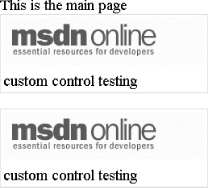
The output page is shown in Figure 7-6.
Figure 7-6. Custom control test output, statically and dynamically
7.5.5 Event-Driven Programming
There are two ways to associate event handlersfunctions that handle the eventto the UI controls.
Refer to Section 7.4 earlier in this chapter, particularly where we describe the syntax for server controls. All we do to bind an event from a control to an event handler is use the eventname=eventhandlername attribute/value pair for the control. For example, if we want to handle the onclick event for the HTML control input, all we do is the following. Note that for the HTML controls, the server-side click event is named onserverclick, as opposed to the client-side click event, onclick, which can still be used in DHTML scripting:
<input id="cmd1" runat="server"
  onserverclick="OnClickHandler"
  type="button" value="click me">
For an ASP.NET web control, the syntax is the same:
<asp:Button id="cmd2" runat="server"
  onclick="OnclickHandler2"
  Text="click me too"></asp:Button>
After binding the event to the event-handling function name, we have to provide the actual event handler:
void OnClickHandler(object sender, EventArgs e)
{
  // Code to retrieve and process the posted data
}
The second way of binding events is delegation. You don't have to have any notion of code in the aspx file, not even the event-handling function name. All you have to do is register the event handler with the control's event-handler property. For web controls, the event-handler property for button click is Click. For HTML controls, it's ServerClick:
ControlID.Click += new System.EventHandler (this.EventHandlerName);

ControlID.ServerClick += new System.EventHandler (this.EventHandlerName);
7.5.6 Custom Server Controls and Client Script
Although ASP allows for the generating of dynamic pages from the server, the HTML generated usually needs the help of client-side scripting to provide a richer user experience. Again, in ASP.NET, the Server Controls are not meant to just generate static HTML. Client-side scripts can still be incorporated to further enhance the user interaction. There are two general way of doing this. The first is to include the client-side scripts within the body of the ASPX page, or somewhere the custom control can get to. The second way is to make the custom control emit its related client-side script while rendering. Either way, the client-side events will need to be tied to the script either through declarative means (i.e., attributeEvent=eventHandler) or programmatically through adding attributes to the rendering control dynamically. This is also where we can use the ClientId property of the Control object to allow client-side script to refer to the control on the client side.
We show two examples in this section to describe how you can do both. The pros and cons for each of these should be weighed technically as by other factors, such as time and usage of the control. For example, if you write the custom control for internal use in your company and the time-to-market is extremely short, you might opt to just include the client-side script manually because it might be easier to debug and change client or server-side code independently. On the other hand, if the custom control you are writing will be distributed widely, you might want to package it so that the control users do not have to worry about having to set up any external scripts. Enough said, let's see some examples. In this first example, we change the simple custom control shown earlier to include some invocation of client-side script and add the client script to the test page that uses the control:
namespace MyWebControls
{
   . . .

  public class MyWebControlWithClientScriptV1 :
  System.Web.UI.WebControls.WebControl
  {
    protected override void CreateChildControls(  )
    {
       . . .
      cell.Controls.Add (new LiteralControl("custom control testing"));
      cell.Attributes.Add("onmouseover", "MouseOverHandler(this);");
      cell.Attributes.Add("onmouseout", "MouseOutHandler(this);");
      row.Cells.Add(cell);
       . . .
    }
  }
}
The changes from the custom control are highlighted. Basically, we just add two attributes "onmouseover" and "onmouseout" to the cell that contains the text "custom control testing" to call two client-side functions: MouseOverHandler and MouseOutHandler, respectively. What we need to do now is add these two client-side script functions to the custom control test page:
<%@ Page language="c#" Trace="true"%>
<%@ Register TagPrefix="WC" Namespace="MyWebControls"
             Assembly="MyWebControlWithClientScriptV1"%>
<html>
<head>
  <script language="javascript">
    function MouseOverHandler(ctl) {
      ctl.style.color="red";
    }
    function MouseOutHandler(ctl) {
      ctl.style.color="black";
    }
  </script>
</head>
<body>
  <form id="myForm1" method="post" runat="server">
    <WC:MyWebControlWithClientScriptV1 id="myControl1" runat="server" />
  </form>
</body>
</html>
The two client-side script functions change the color of the text within the custom control when the mouse moves over and out of it.
As you can see, in order to use this version of the custom control, you have to know to include the client-side script functions to avoid errors. This is not ideal if you are writing custom control for a living. We move on to the second example where you don't have to do anything special to use the custom control.
Let's start with the test ASPX page:
<%@ Page language="c#" Trace="true"%>
<%@ Register TagPrefix="WC" Namespace="MyWebControls"
             Assembly="MyWebControlWithClientScriptV2"%>
<html>
<head>
</head>
<body>
  <form id="myForm1" method="post" runat="server">
    <WC:MyWebControlWithClientScriptV2 id="myControl1" runat="server" />
  </form>
</body>
</html>
Notice that there is no client-side script block and the class name for the control is V2.
Now on the control side, we add the following block of code in the overridden CreateChildControls method:
      if(!Page.IsClientScriptBlockRegistered("myScript")) {
        string sScript =
@"
<!-- ctrl generated -->
<script language=""javascript"">
    function MouseOverHandler(ctl) {
      ctl.style.color=""red"";
    }
    function MouseOutHandler(ctl) {
      ctl.style.color=""black"";
    }
</script>
<!-- ctrl generated -->
";
        Page.RegisterClientScriptBlock("myScript", sScript);
Here, we basically ask the Page (that hosts the control) to see if "myScript" has been registered. If not, we register the included script with the name "myScript". When the control is rendered to the browser, the script will be rendered only once for this version of the control.
This example is just to demonstrate how client-side scripts can be inserted into the stream rendering to the browser. In practice, you might only render the script header block that points to an external script file that you've installed on a specific location on the web server. This improves performance in the long run by having the client-side script file cached by the browser. In case you really don't want anybody to change the client-side script that you have installed on the web server, you can include the client-side script file in your assembly as a resource. You can then load and register the script block from the DLL file.
7.5.7 ASP.NET and Caching
When talking about caching in ASP.NET, there are two kind of caching you should know. "Output caching" involves caching the generated html for part or the whole ASPX page so that it can be resent to the client without regenerating the cache content. The second type of caching in ASP.NET is application specific "Application data caching". Here you write code to cache data generated via expensive operations so that you don't have to regenerate the data for every request. Output caching is done through a declarative mean and it's automatic while Application data caching is programmable and flexible but not automatic.
Let's look at the following simple ASPX file:
<%@ Page language="c#" %>
<html>
<body>
  <form id="frm1" runat="server">
    Page generated: <% DateTime t = DateTime.Now; Response.Write(t); %><br/>
  </form>
</body>
</html>
If you browse to this ASPX file, you will see the time the page was generated on the server. Every time you refresh your browser, the page is regenerated.
You can cache the content of this page by just adding the output cache directive:
<%@ OutputCache duration="30" varybyparam="none" %>
With this change, every time you refresh the browser within 30 seconds from the first request, the page does not get regenerated.
There are attributes associating with the OutputCache directive dealing with:
- Duration
-
How long the item stays in the cache (in seconds).
- Location
-
Where the cache is stored (for an ASPX file).
- Shared
-
Whether the cached item can be shared with multiple pages (for an ASCX file).
The rest of the attributes specify how to uniquely cache the item based on differences by control IDs, by HTTP header variables, by QueryString variables or Form variables, and by custom management (VaryByControl, VaryByCustom, VaryByHeader, VaryByParam).
The example shows that we cache the page with no distinction on param. Of course, you can set it up so that the system will cache multiple versions of the page based on params.
Now that we know how to cache pages or controls on a page, let's take a look at how application content caching has changed from ASP. In ASP, developers have used Application variables or even Session variables as the cache mechanism. This works fine, but there are a number of considerations the developers have to worry about around issues such as memory resource and freshness of data. ASP.NET introduces the Cache object that is associated with each instance of ASP.NET application. You can add items into this Cache collection with priority, duration (absolute duration or relative to latest access), file or key dependencies (so that when the file, directory, or dependent cache item changes, the cache item is cleared. In addition, you can also have call-back function so you will know when the cache item is removed from the cache.
<%@ Page language="c#" %>
<script runat="server" language="c#">
  void Page_Load(  ) {
    if(Cache["myItem"] == null) {
      Cache.Insert("myItem", // Cache name
               DateTime.Now, // Cache data
               null, // Cache dependency
               DateTime.Now.AddSeconds(30), // Absolute
               TimeSpan.Zero // Relative
                   );
    }
    myLabel.Text = Cache["myItem"].ToString(  );
  }
</script>
<html>
<body>
  <form id="frm1" runat="server">
    <asp:Label id="myLabel" runat="server"></asp:Label>
  </form>
</body>
</html>
The above code behaves similar to the output cache example we had earlier. The cache item, which is the current date time value is stored for 30 seconds. In the real world, you would probably cache something that would cost a little more than DateTime.Now, such as a DataSet that contains a number of rows or tables from a database.
For the second example, let's see how we can cause the cache to refresh the data using the dependency. We continue with the previous example and add the following code to Page_Load to load myDoc.xml into the cache and display this xml content in myLabel2. The cache dependency specifies that when myDoc.xml is changed, this cache item should be invalidated:
    if(Cache["myItem2"] == null) {
      System.Xml.XmlDocument oDoc = new System.Xml.XmlDocument(  );
      oDoc.Load(Server.MapPath("myDoc.xml"));
      Cache.Insert("myItem2",
               oDoc,
               new CacheDependency(Server.MapPath("myDoc.xml")));
      myLabel2.Text = "<br/>Refresh time: " + DateTime.Now.ToString(  );
    }
    myLabel2.Text += "<xmp>"
               + ((System.Xml.XmlDocument)Cache["myItem2"]).InnerXml
               + "</xmp>";
We also have to add another label object inside the form tag:
<br/>
<asp:Label id="myLabel2" runat="server"></asp:Label>
Now if you navigate to this test page for the first time, the first label will be the date time on the server and the second label will contain "Refresh time" and the xml in myDoc.xml. Refreshing the page won't reload the xml file until this file is modified.[6]
[6] This is merely an example to demonstrate the CacheDependency. Reading a file in a web application is dangerous, especially when there is no error handling code.


