5.3 Content Components
Content components encapsulate data. In previous ADO versions, the Recordset object represented such a component. The data contained by the recordset component is in the form of a table, consisting of columns and rows. In ADO.NET, the data encapsulated by the DataSet component is in the form of a relational database, consisting of tables and relationships. This is a major improvement in data-access technology. In this section, we provide a high-level survey of the core classes that make up the content components, including DataSet, DataTable, DataColumn, DataRow, DataView, and DataRelation.[3]
[3] The complete list of all classes can be found in the Microsoft .NET SDK.
5.3.1 DataSet
If you are familiar with ADO, you know that data is typically transferred between components in recordsets. The recordset contains data in a tabular form. Whether the recordset includes information from one or many tables in the database, the data is still returned in the form of rows and columns as if they were from a single table. ADO.NET allows for more than just a recordset to be shared between application components. This is one of the most important features of ADO.NET: we will be transferring a DataSet instead of a recordset.
The DataSet can be viewed as an in-memory view of the database. It can contain multiple DataTable and DataRelation objects.[4] With previous versions of ADO, the closest you could get to this functionality was to exchange data with a chain of Recordset objects. When the client application receives this chained recordset, it can get to each of the recordsets through NextRecordset( ); however, there is no way to describe the relationship between each of the recordsets in the chain. With ADO.NET, developers can navigate and manipulate the collection of tables and their relationships.
[4] Furthermore, the DataSet can be persisted into disconnected XML datafiles so that your application can continue to work offline. More information on this topic will be presented in later sections.
As mentioned earlier, ADO.NET involves disconnected datasets because it is geared toward a distributed architecture. Since a DataSet is disconnected, it must provide a way to track changes to itself. The DataSet object provides a number of methods so that all data manipulation done to the DataSet can be easily reconciled with the actual database (or other data source) at a later time. They include: HasChanges( ), HasErrors, GetChanges( ), AcceptChanges( ), and RejectChanges( ). You can employ these methods to check for changes that have happened to the DataSet, obtain the modifications in the form of a changed DataSet, inspect the changes for errors, and then accept or reject the changes. If you want to communicate the changes to the data store back end (which is usually the case), you would ask the DataSet for an update.
The DataSet is intended to benefit enterprise web applications, which are disconnected by nature. You don't know that the data at the back end has changed until you have updated records you were editing or performed any other tasks that required data reconciliation with the database.
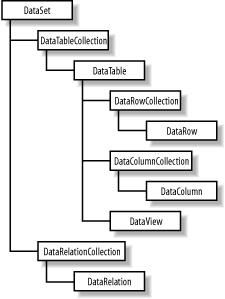
As depicted in Figure 5-2, a DataSet contains two important collections. The first is the Tables (of type DataTableCollection), which holds a collection for all the tables belonging to a given DataSet. The second collection contains all the relationships between the tables, and it is appropriately named the Relations (of type DataRelationCollection).
Figure 5-2. Important ADO.NET data objects, including DataSet
5.3.1.1 Creating a DataSet: An example in C#
All the tables and relations inside the DataSet are exposed through its Tables and Relations properties, respectively. Normally, you obtain tables from some data sources such as SQL Server or other databases; however, we would like to show the nuts and bolts of the DataSet here first. The following block of C# code demonstrates how to create a DataSet dynamically that consists of two tables, Orders and OrderDetails, and a relationship between the two tables:
using System;
using System.Data;

// Class and method declarations omitted for brevity . . .

// Construct the DataSet object.
DataSet m_ds = new DataSet("DynamicDS");

// Add a new table named "Order" to m_ds's collection tables.
m_ds.Tables.Add ("Order");

// Add new columns to table "Order".
m_ds.Tables["Order"].Columns.Add("OrderID",
                                  Type.GetType("System.Int32"));
m_ds.Tables["Order"].Columns.Add("CustomerFirstName",
                                  Type.GetType("System.String"));
m_ds.Tables["Order"].Columns.Add("CustomerLastName",
                                  Type.GetType("System.String"));
m_ds.Tables["Order"].Columns.Add("Date",
                                  Type.GetType("System.DateTime"));

// Register the column "OrderID" as the primary key of table "Order".
DataColumn[] keys = new DataColumn[1];
keys[0] = m_ds.Tables["Order"].Columns["OrderID"];
m_ds.Tables["Order"].PrimaryKey = keys;

// Add a new table named "OrderDetail" to m_ds's collection of tables.
m_ds.Tables.Add ("OrderDetail");

// Add new columns to table "OrderDetail".
m_ds.Tables["OrderDetail"].Columns.Add("fk_OrderID",
                                        Type.GetType("System.Int32"));
m_ds.Tables["OrderDetail"].Columns.Add("ProductCode",
                                        Type.GetType("System.String"));
m_ds.Tables["OrderDetail"].Columns.Add("Quantity",
                                        Type.GetType("System.Int32"));
m_ds.Tables["OrderDetail"].Columns.Add("Price",
                                        Type.GetType("System.Currency"));

// Get the DataColumn objects from two DataTable objects in a DataSet.
DataColumn parentCol = m_ds.Tables["Order"].Columns["OrderID"];
DataColumn childCol = m_ds.Tables["OrderDetail"].Columns["fk_OrderID"];

// Create and add the relation to the DataSet.
m_ds.Relations.Add(new DataRelation("Order_OrderDetail",
                                     parentCol,
                                     childCol));
m_ds.Relations["Order_OrderDetail"].Nested = true;
Let's highlight some important points in this block of code. After instantiating the DataSet object with the new operator, we add some tables with the Add method of the Tables object. We go through a similar process to add columns to each Table's Columns collection. Each of the added tables or columns can later be referenced by name. In order to assign the primary key for the Order table, we have to create the DataColumn array to hold one or more fields representing a key or a composite key. In this case, we have only a single key field, OrderID. We set the PrimaryKey property of the table to this array of key columns. For the relationship between the two tables, we first create the DataRelation called Order_OrderDetail with the two linking columns from the two tables, and then we add this DataRelation to the collection of relations of the DataSet. The last statement indicates that we want to represent the relationship between the Order and OrderDetail table as a nested structure. This makes dealing with these entities easier in XML.
The following block of C# code shows how to insert data into each of the two tables:
DataRow newRow;
newRow = m_ds.Tables["Order"].NewRow(  );
newRow["OrderID"] = 101;
newRow["CustomerFirstName"] = "John";
newRow["CustomerLastName"] = "Doe";
newRow["Date"] = new DateTime(2001, 5, 1);;
m_ds.Tables["Order"].Rows.Add(newRow);
newRow = m_ds.Tables["Order"].NewRow(  );
newRow["OrderID"] = 102;
newRow["CustomerFirstName"] = "Jane";
newRow["CustomerLastName"] = "Doe";
newRow["Date"] = new DateTime(2001, 4, 29);
m_ds.Tables["Order"].Rows.Add(newRow);

newRow = m_ds.Tables["OrderDetail"].NewRow(  );
newRow["fk_OrderID"] = 101;
newRow["ProductCode"] = "Item-100";
newRow["Quantity"] = 7;
newRow["Price"] = "59.95";
m_ds.Tables["OrderDetail"].Rows.Add(newRow);

newRow = m_ds.Tables["OrderDetail"].NewRow(  );
newRow["fk_OrderID"] = 101;
newRow["ProductCode"] = "Item-200";
newRow["Quantity"] = 1;
newRow["Price"] = "9.25";
m_ds.Tables["OrderDetail"].Rows.Add(newRow);

newRow = m_ds.Tables["OrderDetail"].NewRow(  );
newRow["fk_OrderID"] = 102;
newRow["ProductCode"] = "Item-200";
newRow["Quantity"] = 3;
newRow["Price"] = "9.25";
m_ds.Tables["OrderDetail"].Rows.Add(newRow);
Tables and Relations are important properties of DataSet. Not only do they describe the structure of the in-memory database, but the DataTables inside the collection also hold the content of the DataSet.
5.3.1.2 XML and tables sets
Now that you have a DataSet filled with tables and relationships, let's see how this DataSet helps in interoperability. XML is the answer. The DataSet has a number of methods that integrate DataSet tightly with XML, thus making it universally interoperable. These methods are WriteXml( ), WriteXmlSchema( ), ReadXml( ), and ReadXmlSchema( ).
WriteXmlSchema( ) dumps only the schema of the tables, including all tables and relationships between tables. WriteXml( ) can dump both the schema and table data as an XML encoded string. Both WriteXmlSchema( ) and WriteXml( ) accept a Stream, TextWriter, XmlWriter, or String representing a filename. WriteXml( ) accepts an XmlWriteMode as the second argument so you can optionally write the schema in addition to the data.
By default, WriteXml( ) writes only the data. To also write the schema, you will have to pass XmlWriteMode.WriteSchema as the second parameter to the call. You can also retrieve only the data portion of the XML by using the XmlWriteMode.IgnoreSchema property explicitly. Another mode that you can set is XmlWriteMode.DiffGram. In this DiffGram mode, the DataSet will be dumped out as both the original data and changed data. More on this topic when we get to the GetChanges( ) method of the DataSet.
The DataSet object also provides methods to reconstruct itself from an XML document. Use ReadXmlData( ) for reading XML data documents, and ReadXmlSchema( ) for reading XML schema documents.
The following code creates an XML document from the previously created dataset:
// Dump the previously shown DataSet to
// the console (and to an XML file).
m_ds.WriteXml(Console.Out, XmlWriteMode.WriteSchema);
m_ds.WriteXml("DS_Orders.xml", XmlWriteMode.WriteSchema);

// Constructing a new DataSet object
DataSet ds2 = new DataSet("RestoredDS");
ds2.ReadXml("DS_Orders.xml");
Let's examine the resulting XML file and its representation of the dataset:
<?xml version="1.0" standalone="yes"?>
<DynamicDS>
  <xs:schema id="DynamicDS"
             xmlns=""
             xmlns:xs="http://www.w3.org/2001/XMLSchema"
             xmlns:msdata="urn:schemas-microsoft-com:xml-msdata">
    <xs:element name="DynamicDS" msdata:IsDataSet="true">

      <xs:complexType>
        <xs:choice maxOccurs="unbounded">

          <xs:element name="Order">
            <xs:complexType>
              <xs:sequence>
                <xs:element name="OrderID"
                            type="xs:int" />
                <xs:element name="CustomerFirstName"
                            type="xs:string" minOccurs="0" />
                <xs:element name="CustomerLastName"
                            type="xs:string" minOccurs="0" />
                <xs:element name="Date"
                            type="xs:dateTime" minOccurs="0" />

                <xs:element name="OrderDetail"
                            minOccurs="0" maxOccurs="unbounded">

                  <xs:complexType>
                    <xs:sequence>
                      <xs:element name="fk_OrderID"
                                  type="xs:int" minOccurs="0" />
                      <xs:element name="ProductCode"
                                  type="xs:string" minOccurs="0" />
                      <xs:element name="Quantity"
                                  type="xs:int" minOccurs="0" />
                      <xs:element name="Price"
                                  msdata:DataType="System.Currency,
                                  mscorlib, Version=n.n.nnnn.n,
                                  Culture=neutral,
                                  PublicKeyToken=nnnnnnnnnnnnnnnn"
                                  type="xs:string" minOccurs="0" />
                    </xs:sequence>
                  </xs:complexType>

                </xs:element>

              </xs:sequence>
            </xs:complexType>
          </xs:element>

        </xs:choice>
      </xs:complexType>

      <xs:unique name="Constraint1"
                 msdata:PrimaryKey="true">
        <xs:selector xpath=".//Order" />
        <xs:field xpath="OrderID" />
      </xs:unique>

      <xs:keyref name="Order_OrderDetail"
                 refer="Constraint1"
                 msdata:IsNested="true">
        <xs:selector xpath=".//OrderDetail" />
        <xs:field xpath="fk_OrderID" />
      </xs:keyref>

    </xs:element>
  </xs:schema>

  < . . .  Data Portion  . . . >

</DynamicDS>
The root element is named DynamicDS because that is the name of the dataset we created earlier. The xsd:schema tag contains all table and relationship definitions in this DynamicDS dataset. Because we've indicated that the relationship should be nested, the schema shows the xsd:element OrderDetail nested within the xsd:element Order. All columns are also represented as xsd:elements.
After the table definitions, the document holds definitions for various key types. The xsd:unique element is used with msdata:PrimaryKey for keys, as shown in the xsd:unique named Constraint1. The msdata:PrimaryKey attribute makes this a primary key, which has the added effect of enforcing uniqueness (every OrderID in the Order table must be unique).
The xsd:keyref element is used for foreign keys, as shown in the Order_OrderDetail key that refers to the Constraint1 key. This links the OrderDetail and Order tables where OrderDetail.fk_OrderID = Order.OrderID.
Let's now look at the data portion of the XML file:
  <Order>
    <OrderID>101</OrderID>
    <CustomerFirstName>John</CustomerFirstName>
    <CustomerLastName>Doe</CustomerLastName>
    <Date>2001-05-01T00:00:00.0000000-04:00</Date>
    <OrderDetail>
      <fk_OrderID>101</fk_OrderID>
      <ProductCode>Item-100</ProductCode>
      <Quantity>7</Quantity>
      <Price>59.95</Price>
    </OrderDetail>
    <OrderDetail>
      <fk_OrderID>101</fk_OrderID>
      <ProductCode>Item-200</ProductCode>
      <Quantity>1</Quantity>
      <Price>9.25</Price>
    </OrderDetail>
  </Order>
  <Order>
    <OrderID>102</OrderID>
    <CustomerFirstName>Jane</CustomerFirstName>
    <CustomerLastName>Doe</CustomerLastName>
    <Date>2001-04-29T00:00:00.0000000-04:00</Date>
    <OrderDetail>
      <fk_OrderID>102</fk_OrderID>
      <ProductCode>Item-200</ProductCode>
      <Quantity>3</Quantity>
      <Price>9.25</Price>
    </OrderDetail>
  </Order>
This part of the XML document is fairly self-explanatory. For each row of data in the Order table, we end up with one record of type Order. This is the same for the OrderDetail table. The OrderDetail that relates to a particular Order is nested inside the Order element.
Because the dataset is inherently disconnected from its source, changes to the data inside the dataset have to be tracked by the dataset itself. This is done through the following methods: HasChanges( ), GetChanges( ), and Merge( ). The application can check the changes to the dataset and then ask the DataAdapter object to reconcile the changes with the data source through the DataAdapter Update( ) method.
The following block of code demonstrates how to the track and manage changes to a DataSet:
m_ds.AcceptChanges(  );
/* Make a change to the data set. */
m_ds.Tables["OrderDetail"].Rows[0]["Quantity"] = 12;

if(m_ds.HasChanges(  )){

  /* Get a copy of the data set containing the changes. */
  DataSet changeDS = m_ds.GetChanges(  );

  /* Dump the changed rows. */
  changeDS.WriteXml("ChangedDS.xml" , XmlWriteMode.DiffGram);

  /* Commit all changes. */
  m_ds.AcceptChanges(  );

}
Because we create this DataSet dynamically, we want to tell the DataSet to accept all changes made up to this point by first issuing an AcceptChange( ) call. Knowing that the DataSet should start tracking the changes again, we then change the quantity of one of the OrderDetail rows. Next, we ask the dataset for all the changes and dump it into a new dataset called changeDS. This dataset results in the following XML dump when using DiffGram mode. Notice that because OrderDetail is a child of Order, the change also includes the parent row:
<?xml version="1.0" standalone="yes"?>
<diffgr:diffgram xmlns:msdata="urn:schemas-microsoft-com:xml-msdata"
                 xmlns:diffgr="urn:schemas-microsoft-com:xml-diffgram-v1">
  <DynamicDS>
    <Order diffgr:id="Order1" msdata:rowOrder="0">
      <OrderID>101</OrderID>
      <CustomerFirstName>John</CustomerFirstName>
      <CustomerLastName>Doe</CustomerLastName>
      <Date>2001-05-01T00:00:00.0000000-04:00</Date>
      <OrderDetail diffgr:id="OrderDetail1"
                   msdata:rowOrder="0" diffgr:hasChanges="modified">
        <fk_OrderID>101</fk_OrderID>
        <ProductCode>Item-100</ProductCode>
        <Quantity>12</Quantity>
        <Price>59.95</Price>
      </OrderDetail>
    </Order>
  </DynamicDS>

  <diffgr:before>
    <OrderDetail diffgr:id="OrderDetail1" msdata:rowOrder="0">
      <fk_OrderID>101</fk_OrderID>
      <ProductCode>Item-100</ProductCode>
      <Quantity>7</Quantity>
      <Price>59.95</Price>
    </OrderDetail>
  </diffgr:before>

</diffgr:diffgram>
We would like to emphasize that the DataSet object is the most important construct in ADO.NET. Because DataSet does not tie to an underlying representation, such as SQL Server or Microsoft Access, it is extremely portable. Its data format is self-described in its schema, and its data is in pure XML. A DataSet is self-contained regardless of how it was created, whether by reading data from a SQL Server, from Microsoft Access, from an external XML file, or even by being dynamically generated as we have seen in an earlier example. This portable XML-based entitywithout a doubtshould be the new standard for data exchange.
Enough said about DataSet. Let's drill down from DataSet to DataTable.
5.3.2 DataTable
DataTable represents a table of data and, thus, contains a collection of DataColumns as a Columns property and a collection of DataRows as a Rows property. The Columns property provides the structure of the table, while the Rows property provides access to actual row data. Fields in the table are represented as DataColumn objects, and table records are represented as DataRow objects. Here is some sample code that dumps the name of each column as a row of headers, followed by each row of data:
/* Walk the DataTable and display all column headers
 * along with all data rows.
 */
DataTable myTable = m_ds.Tables["OrderDetail"];

/* Display all column names. */
foreach(DataColumn c in myTable.Columns) {
  Console.Write(c.ColumnName + "\t");
}
Console.WriteLine(""); // Newline

/* Process each row. */
foreach(DataRow r in myTable.Rows) {

  /* Display each column. */
  foreach(DataColumn c in myTable.Columns) {
    Console.Write(r[c] + "\t");
  }
  Console.WriteLine(""); // Newline

}
Here is the output of that code:
fk_OrderID    ProductCode     Quantity   Price
101           Item-100        12         59.95
101           Item-200        1          9.25
102           Item-200        3          9.25
Typically, a DataTable has one or more fields serving as a primary key. This functionality is exposed as the PrimaryKey property. Because the primary key might contain more than one field, this property is an array of DataColumn objects. We revisit this excerpt of code here to put things in context. Note that in this example, the primary key consists of only one field; hence, the array of size one.
// Register the column "OrderID" as the primary key of table "Order".
DataColumn[] keys = new DataColumn[1];
keys[0] = m_ds.Tables["Order"].Columns["OrderID"];
m_ds.Tables["Order"].PrimaryKey = keys;
5.3.2.1 Relations and constraints
Relations define how tables in a database relate to each other. The DataSet globally stores the collection of relations between tables in the Relations property; however, each of the tables participating in the relation also has to know about the relationship. ChildRelations and ParentRelations, two properties of the DataTable object, take care of this. ChildRelations enumerates all relations that this table participates in as a master table. ParentRelations, on the other hand, lists the relations in which this table acts as a slave table. We provide more information on the topic of relations when we explain the DataRelation object in an upcoming section of this chapter.
While we are on the topic of tables and relationships, it is important to understand how to set up constraint enforcements. There are two types of constraints that we can set up and enforce, UniqueConstraint and ForeignKeyConstraint. UniqueConstraint enforces the uniqueness of a field value for a table. ForeignKeyConstraint enforces rules on table relationships. For ForeignKeyConstraint, we can set up UpdateRule and DeleteRule to dictate how the application should behave upon performing update or delete on a row of data in the parent table.
Table 5-1 shows the constraint settings and behavior of ForeignKeyConstraint rules.
|
Setting |
Behavior |
|---|---|
|
None |
Nothing. |
|
Cascade |
Dependent rows (identified by foreign key) are deleted/ updated when parent row is deleted/updated. |
|
SetDefault |
Foreign keys in dependent rows are set to the default value when parent row is deleted. |
|
SetNull |
Foreign keys in dependent rows are set to null value when parent row is deleted. |
Constraints are activated only when the EnforceConstraint property of the DataSet object is set to true.
The following block of code shows how we have altered the foreign key constraint between the Order and OrderDetail tables to allow cascading deletion:
m_ds.Relations["Order_OrderDetail"].ChildKeyConstraint.DeleteRule =
 Rule.Cascade;

m_ds.WriteXml("DS_BeforeCascadeDelete.xml");
m_ds.Tables["Order"].Rows[0].Delete(  );
m_ds.WriteXml("DS_AfterCascadeDelete.xml");
As the result of running this code, the DataSet is left with only one order (order 102), which contains one line item.
5.3.3 DataView
The DataView object is similar to a view in conventional database programming. We can create different customized views of a DataTable, each with different sorting and filtering criteria. Through these different views, we can traverse, search, and edit individual records. This ADO.NET concept is the closest to the old ADO recordset. In ADO.NET, DataView serves another important roledata binding to Windows Forms and Web Forms. We show the usage of DataView when we discuss data binding on Windows Forms and Web Forms in Chapter 7 and Chapter 8.
5.3.4 DataRelation
A DataSet object as a collection of DataTable objects alone is not useful enough. A collection of DataTable objects returned by a server component provides little improvement upon the chained recordset in previous versions of ADO. In order for your client application to make the most of the returned tables, you also need to return the relations between these DataTables. This is where the DataRelation object comes into play.
With DataRelation, you can define relationships between the DataTable objects. Client components can inspect an individual table or navigate the hierarchy of tables through these relationships. For example, you can find a particular row in a parent table and then traverse all dependent rows in a child table.
The DataRelation contains the parent table name, the child table name, the parent table column (primary key), and the child table column (foreign key).
Because it has multiple DataTables and DataRelations within the DataSet, ADO.NET allows for a much more flexible environment where consumers of the data can choose to use the data in whichever way they wish.
One example might be the need to display all information about a particular parent table and all of its dependent rows in a child table. You have ten rows in the parent table. Each of the rows in the parent table has ten dependent rows in the child table. Let's consider two approaches to getting this data to the data consumer. First, we will just use a join in the query string:
Select
  Order.CustomerFirstName, Order.CustomerLastName, Order.OrderDate,
  OrderDetail.ProductCode, OrderDetail.Quantity, OrderDetail.Price
from
  Order, OrderDetail
    where Order.OrderID = OrderDetail.fk_OrderID
The result set contains 100 rows, in which each group of ten rows contains duplicate information about the parent row.
A second approach is to retrieve the list of rows from the parent table first, which would be ten rows:
Select
  Order.OrderID,
  Order.CustomerFirstName, Order.CustomerLastName, Order.OrderDate
from
  Order
Then for each of the ten rows in the parent table, you would retrieve the dependent rows from the child table:
Select
  OrderDetail.ProductCode, OrderDetail.Quantity, OrderDetail.Price
from
  OrderDetail where fk_OrderID = thisOrderID
This second approach is less of a resource hog since there is no redundant data; however, you end up making 11 round-trips (one time for the parent table, and 10 times for each parent of the child table).
It's better to get the parent table, the child table, and the relation between them using one round-trip, without all the redundant data. This is one of the biggest benefits that DataSet brings. The following block of code demonstrates the power of having tables and relationships:
/*
 * Given an order id, display a single order.
 */
public static void DisplaySingleOrder(DataSet m_ds, int iOrderID) {

  Decimal runningTotal = 0;
  Decimal lineTotal = 0;
  Decimal dPrice = 0;
  int iQty = 0;

  DataTable oTable = m_ds.Tables["Order"];

  // Find an order from the Order table.
  DataRow oRow = oTable.Rows.Find(iOrderID);

  /* Navigate to the OrderDetail table
   * through the Order_Details relationship.
   */
  DataRow[] arrRows = oRow.GetChildRows("Order_OrderDetail");

  /* Display the order information. */
  Console.WriteLine ("Order: {0}", iOrderID);
  Console.WriteLine ("Name: {0} {1}",
                     oRow["CustomerFirstName"].ToString(  ),
                     oRow["CustomerLastName"].ToString(  ));
  Console.WriteLine ("Date: {0}", oRow["Date"].ToString(  ));
  Console.WriteLine("---------------------------");


  /*
   * Display and calculate line total for each item.
   */
  for(int i = 0; i < arrRows.Length; i++)  {

    foreach(DataColumn myColumn in m_ds.Tables["OrderDetail"].Columns)
    {
      Console.Write(arrRows[i][myColumn] + " ");
    }

    iQty = System.Int32.Parse(arrRows[i]["Quantity"].ToString(  ));
    dPrice = System.Decimal.Parse(arrRows[i]["Price"].ToString(  ));

    lineTotal = iQty * dPrice;
    Console.WriteLine("{0}", lineTotal);

    /* Keep a running total. */
    runningTotal += lineTotal;
  }

  /* Display the total of the order. */
  Console.WriteLine("Total: {0}", runningTotal);
}
DisplaySingleOrder finds a single row in the Order table with a given order ID. Once this row is found, we ask the row for an array of dependent rows from the OrderDetail table according to the Order_OrderDetail relationship. With the returned array of DataRows, we then proceed to display all fields in the row. We also calculate the lineTotal value based on the quantity ordered and the price of the item, as well as keeping a runningTotal for the whole order. The following shows the output from the DisplaySingleOrder function:
Order: 101
Name: John Doe
Date: 5/1/2001 12:00:00 AM
---------------------------
101 Item-100 12 59.95 719.4
101 Item-200 1 9.25 9.25
Total: 728.65


