2.3 Metadata
Metadata is machine-readable information about a resource, or "data about data." Such information might include details on content, format, size, or other characteristics of a data source. In .NET, metadata includes type definitions, version information, external assembly references, and other standardized information.
In order for two systems, components, or objects to interoperate with one another, at least one must know something about the other. In COM, this "something" is an interface specification, which is implemented by a component provider and used by its consumers. The interface specification contains method prototypes with full signatures, including the type definitions for all parameters and return types.
Only C/C++ developers were able to readily modify or use Interface Definition Language (IDL) type definitionsnot so for VB or other developers, and more importantly, not for tools or middleware. So Microsoft invented something other than IDL that everyone could use, called a type library. In COM, type libraries allow a development environment or tool to read, reverse engineer, and create wrapper classes that are most appropriate and convenient for the target developer. Type libraries also allow runtime engines, such as the VB, COM, MTS, or COM+ runtime, to inspect types at runtime and provide the necessary plumbing or intermediary support for applications to use them. For example, type libraries support dynamic invocation and allow the COM runtime to provide universal marshaling[4] for cross-context invocations.
[4] In COM, universal marshaling is a common way to marshal all data types. A universal marshaler can be used to marshal all types, so you don't have to provide your own proxy or stub code.
Type libraries are extremely rich in COM, but many developers criticize them for their lack of standardization. The .NET team invented a new mechanism for capturing type information. Instead of using the term "type library," we call such type information metadata in .NET.
2.3.1 Type Libraries on Steroids
Just as type libraries are C++ header files on steroids, metadata is a type library on steroids. In .NET, metadata is a common mechanism or dialect that the .NET runtime, compilers, and tools can all use. Microsoft .NET uses metadata to describe all types that are used and exposed by a particular .NET assembly. In this sense, metadata describes an assembly in detail, including descriptions of its identity (a combination of an assembly name, version, culture, and public key), the types that it references, the types that it exports, and the security requirements for execution. Much richer than a type library, metadata includes descriptions of an assembly and modules, classes, interfaces, methods, properties, fields, events, global methods, and so forth.
Metadata provides enough information for any runtime, tool, or program to find out literally everything that is needed for component integration. Let's take a look at a short list of consumers that make intelligent use of metadata in .NET, just to prove that metadata is indeed like type libraries on steroids:
- CLR
-
The CLR uses metadata for verification, security enforcement, cross- context marshaling, memory layout, and execution. The CLR relies heavily on metadata to support these runtime features, which we will cover in a moment.
- Class loader
-
A component of the CLR, the class loader uses metadata to find and load .NET classes. This is because metadata records detailed information for a specific class and where the class is located, whether it is in the same assembly, within or outside of a specific namespace, or in a dependent assembly somewhere on the network.
- Just-in-time (JIT) compilers
-
JIT compilers use metadata to compile IL code. IL is an intermediate representation that contributes significantly to language-integration support, but it is not VB code or bytecode, which must be interpreted. .NET JIT compiles IL into native code prior to execution, and it does this using metadata.
- Tools
-
Tools use metadata to support integration. For example, development tools can use metadata to generate callable wrappers that allow .NET and COM components to intermingle. Tools such as debuggers, profilers, and object browsers can use metadata to provide richer development support. One example of this is the IntelliSense features that Microsoft Visual Studio .NET supports. As soon as you have typed an object and a dot, the tool displays a list of methods and properties from which you can choose. This way, you don't have to search header files or documentation to obtain the exact method or property names and calling syntax.
Like the CLR, any application, tool, or utility that can read metadata from a .NET assembly can make use of that assembly. You can use the .NET reflection classes to inspect a .NET PE file and know everything about the data types that the assembly uses and exposes. The CLR uses the same set of reflection classes to inspect and provide runtime features, including memory management, security management, type checking, debugging, remoting, and so on.
Metadata ensures language interoperability, an essential element to .NET, since all languages must use the same types in order to generate a valid .NET PE file. The .NET runtime cannot support features such as memory management, security management, memory layout, type checking, debugging, and so on without the richness of metadata. Therefore, metadata is an extremely important part of .NETso important that we can safely say that there would be no .NET without metadata.
2.3.2 Examining Metadata
At this point, we introduce an important .NET tool, the IL disassembler (ildasm.exe), which allows you to view both the metadata and IL code within a given .NET PE file. For example, if you execute ildasm.exe and open the hello.exe .NET PE file that you built earlier in this chapter, you will see something similar to Figure 2-3.
Figure 2-3. The ildasm.exe tool
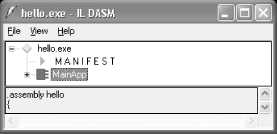
The ildasm.exe tool displays the metadata for your .NET PE file in a tree view, so that you can easily drill down from the assembly, to the classes, to the methods, and so on. To get full details on the contents of a .NET PE file, you can press Ctrl-D to dump the contents out into a text file.[5]
[5] The ildasm.exe tool also supports a command-line interface. You can execute ildasm.exe /h to view the command-line options. As a side note, if you want to view exactly which types are defined and referenced, press Ctrl-M in the ildasm.exe GUI, and it will show you further details.
Here's an example of an ildasm.exe dump, showing only the contents that are relevant to the current discussion:
.assembly extern mscorlib
{
}

.assembly hello
{
}

.module hello.exe

.class private auto ansi beforefieldinit MainApp
       extends [mscorlib]System.Object
{
  .method public hidebysig static
          void Main(  ) cil managed
  {
  } // End of method MainApp::Main

  .method public hidebysig specialname rtspecialname
          instance void .ctor(  ) cil managed
  {
  } // End of method MainApp::.ctor

} // End of class MainApp
As you can see, this dump fully describes the type information and dependencies in a .NET assembly. While the first IL instruction, .assembly extern, tells us that this PE file references (i.e., uses) an external assembly called mscorlib, the second IL instruction describes our assembly, the one that is called hello. We will discuss the contents of the .assembly blocks later, as these are collectively called a manifest. Below the manifest, you see an instruction that tells us the module name, hello.exe.
Next, you see a definition of a class in IL, starting with the .class IL instruction. Notice this class, MainApp, derives from System.Object, the mother of all classes in .NET. Although we didn't derive MainApp from System.Object when we wrote this class earlier in Managed C++, C#, J#, or VB.NET, the compiler automatically added this specification for us because System.Object is the implicit parent of all classes that omit the specification of a base class.
Within this class, you see two methods. While the first method, Main( ), is a static method that we wrote earlier, the second method, .ctor( ), is automatically generated. Main( ) serves as the main entry point for our application, and .ctor( ) is the constructor that allows anyone to instantiate MainApp.
As this example illustrates, given a .NET PE file, we can examine all the metadata that is embedded within a PE file. The important thing to keep in mind here is that we can do this without the need for source code or header files. If we can do this, imagine the exciting features that the CLR or a third-party tool can offer by simply making intelligent use of metadata. Of course, everyone can now see your code, unless you use different techniques (e.g., obfuscation and encryption) to protect your property rights.
2.3.3 Inspecting and Emitting Metadata
To load and inspect a .NET assembly to determine what types it supports, use a special set of classes provided by the .NET Framework base class library. Unlike API functions, these classes encapsulate a number of methods to give you an easy interface for inspecting and manipulating metadata. In .NET, these classes are collectively called the Reflection API, which includes classes from the System.Reflection and System.Reflection.Emit namespaces. The classes in the System.Reflection namespace allow you to inspect metadata within a .NET assembly, as shown in the following example:
using System;
using System.IO;

using System.Reflection;

public class Meta
{
  public static int Main(  )
  {
    // First, load the assembly.
    Assembly a = Assembly.LoadFrom("hello.exe");

    // Get all the modules that the assembly supports.
    Module[] m = a.GetModules(  );

    // Get all the types in the first module.
    Type[] types = m[0].GetTypes(  );

    // Inspect the first type.
    Type type = types[0];
    Console.WriteLine("Type [{0}] has these methods:", type.Name);

    // Inspect the methods supported by this type.
    MethodInfo[] mInfo = type.GetMethods(  );
    foreach ( MethodInfo mi in mInfo )
    {
      Console.WriteLine("  {0}", mi);
    }

    return 0;
  }
}
Looking at this simple C# program, you'll notice that we first tell the compiler that we want to use the classes in the System.Reflection namespace because we want to inspect metadata. In Main( ), we load the assembly by a physical name, hello.exe, so be sure that you have this PE file in the same directory when you run this program. Next, we ask the loaded assembly object for an array of modules that it contains. From this array of modules, we pull off the array of types supported by the module, and from this array of types, we then pull off the first type. For hello.exe, the first and only type happens to be MainApp. Once we have obtained this type or class, we loop through the list of its exposed methods. If you compile and execute this simple program, you see the following result:
Type [MainApp] has these methods:
  Int32 GetHashCode(  )
  Boolean Equals(System.Object)
  System.String ToString(  )
  Void Main(  )
  System.Type GetType(  )
Although we've written only the Main( ) function, our class actually supports four other methods, as is clearly illustrated by this output. There's no magic here, because MainApp inherits these method implementations from System.Object, which once again is the root of all classes in .NET.
As you can see, the System.Reflection classes allow you to inspect metadata, and they are really easy to use. If you have used type library interfaces in COM before, you know that you can do this in COM, but with much more effort. However, what you can't do with the COM type library interfaces is create a COM component at runtimea missing feature in COM but an awesome feature in .NET. By using the System.Reflection.Emit classes, you can write a simple program to generate a .NET assembly dynamically at runtime. Given the existence of System.Reflection.Emit, anyone can write a custom .NET compiler.
2.3.4 Interoperability Support
Because it provides a common format for specifying types, metadata allows different components, tools, and runtimes to support interoperability. As demonstrated earlier, you can inspect the metadata of any .NET assembly. You can also ask an object at runtime for its type, methods, properties, events, and so on. Tools can do the same. The Microsoft .NET SDK ships four important tools that assist interoperability, including the .NET assembly registration utility (RegAsm.exe), the type library exporter (tlbexp.exe), the type library importer (tlbimp.exe), and the XML schema definition tool (xsd.exe).
You can use the .NET assembly registration utility to register a .NET assembly into the registry so COM clients can make use of it. The type library exporter is a tool that generates a type library file (.tlb) when you pass it a .NET assembly. Once you have generated a type library from a given .NET assembly, you can import the type library into VC++ or VB and use the .NET assembly in exactly the same way as if you were using a COM component. Simply put, the type library exporter makes a .NET assembly look like a COM component. The following command-line invocation generates a type library, called hello.tlb:
tlbexp.exe hello.exe
Microsoft also ships a counterpart to tlbexp.exe, the type library importer; its job is to make a COM component appear as a .NET assembly. So if you are developing a .NET application and want to make use of an older COM component, use the type library importer to convert the type information found in the COM component into .NET equivalents. For example, you can generate a .NET PE assembly using the following command:
tlbimp.exe COMServer.tlb
Executing this command will generate a .NET assembly in the form of a DLL (e.g., COMServer.dll). You can reference this DLL like any other .NET assembly in your .NET code. When your .NET code executes at runtime, all invocations of the methods or properties within this DLL are directed to the original COM component.
|

Another impressive tool that ships with the .NET SDK is the XML schema definition tool, which allows you to convert an XML schema into a C# class, and vice versa. This XML schema:
<schema xmlns="http://www.w3.org/2001/XMLSchema"
 targetNamespace="urn:book:car"
 xmlns:t="urn:book:car">
  <element name="car" type="t:CCar"/>
  <complexType name="CCar">
    <all>
      <element name="vin" type="string"/>
      <element name="make" type="string"/>
      <element name="model" type="string"/>
      <element name="year" type="int"/>
    </all>
  </complexType>
</schema>
represents a type called CCar. To convert this XML schema into a C# class definition, execute the following:
xsd.exe /c car.xsd
The /c option tells the tool to generate a class from the given XSD file. If you execute this command, you get car.cs as the output that contains the C# code for this type.
The XML schema definition tool can also take a .NET assembly and generate an XSD file that contains representations for the public types within the .NET assembly. For example, if you execute the following, you get an XSD file as output:
xsd.exe somefile.exe
Before we leave this topic, we want to remind you to try out these tools for yourself, because they offer many impressive features that we won't cover in this introductory book.


