7.3 The System.Web.UI Namespace
Before getting into developing your favorite Hello, World! application in ASP.NET, it's important that you become familiar with the underlying structure of ASP.NET. This section describes some of the most important classes packaged in the System.Web.UI namespace in the ASP.NET framework.
The System.Web.UI namespace defines classes and interfaces used in constructing and rendering elements on a Web Form. The most important class in the System.Web.UI is the Control class, which defines properties, methods, and events that are common in all server controls in the Web Forms framework. Another important class in this namespace is Page, which is a derivative of the Control class. All ASP.NET web pages are instances of derivatives of the Page class. To have an extensible framework, the System.Web.UI namespace also includes the UserControl class, which is similar to the Page class except that it is used as the base class for user controls. We will make use of the UserControl and Page classes in Section 7.5 and Section 7.5.4 sections later in this chapter.
7.3.1 Control Class
The Control class is the root of all controls. For example, a text box is a control; a button or a combo box is also a control. The Control class basically encapsulates common functionalities and properties of all user-interface widgets. As you get deeper into ASP.NET development, everything you see is a Control derivative of some sort.
7.3.1.1 Control's properties
The Control class has the following important properties: Controls, ID, ClientID, Parent, EnableViewState, Visible, Context, and ViewState. We will go over each of these properties briefly to show you what the Control class is made up of and how deriving from Control class would create a model that is consistent and easy to work with.
The Controls property represents the children of the control instance; the Parent property defines the parent of the control. These properties enable a hierarchy of controls on a web page. The ID property allows the control to be accessed programmatically by just using the ID and the dot notation to get to the object's properties and methods (i.e., MyObjectId.propertyname). While the ID property allows us to program the control on the server side, ClientID allows us to setup client-side script to access the control on the client side. More information on using ClientID will be shown later in this chapter.
The EnableViewState flag indicates whether the control will maintain its view state, as well as all view states of its child controls. If this flag is set to true, the control will remember its previous view state when the page posts back to itself.[1] For example, if EnableViewState is set to true, the user's previous selection or form-field data are preserved automatically when the user performs some operation that requires a postback. When the page is sent back to the browser, the user can just continue filling in the form as if he never left it. This is how all derivatives of the Control class maintain their states between requests and free ASP developers from having to simulate view-state behavior with hidden form fields.
[1] Postback is the condition when an ASP page posts the data back to itself for processing. In conventional ASP programming, the states of the fields in the form have to be managed manually. In ASP.NET, we can have these field states managed automatically with a simple EnableViewState flag.
The Context property enables us to get to information about the current HTTP request, such as the Application, Server, Session, Request, and Response objects. ASP developers should be familiar with these intrinsic objects. You will likely use the Context property when you are processing the web page's Load event to get to application- or session-level variables and request parameters to set up your page. Through the Context property, you can also get other information, such as cached resources, including database connection for performance improvement; the trace property for debugging purposes; and the user property for security validation.
The ViewState property is an instance of the StateBag class, which is used to store name/value pairs of information that can be made accessible across multiple requests for the same web page. These name/value pairs are instances of the StateItem class. ViewState allows ASP.NET controls to maintain their own state across multiple client roundtrips; it is implemented as a hidden form field on the page. If you've attempted to maintain state for your form in ASP development, you will appreciate this because it is now automatically done for you.
7.3.1.2 Control class methods
The list of methods for the Control class is much longer than what we've covered in this section; however, this short list is probably all you need to know to get started with the Control class:
- DataBind method
-
Binds the control to a data source. This method is used in conjunction with the data-binding expression syntax on the Web Form. When this method is called, all data-binding tags, <%# %>, are re-evaluated so that the new data is bound to the appropriate tag location. Also, any controls that have their DataSource property set, retrieve the data from the DataSource and fill themselves.
- CreateChildControls method
-
Called before any compositional custom control is rendered. A compositional custom control is similar to a user control. Both of them are composed of other controls to create more complex controls. You would not employ this method simply to use the control. When developing custom controls, this method can be overridden so that custom control developers can create and layout child controls prior to rendering the controls, whether for the first time or for postbacks.
- Render method
-
Similar to the CreateChildControls, primarily used to develop custom controls. Control developers override this method to render the control content through the provided HtmlTextWriter parameter.
We will revisit the Render and CreateChildControls methods when we show you how to create custom controls in "Customer Server Controls" later in this chapter.
- SaveViewState and LoadViewState methods
-
Save and reload the state for the control. Server controls maintain their state between requests via these methods.
7.3.2 Page Class
As mentioned earlier, the Page class is actually a derivative[2] of the Control class. This means it inherits all properties, methods, and events exposed by the Control class. In addition to the inherited things, the Page class defines more specific properties, methods, and events for a web page in the ASP.NET framework.
[2] The Page class derives from TemplateControl, which derives from the Control class.
If you've done ASP development, you already know that Application, Request, Response, Server, and Session are intrinsic objects that you can access while scripting your ASP page. With ASP.NET, these objects are actually properties of the Page class. In addition to these familiar objects, the Page class also exposes other properties such as Cache, ErrorPage, IsPostBack, IsValid, Trace, and Validators.
7.3.2.1 Page class properties and methods
This list is not complete; however, it includes some of the more important features that we want to introduce:
- Cache property
-
Points to a Cache object of the Context for the current page. Here, resources such as DataSet with information retrieved from a database are stored for reuse while the cache item is not yet expired.
- ErrorPage property
-
Specifies the page to display when an error occurs. You can also specify the error page by using the @Page directive, as shown in Section 7.4.
- IsPostBack property
-
Indicates whether the page request is an original request or a postback, since the interaction between the user and the server controls requires a postback to the current page. If IsPostBack is true, you should not redo all your page initialization to improve performance.
- Validators property
-
Groups together server controls that can validate themselves inside the Validators property of the Page. (In ASP.NET, a web page usually consists of a number of server controls.) This is so that when the Page needs to validate itself, it can delegate the validation to all of these controls and then set the IsValid property to the appropriate value.
- Trace property
-
References a TraceContext object, through which you can issue warning or error messages. Tracing can be switched on or off at any time from the web.config setting. web.config is an XML-based text file that stores the runtime configuration for an ASP.NET application. Changes to this file take effect immediately. The main configuration file is at the root of your web application; however, you can have a configuration file for each subdirectory in your web application. The closest configuration file overrides the settings of distant configuration files. Being able to switch off tracing in a configuration file like this is much better than doing so manually in ASP development, where you must go through all ASP files to remove all instances of Response.Write debugging messages when you are ready to deploy your application.
- LoadControl method
-
Loads server controls from a file into the page programmatically. This is especially for user controls in ascx files. For ordinary server controls, they can be instantiated directly and added to the page's Controls collection. You can also have static server control declared on the page using the server-side object syntax as described in Section 7.4 later in this chapter.
- MapPath method
-
Maps a virtual path to a physical path for file I/O. This should be familiar to ASP developers.
- Validate method
-
Works with the Server Validation Controls on the page to validate data on the page. If any of the server controls fail to validate, this method returns false, and the failed server-validation control renders the error message to the user.
- CreateHtmlTextWriter method
-
Produces an HtmlTextWriter object to write HTML to the response stream. This is similar to ASP's Response.Write method; however, the HtmlTextWriter object is much smarter than the raw Write method. It helps you write well-formed HTML.
- LoadPageStateFromPersistenceMedium, SavePageStateToPersistenceMedium methods
-
By default, save and load view state for all controls as hidden fields on the page. If you don't want this setting, you can override the SavePageStateFromPersistenceMedium method to save the view state anywhere other than hidden fields. You will also have to override the LoadPageStateFromPersistenceMedium method to have the saved view states loaded back onto the page prior to rendering.
7.3.3 UserControl Class
The UserControl class is similar to the Page class (see the previous section) with the omission of page-specific properties or methods such as ErrorPage, IsValid, User, Validators, MapPath, Validate, and CreateHtmlTextWriter.
The UserControl class is typically used as the base class for custom controls. We can also build custom controls by inheriting directly from the Control class; however, it's better to start from UserControl because it is not as raw as the Control class. If you find that UserControl supports a number of properties and methods that you don't really want in your custom control, you might choose to inherit the raw Control class instead. We show you how to create custom controls in Section 7.5.4 later in this chapter.
7.3.4 System.Web.UI.HtmlControls Namespace
If you've done any client-side DHTML scripting, you know how all HTML tags are mapped to scriptable objects. ASP.NET brings this mapping to the server side. Before the web page is rendered and sent back the client, you can access and manipulate each of the objects on the page.
ASP.NET maps HTML tags with objects in the hierarchy of server-side classes defined in the System.Web.UI.HtmlControls namespace. These server objects are called HtmlControls because they closely map to standard HTML elements.
For example, here is a simple HTML page that relies on client-side scripting to change the output page dynamically. (This page won't run on browsers that do not support VBScript client-side scripting or browsers that have client-side scripting turned off.)
<html>
<head>
  <script language=vbscript>
  sub cmd1_onclick(  )
    txtMessage.InnerHtml = _
        "(Client-side) Your name is: " & frm1.txtName.value
  end sub
  </script>
</head>
<body>
  <form id=frm1>
    Enter Name: <input id="txtName" type="text" size="40">
    <input type=button id="cmd1" value="Click Me">
    <span id="txtMessage"></span>
  </form>
</body>
</html>
We will convert this page so that it relies on server control instead of the IE Document Object Model. Since the output of the page is controlled from the server side, the page works regardless of what kind of browser you are using. One drawback to this is that all interaction with the page requires a postback to the server.
To take advantage of server controls mapping, all you have to do is to add the id and runat attributes, and your server-side script will be able to access and manipulate the server controls:
<html>
<head>
  <script id="scr1" language="c#" runat="server">
    void svr_cmd1_onclick(Object o, EventArgs e)
    {
      txtMessage.InnerHtml =
          "(Server-side) Your name is: " + txtName.Value;
    }
  </script>
</head>
<body>
  <form id="frm1" runat="server">
    Enter Name: <input id="txtName" type="text" size="40" runat="server">
    <input type="button" id="cmd1" value="Click Me"
        onserverclick="svr_cmd1_onclick" runat="server">
    <span id="txtMessage" runat="server"></span>
  </form>
</body>
</html>
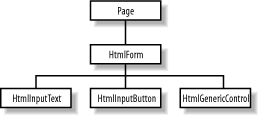
By adding the runat="server" attribute to the HTML form and its controls, you have exposed an HtmlForm object, an HtmlInputText object, an HtmlInputButton object, and an HtmlGenericControl object (the span) to your server-side script, as depicted in Figure 7-1. As you can see in the previous script, you can manipulate the HtmlGenericControl object's txtMessage to set its InnerHtml property.
Figure 7-1. Server-side scriptable objects for the code example
Even though the results of the two simple examples appear to be the same, they are drastically different from the technical point of view. Client-side scripting, as the name implies, runs in the client browser process. On the other hand, when we have controls tagged to run on the server, we can have accesses to other server resources.
Most classes in the System.Web.UI.HtmlControls namespace are derivatives of the HtmlControl class, which in turn derives from the Control class of the System.Web.UI namespace. See Figure 7-2 for a graphical presentation of the hierarchy. The HtmlControl class serves as the base class for these HtmlControls because most HTML elements share common characteristics that are defined in this HtmlControl base class. They share properties such as ID, Disabled, Value, Style, and TagName. Because these HtmlControls ultimately are derivatives of the Control class, they also have methods and events that the Control class exposes.
Figure 7-2. HtmlControls object hierarchy
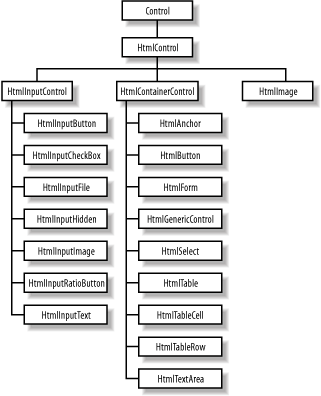
Table 7-1 maps the HtmlControls to standard HTML tags. This means when you have an HTML tag that is flagged to run on the server side with runat="server", ASP.NET creates an appropriate HtmlControl that you can program against.
|
HTMLControl |
Description |
HTML tag |
|---|---|---|
|
HtmlImage |
Image tag |
<img> |
|
HtmlInputFile |
File selector |
<input type="file"> |
|
HtmlInputHidden |
Used for hidden form fields |
<input type="hidden"> |
|
HtmlInputImage |
Image input |
<input type="image"> |
|
HtmlInputRadioButton |
Radio button |
<input type="radio"> |
|
HtmlInputText |
Standard text input |
<input type="text"> |
|
HtmlInputButton |
Standard HTML button |
<input type="button"> |
|
HtmlInputCheckBox |
Standard HTML checkbox |
<input type="checkbox"> |
|
HtmlForm |
Form tag |
<form> |
|
HtmlGenericControl |
Miscellaneous generic HTML tags |
<span, div, etc.> |
|
HtmlSelect |
Standard HTML drop-down control |
<select> |
|
HtmlTable |
Standard HTML table |
<table> |
|
HtmlTableCell |
A cell in a table row |
<td> |
|
HtmlTableRow |
A row in a table |
<tr> |
|
HtmlTextArea |
Multiline text area |
<textarea rows=n cols=n> |
|
HtmlAnchor |
Standard HTML hyperlink control |
<a href= . . . > or <a name= . . . > |
|
HtmlButton |
HTML button |
<button> |
7.3.5 System.Web.UI.WebControls Namespace
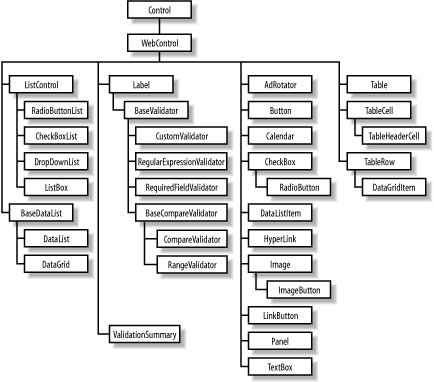
While providing HtmlControls, which map to standard HTML elements, ASP.NET also provides another group of UI controls, the WebControl class (see Figure 7-3). In addition to providing all traditional controls similar to HtmlControls, WebControls also provide much richer controls such as calendars, grids, and validators.
WebControls are richer, more powerful, and more flexible than HtmlControls. It seems that it is the natural choice for new ASP.NET applications; however, HtmlControls are better if you are migrating ASP applications. Another thing that might make you consider using HtmlControls is that with it, your client-side scripts can still access and manipulate the objects.
Most classes in this namespace are based on WebControl, which is again a derivative of the Control class. The WebControl class provides the common properties and methods inherited by all of its descendants, including access key, tab index, tool tip, color, font, and border setting.
Figure 7-3. WebControls object hierarchy