2.1 How Objects Are Stored and Identified
Data is stored within Active Directory in a hierarchical fashion similar to the way data is stored in a filesystem. Each entry is referred to as an object. At the structural level, there are two types of objects: containers and non-containers, also known as leaf nodes. One or more containers branch off in a hierarchical fashion from a root container. Each container may contain leaf nodes or other containers. A leaf node, however, as the name implies, may not contain any other objects.
Consider the parent-child relationships of the containers and leaves in Figure 2-1. The root of this tree has two children, Finance and Sales. Both of these are containers of other objects. Sales has two children of its own, Pre-Sales and Post-Sales. Only the Pre-Sales container is shown as containing additional child objects. The Pre-Sales container holds user, group, and computer objects as an example.[1] Each of these child nodes is said to have the Pre-Sales container as its parent. Figure 2-1 represents what is known in Active Directory as a domain.
[1] User, group, and computer objects are actually containers, as they can contain other objects such as printers. However, they are not normally drawn as containers in domain diagrams such as this.
Figure 2-1. A hierarchy of objects
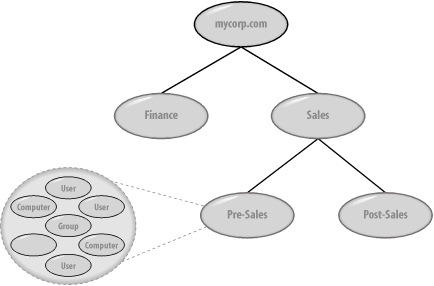
The most common type of container you will create in Active Directory is an Organizational Unit, but there are others as well, such as the one called Container. Each of these has its place, as we'll show later, but the one that we will be using most frequently is the Organizational Unit (OU).
2.1.1 Uniquely Identifying Objects
When you are potentially storing millions of objects in Active Directory, each object has to be uniquely locatable and identifiable. To that end, objects have a Globally Unique Identifier (GUID) assigned to them by the system at creation. This 128-bit number is guaranteed to be unique by Microsoft. The object GUID stays with the object until it is deleted, regardless of whether it is renamed or moved within the Directory Information Tree (DIT).
While an object GUID is unique and resilient, it is not very easy to remember, nor is it based on the directory hierarchy. For that reason, another way to reference objects, called an ADsPath, is more commonly used.
2.1.1.1 ADsPaths
Hierarchical paths in Active Directory are known as ADsPaths and can be used to uniquely reference an object. In fact, ADsPath is a slightly more general term and is used by Microsoft to apply to any path to any of the major directories: Active Directory, Windows NT, Novell's NDS, and many others.
ADsPaths for Active Directory objects are normally represented using the syntax and rules defined in the LDAP standards. Let's take a look at how a path to the root of Figure 2-1 looks:
LDAP://dc=mycorp,dc=com
The path starts with a programmatic identifier (progID) of LDAP followed by a colon (:) and a double forward slash (//).
|

In the previous ADsPath, after the progID, you represent the domain root, mycorp.com, by separating each part by a comma and prefixing each part with the letters dc. If the domain had been called mydomain.mycorp.com, the ADsPath would have looked like this:
LDAP://dc=mydomain,dc=mycorp,dc=com
|
A distinguished name (DN) is the name used to uniquely reference an object in a DIT. A relative distinguished name (RDN) is the name used to uniquely reference an object within its parent container in a DIT. For example, this is the ADsPath for the default Administrator account in the Users Container in the mycorp.com domain:
LDAP://cn=Administrator,cn=Users,dc=mycorp,dc=com
This is the DN of the same user (note the absence of the progID):
cn=Administrator,cn=Users,dc=mycorp,dc=com
This is the RDN of the user:
cn=Administrator
These paths are made up of names and prefixes separated by the equal sign (=). Another prefix that will become very familiar to you is OU, which stands for Organizational Unit. Here is an example:
cn=Keith Cooper,ou=Northlight IT Ltd,dc=mycorp,dc=com
All RDNs, DNs, and ADsPaths use a prefix to indicate the class of object that is being referred to. Any object class that does not have a specific letter code uses the default of cn, which stands for Common Name. Table 2-1 provides the complete list of the most common prefixes among the directory server implementations. The list is from RFC 2253, and full text can be found at http://www.ietf.org/rfc/rfc2253.txt.
|
Key |
Attribute |
|---|---|
|
CN |
Common Name |
|
L |
Locality Name |
|
ST |
State or Province Name |
|
O |
Organization Name |
|
OU |
Organizational Unit Name |
|
C |
Country Name |
|
STREET |
Street Address |
|
DC |
Domain Component |
|
UID |
Userid |
While Microsoft Exchange 5.5 uses the O prefix, Active Directory uses only DC, CN, and OU, with CN being used in the majority of cases.
2.1.1.2 Examples
Let's take a look at Figure 2-1 again. If all the containers were Organizational Units, the ADsPaths for Pre-Sales and Post-Sales would be as follows:
LDAP://ou=Pre-Sales,ou=Sales,dc=mycorp,dc=com
LDAP://ou=Post-Sales,ou=Sales,dc=mycorp,dc=com
And if you wanted to specify a user named Richard Lang, a group called My Group, and a computer called Moose in the Pre-Sales OU, you would use the following:
LDAP://cn=Richard Lang,ou=Pre-Sales,ou=Sales,dc=mycorp,dc=com
LDAP://cn=My Group,ou=Pre-Sales,ou=Sales,dc=mycorp,dc=com
LDAP://cn=Moose,ou=Pre-Sales,ou=Sales,dc=mycorp,dc=com
You can also reference a specific server in the ADsPath as in the following example:
LDAP://server1/cn=Moose,ou=Pre-Sales,ou=Sales,dc=mycorp,dc=com
When a server is specified, the object referenced in the ADsPath must be contained on that server.


