10.3 Using GPOs to Help Design the Organizational Unit Structure
In Chapter 8, we described the design of the Active Directory Organizational Unit hierarchy. We also explained that other items have a bearing on that design. You see, there are two key design issues that affect the structure of your Organizational Units: permissions delegation and GPO placement. If you decide that your Active Directory is to be managed centrally rather than in a distributed fashion and that you will employ only a few GPOs that will be implemented mostly domainwide (rather than many GPOs on many Organizational Units), your Organizational Unit structure can be almost any way that you want it to be. It shouldn't make much difference whether you have 400 branches coming off the root or one container with every item inside it. However, if permissions over specific objects do need to be delegated to specific sets of administrators, it will make more sense to structure your domain Organizational Units in a manner that facilitates that administration. This doesn't have to be the case, but it makes it much easier to use Organizational Units.
For example, if we have 1,000 users and 10 managers who each manage 100 users, we could put the 1,000 users in one Organizational Unit and give the 10 admins permission to modify only their 100 users. This is a slow and daft way to run systems administration. It would be better to create 10 Organizational Units and put 100 users in each, giving each administrator permission over his particular Organizational Unit. This makes much more sense, as the administrator can be changed very easily, it is easier to report on access, and so on. Sense and reducing management overhead are the overriding keys here. Either solution is feasible; one is just easier to implement and maintain.
|

The same fundamental facts apply to GPOs. If you are going to need to apply multiple policies to multiple sets of users, it makes more sense and will be easier to manage if you set up multiple Organizational Units. However, this isn't always possible, for example, if the Organizational Unit structure that you have as an ideal conflicts with the one that you will need for permissions delegation, which again conflicts with the one you would like for GPO structuring.
10.3.1 Identifying Areas of Policy
We will assume that within your organization, you will be writing a document that describes your plan for the security features you wish to use in your Active Directory environment and exactly how those features will be implemented. Part of this document will relate to other security features of AD, such as Kerberos, firewalls, permissions, and so on, but here we're concerned with GPOs.
First you need to identify the general policy goals that you wish to achieve with GPOs. There's no need to go into the exact details of each GPO setting and its value at this moment. Instead, you're looking at items like "Deploy financial applications" and "Restrict desktop settings." As you identify each general policy area, you need to note whether it is to apply to all computers or users in a site, to all computers or users in a single domain, or to a subsection of the user and computer accounts. If you aren't sure for some items, put the items in more than one category. You end up with items like "Deploy financial applications to accountants in France" and "Restrict desktop settings in southern Europe."
Once you have the general policy areas constructed, you need to construct an Organizational Unit structure that facilitates implementation of this policy design. At this point, you start placing computers and users in various Organizational Units, deciding if all objects in each container are to receive the policy or whether you will restrict application to the policy via ACLs. There are a number of questions you can ask yourself during this stage. To help with this, a loose set of guidelines follows the example in the next section.
Ultimately the document will need to specify exactly which GPO settings are to be applied, which groups you will set up for ACL permission restrictions, and what the Organizational Unit structure is going to be. It helps to explain justifications for any decisions you make.
To make the guidelines more meaningful, we'll show how you can structure a tree in different ways using a real-world example.
10.3.2 How GPOs Influenced a Real Organizational Unit Design
Leicester University needed an Organizational Unit structure that represented its user and computer population. The system needed to allow users from every department to roam anywhere on campus and log on to the system. User accounts were fairly generic across the system, with the main differences resulting only from membership in certain groups indicating the type of account the user had (staff, undergraduate, and so on). The main distinction came in the two sorts of machines that we maintain on campus: staff devices that exist in a number of staff member's offices, and open devices that exist in areas known as open-area labs, which anyone could use. While staff machines always exist within a department, labs exist in certain locations and buildings throughout the university campus.
Having full Internet and drop-in access, we needed to make sure that these open area client devices were as secure as they could possibly be. This security had to extend to all users who logged on at the machines, whether they were staff or student. However, we also wanted to make sure that staff accounts were not locked down in their own departments. In other words, we wanted the user profiles of the staff users to be much more locked down only in the open-area labs and nowhere else.
In terms of policies, we needed to apply quite a few. While the specifics aren't important here, we needed a number of policies to apply to different areas:
|
Area |
Policies to apply to |
|
A |
All computers and users in the domain |
|
B |
Users in specific departments |
|
C |
All clients (not servers) |
|
D |
All open-area clients |
|
E |
All staff clients |
|
F |
Staff clients in specific departments |
|
G |
Open-area clients in specific labs |
With these requirements, we came up with a design. This was a lengthy process, but we'll try to break it down so that it makes sense. Let's take a look at the users themselves to start with.
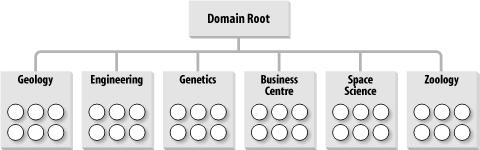
Users were always members of a specific department, and this was how the university was structured in terms of its business, so it seemed logical to name the Organizational Units after the university departments. We should add, by the way, that Leicester University needed only one domain, the forest root domain in a single forest, for its organization; the Organizational Unit structure was much more important than the domain structure in this case. The overall Organizational Unit structure came out something like that shown in Figure 10-12. Each department is joined directly to the root of the domain, with the users (represented by the circles) being children of the departmental containers.
Figure 10-12. OU structure to hold user objects
Next, we needed an Organizational Unit structure that represented the distinct divisions of computers that existed throughout the university. There's no necessity to presume that your computers should go in the same Organizational Unit structure as your users, and that's how we approached the concept at Leicester. Initially, based on the policy areas, it seemed sensible to us to create an entirely new client tree that held only the machine accounts. This hierarchy ended up looking like the one in Figure 10-13.
Figure 10-13. OU structure to hold computer objects
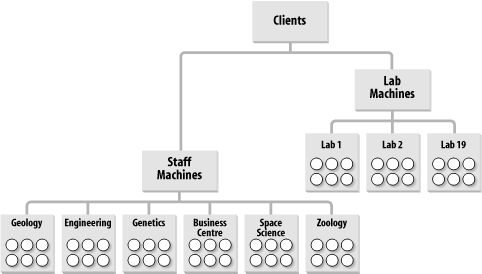
Here you can see the branch solely for the computer accounts, with two children that each hold lab locations or departments themselves. Notice how the staff machine branch of the tree looks remarkably like the user structure diagram from Figure 10-12. We'll come back to that in a minute. For now, let's see if we can successfully apply the policies properly to this hierarchy. Take a look at Figure 10-14; where the policies are shown using the letter notation from the earlier table. This screen looks very cluttered, but it simply depicts each policy area with indications of where the policy area is linked. The trapezoid is Microsoft's symbol for a GPO.
Figure 10-14. GPOs applied to the entire OU structure
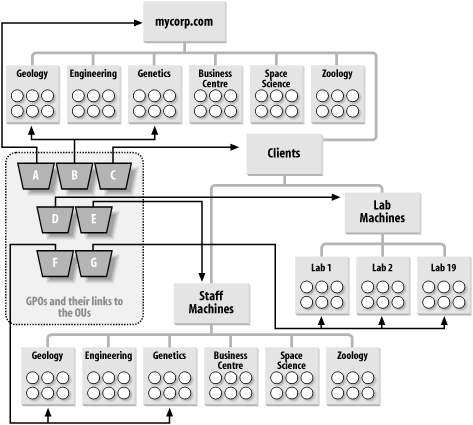
Not every department and lab is listed in this screen. In a similar vein, we've linked the GPOs to only some of the Organizational Units, since that would be the case in reality. After all, if every department or lab were to receive a policy, you might as well link the GPO to the parent.
10.3.2.1 The merits of collapsing the Organizational Unit structure
We've created a structure that is understandable and perfectly represents the business that we operate. That's a good achievement from this design. The next step is to consider whether the domain would be easier to manage if we merged the duplicated staff organizational units.
Take a look at Figure 10-15. This is the hierarchy if we do away with all the staff machine Organizational Units and put the staff computers directly into the departmental Organizational Units. Policy areas A and B stay the same. Policy area C has to apply to all clients, so we can't use the Clients Organizational Unit any more. We have two choices: link the policy to the domain and have it apply to all Organizational Units containing computers beneath the root, or link the policy to each Organizational Unit under the root by hand. The latter solution also requires us to link the GPO to any new Organizational Units that we create under the root, if they are to receive the policy.
Figure 10-15. Another solution to the OU structure
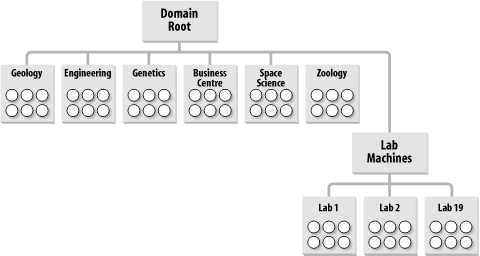
The former is the easier solution to manage, so let's run with it and link policy area C to the domain root. Unfortunately, this means that the GPO is going to apply to any computer objects in the domain, including Organizational Units that we store servers in, such as the Domain Controllers Organizational Unit that exists under the root of the domain. We don't want this, so the only way forward here is to block policy inheritance at these server Organizational Units. You may see where this is going now. We've not only blocked policy area C from being inherited by these Organizational Units that contain servers, we've also blocked any other policies that may need to apply as part of policy area A. My only solution to fix this is to use my ability to force an override of policy area A down the tree. So much for a simpler solution. We now have at least one block in place (for the domain controllers Organizational Unit) and policies from area A overriding all blocks down the tree to make sure they get past the blocks we just set up. While this is a solution, it's starting to feel more complex than the one before. Isn't there a better way?
Yes, by making use of security groups. Forget about the blocks and inheritance for now and consider that instead we put all the computers that are not to get policy area C in a security group. We can then deny the Apply Group Policy permission to this particular security group, so that no members of the group ever have that policy applied to them. This is a much easier solution. However, it does mean that the administrators must remember that if a new computer is created and is not to receive the policy, it must be added to the group.
Policy areas D and G can still apply as they did before. Policy area F applies only to certain Organizational Units, so we just link F to the various departments under the root and carry on as before. However, we have more problems with E. Again, the choices are similar to the previous predicament: we could apply E to the department Organizational Units individually (remembering to do this for each new department we create), we could apply the policy to the domain root and use block inheritance-force override as before, or we could use groups again. The use of groups seems simpler, so let's go with that option. If we create a group for all the staff machines, we can just give the group permission to apply group policy to policy E in addition to removing the default permission for authenticated users to apply group policy. Now all users won't run the policy by default, but members of the staff machines group will.
This is a different solution that now achieves the same goal. The solution that Leicester chose (the first design) required fewer groups and allowed a computer's or user's location in the hierarchy to dictate which policies were applied. The new solution that we've just worked through collapses the tree structure but instead makes more use of groups to indicate which policies are to be applied.
In fact, this tends to be a rule: as you collapse a structure where a number of GPOs apply, you need greater control via groups or the use of block inheritance and overrides.
10.3.2.2 A bridge too far
We could go one stage further and remove the lab machines' Organizational Unit entirely. That would cause the same problems with policy area D that we had with E. The simpler solution is to add all lab machines into a group and allow only members of that group to access the policy.
You can continue on in this manner, removing Organizational Units and creating more groups until you actually end up with all objects in a single Organizational Unit under the domain. At that point, all the GPOs are applied to that Organizational Unit, and you control access to the Organizational Units via groups. Prioritization of the order that the multiple GPOs would be applied might be more of a nightmare in this situation.
We hope you can see that there are a number of options open to you when designing your Organizational Unit structure for GPOs. It doesn't really matter which method you choose, as long as you're happy with it. The Organizational Unit structure that Leicester adopted requires less maintenance, because you don't have to put an object in a group after creation; you just create it in the place in the tree that it is to receive policies from. That's less of an issue with the capabilities of ADSI, since the code to bind to the parent group and add the newly created object to that group is just two extra lines.
We also created some other Organizational Units for specific functions. For example, one Organizational Unit holds all the groups that we ever created. That way, when we want to find a group, we know where it is. We also created a test Organizational Unit so that we could roll out policies and do testing with users and computers within the domain without affecting the existing user setup.
It may appear that Leicester doesn't make much use of groups to control access to GPOs, but that's not the case. Just because we set up the Organizational Unit structure in a way that made sense to us doesn't mean that we shouldn't make good use of groups as well. Let me give you some examples. Look back at Figure 10-14. Policy areas D and G actually consist of a number of completely different and opposing GPOs that can affect all lab machines (D) or machines in specific labs (G). One group of settings entirely locks down the workstations in those labs from access to the hard disk and various control panels and places other security measures. Another raft of settings serves to unlock the machines entirely; in other words, this GPO is the complete opposite of the first. Further sets of GPOs allow us to put the lab into a mixture of the two states with some areas locked down and others remaining unlocked. These policies are applied as required to the specific lab Organizational Units, so that if all were to apply at the same time, it would be a complete fiasco. Instead, we use global security groups, one for access to each GPO, and make the computers from that lab members of each group.
To gain access to the policies, we move the computers from one group into another. If a client needs to be unlocked entirely, we move it to the unlocked group and reboot or wait until the policy refreshes. Similarly, if a user from zoology decides that he wants his machine locked down, we can apply the relevant GPOs to the zoology Organizational Unit, then place that machine in the global group that allows access to the GPO.
If we had a situation in which the client was either locked down or not locked down, we could have used just one group and had a lockdown state by default, with membership in the group implying an unlocked state or vice versa.
10.3.2.3 Loopback mode
We've held one important aspect of Leicester's GPO design until now, that of loopback mode. Leicester needs to use loopback mode to lock down both staff and students while they are in a lab environment. To do this successfully requires that the computer policies be separate from the user policies. When you add this requirement to the equation, it makes more sense to keep the lab part of the tree separate in some way from the other part of the tree. This ensures that the user sections of the computer policies do not apply to any user accounts except during loopback mode. Both Figure 10-12 and Figure 10-13 have structures that will happily accommodate the requirement.
10.3.3 Guidelines for Designing GPOs
In this section, we provide guidelines that help you toward two critical design goals:
All policies should be applied quickly, so that users do not feel a significant impact due to policy processing.
All policies should be as easy as possible to administer and maintain.
With these two concepts in mind, let's take a look at the guidelines:
- Design in a way that you feel comfortable with
-
As shown in the example in the last section, it can be easier to do large designs by considering the user Organizational Unit and computer Organizational Unit structures separately. If you want to do them together and have a small enough network that you can do so easily, that's fine. If not, try it the way we first did.
- Restrict as best you can the number of policies that apply
-
In a perfect world, this wouldn't be important. But in the real world, the more policies you have, the more processing the client has to do in addition to its normal logon/boot up, and the longer it takes to complete the process.
If you have multiple policies applying to an object from the same location in a tree, consider collapsing them into a single object, since this will process faster than multiple policies will. If the number of policies you are applying during a logon/boot up is larger than you can effectively get out to the client across the network or, more importantly, larger than you can get the client to process, you need to consider reducing or collapsing the policies. If you need to apply a significantly large set of policies with many settings that extends logon to five minutes, but you feel that is acceptable to achieve this level of policy, that's fine.
When it comes down to it, only you know what you can accept, and you will need to do your own testing in this area to satisfy your constraints. If you have to have a client logged on in less than 4 seconds, you have to work within that constraint. Microsoft likes to recommend no more than 10 Organizational Units deep to make sure that you don't use too many GPOs. As we know, this isn't very helpful. Having one GPO applying at a site, one at the domain, and one at each of 5 Organizational Units means only 7 GPOs. Applying 10 at each level is 70. So it's not only how deep you nest your Organizational Unit structure that matters, it's how many policies you can apply. The unfortunate part, of course, is that it always comes back to how many settings you are applying in each policy.
The simple answer is that a faster machine with more RAM can apply more policies in less time than a slower PC with less RAM; consequently, for a network of heterogeneous clients, you need to do testing on your own network to see how fast application of policies is and how much bandwidth they take up. Sorry, but that's the way it is for now.
- Use security groups to tailor access
-
While you can set up ACLs to allow or deny application of policy to an individual user or computer, it makes more sense to use groups to do this whenever you can. If you use groups, it lets you keep all policy access in one object, and it can make complex systems much more manageable.
- Limit the use of block/force inheritance
-
You should be very cautious of blocking inheritance at locations in the tree unless you are quite sure that this is the right way to solve your problem. The repercussions from a simple blocking of inheritance can spiral quickly as you encounter areas of policy that need to override the block. Your well-designed system can become quite difficult to maintain if you block and override regularly. This is not to say that you should never use them; just exercise caution in their use.
- Collapse the Organizational Unit design
-
If you wish, you can collapse your Organizational Unit design and make more use of groups (or even block inheritance/force override) to govern access to specific policies. These are both perfectly valid solutions, and you should use whichever you are more comfortable with. Remember the axiom that the more you collapse the Organizational Unit structure while maintaining or increasing the number of GPOs, the greater need for control via groups or block inheritance/force override.
- Avoid using cross-domain GPO links
-
If you link GPOs across domains, the entire set of SYSVOL data as well as the object information itself needs to transfer over from the source domain whenever a user or computer needs to access it. So unless you have very fast links between the two domains with enough available bandwidth, you should duplicate the functionality of the GPO in the target domain instead of cross-domain linking unless the domain controllers for each domain are co-located on the same network.
- Prioritize GPOs
-
Remember that it is possible to prioritize applications of multiple GPOs at the site, domain, or Organizational Unit level. This ordering of the application of policies allows you to add useful options to the administrator's toolkit. For example, if you need a group of users to reverse specific settings that are being applied by default as part of a larger set, create a new GPO with ACLs for this group that apply in the priority list to unset all the previous settings. This solution allows you to override a selection of previous settings without creating two GPOs, one with settings for everyone and one for just this group. The former solution allows you to add in settings to the main GPO and still have them apply to everyone, without needing to add them to the second GPO of the latter solution. Prioritizing GPOs can be very useful.
- Increase processing speed
-
The main ways to increase processing speed are to reduce the number of GPOs that you apply, disable the computer or user portion of a GPO if it is not needed, or limit the use of block inheritance, force override, cross-domain linking, and loopback mode. All of these place an extra processing load on the client to some degree. A really bad mistake would be to use combinations of them.
- Be cautious with loopback mode
-
Loopback mode is a very useful tool but is another technology that you need to approach with caution. As a completely different set of policies (replace mode) or a very large number of policies (merge mode) will be applied to your users, and since there are no Resultant Set of Policy (RSoP) tools in existence as we write this, you need to take great care to ensure that the policy received by a user is the one you expect.
In most cases, loopback merge mode will incur significant extra processing load on the client PC and extra bandwidth on the network. That's not to say it isn't useful, but you have to be very aware of the delays that could occur after its introduction. Loopback replace mode imposes less of a processing load, but it can still be a problem. If you are contemplating loopback mode, ensure adequate stress testing of user impact.
- Limit how often GPOs are updated
-
This relates to two specific times. You should limit your modifications to GPOs that could immediately cause a policy refresh on all clients or users, as this could impose a slowdown across the network and on the client. It would be better to make the updates during scheduled systems maintenance times. You should also carefully control the policy refresh interval. You have to ask yourself if you really need to refresh policy every 10 minutes when every 24 hours might be sufficient.
- Thoroughly test WMI filters
-
If you are using WMI filters, be sure to test the queries thoroughly before releasing in production. If you use an unoptimized query or one that is very resource-intensive, it could cause significant delays during GPO processing. Creating a simple script or even using the new WMI tool called WMIC can help facilitate the testing.
- Restrict blocking of domain GPOs
-
You should not block domain GPOs to specifically use LGPOs on a domain client without very good reasons. If you do choose to apply LGPOs only to a client, you need to be aware of the management overhead because each client needs to be managed individually. If you have 20 orphaned clients using LGPOs and you need to make a change, you need to make it 20 times, once per client. The whole concept behind GPOs was to aid centralized management and administration of distributed resources, not distributed management of distributed resources. Think carefully before going down this path.
- Use test GPOs
-
We always recommend creating test GPOs and linking them to a branch of test Organizational Units set up for this purpose. No GPO should ever be applied to users or computers unless it has been fully tested. And with the new tools, such as GPMC or the Resultant Set of Policies (described in more detail shortly), it is much easier to assess the impact GPOs will have on your client base.
- Choose monolithic or segmented GPOs
-
While we would recommend keeping similar settingsor all settings relating to a particular itemin the same GPO, there is nothing stopping you from having only a few huge GPOs as opposed to a number of smaller GPOs. If you go for the monolithic approach, you process fewer GPOs, which is obviously faster; however, delegation is not as easy due to the fact that the policy contains so many settings. Segmented GPOs allow easier delegation but can impact performance. Mix and match the two to a level that you are comfortable with and that works for your network.
10.3.4 Designing Delegation and Change Control
Now that you've designed a policy-based implementation for your organization, you have to work out how you will maintain firm control over GPOs once you start deploying them. Specifically, you need to consider who will be managing your GPOs and how you will keep control over the wide-ranging changes they can make.
10.3.4.1 The importance of change-control procedures
The best way to keep track of GPOs in your organization is through a series of change-control procedures. These work well whether your GPO administrators are domain administrators or not. We suggest a file such as a Word document with tables, a spreadsheet, or even a database in a central location to hold data on each GPO, the settings that it applies, whether it applies to computers and users or both, the containers in Active Directory that it applies to, and so on. You also should add extra columns/fields to the data for the proposer of the original GPO and those people who ratified the change. If you add those fields/columns, every time a new change is made, it is added by the proposer to the existing data set. Then the proposer or the system automatically contacts the rest of the GPO administrators and asks them to review and ratify the change in the data set. Discussions could continue via email if there were problems preventing ratification or if items needed clarification. Finally, when the GPO data is ratified by all, it can be regression-tested on test systems if that hasn't already been done and then implemented within Active Directory.
Default GPO PermissionsAny user, computer, or group needs both Read and Apply Group Policy to apply a policy. Active Directory ships with certain permissions already in existence for GPOs. These are:
Administrators in the latter two groups are also authenticated users and so inherit the Read permission from that group. If you don't want administrators to have the user parts of GPOs applied on logon, set the Apply Group Policy setting to Deny for Domain Admins, Enterprise Admins, and possibly Creator Owner as well. |
10.3.4.2 Designing the delegation of GPO administration
There are three types of permission that can be considered here:
The permission to allow sets of users to link policies to a domain or an Organizational Unit branch
The permission to allow sets of users to create GPOs
The permission to allow sets of users to change the GPOs themselves
Link delegation can be easily accomplished using the Delegation of Control Wizard[5] that you get by right-clicking an Organizational Unit, domain, or site in Active Directory and choosing Delegate Control. You'll want to use the "Manage Group Policy Links" task. Here you are actually delegating read and write access to the gPLink[6] attribute of the GPO.
[5] This wizard is discussed more fully in Chapter 11.
[6] The GPC data part of a GPO is an object in Active Directory. This object, like all others, has attributes. One of the attributes of a GPO is a multivalued one called gPLink that stores Active Directory ADsPaths of the containers that the GPO is linked to.
The other GPO attribute that can be delegated in this way is called gPOptions. As discussed earlier and shown in Figure 10-10, this deals with the area of blocking inheritance. If you're interested in how these attributes work, set up a few GPOs in your Active Directory. Then use ADSI Edit from the Windows Support Tools to examine the attributes of the newly created GPOs in this location:
LDAP://CN=Policies,CN=System,dc=windows,dc=mycorp,dc=com
Creation of GPOs is limited to those indicated in the sidebar by default. However, you can add users to the Group Policy Creator Owners security group, which allows members to create new GPOs. If a member of Group Policy Creator Owners creates a GPO, that user is set as the Creator Owner[7] of the GPO and can continue to manage it. The Creator Owner of a GPO can manage the GPO even if the user is removed from all groups that give GPO management privileges.
[7] When administrators create GPOs, the Domain Admins group becomes the Creator Owner.
|
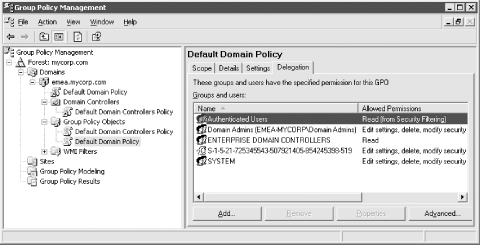
You can delegate edit access to new GPOs, as long as the people creating those GPOs are the ones who will be editing them, by placing those users into the Group Policy Creator Owners group. If you also want to delegate edit access to more people or to GPOs that a user is not the Creator Owner of, use the GPMC. Navigate to the Group Policy Object folder under the domain in which the GPO you want edit is contained. Click on the GPO you want to delegate and select the Delegation tab in the right pane as shown in Figure 10-16. Click the Add button, which will bring up the object picker, which allows you to select which users or groups you want to have access. Next you'll need to pick the permission you want to grant. You have three options:
Read
Edit settings
Edit settings, delete, modify security
Finally, click OK and the delegation will be applied.
Figure 10-16. GPO delegation in the GPMC
|

10.3.4.3 Creating customized GPOEs for administrators
The GPOE comes with a series of permitted snap-ins that normal administrators will get by default. These snap-ins allow administrators to manage all parts of a GPO. However, it is possible to ship customized GPOEs that focus on only one GPO and load only certain permitted snap-ins. This allows you to state that Group 1 can manage this part of a policy and Group 2 that part of the same policy. This is a very useful tool that we encourage you to use when delegating administration, but you must be aware that just giving a restricted tool to certain users will not stop them from being able to manipulate other aspects of a GPO if they open up their own GPOE and point it at the same policy.
To solve this problem, cast your mind back to the section when we was
discussing the Administrative Templates (User) section, specifically
the Windows Components  Microsoft Management
Console Restricted Permitted
snap-ins Group Policy section. The best solution
is to use the Restricted Permitted snap-ins
Group Policy section of a GPO in order to allow
and deny users or groups access to certain extensions. This covers
you completely, since your users or groups can now run up only their
own GPOE with the extensions that you have explicitly permitted them
to use.
Microsoft Management
Console Restricted Permitted
snap-ins Group Policy section. The best solution
is to use the Restricted Permitted snap-ins
Group Policy section of a GPO in order to allow
and deny users or groups access to certain extensions. This covers
you completely, since your users or groups can now run up only their
own GPOE with the extensions that you have explicitly permitted them
to use.


