4.1 Structure of the Schema
The Schema Container is located in Active Directory under the Configuration Container. For example, the distinguished name of the Schema Container in the mycorp.com forest would be cn=schema,cn=Configuration,dc=mycorp,dc=com. You can view the contents of the container directly by pointing an Active Directory viewer such as ADSI Edit or LDP at it. You can also use the Active Directory Schema MMC snap-in, which splits the classes and attributes in separate containers for easy viewing, even though in reality all the schema objects are stored directly in the Schema Container.
The schema itself is made up of two types of Active Directory objects: classes and attributes. In Active Directory, these are known respectively as classSchema (Class-Schema) and attributeSchema (Attribute-Schema) objects. The two distinct forms of the same names result from the fact that the cn (Common-Name) attribute of a class contains the hyphenated easy-to-read name of the class, and the lDAPDisplayName (LDAP-Display-Name) attribute of a class contains the concatenated string format that is used when querying Active Directory with LDAP or ADSI. In the schema, the lDAPDisplayName attribute of each object is normally made by capitalizing the first letter of each word of the Common-Name, then removing the hyphens and concatenating all the words together. Finally, the first letter is made lowercase.[1] This creates simple names like user, as well as the more unusual sAMAccountName and lDAPDisplayName. We'll specify the more commonly used LDAP display name format from now on.
[1] Names defined by the X.500 standard don't tend to follow this method. For example, the Common-Name attribute has an LDAP-Display-Name of cn, and the Surname attribute has an LDAP-Display-Name of sn.
Whenever you need to create new types of objects in Active Directory, you must first create a classSchema object defining the class of the object and the attributes it contains. Once the class is properly designed and added to the schema, you can then create objects in Active Directory that use the class. Alternatively, if you want to add a new attribute to an object, you must first create the attributeSchema object and associate the attribute with whatever classes you want to use it with.
Before we delve into what makes up an Active Directory class or attribute, we need to explain how each class that you create is unique not just within your Active Directory but also throughout the world.
4.1.1 X.500 and the OID Namespace
Active Directory is based on LDAP, which was originally based on the X.500 standard created by the ISO (International Organization for Standardization) and ITU (International Telecommunications Union) organizations in 1988. To properly understand how the Active Directory schema works, you really need to understand the basics of X.500; we'll run through them next.
The X.500 standard specifies that individual object classes in an organization can be uniquely defined using a special identifying process. The process has to be able to take into account the fact that classes can inherit from one another, as well as the potential need for any organization in the world to define and export a class of their own design.
To that end, the X.500 standard defined an Object Identifier (OID) to uniquely identify every schema object. This OID is composed of two parts:
One to indicate the unique path to the branch holding the object in the X.500 treelike structure
Another to indicate the object uniquely in that branch
OID notation uses integers for each branch and object, as in the following example OID for an object:
1.3.6.1.4.1.3385.12.497
This uniquely references object 497 in branch 1.3.6.1.4.1.3385.12. The 1.3.6.1.4.1.3385.12 branch is contained in a branch whose OID is 1.3.6.1.4.1.3385, and so on.
|

This notation continues today and is used in the Active Directory schema. If you wish to create a schema object, you need to obtain a unique OID branch for your organization. Using this as your root, you can then create further branches and leaf nodes within the root, as your organization requires.
The Internet Assigned Numbers Authority (IANA) maintains the main set of root branches. The IANA says of itself:
The central coordinator for the assignment of unique parameter values for Internet protocols. The IANA is chartered by the Internet Society (ISOC) and the Federal Network Council (FNC) to act as the clearinghouse to assign and coordinate the use of numerous Internet protocol parameters. The Internet protocol suite, as defined by the Internet Engineering Task Force (IETF) and its steering group (the IESG), contains numerous parameters, such as Internet addresses, domain names, autonomous system numbers (used in some routing protocols), protocol numbers, port numbers, management information base object identifiers, including private enterprise numbers, and many others. The common use of the Internet protocols by the Internet community requires that the particular values used in these parameter fields be assigned uniquely. It is the task of the IANA to make those unique assignments as requested and to maintain a registry of the currently assigned values. The IANA is located at and operated by the Information Sciences Institute (ISI) of the University of Southern California (USC).
You can find the IANA web page at http://www.iana.org.
You can request an OID namespace, i.e., a root OID number from which you can create your own branches, directly from the IANA if you like. These numbers are known as Enterprise Numbers. The entire list of Enterprise Numbers assigned by the IANA can be found at http://www.iana.org/assignments/enterprise-numbers/. This list of numbers changes every time a new one is added. At the top of the file you can see that the root that the IANA uses is 1.3.6.1.4.1. If you look down the list, you will see that Microsoft has been allocated branch 311 of that part of the tree, so Microsoft's OID namespace is 1.3.6.1.4.1.311. Leicester University's OID namespace is 1.3.6.1.4.1.3385. As each number also has a contact email address alongside it in the list, you can search through the file for any member of your organization that has already been allocated a number. It is likely that large organizations that already have an X.500 directory or that have developed SNMP MIBs will have obtained an OID.
|
If you want to obtain an Enterprise Number, fill in the online form at http://www.isi.edu/cgi-bin/iana/enterprise.pl. If this URL changes, you can navigate to it from the main IANA web page.
Once an organization has an OID namespace, it can add unique branches and leaves in any manner desired under the root. For example, Leicester University could decide to have no branches underneath and just give any new object an incrementing integer starting from 1 underneath the 1.3.6.1.4.1.3385 root. Alternatively, they could decide to make a series of numbered branches starting from 1, each corresponding to a certain set of classes or attributes that they wish to create. Thus, the fifth object under the third branch would have an OID of 1.3.6.1.4.1. 3385.3.5.
|
To reinforce this point, let's look at a couple of examples directly from the Active Directory schema. If you open the Active Directory Schema snap-in, you can look at the schema class OIDs very easily. Navigating through the classes when we open the property page for the printQueue class, we get Figure 4-1. You can see that the unique OID is 1.2.840.113556.1.5.23. This tells us that the number is a defined part of Microsoft's object class hierarchy.
Figure 4-1. printQueue Schema class properties
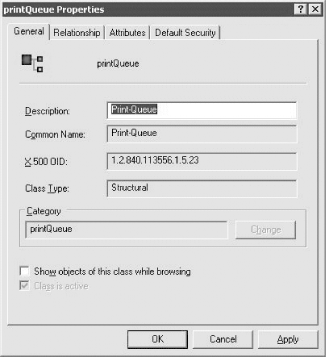
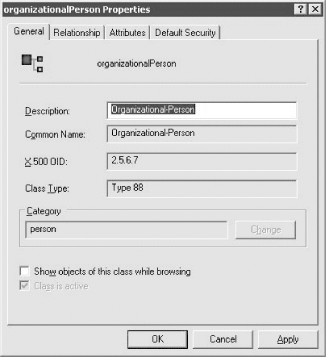
Figure 4-2 shows the property page for the organizationalPerson class. Here, you can see that the unique OID 2.5.6.7 is very different, because within the original X.500 standard, a set of original classes was defined. One of these was organizationalPerson, and this is a copy of that class. Microsoft included the entire base X.500 classes within Active Directory.
Figure 4-2. organizationalPerson Schema class properties
|
Let's dissect an example attribute and class to see what they contain. With that information, you will be able to see what is required when you create a new schema object.


