2.2 Building Blocks
Now that we've shown how objects are structured and referenced, let's look at the core concepts behind Active Directory.
2.2.1 Domains and Domain Trees
Active Directory's logical structure is built around the concept of domains introduced in Windows NT 3.x and 4.0. However, in Active Directory, domains have been updated significantly from the flat and inflexible structure imposed by Windows NT. An Active Directory domain is made up of the following components:
An X.500-based hierarchical structure of containers and objects
A DNS domain name as a unique identifier
A security service, which authenticates any access to resources via accounts in the domain or trusts with other domains
One or more policies that dictate how functionality is restricted for users or machines within that domain
A domain controller (DC) can be authoritative for one and only one domain. Currently it is not possible to host multiple domains on a single DC. For example, Mycorp Company has already been allocated a DNS domain name for their company called mycorp.com, so they decide that the first Active Directory domain that they are going to build is to be named mycorp.com. However, this is only the first domain in a series that needs to be created, and mycorp.com is in fact the root of a domain tree.
The mycorp.com domain itself, ignoring its contents, is automatically created as the root node of a hierarchical structure called a domain tree. This is literally a series of domains connected together in a hierarchical fashion, all using a contiguous naming scheme. So, when Finance, Marketing, and Sales each wants its own domain, the names become finance.mycorp.com, mktg.mycorp.com, and sales.mycorp.com. Each domain tree is called by the name given to the root of the tree; hence, this domain tree is known as the mycorp.com tree, as illustrated in Figure 2-2. You can also see that we have added further domains below sales, for pre-sales and post-sales.
Figure 2-2. The mycorp.com domain tree
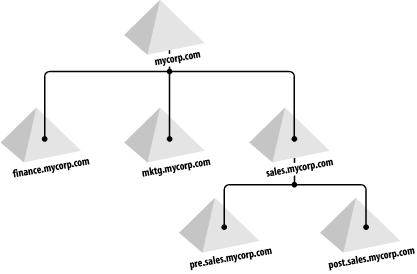
You can see that in Mycorp's setup, we now have a contiguous set of domains that all fit into a neat tree. Even if we had only one domain, it would still be a domain tree, albeit with only one domain.
Trees ease management and access to resources, as all the domains in a domain tree trust one another implicitly. Put much more simply, the administrator of finance.mycorp.com can allow any user in the tree access to any of the resources in the finance domain that the administrator wishes. The object accessing the resource does not have to be in the same domain. This is equivalent to Windows NT 4.0's complete trust model.
|
2.2.2 Forests
Now let's say that Mycorp also has a subsidiary business called Othercorp. The DNS domain name allocated and used by Othercorp is othercorp.com. Remember that when the mycorp.com domain was first created, a domain tree was also created with mycorp.com as the root. In fact, a new forest was also automatically created with one tree as a member: the mycorp.com domain tree. A forest consists of a number of discontinuous domain trees that all trust one another in the same manner that domains in a tree do. In other words, the trusts are transitive: if A trusts B and B trusts C, this implies that A trusts C as well. Forests are named after the domain that is created when creating a new forest, also known as the forest root domain. The forest root domain is important because it has special properties.
|
In Othercorp's case, all you would need to do is create the root of the othercorp.com tree as a member of the existing forest; thus, othercorp.com and mycorp.com can exist together and share resources. Typically, individual companies implement their own forest, and in this configuration, you would want to employ a forest trust to provide seamless access. A forest trust is a new type of trust in Windows Server 2003 that allows an administrator to create a single transitive one-way or two-way trust between two forest root domains. This trust allows all the domains in one forest to trust all the domains in another forest, and vice versa. Obviously, in this example, we wanted othercorp.com to be able to access mycorp.com's resources and vice versa. This doesn't have to be the case; each could have domain trees in its own separate forest with no communication between them. Thus, the forest containing the mycorp.com and othercorp.com domain trees is known as the mycorp.com forest, in which mycorp.com is the forest root.
If you have business units that are independent and in fact wish to be isolated from each other, then you must not combine them in a single forest. If you simply give each business unit its own domain, these business units are given the impression that they are autonomous and isolated from each other. However, in Active Directory, this level of autonomy and isolation can be achieved only through separate forests. This is also the case if you need to comply with regulatory or legal isolation requirements.
2.2.3 Organizational Units
Having covered the large-scale (domains, trees, and forests) view of Active Directory, we'll now talk about the small scale. When you look inside an Active Directory domain, you will see a hierarchical structure of objects. This hierarchy is made up of objects that can act as containers and objects that cannot. The primary type of container that you will create to house objects is called an Organizational Unit (OU). There is another type of container that is actually called a Container that can also be used to store a hierarchy of objects and containers.
Organizational Units have domain-like properties, whereas Containers do not. While both can contain huge hierarchies of containers and objects, an Organizational Unit is a security boundary and can have group policies applied to it. This makes Organizational Units the most significant structural component of a domain.
Let's illustrate this with an example. Imagine that you are the administrator of the pre.sales.mycorp.com domain from Figure 2-2. You have 500 users and 500 computer accounts in the domain. Most of the day-to-day account and machine management is very simple, but the pre-sales engineers' section is currently undergoing restructuring and an extensive recruitment program; people keep being transferred in or hired. You would like to be able to give that group autonomy, by allowing one of the senior engineers to manage its own section of the tree, but it isn't a large enough requirement to justify creating another domain to manage along with the associated domain controllers. You can instead create an Organizational Unit in your hierarchy called Pre-sales Engineers. You then nominate the senior engineer and give him autonomy over that Organizational Unit to create and delete accounts, change passwords, and create other Organizational Units and hierarchies. Obviously, the permissions that the senior engineer would be given would be properly tailored so that he had control over only that Organizational Unit and not the pre.sales.mycorp.com domain tree as a whole. You could do this manually or delegate control using the Delegation of Control wizard, discussed in more depth in Chapter 11.
When you install an Active Directory domain, a number of default Containers (and one Organizational Unit) are created automatically. Some of the Containers include Users, Computers, and so on. If you try to create a new Container, you will find that there is no option to do so from within the Active Directory Users and Computers (ADUC) MMC snap-in. This is intentional; in essentially all cases, you would want to create an Organizational Unit instead of a Container. It is possible to create containers from within scripts, but generally it is not necessary. So, throughout this book, whenever we advocate creating hierarchies within domains, we always use Organizational Units. After all, an Organizational Unit is just a superset of a Container, so there is nothing a Container can do that an Organizational Unit cannot.
Each forest has a child container called Configuration, which itself has a child container called Schema. Both the Configuration and Schema containers are actually hidden from view by default when you view the contents of Active Directory using ADUC. However, you can view a container by specifically connecting to it directly using a tool such as LDP or ADSI Edit, which are available from the Windows Support Tools. These containers are covered in more detail in Chapter 3.
2.2.4 Global Catalog
The Global Catalog (GC) is a very important part of Active Directory because it is used to perform forest-wide searches. As its name implies, the Global Catalog is a catalog of all objects in a forest with a subset of attributes for each object. The GC can be accessed via LDAP over port 3268, and with the GC:// progID in ADSI. The GC is read-only and therefore cannot be updated directly.
In multi-domain forests, typically you first need to perform a query against the GC to locate the objects of interest. Then you can perform a more directed query against a domain controller for the domain the object is in if you want to access all the attributes available on the object.
The attributes that are available in the GC are considered to be members of the partial attribute set (PAS). You can add and remove attributes from the PAS using tools such as the Active Directory Schema snap-in or by modifying the attributeSchema object for the attribute directly in the schema.
|
2.2.5 Flexible Single Master of Operations (FSMO)
Even though Active Directory is a multi-master directory, there are some situations in which there should only be a single DC that can perform certain functions. In these cases, Active Directory nominates one server to act as the master for those functions. There are five such functions that need to take place on one server only. The server that is the master for a particular function or role is known as the Flexible Single Master Operations (FSMO, pronounced "fizmo") role owner.
Of the five roles, three exist domain-wide, and two apply to the entire forest. If there are 12 domains in your forest, there will be 38 FSMO roles: 12 lots of 3 domain-wide FSMOs and 2 single forest-wide FSMOs. The number of different role owners can vary greatly depending on whether you have domain controllers serving multiple roles, as is often the case.
The different FSMO roles are the following:
- Schema Master (forest-wide)
-
The Schema Master role owner is the DC that is allowed to make updates to the schema. No other server can process changes to the schema. The default FSMO Schema Master is the first server to be promoted in the forest.
- Domain Naming Master (forest-wide)
-
The Domain Naming Master role owner is the server that controls changes to the namespace. This server adds and removes domains and is also required to rename or move domains within a forest. Like the Schema Master, this role owner defaults to the first DC you promote in a forest.
- PDC Emulator (domain-wide)
-
For backward compatibility purposes, one Active Directory DC has to act as the Windows NT Primary Domain Controller (PDC). This server acts as the Windows NT master browser, and it also acts as the PDC for down-level clients and Backup Domain Controllers (BDCs). While doing this, it replicates the Windows NT SAM database to Windows NT 4.0 and Windows 3.51 BDCs. It also propagates down to those BDCs password changes and account lockout requests it receives as a normal DC, in addition to propagating password changes and account lockout requests passed to it from down-level clients out to the other DCs via multi-master replication.
- RID Master (domain-wide)
-
A Relative-Identifier (RID) Master exists per domain. Every security principal[2] in a domain has a Security Identifier (SID) that the system uses to uniquely identify that object for security permissions and authentication issues. In a way, this is similar to the GUID that every object has, but the SID is given only to security-enabled objects and is used only for security authentication and verification purposes. While you may log on or authenticate using the SAM account name or Universal Principal Name (UPN) to reference an object, the system will always obtain and authenticate using the SID corresponding to that name.
[2] A security principal is a security-enabled object, like a user, group, or computer that can access resources or be specified in ACLs.
The server or workstation hosting those objects creates unique SIDs for standalone users, groups, and computers on Windows NT/2000/XP workstations and Windows NT/2000/2003 servers in workgroups. In a domain, the SIDs must be unique across the entire domain. As each DC can create security-enabled objects, some mechanism has to exist so that two identical SIDs are never created.
To keep conflicts from occurring, the RID Master maintains a large pool of unique RID values. When a DC is added to the network, it is allocated a subset of 512 values from the RID pool for its own use. Whenever a DC needs to create a SID, it takes the next available value from its own RID pool to create the SID with a unique value.
In this way, the RID Master makes sure that all SIDs in a domain are unique RID values. When a DC's RID pool drops to 100 free values, the DC contacts the RID Master for another set of RID values. The threshold is set to 100 and not 0 to ensure that the RID Master can be unavailable for a brief time without immediately impacting object creations. The RID Master itself is in charge of generating and maintaining a pool of unique values across the entire domain.
- Infrastructure Master (domain-wide)
-
The Infrastructure Master is used to maintain references to objects in other domains, known as phantoms. If three users from Domain B are members of a group in Domain A, the Infrastructure Manager on Domain A is used to maintain references to the phantom Domain B user members.
The Infrastructure FSMO role owner is used to continually maintain the links to phantoms, whenever they are changed or moved on the other domain. When an object in another domain references an object in a domain, it represents that reference by the GUID, the SID (for references to security principals), and the DN of the object being referenced. The Infrastructure FSMO role holder is the DC responsible for updating an object's SID and distinguished name in a cross-domain object reference.

In a single-domain scenario, the Infrastructure FSMO has nothing to do, so it makes no difference whether the FSMO role owner exists on a server running the GC. As soon as you introduce a second domain, the FSMO role owner should be moved to a non-GC-hosting DC.
The Infrastructure FSMO is responsible for fixing up stale references from objects in its domain to objects in other domains ("stale" means references to objects that have been moved or renamed so that the local copy of the remote object's name is out of date). It does this by comparing its (potentially stale) naming data with that of a GC, which automatically receives regular replication updates for objects in all domains and hence has no stale data. The Infrastructure FSMO writes any updates it finds to its objects and then replicates the updated information around to other DCs in the domain. However, if a GC also holds the Infrastructure role, then by definition, that server hosting the GC will always be up to date and will therefore have no stale references. If it never notices that anything needs changing, it will never update any non-GC servers with Infrastructure updates.

If all DCs in the domain are also GCs, no server will have stale references, and the Infrastructure FSMO role is not significant.
FSMO roles can be transferred between domain controllers. You can transfer the Domain Naming FSMO with the Active Directory Domains and Trusts snap-in, the Schema FSMO with the Active Directory Schema snap-in, and the RID, Infrastructure and PDC Emulator FSMOs using the Active Directory Users and Computers snap-in. Alternatively, you can use the NTDSUTIL utility available on Windows 2000 Server and Windows Server 2003 platforms to perform transfers from a command-line.
While the AD snap-ins and NTDSUTIL can trivially transfer a role from one server to another while both servers are available (and this is the normal method before taking a FSMO role owner down for maintenance), there will be some cases in which a FSMO role owner becomes unavailable without previously transferring the role. In this case, you have to use NTDSUTIL to force an ungraceful transfer of the role to a server. When you do this, you will need to bring the original FSMO role owner back, and for a while you will have two competing FSMO role owners on the network until replication takes place.
|
One final word of warning: keep NTDSUTIL and other tools nearby on floppies or a mastered CD of utilities in case of problems. Become familiar with the tools on a working network. If you lose one of the FSMO masters for a domain, you should always make sure that you are in control of the situation and are promoting a new DC to be the relevant master or bringing the DC that is the relevant master back swiftly. The last thing that you will want to do is to lose one of these masters and not notice. While at Leicester University on an earlier beta of Active Directory, the entire set of FSMO roles was lost and couldn't be brought back due to a bug. Loss of the FSMO RID Master meant that after each DC had exhausted its pool of RIDs, no more users could be created. While this will more than likely not happen to you, it illustrates the point that you need to have the tools on hand and be familiar with their usage before a disaster occurs. NTDSUTIL and its quirky interface should be very familiar to you as an administrator. You should certainly get familiar with using it to move FSMO role owners around.
The fSMORoleOwner AttributeThe FSMO role owners are stored in Active Directory in different locations depending on the role. The DN of the server holding the role is actually stored as the fSMORoleOwner attribute of various objects. For the mycorp.com domain, here are the containers that hold that attribute in the following order: PDC Role Owner, Infrastructure Master, RID Master, Schema Master, and Domain Naming Master: LDAP://dc=mycorp,dc=com LDAP://cn=Infrastructure,dc=mycorp,dc=com LDAP://cn=RID Manager$,cn=System,dc=mycorp,dc=com LDAP://cn=Schema,cn=Configuration,dc=mycorp,dc=com LDAP://cn=Partitions,cn=Configuration,dc=mycorp,dc=com The information in the attribute is stored as a DN, representing the NTDS Settings object of the domain controller that is the role owner. So, example contents for this attribute are: CN=NTDS Settings, CN=MYSERVER1, CN=Servers, CN=My Site, CN=Sites, CN=Configuration, DC=mycorp, DC=com |
2.2.6 Windows 2000 Domain Mode
Each Windows 2000 Active Directory domain is said to have one of two modes: mixed mode (the default) or native mode. A mixed-mode domain allows servers running previous versions of Windows NT to exist as domain controllers in the domain. A native-mode domain supports only Windows 2000 domain controllers. Supporting a mixed-mode domain was necessary to allow administrators to update Windows NT domains to Active Directory. A mixed-mode Active Directory domain emulates a Windows NT domain. Remember that with previous versions of Windows NT, networks of servers used to have a Primary Domain Controller (PDC) for a domain that held a writeable copy of the accounts database, and zero or more Backup Domain Controllers (BDCs) that held a read-only accounts database copied from the PDC. For an Active Directory network to support older NT servers, one (and only one) of the Active Directory servers has to act as a PDC. That way, the old servers that look for a PDC will find one.
The Windows NT BDCs periodically request a copy of the accounts database to get the relevant user, group, and computer accounts from Active Directory. While all accounts are passed out, the total attributes for each object are a much smaller subset of the total attributes that Active Directory now holds for these types of objects. When requests from member servers come in for authentication, the Active Directory DC acting as the PDC does the authentication and passes a response back in a manner that the older server would understand (i.e., using Windows NT LAN Manager (NTLM) authentication).
|
Going from mixed mode to native mode is a one-way change. Once you have done this, the only way to go back is to wipe the domain and restore from a backup made prior to the upgrade. Never upgrade to native mode unless you are certain that you will not require any BDCs[3] to exist anywhere in that domain.
[3] Windows NT member servers can still exist in native-mode domains; it's BDCs that can't.
|
The specific differences between mixed mode and native mode are shown in Table 2-2. When you upgrade to native mode, the DCs stop using NTLM protocols to authenticate, the RID pool becomes distributed, and you are allowed for the first time to have a new type of group called "universal" in your Active Directory. The change may be simple to do, but its ramifications are quite wide-ranging.
|
Action |
Mixed mode |
Native mode |
|---|---|---|
|
Replication |
PDC FSMO master sends updates to Windows NT BDCs; same DC acts like ordinary Active Directory DC when communicating with other Active Directory DCs. All Active Directory DCs use multimaster replication between themselves. |
Only Active Directory DCs allowed, so all DCs use multimaster replication. |
|
Authentication |
NT LAN Manager (NTLM) authentication used for communication with Windows NT down-level servers and Kerberos authentication for Active Directory servers. |
Kerberos is used when possible and negotiates down to NTLM only when required by the client. |
|
RID Allocation |
Forced centralized. |
Distributed. |
|
NetBIOS |
Can't disable. |
Can disable. |
|
Group definitions |
Forced; i.e., global groups don't nest, and local groups can exist on individual NT servers. |
Allow administrators to create Active Directory-only group definitions, i.e., universal groups and distribution groups. |
One important difference between native-mode and mixed-mode domains has to do with groups. We'll go in more detail about those differences later in the chapter.
2.2.7 Windows Server 2003 Functional Levels
For the Windows Server 2003 release of Active Directory, Microsoft expanded on the domain mode concept by introducing functional levels. Whereas the domain modes applied only to domains, functional levels apply to both forests and domains. Like the domain mode, functional levels dictate what type of operating systems can run on domain controllers in a domain or forest. Each functional level also has an associated list of features that become available when the domain or forest reaches that particular functional level. We covered many of the features that are available for each functional level in Chapter 1.
Functional levels are introduced into a domain and forest when the first domain controller running Windows Server 2003 is added to a domain. By default the domain functional level is set to "Windows 2000 Mixed", and the forest function level is set to "Windows 2000". As with domain modes under Windows 2000, functional levels can be set via the Active Directory Domains and Trusts snap-in. Also like domain mode, once a functional level has been "elevated" to a higher status, it cannot be changed back.
Table 2-3 and Table 2-4 show the operating systems that are supported by the various domain and forest functional levels.
|
Functional level |
Supported domain controller OS |
|---|---|
|
Windows 2000 Mixed |
Windows NT 4.0 Windows 2000 Windows Server 2003 |
|
Windows 2000 Native |
Windows 2000 Windows Server 2003 |
|
Windows Server 2003 Interim |
Windows NT 4.0 Windows Server 2003 |
|
Windows Server 2003 |
Windows Server 2003 |
|
Functional level |
Supported domain controller OS |
|---|---|
|
Windows 2000 |
Windows NT 4.0 Windows 2000 Windows Server 2003 |
|
Windows Server 2003 Interim |
Windows NT 4.0 Windows Server 2003 |
|
Windows Server 2003 |
Windows Server 2003 |
For more information on upgrading to Windows Server 2003, check out Chapter 14.
2.2.8 Groups
Active Directory supports three group scopes: domain local, domain global, and universal. Each of these groups behaves slightly differently based on which Windows 2000 domain mode or Windows Server 2003 functional level your forest is at. To complicate matters further, each group scope can have two types, distribution and security.
The type is the easiest bit to define. If the type is distribution, the group can effectively be considered a mailing list (a set of users that you can mail all at once). These are known as Distribution Lists in Exchange, and the concept is identical. Security groups can also act as mailing lists. However, security groups can also have Access Control Lists (ACLs) applied to them for Active Directory objects or files and directories. Distribution groups do not support ACLs. Distribution groups are ignored during a user logon, while security groups that a user is a member of are enumerated and checked during logon. So you can add a user to as many mailing lists as you like without affecting logon speed.
The three different scopes of mailing lists and security groups result from the legacy of Windows NT and the introduction of the GC. Global groups and local groups are the direct descendants of Windows NT groups and are stored in the domains they are created in. Universal groups are a new type of group in Active Directory, which are held in the GC and can be applied forest wide.
In order to fully understand how groups work in Active Directory, we will explain the following items in this section:
How Windows NT groups have a bearing on Active Directory
Which groups are available in mixed, native, and Windows Server 2003 functional levels
Which groups each group may contain in mixed, native, and Windows Server 2003 functional levels
How you can nest groups across domain boundaries
What options are available to you for converting between different group scopes in mixed, native, and Windows Server 2003 functional levels
To start with, let's take a look at how Windows NT handles groups.
2.2.8.1 Groups in Windows NT
Back in Windows NT, domains could have two scopes of groups: local and global. Both were security groups. The local group could contain users and global groups. The global group could contain only users. Both could have permissions assigned to them. Administrators typically took advantage of the fact that global groups could nest in local groups. Users went into global groups, and local groups were given access to resources on local machines, such as file servers. Then you simply put the global groups in the appropriate local groups to assign the permissions.
Windows NT groups are important in Windows 2000 mixed domains, as down-level Windows NT BDCs will need to replicate these groups from the Active Directory FSMO PDC role owner. During an upgrade of a PDC from Windows NT to Active Directory, Windows NT local and global groups are migrated to Active Directory local security groups and global security groups, although they still appear as local and global groups to any Windows NT BDCs.
2.2.8.2 Group availability in various functional levels
Table 2-5 shows the groups that you can have at the various functional levels.
|
Scope of group |
Type of group |
Available in W2K Mixed |
Available in W2K Native |
Available in Windows Server 2003 |
|---|---|---|---|---|
|
Domain local |
Security |
Yes |
Yes |
Yes |
|
Domain global |
Security |
Yes |
Yes |
Yes |
|
Universal |
Security |
No |
Yes |
Yes |
|
Domain local |
Distribution |
Yes |
Yes |
Yes |
|
Domain global |
Distribution |
Yes |
Yes |
Yes |
|
Universal |
Distribution |
Yes |
Yes |
Yes |
At first, the only difference appears to be that universal security groups are not available in Windows 2000 mixed mode. Every other group is available in all domain functional levels. The complexity lies in what each group may contain, and this varies depending on the mode of your domain and which domain the group you wish to add comes from.
2.2.8.3 Group nesting in different functional levels
You have a Windows 2000 mixed-mode domain and you want to create and then nest some groups. Table 2-6 is the easiest way to describe the available options.
|
Can contain domain local |
Can contain domain global |
Can contain universal |
|||||
|---|---|---|---|---|---|---|---|
|
Scope |
Type |
Distribution groups |
Security groups |
Distribution groups |
Security groups |
Distribution groups |
Security groups |
|
Domain local |
Distribution groups |
Yes |
Yes |
Yes |
Yes |
Yes |
No group access |
|
Security groups |
No |
No |
Yes |
Yes |
Yes |
No group access |
|
|
Scope |
Type |
Distribution groups |
Security groups |
Distribution groups |
Security groups |
Distribution groups |
Security groups |
|
Domain global |
Distribution groups |
No |
No |
Yes |
Yes |
No |
No group access |
|
Security groups |
No |
No |
No |
No |
No |
No group access |
|
|
Universal |
Distribution groups |
No |
No |
Yes |
Yes |
Yes |
No group access |
|
Security groups |
No group access |
No group access |
No group access |
No group access |
No group access |
No group access |
|
Two points to note: first, universal security groups are evidently ot availnot available in mixed mode, which corresponds with Table 2-5. Second, domain global security groups can contain only users in mixed mode.
When you convert a domain to Windows 2000 native or Windows Server 2003 functional level, certain groups become available, but you do not lose any group nesting options that you had in mixed mode. The new options can be summarized quite easily as follows:
Domain local security groups can contain domain local security and domain local distribution groups.
Domain global security groups can contain domain global security and domain global distribution groups.
Universal security groups become available.
Let's look at this summary using a table. Consider Table 2-7, with the extra options available only in Windows 2000 Native mode and Windows Server 2003 emphasized in bold.
|
Can contain domain local |
Can contain domain global |
Can contain universal |
|||||
|---|---|---|---|---|---|---|---|
|
Scope |
Type |
Distribution groups |
Security groups |
Distribution groups |
Security groups |
Distribution groups |
Security groups |
|
Domain local |
Distribution groups |
Yes |
Yes |
Yes |
Yes |
Yes |
Yes |
|
Security groups |
Yes |
Yes |
Yes |
Yes |
Yes |
Yes |
|
|
Scope |
Type |
Distribution groups |
Security groups |
Distribution groups |
Security groups |
Distribution groups |
Security groups |
|
Domain global |
Distribution groups |
No |
No |
Yes |
Yes |
No |
No |
|
Security groups |
No |
No |
Yes |
Yes |
No |
No |
|
|
Universal |
Distribution groups |
No |
No |
Yes |
Yes |
Yes |
Yes |
|
Security groups |
No |
No |
Yes |
Yes |
Yes |
Yes |
|
While these tables are fine, there is one other complicating factor that needs to be taken into account: cross-domain group membership.
2.2.8.4 Group membership across domain boundaries
Since universal groups are held in the GC, you can add universal groups from one domain to universal groups from another domain. Restrictions are shown in Table 2-8 and Table 2-9. Two items are listed as "Special," which signifies distribution groups in Windows 2000 Mixed, and distribution and security groups in Windows 2000 Native and Windows Server 2003.
|
Group scope |
Can contain users and computers from |
Can contain domain local groups from |
||
|---|---|---|---|---|
|
Same domain |
Different domain |
Same domain |
Different domain |
|
|
Domain local groups |
Yes |
Yes |
Special |
No |
|
Domain global groups |
Yes |
No |
No |
No |
|
Universal groups |
Yes |
Yes |
No |
No |
|
Can contain domain global groups from |
Can contain universal groups from |
|||
|---|---|---|---|---|
|
Group scope |
Same domain |
Different domain |
Same domain |
Different domain |
|
Domain local groups |
Yes |
Yes |
Yes |
Yes |
|
Domain global groups |
Special |
No |
No |
No |
|
Universal groups |
Yes |
Yes |
Yes |
Yes |
Table 2-8 and Table 2-9 work in conjunction with Table 2-6 and Table 2-7. You would normally check which groups may be members from either Table 2-6 or Table 2-7 (if any) and then cross reference with Table 2-8 and Table 2-9 to identify what options you have across domain boundaries.
2.2.8.5 Converting groups
Converting groups from one scope to another is available only in Windows 2000 Native and Windows Server 2003. There are limits on what groups can be converted based on the existing members of the group and the current type and scope of the group. The former should be fairly obvious based on the existing restrictions that we've shown in Table 2-7. The conversion process cannot work if the existing group members would not be valid members of the new group type once the conversion had taken place. However, when you upgrade to Windows 2000 Native or Windows Server 2003, you gain the ability to convert between groups based on these restrictions:
Security groups can be converted to distribution groups.
Distribution groups can be converted to security groups.
A domain local group can be converted to a universal group provided that the domain local group is not already a member of another domain local group.
A domain global group can be converted to a universal group provided that the domain global group does not contain any other domain global groups.
2.2.8.6 Wrap-up
While this all looks complicated, using the tables helps a lot. Ultimately you need to decide how long you will be staying in Windows 2000 mixed mode before going to Windows 2000 native or Windows Server 2003 so that you can decide what sort of groups you are looking for. You also have to consider in Windows 2000 native and Windows Server 2003 that the more universal groups you add, the larger the GC, and the longer members of those groups will take to log on. Chapter 8 and Chapter 10 explain more about when and how to use groups in your designs.


