6.4 Delegation Options
Now that we've covered what Active Directory uses DNS for, we will review some of the options for setting up who is authoritative for the Active Directory-related zones. Ultimately, the decision boils down to whether you want to use your existing DNS servers or different servers, such as the domain controllers, to be authoritative for the zones. There are many factors that can affect this decision, including:
Political turf battles between the AD and DNS teams
Initial setup and configuration of the zones
Support and maintenance of the zones
Integration issues with existing administration software and practices
We will look at each of these factors as they apply to delegating the AD zones. Other slight variations of these options do exist, but we will discuss only the basic cases.
6.4.1 Not Delegating the AD DNS Zones
The first impulse of any cost-conscious organization should be to determine whether the existing DNS servers can be authoritative for the AD zones. That would entail populating all the necessary resource records required by each DC. While this sounds fairly trivial, there are several issues to be aware of.
6.4.1.1 Political factors
By utilizing the existing DNS servers for the AD DNS zones, the AD administrators will likely not have the same level of control as they would if the zones were delegated and managed by them. While it does limit the scope of control for a crucial service used by Active Directory, some AD administrators may find it a blessing!
6.4.1.2 Initial setup and configuration
The initial population of the AD resource records can be burdensome depending on how you manage your resource records and how easy it will be for you to inject new ones. The domain controllers try to register their resource records via DDNS on a periodic basis. Most organizations do not allow just any client to make DDNS updates due to the potential security risks. For that reason, you'll need to configure your existing DNS servers to allow the domain controllers to perform DDNS updates. And unless you restrict which zones the domain controllers can send DDNS updates for, it opens a potential security hole. If a domain controller can update any zone, an AD administrator could conceivably perform individual updates for any record in any zone while logged onto that DC. This should not typically be a problem, but depending on how paranoid the DNS administrators are, it could be a point of contention.
6.4.1.3 Support and maintenance
Assuming the existing DNS servers are stable and well supported (as they tend to be in most organizations), name resolution issues should not be a problem for AD DCs or other clients that are attempting to locate a DC via DNS. Ongoing maintenance of the DC resource records can be an issue, as pointed out previously. Each time you promote a new DC in the forest, you'll need to make sure it is allowed to register all of its records via DDNS. The registration of these records could be done manually, but due to the dynamic nature of the AD resource records, they would have to be updated on a very frequent basis (potentially multiple times a day). Yet another option is to programmatically retrieve the netlogon.dns file from each domain controller on a periodic basis and perform the DDNS updates from a script. In large environments, the manual solution will probably not scale, and either DDNS or a programmatic solution will need to be explored.
6.4.1.4 Integration issues
When Windows 2000 Active Directory was first released in 1999, this was more of a problem than it is today, but if you are running older versions of DNS server or administration software, it may not support SRV records or underscores in zone names (e.g., _msdcs.mycorp.com). Upgrading to the latest versions should be a priority in this case.
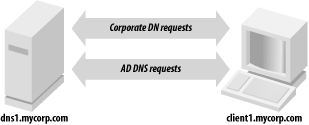
Figure 6-1 shows how the client request process is straightforward when the AD DNS zones are not delegated. Clients point at the same DNS servers they always have.
Figure 6-1. Client request flow when the AD DNS zones are not delegated
6.4.2 Delegating the AD DNS Zones
While at first glance it may seem pretty straightforward to support AD DNS zones in your existing DNS infrastructure, it can cause difficulties depending on your environment. Perhaps the most straightforward option is simply to delegate the AD zones to the domain controllers to manage. And if you use AD Integrated DNS zones, the maintenance becomes even easier. After you've done the initial creation of the zones by promoting a DC and adding the DNS service, the records are stored in AD and distributed to the other DCs via replication.
6.4.2.1 Political factors
These days most organizations have a central DNS team that manages and supports name resolution. If you make the decision to delegate the AD DNS zones to domain controllers, for example, a significant part of name resolution for your clients will not be done on the existing corporate servers. This can make the DNS administrators uncomfortable and rightly so.
6.4.2.2 Initial setup and configuration
The initial setup to delegate the AD DNS zones is straightforward. An NS record and any necessary glue recordsfor example, an A record for the server to which you're delegatingneed to exist on the parent zone pointing to the servers that will be authoritative for the zones. The rest of the configuration must be done on the servers that are going to support the AD DNS zones. If that is one or more domain controllers, you will only need to add the DNS service and create the zone(s) on those servers.
6.4.2.3 Support and maintenance
Especially if you are using AD-integrated zones, ongoing support and maintenance of the AD DNS zones is very minimal. In fact, since the domain controllers can use DDNS to update each other, this is one of the primary benefits of using this method.
6.4.2.4 Integration issues
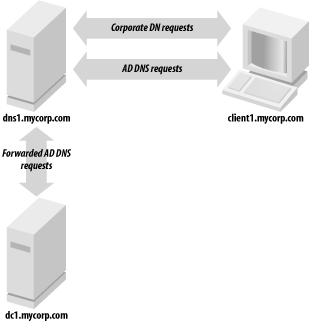
Unless you already run Windows DNS Server, it is unlikely you'll be able to manage the AD DNS zones in the same manner as your primary DNS. Figure 6-2 illustrates that by delegating the AD DNS zones, you can still have clients point to the same DNS servers they do today. A variation of this approach would be to point the clients at the AD DNS servers and configure forwarding as described in the next section.
Figure 6-2. Client request flow when delegating the AD DNS zones
6.4.3 DNS for Standalone AD
Another scenario that is worth mentioning is creating a standalone Active Directory environment. By standalone, we mean an environment that can be set up without requiring your DNS admins to either create or delegate zones on the corporate DNS servers. This is often needed when setting up lab or test forests, which may be short-lived. Figure 6-3 shows that the resolver for the clients must be pointed to the AD DNS servers in this scenario or they will not be able to locate any domain controllers for the forest.
Figure 6-3. Client request flow in a standalone AD environment
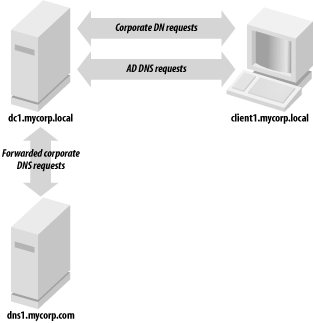
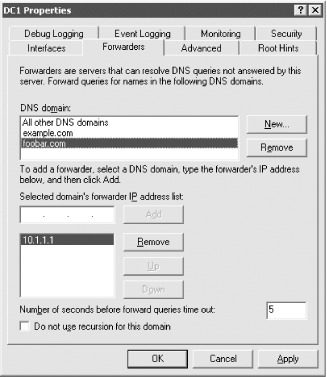
To set up a standalone environment, you simply need to install the DNS service on one or more domain controllers in the forest, add the DNS zones for the AD domains (for example mycorp.local), and then configure the DNS server to forward unresolved queries to one or more of your existing corporate DNS servers. Figure 6-4 and Figure 6-5 show the screens from the DNS MMC snap-in for Windows 2000 and Windows Server 2003, respectively, that allow you to configure forwarders. Finally, you need to configure any clients of the mycorp.local forest to point their primary DNS resolver at the IP address of dc1.mycorp.local. When client1 makes a DNS request, it would first be sent to dc1.mycorp.local. If dc1 can resolve, it will return a response; if not, it will forward the query to dns1.mycorp.com, which will reply with an answer to dc1, who will then send the reply to client1.
Figure 6-4. Forwarders configuration screen in the Windows 2000 DNS MMC snap-in
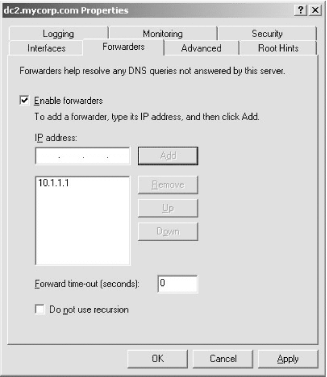
Figure 6-5. Forwarders configuration screen in the Windows Server 2003 DNS MMC snap-in
The great thing about this configuration is that it requires nothing to be set up on the existing DNS servers. Since you will need to modify the DNS resolvers that clients point to, you may want to look at using a Group Policy Object (GPO). In Windows Server 2003, you can configure client DNS settings through GPOs for Windows Server 2003 servers and Windows XP workstations. The new settings allow you to control things such as client DNS suffix, DNS resolvers, and DDNS behavior.
|

Conditional ForwardingConditional forwarding is a new feature available in Windows Server 2003; it gives administrators much more flexibility over how forwarding is handled than was available under Windows 2000. Figure 6-4 shows the forwarders configuration screen in the Windows 2000 MMC snap-in. It allows you to set up one or more IP addresses to forward all requests that cannot be handled by the local DNS server. Figure 6-5 shows the same configuration screen, but on Windows Server 2003. As you can see, we configured forwarding based on the domain name being queried.
Conditional forwarding allows you to create a more efficient resolution topology by sending queries directly to servers responsible for the zones instead of using recursive queries to the Internet. |


