12.3 Creating Schema Extensions
There are three ways to modify the schema: through the Schema Manager MMC, using LDIF files, or programmatically using ADSI. We will not cover the use of the Schema Manager MMC very heavily here since it is fairly straightforward to use, although we will cover its use in managing the Schema FSMO role. Typically you should not use the Schema Manager MMC to extend the schema and instead use LDIF files or ADSI. Most vendors provide LDIF files, which contain the schema extensions that you can run at your leisure. We cover extending the schema with ADSI in Chapter 24.
12.3.1 Running the Schema Manager MMC for the First Time
The Schema Manager MMC is not available from the Administrative Tools menu like the other Active Directory snap-ins. To use it, you need to first register the Dynamic Link Library (DLL) file for the MMC snap-in by typing the following command at the command prompt:
regsvr32.exe schmmgmt.dll
You can then start the Schema Manager console by creating a custom MMC and adding the Active Directory Schema snap-in to it. To create a console, go to the Run menu from the Start button, type mmc.exe, and click OK. Then in the empty MMC, choose the Console menu and select Add/Remove Snap-in. From here, you can click the Add button and select Active Directory Schema as the item. If you then click the Add button, followed by Close, and then the OK button, that will give you an MMC hosting the Schema Manager snap-in for you to use and later save as required.
Allowing the Schema to be modified on Windows 2000Under Windows 2000, there was a safeguard you had to bypass for the Schema FSMO to allow you to modify the schema. With Windows 2003 Active Directory, this is no longer required. First, the user who is to make the changes has to be a member of the Schema Admins group, which exists in the forest root domain. Second, you need to make a change to the registry on the DC that you wish to make the changes on. The fastest and probably best solution is to use the checkbox from the Schema Master MMC, shown later in the chapter. Alternatively, on the DC itself, open up the registry using regedit32.exe or regedit.exe and locate the following key:
Now, create a new REG_DWORD value called "Schema Update Allowed" (no quotes) and set the value to 1. That's all you need to do. You now can edit the Schema on that DC. Another alternative method for making the change is to copy the following three lines to a text file with a REG extension and open it (i.e., execute it) on the DC where you wish to enable schema updates. This will automatically modify the registry for you without the need to open the registry by hand: REGEDIT4 [HKEY_LOCAL_MACHINE\SYSTEM\CurrentControlSet\Services\NTDS\Parameters] "Schema Update Allowed"=dword:00000001 Once you've modified the registry on a particular DC and placed the user account that is to make the changes into the Schema Admins group, any changes you make to the schema on that DC will be accepted. If you wish changes to be accepted on any DC, you need to modify the registry correspondingly on every DC. |
12.3.2 The Schema Cache
Each domain controller maintains a copy of the entire schema in memory. This is known as the schema cache. It is used to provide a very rapid response when requesting a schema object OID from a name.
The schema cache is actually a set of hash tables of all the classSchema and attributeSchema objects known to the system, along with specific indices (attributeID and lDAPDisplayName for attributeSchema objects and governsID, lDAPDisplayName, and mapiID for classSchema objects) for fast searching.
The hash table sizes are dynamic in terms of the amount of memory that is allocated for the stored objects. Initially, the tables are set to a size capable of holding 2,048 attributes and 1,024 classes. The system keeps count of the number of attributes and classes in the schema and is responsible for making sure that the table sizes are kept greater than twice the number of attributes (for the attribute hash tables) or twice the number of classes (for the class hash tables). If at any time the number of attributes or classes increases enough that the table sizes are not at least twice as big, as required, the cache table sizes are incremented in blocks of 2,048 or 1,024, as appropriate.
The objects are loaded into the schema cache when the DC is booted and then five minutes after an update. However, if you need the schema cache to be updated immediately for some reason, say after the creation of a new object or attribute class, you can force an immediate reload of the cache.
As we said, the system holds a copy in memory solely to aid in searches that require quick and regular access to the schema. If the system were to keep both the cache and the actual Active Directory schema in parity, it could be costly in terms of performance; making changes to the schema is an intensive process due to the significant checking and setting of object defaults by the system upon creation of new objects. Consequently, there is a time delay between changes made to the underlying schema and the cached copy. Typically the schema tends to be updated in bunches. This is likely to be due to applications creating multiple classes for their own purposes during an installation or even normal operation. If classes are still being created after five minutes, the system updates the cache in five-minute increments after the first five-minute update has completed. This continues for as long as schema class updates continue.
During the intervening five-minute period, when the underlying schema has been modified but the cache has yet to be updated, instances of objects or attributes of the new classes cannot be created. If you try to create an object, the system will return an error. This is due to the fact that object creations refer to the cache and not the underlying schema. To get around this problem, you can force an immediate reload of the cache by adding a special operational attribute to the Root DSE. We'll cover this later when we consider how to use the Schema Manager interface to create and delete classes. In a similar vein, if you mark an object as defunct, this will not take effect until the cache is reloaded.
While you cannot create new instances, since this would reference the schema cache, you can add new attributes or classes that you have created to other classes that you are creating. For example, if you create a new attribute, you can immediately add it to a new class. Why? Because the attribute or class is added using an OID, and the system thus doesn't need to do any lookups in the schema cache. While all system checks by Active Directory confirming that the data is valid (covered in detail a couple of sections later) will still be performed, the checks are performed on the schema in Active Directory, not in the cache. If this weren't the case, you would have to wait for at least five minutes before any new attributes that you created could be added to new classes, and that would be unacceptable.
12.3.3 The Schema FSMO
The Schema FSMO is the server where changes to the schema take place so that multiple users or applications cannot modify the schema on two or more different domain controllers at the same time. When Active Directory is installed in an enterprise, the first server in the first domain in the forest (the forest root domain) becomes the nominated Schema FSMO. Later, if changes need to be made to the schema, they can be made at the current master.
Let's take two servers, Server A and Server B. Server A is the current Schema FSMO. When the role is to be transferred, Server A modifies the fSMORoleOwner attribute to represent Server B and then passes that attribute to Server B along with any other schema changes that Server B may not yet have seen. Server B then applies any schema changes it hasn't seen, including the fSMORoleOwner attribute, and thus becomes the new Schema FSMO. This new role is replicated out when the Schema NC data is next replicated.
You can transfer the role from an existing Schema Master in three ways: via the Schema Manager MMC, via the NTDSUTIL tool, or via code that makes use of ADSI.
Using the Schema Manager MMC to make the changes is easy. First you need to connect to the server that is to be the new master (dc2.mycorp.com), then you need to force the role to change to the server to which you are now connected. To start the process, simply run the MMC and right-click Active Directory Schema in the lefthand scope pane. From the context menu that drops down, select Change Domain Controller. A dialog box similar to Figure 12-1 then appears.
Figure 12-1. Changing the connected server
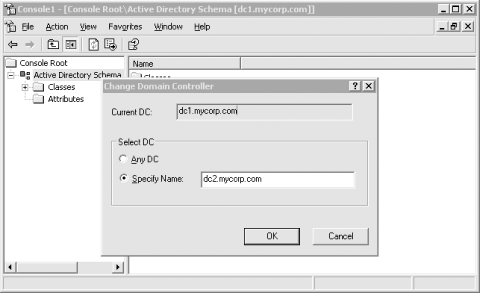
You can now select a new server to connect to. You should transfer any FSMO roles (not just the Schema Master) to a new server before shutting a server down for an extended period, such as for maintenance. You may wish just to transfer the role to any other server, rather than to a specific one, which is why there is an option to connect to any other server. Once that has been done, right-click on Active Directory Domains Schema in the scope pane and select Operations Master from the context menu. A dialog box will appear showing the current DC holding the Schema FSMO role, as well as an option to change the role to the currently connected server. Figure 12-2 shows this dialog box.
Figure 12-2. Changing the Schema FSMO from the MMC
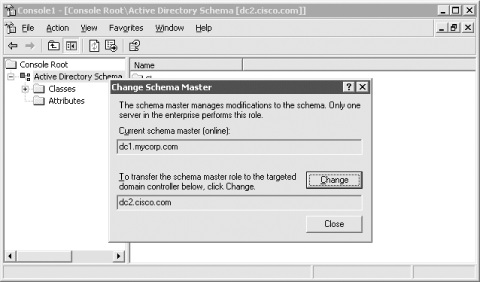
Click the Change button and change the schema role. There is also an option to modify the registry on the DC you are currently connected to so that schema changes will be allowed on this new Schema FSMO.
If a server corruption or crash takes the Schema FSMO out of the enterprise, no server will automatically assume the role. In this situation, you can use similar methods to force the Schema FSMO role on a server. It is possible to force a server to assume the role, but this can cause data corruption if the old server comes back online. This is covered later under Section 12.4.
If you are writing ADSI scripts to manipulate the schema, just connect to the Schema FSMO directly and make the changes there, rather than worrying about checking to see if the server you wish to make the changes on is the Schema FSMO. We'll show you how to do that later in the book.
12.3.4 Using LDIF to Extend the Schema
One of the most commonly used ways to extend the schema is with LDIF. The LDAP Data Interchange Format was defined in RFC 2849 (http://www.ietf.org/rfc/rfc2849.txt) and provides a way to represent directory data via a human-readable text file. You can export data from Active Directory in LDIF format, and you can also add, modify and delete data with LDIF. The LDIFDE program comes installed as part of any Windows 2000 or Windows 2003 Server and can be used to import and export LDIF data. To import the contents of an LDIF file, run the following command:
c:> ldifde -v -i -f import.ldf
Replace import.ldf with the name of the LDIF file you want to import.
LDIF files contain one or more entries, with each entry containing one or more attributes that should be added, replaced or removed. The format is straightforward but very strict. The following is an LDIF that would add a group object to the Users container:
dn: cn=mygroup,cn=users,dc=mycorp,dc=com
changetype: add
objectclass: group
description: My Group
member: cn=administrator,cn=users,dc=mycorp,dc=com
member: cn=guest,cn=users,dc=mycorp,dc=com
The first line must be the DN of the object. The second line is changetype:, which is one of add, modify, or delete. When using add as in this case, we must specify all the mandatory attributes for the object. For group objects, we need to specify only objectClass. The cn attribute is not required because it is already specified as part of the DN.
It is easy to create portable schema extensions using LDIF files. Simply create an LDIF file with all the necessary classSchema or attributeSchema object additions or modifications, and administrators using any LDIF-based client can easily import it into Active Directory. The following LDIF shows how to create an attribute and auxiliary class that contains the new attribute.
dn: cn=myCorp-ITUserBuilding,cn=schema,cn=configuration,dc=mycorp,dc=com
changetype: add
attributeID: 1.2.3.4.111.1
attributeSyntax: 2.5.5.1
oMSyntax: 127
isSingleValued: TRUE
lDAPDisplayName: myCorp-ITUserBuilding
objectClass: attributeSchema
dn:
changetype: modify
add: schemaUpdateNow
schemaUpdateNow: 1
-
dn: cn=myCorp-ITUser,cn=schema,cn=configuration,dc=mycorp,dc=com
changetype: add
objectclass: classSchema
description: Class for MyCorp Employees
lDAPDisplayName: myCorp-ITUser
governsID: 1.2.3.4.111.2
objectClassCategory: 3
subClassOf: top
mayContain: myCorp-ITUserBuilding
dn:
changetype: modify
add: schemaUpdateNow
schemaUpdateNow: 1
-
As we mentioned before, all mandatory attributes for attributeSchema and classSchema objects must be specified. The order of the additions is also important. Since we wanted to add the new attribute to the class, we needed to create it first. We also needed to reload the schema cache before attempting to reference the new attribute or a failure would have occurred. When each entry is added or modified, it is only committed to memory, not disk. When we reference the attribute as part of the mayContain for the new class, the attribute must also have been written to the disk. To accomplish that, we perform a modify operation against the Root DSE (i.e., blank DN) and write to the schemaUpdateNow attribute.
The benefits of using LDIF to implement schema extensions are two-fold. First, since LDIF is human-readable with a well-defined syntax, it is easy for those that need to implement the extensions to see what is going to be done. If you use a program that the administrator cannot see the source for, they will not have as much visibility into what changes are made. Along the same lines, LDIF files provide a crude documentation mechanism for schema extensions. Since LDIF files are just text-based files, schema administrators can archive the files on a server and have instant access to exactly what changes were made for certain applications.
12.3.5 Checks the System Makes When You Modify the Schema
When you create a new class or attribute, the system performs some basic checks within Active Directory to see if the data is valid, in addition to any checks you provide. The checks for attributes are shown in Table 12-1, and those for new classes are in Table 12-2.
|
Attribute |
System check performed |
|---|---|
|
lDAPDisplayName |
Must be unique in Active Directory. |
|
attributeId |
Must be unique in Active Directory. |
|
mapiId |
If present, must be unique in Active Directory. |
|
schemaIDGUID |
Must be unique in Active Directory. |
|
attributeSyntax |
Must correlate with oMSyntax. |
|
oMSyntax |
Must correlate with attributeSyntax. |
|
rangeLower |
If rangeUpper is present as well, the following should be true: rangeUpper > rangeLower. |
|
rangeUpper |
If Range-Lower is present as well, thefollowing should be true: rangeUpper > rangeLower. |
|
Attribute |
System check performed |
|---|---|
|
lDAPDisplayName |
Must be unique in Active Directory. |
|
governsId |
Must be unique in Active Directory. |
|
schemaIDGUID |
Must be unique in Active Directory. |
|
subClassOf |
Checks to make sure that the X.500 specifications are not contravened, (i.e., that an auxiliary class cannot inherit from a structural class, and an abstract class can only inherit from another abstract class). All classes defined in this attribute must already exist. |
|
rDNAttID |
Must have a Unicode string as its syntax. |
|
mayContain |
All classes defined in this attribute must already exist. |
|
systemMayContain |
All classes defined in this attribute must already exist. |
|
mustContain |
All classes defined in this attribute must already exist. |
|
systemMustContain |
All classes defined in this attribute must already exist. |
|
auxiliaryClass |
All classes defined in this attribute must already exist and must have an objectClassCategory indicating either 88-Class or Auxiliary. |
|
systemAuxiliaryClass |
All classes defined in this attribute must already exist and must have an objectClassCategory indicating either 88-Class or Auxiliary. |
|
possSuperiors |
All classes defined in this attribute must already exist and must have an objectClassCategory indicating either 88-Class or Auxiliary. |
|
systemPossSuperiors |
All classes defined in this attribute must already exist and must have an objectClassCategory indicating either 88-Class or Auxiliary. |
12.3.6 Making Classes and Attributes Defunct
It is not possible to delete objects from the schema, because to delete a class or attribute, the system would have to perform a forestwide cleanup operation to make sure that no instances of the object existed. Due to the distributed nature of Active Directory, this is virtually impossible. If your forest is running at Windows 2003 functional level, you can redefine classes and attributes. This is a new feature in Windows 2003, which allows you to correct potential mistakes you may have made or to repurpose classes or attributes you are no longer using.
If you create a class or attribute of some sort and decide that you don't want it any more, you can simply make it defunct. This is achieved by setting the isDefunct attribute on the schema object to True. For this to succeed for an attribute, the system makes sure that the attribute is not a mandatory or optional attribute of any nondefunct class. For this to succeed for a class, the system makes sure that the class is not a parent of any other nondefunct class, is not an auxiliary class to any other nondefunct class, and is not a possible superior of any other non-defunct class. While an object is defunct, no changes can be made to it. If you then decide that you want to use the schema object again, set the value of isDefunct to False. The checks that occur when doing this are the same as for creating a new schema object of the appropriate type in the first place.
When a schema object is defunct, attempts to create instances of it fail as if it doesn't exist. The same applies to modifying existing instances, whether an attribute on an object or an object itself, as they will appear not to exist. You can, however, delete instances of defunct classes. Searches for defunct classes will happily succeed, as will searches on nondefunct classes that contain defunct attributes. All attributes, defunct or not, can be read. This is all required to enable the administrator or application author to clean up and remove the now defunct object instances and all values from now defunct attributes.
|


