14.1 JBoss
Although numerous commercial J2EE server offerings are available, few of them (as of this writing) have releases built specifically for Mac OS X. Many have Linux and Unix versions of their products, but Mac OS X offerings remain sparse. This situation is expected to change as Mac OS X gains momentum, but for now it creates a problem for enterprise Java developers. To deal with this problem, you need to obtain a server that can be built from source, and therefore optimized for Mac OS X. Since commercial offerings don't make source available, JBoss quickly rises to the top of the heap. Freely available and completely open source, JBoss works beautifully on Mac OS X. This chapter will show you how to get it running.
14.1.1 Downloading a Release
You can download releases of JBoss from http://www.jboss.org/. The release used here is 3.0.4, which uses the default JBoss web server.
|

You should download the JBoss-3.0.4.zip file, weighing in at 28.7 MB. This release of JBoss includes a web (HTTP) server, a JSP and servlet container, and support for EJB, CMP 2.0, RMI, IIOP, Clustering, JTS, and JMX.
Acronym FrenzyLest all the acronyms overwhelm you, here is a brief rundown of some of the common ones in J2EE:
|
14.1.2 Installation
Assuming you've downloaded the JBoss-3.0.4.zip file into your home directory (~), execute the commands below to expand the JBoss distribution:
[Localhost:~] wiverson% ls -l jboss-3.0.4.zip
-rw-r--r--  1 wiverson  staff  28711934 Nov 20 16:33 jboss-3.0.4.zip

[Localhost:~] wiverson% sudo mkdir /usr/local/jboss

[Localhost:~] wiverson% sudo chown wiverson:staff /usr/local/jboss

[Localhost:~] wiverson% cd /usr/local/jboss

[Localhost:/usr/local/jboss] wiverson% cp ~/jboss-3.0.4.zip .

[Localhost:/usr/local/jboss] wiverson% unzip jboss-3.0.4.zip
Archive:  jboss-3.0.4.zip
   creating: jboss-3.0.4/
   creating: jboss-3.0.4/bin/
   creating: jboss-3.0.4/client/
   creating: jboss-3.0.4/docs/
   creating: jboss-3.0.4/docs/dtd/
   creating: jboss-3.0.4/docs/examples/
   creating: jboss-3.0.4/docs/examples/jca/
   creating: jboss-3.0.4/lib/
   creating: jboss-3.0.4/server/
    ...
    omitted for brevity
    ...
  inflating: jboss-3.0.4/docs/tests/overview-frame.html
  inflating: jboss-3.0.4/docs/tests/overview-summary.html
  inflating: jboss-3.0.4/docs/tests/stylesheet.css

[Localhost:/usr/local/jboss] wiverson% cd /usr/local/jboss/jboss-3.0.4

[Localhost:local/jboss/jboss-3.0.4] wiverson% mv ./* ../

[Localhost:local/jboss/jboss-3.0.4] wiverson% cd ..

[Localhost:/usr/local/jboss] wiverson% rmdir jboss-3.0.4

[Localhost:/usr/local/jboss] wiverson% ls
bin             docs            lib
client          jboss-3.0.4.zip server
You'll need to replace the bolded username (wiverson) with the username you want to run JBoss as. This name could be a special user account you created just for this purpose, or your own user account. When you are done, you'll have a complete JBoss installation in the /usr/local/jboss/ directory.
|
14.1.3 Starting JBoss
To start JBoss, simply enter the following command:
[Localhost:/usr/local/jboss] wiverson%  /usr/local/jboss/bin/run.sh
===============================================================================

  JBoss Bootstrap Environment

  JBOSS_HOME: /usr/local/jboss

  JAVA: java

  JAVA_OPTS:  -Dprogram.name=run.sh

  CLASSPATH: /usr/local/jboss/bin/run.jar:/lib/tools.jar

===============================================================================

18:09:09,910 INFO  [Server] JBoss Release: JBoss-3.0.4 CVSTag=JBoss_3_0_4
18:09:10,091 INFO  [Server] Home Dir: /usr/local/jboss
18:09:10,093 INFO  [Server] Home URL: file:/usr/local/jboss/
18:09:10,096 INFO  [Server] Library URL: file:/usr/local/jboss/lib/
18:09:10,105 INFO  [Server] Patch URL: null
18:09:10,107 INFO  [Server] Server Name: default
...
omitted for brevity
...
18:09:53,489 INFO  [jbossweb] Started WebApplicationContext[/jmx-
console,file:/usr/local/jboss/server/default/deploy/jmx-console.war/]
18:09:53,706 INFO  [jbossweb] successfully deployed file:/usr/local/jboss/
server/default/deploy/jmx-console.war/ to /jmx-console
18:09:53,709 INFO  [MainDeployer] Deployed package: file:/usr/local/jboss/
server/default/deploy/jmx-console.war/
18:09:53,719 INFO  [URLDeploymentScanner] Started
18:09:53,721 INFO  [MainDeployer] Deployed package: file:/usr/local/jboss/
server/default/conf/jboss-service.xml
18:09:53,838 INFO  [Server] JBoss (MX MicroKernel) [3.0.4 Date:200211021607]
Started in 0m:43s:637ms
After a lot of messages scroll past, you will see a status message along the lines of:
[Server] JBoss (MX MicroKernel) [3.0.4 Date:200211021607] Started in 0m:22s:871ms
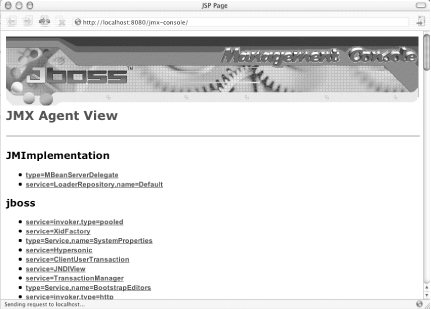
This indicates that JBoss is now running. To verify that it is working properly, open the administrative console at http://localhost:8080/jmx-console/. You should see something similar to Figure 14-1.
Figure 14-1. The JBoss administrative console
|


