1.3 The Pop Framework
There are a zillion different projects that people can dream of. In Software Engineering and Computer Games, we're only going to help you do a few specific kinds of projects. The book describes a framework called the Pop Framework which will make it easy for you to build programs suitable for computer games or for other kinds of simulations.
If you want to get a quick idea of what the Pop Framework can do, download the Pop program from the book website, start up the Pop program and look at some of the different game modes you can choose with the Game menu. A recent version of the Pop help file is printed out as Appendix B, should you wish to spend some time with it right now.
It turns out that the code for the Pop demo program is the same as the code that we call the Pop Framework. Though getting a program to run is hard, it's even harder to design your code so that it is extensible enough to warrant being called a framework.
You can call the code for a particular program a framework in the case where the code has been designed to be very easy to extend to different types of programs. Ordinarily, a framework is a set of files that make up a complete, buildable project. The files contain implementations of some classes that are reasonably easy to tweak and/or extend so as to make the program do different things. The Pop Framework files are based on a 'document view' framework generated by Microsoft Visual Studio. We'll call this underlying framework the MFC framework.
The Pop Framework is actually a bit more than just a collection of new classes, it's the notion of arranging these classes according to certain kinds of patterns. By the same token, the MFC framework is both a collection of new classes, and a certain way of arranging these classes. The special arrangement of MFC classes is called the AFX framework, where the 'AFX' stands for application frameworks. Instead of just speaking of the MFC framework, people sometimes speak of the AFX/MFC framework. But for simplicity we'll stick to just saying 'MFC framework'.
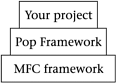
Terminology aside, the idea for your project is simple. You build it on top of the Pop Framework, which is in turn built upon the MFC framework (see Figure 1.1).
Figure 1.1. Building on frameworks
The complexity of the kinds of programs people want keeps getting higher. In order to stay afloat, software engineers are continually devising ways to work at higher levels, and to spend less time on low-level tasks. The use of object-oriented methods is one way to work at a higher level; instead of designing the same kinds of structures over and over, we encapsulate them into reusable classes. Learning how to apply software design patterns is another way to work at a higher level; instead of reinventing ways of making your classes relate to each other, you arrange your classes into a familiar pattern. Finally, the use of frameworks provides software engineers with a huge amount of leverage. A framework comes with a number of classes already organized into useful patterns. Frequently you use a framework simply by deriving off a few child classes from the basic classes it comes with; this is in fact what you'll do to make your computer game project with the Pop Framework.
To introduce you to the Pop Framework, let's list the basic requirements it was designed to satisfy.
We want to be able to open more than one window within the program. The different windows can correspond either to different game sessions or to different views of the same session. A Windows way of putting this is that we will use the multiple document interface (MDI for short) rather than the single document interface (SDI for short).
Strictly speaking it's not really that necessary to have multiple windows for most games. But as the MFC framework gives us this pretty much for free, we're going to use it so as to make our framework as powerful as possible.
So as not to confuse the users unnecessarily, the Pop Framework's default behavior is to show a single maximized view that fills the main window. It will automatically tile additional views into the main window.
Another feature of the MDI is that we use a document-view architecture. This means that we conceptually break the program into three main pieces: the application, the document, and the view. These will be represented by classes called, respectively, CPopApp, CPopDoc, and CPopView. The application is the thing in charge of running your executable program. The document holds the data involved in your game: things like the characteristics and positions of the game pieces. The view is the graphical object in charge of displaying your window on the screen.
The graphics objects in a window must be stable and persistent, that is, they shouldn't disappear if we resize the window or temporarily cover it with another window. This is a standard expectation, but it turns out to be something you have to do a little bit of work to make happen. You don't get this for free. One way to achieve visual persistence is to maintain an array that holds information about the appearance of your objects. This array lives inside your document, and it is used whenever you need to refresh the appearance of your view.
We use templates for our arrays so that they'll be resizeable. Rather than using the C++ Standard Template Library (STL) array templates, we'll use a special Microsoft MFC array template called CArray.
We should have menu and toolbar commands for changing program parameters and controlling the program flow. Once you have menu commands in place, making them into toolbar buttons is quite easy with Visual Studio.
An MFC program handles messages by putting message-handler functions into some of its classes. As it turns out, a message can be handled either by the app, by the document, or by the view. Generally we try and partition out the responsibilities in a reasonable manner. Thus, a program-wide switch for turning the sound off would be handled in the app, a command for restarting a game would be handled by the doc, and a command for switching between solid and wire-frame graphics would be handled by the view.
We'll support mouse and keyboard input. These inputs normally go directly to the view, but we pass them on from there to the game and the game objects. Most people expect to use arrow keys to control computer games. But for more complicated game play we'll use the mouse and have the option of changing the 'cursor tool' and appropriately changing the action of the mouse.
We want to have flexibility in the set of function calls that we use to put our graphics onscreen. The Pop Framework is developed in a somewhat graphics-neutral fashion, so that it can use standard Windows graphics calls or OpenGL graphics calls, with the option of eventually adding support for DirectX graphics calls.
We want the graphic images to be independent of the window size and the screen resolution, that is, we want to see the same kind of pattern in the window no matter what size it is. This is a somewhat non-standard notion. There are many computer games that take over the whole screen, throw it into some fixed resolution and don't allow you to use resizable windows at all. In effect these kinds of programs are making your Windows machine behave like a dedicated arcade-station or like an old DOS machine.
Many full-screen programs of this type give you a range of possible resolutions you can choose from, but even so, once the game starts the resolution is no longer adjustable.
The author's feeling in designing the Pop Framework was that it's more elegant to have the game run in a well-behaved standard window on your desktop, a viewport window with graphics that adjust to fit the size of the window. We do this by saving our objects' positions in terms of real-number-valued vectors which we'll convert into pixel positions depending on the size of the viewport. We write the tools for this conversion in Windows graphics; we get it pretty much for free in OpenGL graphics.
We want to have the option of displaying either 2D or 3D game worlds. Note that the Windows graphics of the Pop Framework supports only the 2D worlds, and to see the 3D worlds, you need to use the OpenGL option.
The objects in the program should move around on their own even when you're just sitting there watching, that is, we should have real-time animation. We want to have an animation speed of at least 20 frames per second.
The animation should be flicker-free. This is a less obvious requirement than some of the others, but it takes a special effort to keep a graphics program from flickering. The technique used is often called 'double buffering', meaning that as well as writing to the videocard buffer (which is what a normal graphics call does), you also make use of a memory-based video buffer. In the case of Windows graphics, it is the framework's job to construct and maintain this memory buffer; in the case of OpenGL graphics, the buffering happens more or less automatically.
The apparent speed of the game objects' motions should be independent of the number of frames per second that are being displayed by the particular combination of processor and videocard. Like being flicker-free, this is a less obvious requirement that takes a certain amount of work. The trick is to link the simulated motion per frame to the actual real-world time elapsed between frames.
We want to be able to save and to load files that contain the current state of the game or process being shown. This is fairly easy to do in MFC, by making use of an overridden Serialize function.
We want to have character sprites based on geometric objects like polygons and polyhedra. These objects should be able to change dynamically, that is, rotate, change size, flex, etc.
We also want to have character sprites which are based on bitmaps in addition to objects that are based on geometrics such as polygons and polyhedra. It should be possible to flip through sequences of bitmaps to achieve character animation.
Our objects should have easily alterable virtual functions controlling their behavior. This way we can give them virtual personalities that are easy to customize.
We should handle collisions between moving objects in a physically reasonable way.
We should try and develop code which is as reusable as possible. This means encapsulating our code into classes with the proper function calls for making the classes fit together in an easily usable framework.
Finally, and most difficult of all, we would like to make playable games.


