8.4 Targeting a Specific Runtime Version
A new feature in Version 1.1 of the .NET Framework is the ability to target a specific version of the .NET runtime with your Web application. This means that if you have a Web application built with the 1.0 version of the framework that will not run on the Version 1.1 framework (for example, if it uses an API that has changed), you can configure your application such that it continues to run under Version 1.0 of the framework (note that the version of the framework you wish to run under must be installed on the target machine).
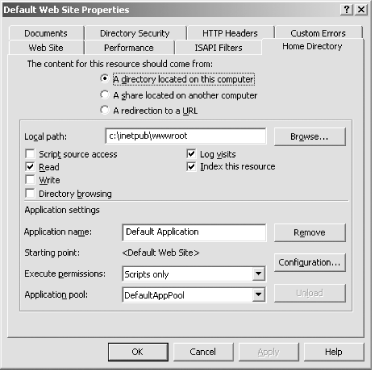
To configure your application to run under ASP.NET 1.0, open the Internet Information Services administrative applet and navigate to the application or web site you want to configure, as shown in Figure 8-1 (Windows Server 2003 version is shown). Right-click the desired application folder, and select Properties. In the Properties dialog, click the Home Directory tab (shown in Figure 8-2), and then click the Configuration button.
Figure 8-1. Internet Information Services Administration Applet
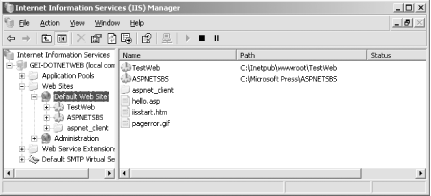
Figure 8-2. Home Directory tab
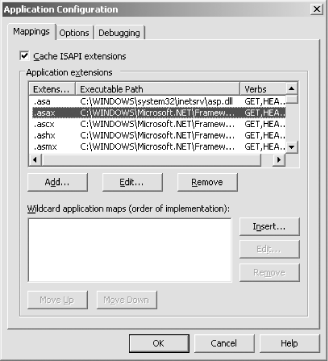
In the Application Configuration dialog, shown in Figure 8-3, in turn select each of the extensions handled by ASP.NET (you can tell which ones because they will be mapped to %windir%\Microsoft.NET\Framework\v1.1.4322\aspnet_isapi.dll, where %windir% represents the path to your Windows directory), and click the Edit button. Browse to the aspnet_isapi.dll file located in the %windir%\Microsoft.NET\Framework\v1.1.3705\ folder.
|

Figure 8-3. Application Configuration dialog
Once you've mapped all the extensions to the correct version of aspnet_isapi.dll, you're done. Your application is now running under ASP.NET Version 1.0.


