Associating Fields with Each Table


In Chapter 3 you learned that tables are composed of fields. During this stage of the database-design process, you'll assign fields to each table on the final table list using fields from your preliminary field list.
Assigning fields to a table is a relatively easy process: Determine which fields best represent characteristics of the table's subject and assign them to that table. Repeat this procedure for every table on the final table list. If you think you can use a field or set of fields to represent characteristics of more than one table, then assign them accordingly. You'll discover whether you've assigned the appropriate fields to each table later when you go through the process of refining the table structures.
Note
In the following examples, you'll note that I ask you to use sheets of paper for specific procedures. Using paper helps you avoid the temptation of using an RDBMS program to design your database. I cannot overemphasize or overstate the fact that you should not use the computer at all until the database-design process is complete unless you're using some type of database-design-specific software, such as Computer-Assisted Software Engineering (CASE) software. By heeding this advice, you will avoid the traps I discuss later in Chapter 14.
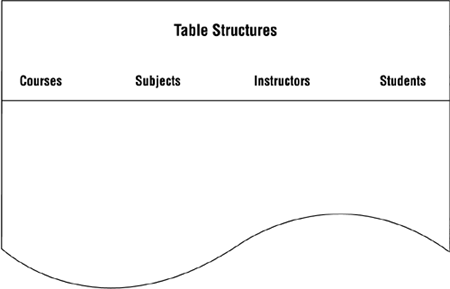
Begin this process by taking a sheet of legal paper and laying it in front of you lengthwise from left to right. Write the name of each table (from the final table list) across the top of the paper, starting at the left-hand side; leave enough space between the table names to give you enough room to list lengthy field names underneath them. Repeat this procedure, using as many sheets as you need to account for every table on the list. Continuing with the school database example, Figure 7.10 shows the set of table structures currently under development.
Figure 7.10. Setting up a sheet for listing table structures.
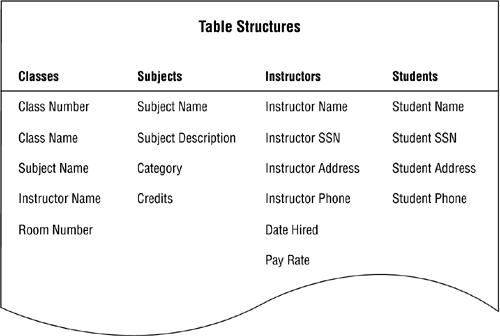
Next, assign fields from the preliminary field list to each table. Determine which fields best describe or define a table's subject and then list these fields underneath the table name. After you've assigned all of the fields you believe to be appropriate for the table, move on to the next table and repeat the process. Continue in this manner until you've assigned fields to all the tables. Figure 7.11 shows a partial set of table structures.
Figure 7.11. Listing tables with their associated fields.
Note
Before you work through the remainder of the chapter, now is a good time to recall a principle I presented in the Introduction:
Focus on the concept or technique and its intended results, not on the example used to illustrate it.
I bring this to your attention once again because you'll certainly wonder why I created an example in a particular manner. Maybe you've thought of a different or better approach to the problem, and you might have thoroughly valid reasons for using it. But don't let the example mislead you. I've fashioned each example in a specific manner for the sole reason of illustrating the concept or technique at hand. Therefore, study the way that I correct the problems you see in a particular example so that you can use those techniques when you encounter similar problems in your database.
| Top |


