4.2 Coordinate Systems
All drawing is performed within an instance of NSView. Each view defines its own coordinate system. By default, the origin (0, 0) is in the lower-left corner of the view with positive y-values extending up from, and positive x-values extending to the right of, the origin. Figure 4-1 illustrates this system.
Figure 4-1. View coordinate systems
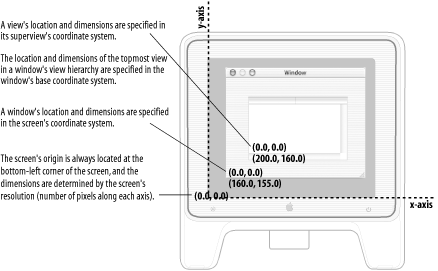
These coordinates are not tied to any particular output device, but are expressed in terms of points (a unit that is 1/72 of an inch). When Quartz renders graphics, it maps what is drawn in the device-independent coordinate system into the coordinate system of the device. One point is equivalent to one screen pixel.
As covered in Chapter 3, views are arranged in a nested hierarchy, with subviews contained within a superview. Two rectangles characterize a view. The size and position of a view within its superview is determined by its frame rectangle. The bounds rectangle defines the coordinate system within the view itself. By default, the origin of the bounds rectangle is at (0, 0), and it has the same height and width as the view's frame rectangle. You can access a view's frame using the methods frame and setFrame:, and access the bounds rectangle with bounds and setBounds:. Figure 4-2 shows how the frame and bounds rectangles are related.
Figure 4-2. The frame and bounds of a view
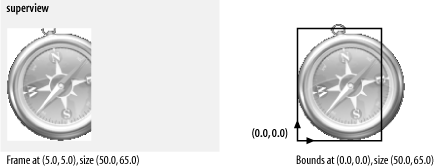
Resizing the bounds rectangle independently of the frame rectangle lets developers define coordinate systems that are natural for their application, instead of being forced to work in screen coordinates. Additionally, coordinate systems within a view may be translated and rotated independent of other coordinate systems.


