7.1 NSPipe
Instances of NSPipe represent a one-way channel for communication between two tasks. While one task pours data into one end of the pipe, another process reads that data out. You can create a pipe in two ways: with the convenience constructor pipe or with alloc and init. Every pipe has a read and a write end that objects connect to by retrieving NSFileHandle instances using the methods fileHandleForReading and fileHandleForWriting.
NSPipe is also buffered, which means that it can store data poured into the write end of the pipe up to a maximum amount that is defined by the underlying operating system. Example 7-1 shows you how to create a pipe by using NSPipe and NSTask.
Example 7-1. Using NSPipe to get data from an NSTask instance
// Instantiate and initialize a new task
NSTask *task = [[NSTask alloc] init];

// Create a pipe to communicate with the task
NSPipe *pipe = [[NSPipe alloc] init];

// Get a file handle to read from the pipe
NSFileHandle *readEnd = [pipe fileHandleForReading];

// Set the path to launch the task at
[task setLaunchPath:@"/bin/ls"];

// Set the arguments; ls takes the directory to list
[task setArguments:[NSArray arrayWithObject:@"/"]];

// Connect the pipe to the task's stdout
[task setStandardOutput:pipe];

// Launch the task
[task launch];

// Once it's launched we can read data from the pipe
NSData *stdOutData = [readEnd availableData];
NSLog(@"%s", [stdOutData bytes]);
7.1.1 Distributed Notifications
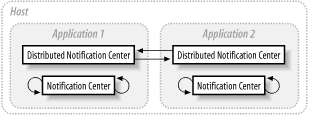
As noted in Chapter 2, the Foundation framework's notification system, supported by NSNotification and NSNotificationCenter, coordinates the actions of isolated objects within an application. NSDistributedNotificationCenter is used to receive and dispatch notifications sent between applications, making it possible for objects in one application to respond to changes to the operating environment made by another (see Figure 7-2).
Figure 7-2. Distributed notification centers and notification centers
|

NSDistributedNotificationCenter is a subclass of NSNotificationCenter, and its APIs are almost identical: both require observers to register for notifications, have a default center that is obtained with the defaultCenter class method, and use instances of NSNotification as the vehicle for communication.
Distributed notifications may be posted with standard NSNotificationCenter methods invoked in the distributed notification center:
postNotificationName:object:
postNotificationName:object:userInfo:
NSDistributedNotificationCenter provides an additional method: postNotification-Name:object:userInfo:deliverImmediately:
Posting with deliverImmediately set to NO permits normal suspension behavior (described later) of observers. If set to YES, the notification is delivered immediately to all observers, regardless of their suspension behavior or suspension state.
When considering the arguments to these methods, remember the two following points: First, since the "object" is passed to another process, which does not share the same address space, distributed notification filtering is based on an object's string value. Second, the userInfo dictionary is serialized as a property list, so it can be passed to another task (where it is deserialized back into a dictionary). This serialization imposes the restriction that you can only place objects that conform to the NSCoding protocol in the dictionary.
Example 7-2 shows how to set up a distributed notification.
Example 7-2. Using distributed notifications
/*
 * In one application we would register with the default
 * distributed notification center...
 */
- (void)registerForNotes
{
    NSDistributedNotificationCenter *dnc;
    dnc = [NSDistributedNotificationCenter defaultCenter];

    [dnc addObserver:self
         selector:@selector(handleDistributedNote:)
         name:@"CocoaNutDistributedNote"
         object:nil];
}

- (void)handleDistributedNote:(NSNotification *)note
{
    NSLog( @"Received Distributed Notification!" );
}

/*
 * ...and another application might post the notification
 */
- (void)postNotes
{
    NSDistributedNotificationCenter *dnc;
    dnc = [NSDistributedNotificationCenter defaultCenter];
    [dnc postNotificationName:@"CocoaNutDistributedNote"
         object:nil];
}
7.1.1.1 Suspending delivery
Distributed notification centers can suspend notification delivery. This is done automatically by NSApplication when an application is not active. To suspend or resume notification delivery manually, use the method setSuspended:, passing YES or NO as appropriate. To inquire into the suspension state of a distributed notification center, use the suspended method.
Suspending a distributed notification center only suspends delivery of notifications by the distributed notification center, not the reception of distributed notifications. In addition to NSNotificationCenter's addObserver:selector: name:object:, the NSDistributedNotificationCenter method addObserver: selector:name:object:suspensionBehavior: can add observers to a distributed notification center. This lets you specify how notifications that would otherwise be sent to the observer should be handled when delivery is suspended.
NSDistributedNotificationCenter has four constants, which are used to specify suspension behaviors:
- NSNotificationSuspensionBehaviorDrop
-
Notifications to observers with this suspension behavior are dropped without further consideration when notification delivery is suspended; it would be as if the notification were never received by the application.
- NSNotificationSuspensionBehaviorCoalesce
-
This suspension behavior causes multiple, identical notifications destined for the observer during suspension to be delivered as a single notification when suspension is lifted.
- NSNotificationSuspensionBehaviorHold
-
Any notification received during delivery suspension is held and delivered to the observer when delivery suspension is removed.
- NSNotificationSuspensionBehaviorDeliverImmediately
-
This behavior causes notifications to the observer to be delivered regardless of the suspension state.
When YES is passed to the postNotificationName:object:userInfo:deliverImmediately: method, the notification is delivered to all observers regardless of the suspension state of the respective distributed notification centers. Here notification posters have the power to override suspension, whereas observers can override suspension by using the last suspended behavior in the previous list.
7.1.2 Distributed Objects
Cocoa's distributed objects (DO) architecture provides a very high-level interface to interprocess communication. It also lets objects in one application transparently send messages to an object in another application, whether it is on the same or a different computer. Instances of NSDistantObject represent objects in a remote application. NSDistantObject is a subclass of NSProxy (the only other root class in Cocoa besides NSObject). NSDistantObject relies on the underlying architecture to forward messages and receive return values or exceptions.
7.1.2.1 DO architecture
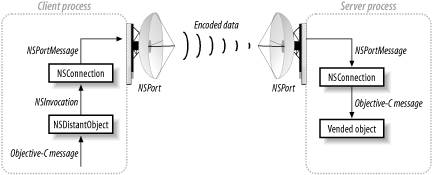
Several Foundation classes participate in the distributed objects system. The primary interface for distributed objects, however, is through the class NSConnection, which vends objects on the server-side and connects to vended objects on the client-side. Each thread has a shared NSConnection object that is obtained through the class method defaultConnection.
NSConnection relies on several classes to provide support for distributed objects. The lowest-level communication in distributed objects occurs between a pair of NSPort objects. NSPort is an abstract class that provides an interface for raw messaging. Foundation implements three concrete subclasses of NSPort: NSMachPort, NSMessagePort, and NSSocketPort. These subclasses each implement the NSPort interface using a different technology. NSSocketPort, for example, supports port communications with BSD sockets.
NSConnection objects rely on port name registration services to contact one another and distribute objects. NSPortNameServer provides the interface to port name registration services. Foundation implements a subclass of NSPortNameServer for each of the three types of ports: NSMachBootstrapServer, NSMessagePortNameServer, and NSSocketPortNameServer.
Figure 7-3 shows how distributed object system classes interact.
Figure 7-3. The distributed objects system (classes are shown in bold)
7.1.2.2 Setting up a server
To set up a server with an NSConnection instance, set the root object (the object to be vended) and register the connection. To set the root object, send the NSConnection instance a setRootObject: message. This method makes the specified object available to other processes as a distributed object. To register the connection, send it either registerName: or registerName:withNameServer:. The specified name is the one clients will use to access the vended object; the latter method also lets you specify an NSPortNameServer (see Example 7-3).
When a connection object vends a distributed object, it takes all necessary steps to create the port object and register the port with the port name registration server so other connection objects can locate the vended object.
Example 7-3. How a server vends an object
id anObject;  // Assume this object exists

// Get the default connection for the main thread
NSConnection *conn = [NSConnection defaultConnection];

// Set anObject as the root object of the connection
[conn setRootObject:anObject];

// Register the name of the connection so clients can get anObject
if ( [conn registerName:@"Server"] == NO ) {
  // If the name could not be registered, NO is returned
  // and we can handle the error
}
7.1.2.3 Connecting to a remote object
NSConnection instances also provide the route to remote objects from the client side. The class method rootProxyForConnectionWithRegisteredName:host: returns a proxyan NSDistantObject--for the root object of the NSConnection with the specified name and host, registered with the default NSPortNameServer. You can also specify a port name server with rootProxyForConnectionWithRegisteredName:host:usingNameServer:. The host name should be an Internet address, such as myserver.mydomain.com. Alternatively, by passing "*" as the host, you can specify that the connection should look for an object on all valid hosts. If the host name is nil or empty, then only the local host is searched.
Example 7-4 demonstrates the process by which a client obtains a vended distributed object.
Example 7-4. How a client acquires a vended object
id remoteObject;

// Get a proxy to the root object of the connection registered to the name "Server"
remoteObject = [[NSConnection
    rootProxyForConnectionWithRegisteredName:@"Server"
    host:@"*"] retain];
7.1.2.4 DO and threads
Distributed objects can be used to communicate between two threads in the same application the same as it can communicate between two applications on hosts separated by great distances. When using distributed objects to communicate between two threads in the same application, consider the following points: For an NSConnection to run as a server, a run loop must handle incoming messages and requests. If you create the connection in the main thread of an NSApplication-based application, this is taken care of. However, if you vend an object from a different thread, you must tell the thread's run loop to start by sending a run message to the currentRunLoop of the thread.
7.1.2.5 Making DO more efficient and reliable
Although DO lets you send arbitrary messages to a remote object, doing so creates additional overhead. To encode a message's arguments for transmission over the network, the argument types must be known in advance. If they're not known, the system must send an initial message just to get them, doubling the network traffic for every new message sent. Setting a protocol, by sending the proxy object a setProtocolForProxy: message, removes the need to define methods by the protocol.
// Set the protocol of the proxy
[remoteObject setProtocolForProxy:@protocol(rObjectProtocol)];
You can still send messages that are not declared in the protocol, but they will incur the additional message overhead. Establishing a protocol for the proxy has the additional benefit of imposing a known API. This reduces the risk that a message will be sent that the remote object does not implement.
You can also make the communication more efficient by employing special Objective-C keywords for distributed messaging. The oneway keyword, for example, is used with methods that return void. The following method might be implemented on a server:
-(void oneway)receiveString:(NSString *)string
{
    [self appendString:string];
}
When the client sends the proxy a receiveString: message, it does not require a return value. Without the oneway keyword, at least two messages will be sent across the network: the message itself, and a receipt. If the client does not need confirmation, the second message, and attendant overhead, are omitted.
Other keywords are: in, out, and inout, bycopy and byref, the latter two may only be used in protocol definitions. For more information, see /Developer/Documentation/Cocoa/ObjectiveC/4objc_runtime_overview/Remote_Messaging.html.
7.1.2.6 Handling communication failures
Most errors in distributed systems behave the way they would in a standalone application. If you send a message to a remote object that the remote object does not implement, an exception is raised. One additional complication with distributed systems, however, is that the remote application might terminate. In the event of a communication failurebecause the remote application has quit, or it has simply ceased to respondthe NSConnection object sends an NSConnectionDidDieNotification to the still-running application's default notification center. Registering for this notification might help you handle connection failures gracefully. You should also implement an applicationWillTerminate method to inform remote objects of your impending disappearance.


