8.1 AddressBook
The AddressBook framework was released with Mac OS X 10.2. This framework provides a consistent, system-wide interface to a user's database of personal contacts. Using the AddressBook framework, applications can access the same information used in Apple's own suite of personal information management applications, including Mail, Address Book, iChat, iCal, and iSync. Figure 8-1 shows the AddressBook framework's class hierarchy.
Figure 8-1. The AddressBook framework class hierarchy
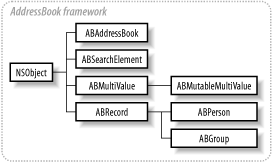
ABAddressBook is the main class representing the contacts database. The ABAddressBook class provides access to a collection of records, of two types: people and groups, represented by the classes ABPerson and ABGroup. ABPerson and ABGroup inherit from the class ABRecord, as shown in Figure 8-1. Records are like souped-up dictionaries that store information in property-value pairs (similar to NSDictionary's key-value pairs, but ABRecord properties provide additional functionality).
Both people and group objects store properties, but they are not the same set of properties since a group does not share the characteristics of an individual. To retrieve the value of a property associated with a record, invoke the method valueForProperty: in the ABRecord object in question. To store a value for a record's property, use the method setValue:forProperty:.
ABAddressBook provides methods that access records in the database. The method people returns an NSArray filled with all ABPerson type records, while the method groups returns an NSArray containing all the Address Book's ABGroup type records. Records are added and removed using addRecord: and removeRecord:. Example 8-1 shows how to work with the AddressBook API.
Example 8-1. Working with the AddressBook framework
// Instantiate ABAddressBook
ABAddressBook *ab = [ABAddressBook sharedAddressBook];

// Access property values
ABPerson *me = [ab me];
NSString *fName = [me valueForProperty:kABFirstNameProperty];
NSString *lName = [me valueForProperty:kABLastNameProperty];

// Set a property value
[me setValue:@"Michael" forProperty:kABFirstNameProperty];

// Get an array of all people in Address Book
NSArray *everyone = [ab people];

// ...and all groups
NSArray *groups = [ab groups];

// Create a new record
ABPerson *newPerson = [[ABPerson alloc] init];

// Add a record to the Address Book
[ab addRecord: newPerson];

// Remove a record from the Address Book
[ab removeRecord: me];

// Set "me"
[ab setMe:newPerson];

// Save changes to disk
[ab save];
Tables Table 8-1 and Table 8-2 show the property strings predefined by the AddressBook framework. Table 8-1 contains properties used exclusively by ABPerson objects, while Table 8-2 lists properties common to people and groups. ABGroup has an additional exclusive property, kABGroupNameProperty, which is the name of the group record.
|
Property key |
Description |
|---|---|
kABFirstNameProperty |
A person's first name as an NSString |
kABLastNameProperty |
A person's last name as an NSString |
kABFirstNamePhoneticProperty |
The phonetic spelling of the person's first name to aid pronunciation |
kABLastNamePhoneticProperty |
The phonetic spelling of the person's last name to aid pronunciation |
kABBirthdayProperty |
The person's birthday as an NSDate |
kABOrganizationProperty |
The person's affiliation as an NSString |
kABJobTitleProperty |
The job title of the person as an NSString |
kABHomePageProperty |
The home page of the person as an NSString |
kABEmailProperty |
The email property for a person as an ABMultiValue of NSStrings (multistring). Values are labeled by kABEmailWorkLabel and kABEmailHomeLabel |
kABAddressProperty |
The address of a person as an NSDictionary multivalue with the labels kABAddressHomeLabel and kABAddressWorkLabel |
kABPhoneProperty |
Phone numbers of person as a multistring with the following labels: kABPhoneWorkLabel, kABPhoneHomeLabel, kABPhoneMobileLabel, kABPhoneMainLabel, kABPhoneHomeFAXLabel, kABPhoneWorkFAXLabel, and kABPhonePagerLabel |
kABAIMInstantProperty |
The AIM screen name of person as a multistring with two labels: kABAIMWorkLabel, and kABAIMHomeLabel |
kABJabberInstantProperty |
The Jabber screen name of person as a multistring with two labels: kABJabberWorkLabel and kABJabberHomeLabel |
kABMSNInstantProperty |
The MSN screen name of person as a multistring with two labels: kABMSNWorkLabel and kABMSNHomeLabel |
kABYahooInstantProperty |
The Yahoo screen name of person as a multistring with two labels: kABYahooWorkLabel and kABYahooHomeLabel |
kABICQInstantProperty |
The ICQ screen name of person as a multistring with two labels: kABICQWorkLabel and kABICQHomeLabel |
kABNoteProperty |
The property whose values are an NSString note about the record |
|
Property key |
Description |
|---|---|
kABUIDProperty |
The UID (unique identifier) property of a record as an NSString |
kABCreationDateProperty |
The date on which the record was created as an NSDate |
kABModificationDateProperty |
NSDate specifies the last modification date of the record |
In Example 8-1, the save method is invoked in the last line of code, saving changes to the database. Until the save method is invoked, changes only exist in memory, and are not reflected on disk. Once the changes are saved, other applications that use the AddressBook framework are notified that changes have been made to the database (see Section 8.1.4 later in this chapter for more information on how this is accomplished).
8.1.1 Working with Multiple-Value Objects
Many property values in the AddressBook are typed as ABMultiValue, which is an object that stores multiple values for a single property. To understand why this might be useful, consider that people tend to have several phone numbers, email addresses, and a work and home address. Rather than create several separate properties for a work and home address, AddressBook defines a generic address property with an ABMultiValue value type.
An ABMultiValue stores the multiple values for a property by index. Each property has a unique identifier, a string label, and a value. Generally, the label is a combination of the property name and "home" or "work" (as shown in Table 8-1). However, it is possible to customize labels for additional values in the multivalue object (such as a summer vacation home address in addition to home and work addresses).
A primary identifier, associated with each multivalued property, identifies the subvalue of the multivalue property that a user most strongly associates with a person. For example, if you interact with a person purely on a professional basis, then the primary identifier for that contact's phone property would be for the work value. You can set this identifier in a ABMutableMultiValue with the method setPrimaryIdentifier:.
You can access values in an ABMultiValue object by index with valueAtIndex:. It is also possible to access the label and identifier of the object at a particular index with labelAtIndex: and identifierAtIndex:.
To demonstrate the use of multivalue objects, look closely at kABAddressProperty, which is of particular interest since itcontains NSDictionary objects as values rather than simple strings. The AddressBook API defines keys used to store values within an address property dictionary. Table 8-3 lists the keys that access values in the dictionaries for kABAddressProperty.
|
Dictionary key |
Description |
|---|---|
kABAddressStreetKey |
The person's street name and number |
kABAddressCityKey |
The person's city |
kABAddressStateKey |
The person's state |
kABAddressZIPKey |
The zip code of the address |
kABAddressCountryKey |
The country name of the address |
kABAddressCountryCodeKey |
The two character country code. These standard ISO country codes can be found in the header file ABGlobals.h |
Example 8-2 shows how to work with the address property and other multi-valued properties in ABPerson.
Example 8-2. Working with multivalued properties such as kABAddressProperty
ABMultiValue *addr = [p valueForProperty:kABAddressProperty];
int i = [addr indexForIdentifier:[addr primaryIdentifier]];
NSDictionary *prim = [addr valueAtIndex:i];
NSString *street = [prim objectForKey:kABAddressStreetKey];
NSString *state = [prim objectForKey:kABAddressStateKey];

ABMultiValue *aim = [p valueForProperty:kABAIMInstantProperty];

// This statement determines the number of values in the multi-value
int n = [aim count];

NSString *aim1 = [aim valueAtIndex:0];
8.1.2 Defining New Properties
It is possible to define your own application-specific keys to store data about a person or group in the contacts database. Because the database contains structured data that can hold values of any property name, the only applications that need know about these additional properties are those that actively look for them. Thus, there is no need to have two separate interfaces for interacting with AddressBook information and information specific to your application.
Add properties to a record by invoking the ABGroup or ABPerson class method addPropertiesAndTypes:. The argument for this method is a dictionary containing the property names as keys and the property types as values. The property type may be one of the following single or multivalue types shown in Table 8-4.
|
Data type |
Single value |
Multiple value |
|---|---|---|
NSString |
KABStringProperty |
kABMultiStringProperty |
NSNumber (int) |
KABIntegerProperty |
kABMultiIntegerProperty |
NSNumber (float) |
KABRealProperty |
kABMultiRealProperty |
NSDate |
KABDateProperty |
kABMultiDateProperty |
NSArray |
KABArrayProperty |
kABMultiArrayProperty |
NSDictionary |
KABDictionaryProperty |
kABMultiDictionaryProperty |
NSData |
KABDataProperty |
kABMultiDataProperty |
Example 8-3 shows how to add property-value pairs to a record.
Example 8-3. Defining new properties for a record
NSMutableDictionary *newProps = [NSMutableDictionary dictionary];
[newProps setObject:kABStringProperty forKey:@"College"];
[newProps setObject:kABDateProperty forKey:@"Grad Date"];
[ABPerson addPropertiesAndTypes:newProps];

ABAddressBook *ab = [ABAddressBook sharedAddressBook];
ABPerson *me = [ab me];
NSString *c = @"The University of Texas at Austin";
NSDate *d = [NSDate dateWithNaturalLanguageString:@"12/12/02"];
[me setValue:c forProperty:@"College"];
[me setValue:d forProperty:@"Grad Date"];
8.1.3 Searching
The AddressBook framework supports searching with the ABSearchElement class. You can create instances of this class with the ABPerson or ABGroup class method searchElementForProperty:label:key:value:comparison:, to which you supply the following search criteria:
- searchElementForProperty:
-
The record property that will be searched for.
- label:
-
If the property has multiple values, a label can be specified to restrict the search to one particular element of the multivalue.
- key:
-
If the property value is a dictionary, the search will be done on the value of the dictionary key specified in this parameter. For example, you could pass kABAddressCityKey here if you want to perform a search against the city of the contact.
- value:
-
The value you are searching for in the property.
- comparison:
-
This parameter specifies how the search process identifies a value as a match. Table 8-5 lists the comparison constants for this parameter.
The searchElementForProperty:label:key:value:comparison: method searches for people or groups, depending on whether it is implemented in the ABPerson or ABGroup class object, respectively.
A search is performed on the AddressBook database by ABAddressBook method recordsMatchingSearchElement:, to which you supply the search element object containing your search criteria. This method returns an array of ABPeople objects or ABGroup objectsdepending on which of these two classes you created the search element inthat contains the search results.
|
Comparison constant |
Description |
|---|---|
kABEqual |
Returns records equal to the search value |
kABNotEqual |
Returns records not equal to the search element value |
kABEqualCaseInsensitive |
Returns records equal when case is ignored |
kABLessThan |
Searches for records whose value is less than the search value |
kABLessThanOrEqual |
Searches for elements less than or equal to the value |
kABGreaterThan |
Searches for elements greater than the search value |
kABGreaterThanOrEqual |
Searches for elements greater than or equal to the search value |
kABContainsSubStringCaseInsensitive |
Searches for records whose value contains the search value as a substring, disregarding case |
kABPrefixMatch |
Searches for elements that contain the search value as a prefix |
kABPrefixMatchCaseInsensitive |
Same as kABPrefixMatch, except case-insensitive |
ABSearchElement's searchElementForConjunction:children: method can create arbitrarily complex searches by combining search elements into composite search elements using either the kABAndSearch or the kABOrSearch conjunction. The search elements to be combined into the complex search are passed as an array in the children: argument.
Example 8-4 shows how to perform searches in the AddressBook framework.
Example 8-4. Constructing and performing searches
ABSearchElement *se1, *se2, *se3;
NSArray *results, *seChildren;

ABAddressBook *ab = [ABAddressBook sharedAddressBook];

// Search against a simple, single-value property
se1 = [ABPerson searchElementForProperty:kABFirstNameProperty
                            label:nil
                            key:nil
                            value:@"Michael"
                            comparison:kABEqual];
results = [ab recordsMatchingSearchElement:se1];

// Search against a key of the kABAddressProperty
se2 = [ABPerson searchElementForProperty:kABAddressProperty
                            label:nil
                            key:kABAddressCityKey
                            value:@"Houston"
                            comparison:kABEqual];
results = [ab recordsMatchingSearchElement:se2];

// Perform a complex search by combining search elements
seChildren = [NSArray arrayWithObjects:se1, se2, nil];
se3 = [ABSearchElement searchElementForConjunction:kABAndSearch
                            children: seChildren];
8.1.4 Notifications
The AddressBook framework API defines two notifications that applications may register to observe so they may be notified of changes to the AddressBook database:
- kABDatabaseChangedNotification
-
Notifies observers of changes the application makes to the database
- kABDatabaseChangedExternallyNotification
-
Notifies an observer that another application has changed the database
8.1.5 Odds and Ends
You can perform a couple of other operations with records beyond just storing name/value pairs: importing and exporting a vCard representation or associating an image with a person.
8.1.5.1 Creating a vCard from a record
Creating a vCard is easily accomplished by using the ABRecord method vCardRepresentation. This method returns an NSData object whose data is formatted in the vCard format. This data is written to disk, where it can be read by any number of applications that recognize the vCard format. Going the other way, you can initialize an ABRecord object with vCard data using initWithVCardRepresentation:. This method takes as a parameter an NSData object, which could be initialized with the contents of a vCard file on disk.
8.1.5.2 Adding an image to a record
To associate an image with a person in the AddressBook, use the methods setTIFFImageData: and TIFFImageData to set and get the person's picture. These methods work with NSData objects whose data is formatted as a TIFF image. These methods interface well with the NSImage methods TIFFRepresentation, which returns an TIFF-formatted NSData object, and initWithData:, which initializes an NSImage object with image data. Example 8-5 shows how to access image data in an Address Book record.
Example 8-5. Accessing image data in a record
// Assign an image to a record
NSData *imageData = [[NSData alloc]
                             initWithContentsOfFile:@"image.tiff"];
ABAddressBook *ab = [ABAddressBook sharedAddressBook];
ABRecord *me = [ab me];

[me setTIFFImageData: imageData];
[ab save];

// Retrieve a record's image
NSImage *anImage = [[NSImage alloc] initWithData: [me imageData]];


