4.4 Working with Paths
Drawing lines is the most basic function you can perform with Cocoa's drawing classes. The Application Kit encapsulates the low-level, Quartz path-based drawing API in the NSBezierPath class. Minimally, NSBezierPath lets you draw straight lines and Bezier paths, and using this functionality, you can construct any shape you like.
|

Drawing with NSBezierPath is in some respects similar to drawing on a sheet of paper with a pencil. Before you can draw a line, you have to place the pencil lead at a point on the page. Drawing a line requires moving the pencil from one point to another. To draw a disjointed line, you pick up the pencil tip from the paper and move it to another location. You might then complete a diagram by drawing a line back to the first point. These actions are reflected in the following NSBezierPath methods, used to construct a path:
moveToPoint:
lineToPoint:
curveToPoint:controlPoint1:controlPoint2:
closePath
The arguments to the first three methods are all of type NSPoint, a C structure that encapsulates a coordinate pair. Example 4-1 shows the struct declaration for NSPoint.
Example 4-1. The NSPoint struct
typedef struct _NSPoint {
  float x;
  float y;
} NSPoint;
At any time, there is a current point. The method moveToPoint: moves the current point to the specified point. The methods lineToPoint: and curveToPoint: controlPoint1:controlPoint2: both extend a path from the current point.
|
Drawing with NSBezierPaths is fundamentally different from drawing with a pencil in that constructing a path is not the same as drawing a path. You can think of a path as an abstract representation that can be rendered into one, or many, views. NSBezierPath provides two methods to render a path: stroke, and fill. stroke draws the outline of the path, while the fill method fills the interior of the path with a color or pattern.
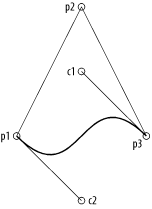
To illustrate this, consider Example 4-2, which draws the image shown in Figure 4-3.
Example 4-2. Code to construct a complex shape using NSBezierPath
// The three vertices of a triangle
NSPoint p1 = NSMakePoint(100, 100);
NSPoint p2 = NSMakePoint(200, 300);
NSPoint p3 = NSMakePoint(300, 100);

// Control points
NSPoint c1 = NSMakePoint(200, 200);
NSPoint c2 = NSMakePoint(200, 0);

// Constructing the path for the triangle
NSBezierPath *bp = [NSBezierPath bezierPath];
[bp moveToPoint:p1];
[bp lineToPoint:p2];
[bp lineToPoint:p3];
[bp curveToPoint:p1 controlPoint1:c1 controlPoint2:c2];
[bp closePath];
[bp stroke];
Figure 4-3. The bold line shows the shape resulting from the path in Example 4-2 (the points are labeled with the variable names from Example 4-2)
For simple drawing, such as constructing rectangles or ellipses, NSBezierPath has two methods: bezierPathWithRect: and bezierPathWithOvalInRect:. Both methods take an NSRect as an argument. In the first method, the NSRect defines the constructed rectangle. In the second method, the specified rectangle determines the boundary of the ellipse. In addition to these two constructors, appendBezierPathWithOvalInRect: and appendBezierPathWithRect: add an ellipse or rectangle to an existing path.
You can also construct arcs with the following three methods:
appendBezierPathWithArcWithCenter:radius:startAngle:endAngle:clockwise:
appendBezierPathWithArcWithCenter:radius:startAngle:endAngle:
appendBezierPathWithArcFromPoint:toPoint:radius:
These methods measure angles in degrees. The first draws an arc centered at the specified center point with a given radius. The arc extends from startAngle: to endAngle:, clockwise or counterclockwise, depending on the value of the clockwise argument. The second method is a wrapper around the first, where clockwise: is NO.
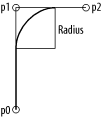
The third method, appendBezierPathWithArcFromPoint:toPoint:radius:, draws an arc from a circle that is inscribed within the angle specified by the current point in a path and the two points specified in the method. The parameter radius: specifies the radius of the circle used to build the arc. This method is more complicated than the other two, so it is illustrated by example. Example 4-3 shows the code used to build the path in Figure 4-4, shown with a bold line.
Example 4-3. Drawing arcs
NSPoint p0 = NSMakePoint( 100, 100 );
NSPoint p1 = NSMakePoint( 100, 250 );
NSPoint p2 = NSMakePoint( 200, 250 );

path = [NSBezierPath bezierPath];
[path moveToPoint:p0];
[path appendBezierPathWithArcFromPoint:p1 toPoint:p2 radius:50];
[path stroke];
Figure 4-4. The bold line represents the path constructed in Example 4-3
4.4.1 Drawing to Views
To draw in a given view, you must first lock focus on the view by sending it a lockFocus message. Quartz interprets all subsequent drawing commands in the context of that view. Once the drawing is done, balance the lockFocus with a matching unlockFocus to the same view.
Custom drawing is implemented in a subclass of NSView. When subclassing NSView, all drawing code is called from an overridden drawRect: method. This method of NSView does nothing by default, but the NSView graphics system is set up to automatically invoke this method at the appropriate times.
While drawRect: does the drawing work, it should never be invoked directly. Instead, to force an immediate redraw of a view, you can send a display message to the view. This causes the receiver to lock its focus, invoke drawRect:, and then unlock its focus before returning control to the caller. To this end, display is functionally similar to the implementation shown in Example 4-4.
Example 4-4. Functional implementation of NSView's display
- (void)display
{
  [self lockFocus];
  [self drawRect:[self bounds]];
  [self unlockFocus];
}
However, display is still not the interface you usually use to tell a view to redraw its contents. A better method of redrawing tells the view that the contents have changed and lets the view redraw itself the next time through the run loop. You do this by sending the view a setNeedsDisplay: message, with the argument YES to indicate that the view should invoke display in the next run loop pass. If you want to cancel a drawing request, invoke this method passing NO. This allows Quartz to decide the proper time to redraw the contents of a view.
In some circumstances it may be more efficient still to send the view a setNeedsDisplayInRect: message, where the argument is a "dirty" area that needs to be updated. The display system can then determine what rectangle to pass as the argument to a view's drawRect:. In your drawing code, you then ensure that you only update parts of the view that need to be refreshed. Other methods used to cause view updates include:
- - (void)displayIfNeeded;
- - (void)displayIfNeededIgnoringOpacity;
- - (void)displayRect:(NSRect)rect;
- - (void)displayIfNeededInRect:(NSRect)rect;
- - (void)displayRectIgnoringOpacity:(NSRect)rect;
- - (void)displayIfNeededInRectIgnoringOpacity:(NSRect)rect;
4.4.2 Line Attributes
NSBezierPath lets you change several path-rendering options, such as the line thickness, join style, dash count, miter limit, cap style, and winding rules. You can change a path's attributes with a class method or an instance method. The instance method changes the attributes of only the receiving instance, while the class method changes the default attribute for all instances in the graphics context.
For example, to change the width of a line, use either setLineWidth: or setDefaultLineWidth:. The first changes the line width of the instance to which you send that particular method, while the second class method sets the line width in the graphics context that applies to subsequent renderings of any instance of NSBezierPath.
NSBezierPath provides methods for changing the following attributes:
Line width
Path flatness
Line dashes and phase
Line cap style
Line join style
Miter limit
Winding rule
You can change any of these attributes for a single instance or for the graphics context, as shown earlier.
4.4.2.1 Path flatness
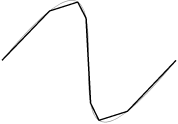
Flatness is one attribute that can be set for a curve. A path's flatness indicates to the rendering engine how accurately it should reproduce the curve; that is, the flatness is a metric of the curve's granularity or resolution as it is rendered. A higher flatness value corresponds to a rougher curve, which can be rendered more quickly; a lower value corresponds to a smoother curve, which comes at the expense of rendering time. Figure 4-5 shows a curve that is stroked with the default flatness of 0.6, and again with a larger flatness of 100 using a thicker line. Example 4-5 shows the code you need to change the flatness.
Example 4-5. Changing the flatness of a Bezier path
- (void)drawRect:(NSRect)aRect
{
    NSBezierPath *path = [NSBezierPath bezierPath];

    [path moveToPoint:NSMakePoint(0, 200)];
    [path curveToPoint:NSMakePoint(500, 200)
          controlPoint1:NSMakePoint(500, 800)
          controlPoint2:NSMakePoint(0, -400)];

    [path setFlatness:100];
    [path stroke];
}
Figure 4-5. The thinner, smooth curve has a default flatness of 0.6; the thicker curve has a flatness of 100
|
Related to setting the flatness of a rendered curve is the method bezierPathByFlatteningPath. This method returns a Bezier path that represents the receiver with all curves approximated as a series of straight lines similar to how changing the flatness renders the curve.
4.4.2.2 Line dashes and phase
The method setLineDash:count:phase: takes three parameters to define a dash pattern for a stroked Bezier path. The first argument is a C array of floats that specifies the lengths of alternating stroked and unstroked segments. The second argument indicates the number of elements in the dash pattern array. The final argument indicates where in the dash pattern drawing begins. Consider the three dash patterns in Example 4-6 and the resulting lines in Figure 4-6.
Example 4-6. The code used to generate three dashed lines
float pattern1[2] = {50.0, 25.0};
float pattern2[3] = {50.0, 25.0, 75.0};

// The top line in Figure 4-6
[aPath setLineDash:pattern1 count:2 phase:0];

// The middle line in Figure 4-6
[aPath setLineDash:pattern2 count:3 phase:0];

// Bottom line in Figure 4-6
[aPath setLineDash:pattern1 count:2 phase:25];
Figure 4-6. Line dash patterns: each line is 400 points long with a line thickness of 10 points

4.4.2.3 Line cap style
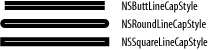
You can render Bezier paths with several line cap styles, which are set using either setLineCapStyle: or setDefaultLineCapStyle:. The line cap style NSButtLineCapStyle makes the ends of the rendered line flush with the end of the path. NSRoundLineCapStyle renders the line with a radius equal to half the thickness of the line, centered at the end of the path. Finally, NSSquareLineCapStyle extends the line past the end of the path by a length equal to half of the line width. The default line cap style is NSButtLineCapStyle. Figure 4-7 shows various line cap styles on a path that is 200 pixels long and a width of 30 pixels; the white line indicates the path to highlight the position of the endpoints (which is critical when discussing the differences between NSButtLineCapStyle and NSSquareLineCapStyle).
Figure 4-7. Line cap styles
4.4.2.4 Line join styles
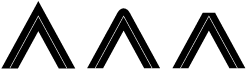
Another property of Bezier paths is the way lines are joined. You can set this property for path objects with setLineJoinStyle:, or set it for the graphics context with setDefaultLineJoinStyle:. The default line join style is NSMiterLineJoinStyle, in which the outside edges of the lines are extended to a sharp point. You can also create rounded and beveled line join styles using the constants NSRoundLineJoinStyle and NSBevelLineJoinStyle. Figure 4-8 shows examples of the three lines join styles.
Figure 4-8. From left to right: NSMiterLineJoinStyle, NSRoundLineJoinStyle, and NSBevelLineJoinStyle
4.4.2.5 Miter limit
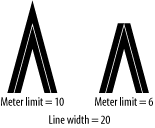
Miter join styles have a special problem: the join appears as a spike when the angle between the two joined lines is extraordinarily acute (since the join is rendered by extending the outer line edges outward until they meet). To prevent this problem, the graphics context has a miter limit that defines a threshold for how small an angle can be before the line join style is changed to a bevel joint. The miter limit is the ratio of the miter length (the diagonal length of the miter extension) to the line width; by default, this is value is 10. To alter this value, use NSBezierPath's class method setDefaultMiterLimit:, or the instance method setMiterLimit:.
Figure 4-9 illustrates a small-angle joint. The joint with the miter join style is drawn with the default miter limit of 10, while the miter limit that produces the bevel joint is reduced to 6. In each example, the line thickness is 20 and the angle between the two lines is about 9.5 degrees.
Figure 4-9. The effect of the miter limit
4.4.2.6 Winding rule
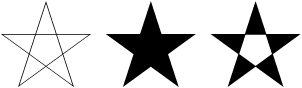
When filling a path, there is another graphics context characteristic to consider: the winding rule. For simple paths such as rectangles and circles, the region that should be filled is unambiguous. However, for complex paths, such as a star with many intersecting line segments, the area that should be filled is less clear. Thus, winding rules are used to determine which regions of a complex intersecting path should be filled.
The two winding rules are non-zero (the default) and even-odd. The even-odd winding rule works by taking a test point within the region and counting the number of times a ray extending from that point crosses the path. If the number of crossings is odd, then the point is considered "inside" the shape, and its region will be filled. If the number of crossing is even, then the point is considered "outside" the shape, and its enclosing region is not filled.
The non-zero winding rule counts crossings based on the direction of the crossed path. A ray extending from the test point increments its crossing count when it crosses a left-to-right path; it decrements its crossing count when crossing a right-to-left path. If the number of crossings is 1, then the point is "inside;" if the number of crossings is zero, then the point is "outside." Figure 4-10 shows an example of these two winding rules at work.
Figure 4-10. Stars illustrating (from left) the path with no fill, the default non-zero winding rule, and the even-odd winding rule