Section 2.4. The Routing Table
Gateways route data between networks, but all network devices, hosts as well as gateways, must make routing decisions. For most hosts, the routing decisions are simple:
If the destination host is on the local network, the data is delivered to the destination host.
If the destination host is on a remote network, the data is forwarded to a local gateway.
IP routing decisions are simply table lookups. Packets are routed toward their destinations as directed by the routing table (also called the forwarding table). The routing table maps destinations to the router and network interface that IP must use to reach that destination. Examining the routing table on a Linux system shows this.
On a Linux system, use the route command with the -n option to display the routing table.[6] The -n option prevents route from converting IP addresses to hostnames, which gives a clearer display. Here is a routing table from a sample Red Hat system:
[6] The netstat command is used to examine the routing table on Solaris 8 systems. A Solaris example is covered later in this chapter.
# route -n

Kernel IP routing table

Destination   Gateway      Genmask        Flags Metric Ref   Use Iface

172.16.55.0   0.0.0.0      255.255.255.0  U     0      0       0 eth0

172.16.50.0   172.16.55.36 255.255.255.0  UG    0      0       0 eth0

127.0.0.0     0.0.0.0      255.0.0.0      U     0      0       0 lo

0.0.0.0       172.16.55.1  0.0.0.0        UG    0      0       0 eth0
On a Linux system, the route -n command displays the routing table with the following fields:
- Destination
-
The value against which the destination IP address is matched.
- Gateway
-
The router to use to reach the specified destination.
- Genmask
-
The address mask used to match an IP address to the value shown in the Destination field.
- Flags
-
Certain characteristics of this route. The possible Linux flag values are:[7]
[7] The flags R, M, C, I, and ! are specific to Linux. The other flags are used on most Unix systems.
- U
-
Indicates that the route is up and operational.
- H
-
Indicates that this is a route to a specific host (most routes are to networks).
- G
-
Indicates that the route uses an external gateway. The system's network interfaces provide routes to directly connected networks. All other routes use external gateways. Directly connected networks do not have the G flag set; all other routes do.
- R
-
Indicates a route that was installed, probably by a dynamic routing protocol running on this system, using the reinstate option.
- D
-
Indicates that this route was added because of an ICMP Redirect Message. When a system learns of a route via an ICMP Redirect, it adds the route to its routing table so that additional packets bound for that destination will not need to be redirected. The system uses the D flag to mark these routes.
- M
-
Indicates a route that was modified, probably by a dynamic routing protocol running on this system, using the mod option.
- A
-
Indicates a cached route that has an associated entry in the ARP table.
- C
-
Indicates that this route came from the kernel routing cache. Most systems use two routing tables: the Forwarding Information Base (FIB), which is the table we are interested in because it is used for the routing decision, and the kernel routing cache, which lists the source and destination of recently used routes. This flag is documented, but I have never seen the C flag in a routing table listing, even when listing the routing cache.
- L
-
Indicates that the destination of this route is one of the addresses of this computer. These "local routes" are found only in the routing cache.
- B
-
Indicates a route whose destination is a broadcast address. These "broadcast routes" are found only in the routing cache. Solaris assigns the flag to both broadcast addresses and network addresses; i.e., both 172.16.255.255 and 172.16.0.0 are given the B flag by Solaris systems that live on network 172.16.0.0/16.
- I
-
Indicates a route that uses the loopback interface for some purpose other than addressing the loopback network. These "internal routes" are found only in the routing cache.
- !
-
Indicates that datagrams bound for this destination will be rejected. Linux permits you to manually install "negative" routes. These are routes that explicitly block data bound for a specific destination. This is Linux-specific and rarely used, but it is a possible flag setting.
- Metric
-
The "cost" of the route. The metric is used to sort duplicate routes if any appear in the table. Beyond this, a dynamic routing protocol is required to make use of the metric.
- Ref
-
The number of times the route has been referenced to establish a connection. This value is not used by Linux systems.
- Use
-
The number of times this route was looked up by IP.
- Iface
-
The name of the network interface[8] used by this route.
[8] The network interface is the network access hardware and software that IP uses to communicate with the physical network. See Chapter 6 for details.
Each entry in the routing table starts with a destination value. The destination value is the key against which the IP address is matched to determine if this is the correct route to use to reach the IP address. The destination value is usually called the "destination network," although it does not need to be a network address. The destination value can be a host address, a multicast address, an address block that covers an aggregation of many networks, or a special value for the default route or loopback address. In all cases, however, the Destination field contains the value against which the destination address from the IP packet is matched to determine if IP should deliver the datagram using this route.
The Genmask field is the bit mask that IP applies to the destination address from the packet to see if the address matches the destination value in the table. If a bit is on in the bit mask, the corresponding bit in the destination address is significant for matching the address. Thus, the address 172.16.50.183 would match the second entry in the sample table because ANDing the address with 255.55.255.0 yields 172.16.50.0.
When an address matches an entry in the table, the Gateway field tells IP how to reach the specified destination. If the Gateway field contains the IP address of a router, the router is used. If the Gateway field contains all 0s (0.0.0.0 when route is run with -n) or an asterisk (* when route is run without -n), the destination network is a directly connected network and the "gateway" is the computer's network interface. The last field displayed for each table entry is the network interface used for the route. In the example, it is either the first Ethernet interface (eth0) or the loopback interface (lo). The destination, gateway, mask, and interface define the route.
The remaining four fields (Ref, Use, Flags, and Metric) display supporting information about the route. These informational fields are of only marginal value. Some systems keep an accurate count in the Ref field; others, such as Linux, don't really use it. Linux uses the Use field to count the number of times a route needed to be looked up because it was not in the routing cache when IP needed it. Some other systems show the number of packets transmitted via the route in the Use field. The Flags field displays information that is often obvious even without the flags: every route has the U flag set because every route in the routing table is up by definition, and looking at the Gateway field tells you whether or not an external gateway is used without looking for the G flag. The Metric value is used only if you run some version of the Routing Information Protocol (RIP) on your system. Don't be distracted by this information. The heart of the routing table is the route, which is composed of the destination, the mask, the gateway, and the interface.
IP uses the information from the routing table (the forwarding table) to construct the routes used for active connections. The routes associated with active connections are stored in the routing cache. On Linux systems, the routing cache can be examined by adding the -C argument to the route command line:
$ route -Cn

Kernel IP routing cache

Source          Destination     Gateway        Flags Metric Ref Use Iface

127.0.0.1       127.0.0.1       127.0.0.1      l     0      0     0 lo

192.203.230.10  172.16.55.3     172.16.55.3    l     0      0     0 lo

172.16.55.1     172.16.55.255   172.16.55.255  ibl   0      0   243 lo

172.16.55.2     172.16.55.255   172.16.55.255  ibl   0      0    15 lo

172.16.55.3     192.203.230.10  172.16.55.1          0      0     0 eth0

127.0.0.1       127.0.0.1       127.0.0.1      l     0      0     0 lo

172.16.55.3     132.163.4.9     172.16.55.1          0      0     0 eth0

172.16.55.2     172.16.55.3     172.16.55.3    il    0      0   149 lo

172.16.55.3     172.16.55.2     172.16.55.2          0      1     0 eth0

132.163.4.9     172.16.55.3     172.16.55.3    l     0      0     0 lo
The routing cache is different from the routing table because the cache shows established routes. The routing table is used to make routing decisions; the routing cache is used after the decision is made. The routing cache shows the source and destination of a network connection and the gateway and interface used to make that connection.
Linux provides a good example for showing the contents of the routing table because the Linux route command displays the table so clearly. On Solaris systems, the route command has a very different syntax. When running Solaris, display the routing table's contents with the netstat -nr command. The -r option tells netstat to display the routing table, and the -n option tells netstat to display the table in numeric form.[9]
[9] Linux incorporates the address mask information in the routing table display. Solaris 8 supports address masks; it just doesn't show them when displaying the routing table.
% netstat -nr

Routing Table: IPv4

Destination     Gateway        Flags  Ref    Use   Interface

-----------    -----------     -----  ----  -----  ---------

127.0.0.1      127.0.0.1       UH      1      298      lo0

default        172.16.12.1     UG      2    50360

172.16.12.0    172.16.12.2     U      40   111379      dnet0

172.16.2.0     172.16.12.3     UG      4     1179

172.16.1.0     172.16.12.3     UG     10     1113

172.16.3.0     172.16.12.3     UG      2     1379

172.16.4.0     172.16.12.3     UG      4     1119
The first table entry is the loopback route for the local host. This is the loopback address mentioned earlier as a reserved network number. Because every system uses the loopback route to send datagrams to itself, an entry for the loopback interface is in every host's routing table. The H flag is set because Solaris creates a route to a specific host (127.0.0.1), not a route to an entire network (127.0.0.0). We'll see the loopback facility again when we discuss kernel configuration and the ifconfig command. For now, however, our real interest is in external routes.
Another unique entry in this routing table is the one with the word "default" in the destination field. This entry is for the default route, and the gateway specified in this entry is the default gateway. The default route is the other reserved network number mentioned earlier: 0.0.0.0. The default gateway is used whenever there is no specific route in the table for a destination network address. For example, this routing table has no entry for network 192.168.16.0. If IP receives any datagrams addressed to this network, it will send them via the default gateway 172.16.12.1.
All of the gateways that appear in the routing table are on networks directly connected to the local system. In the sample shown above, this means that the gateway addresses all begin with 172.16.12 regardless of the destination address. This is the only network to which this sample host is directly attached, and therefore it is the only network to which it can directly deliver data. The gateways that a host uses to reach the rest of the Internet must be on its subnet.
In Figure 2-4, the IP layer of two hosts and a gateway on our imaginary network is replaced by a small piece of a routing table, showing destination networks and the gateways used to reach those destinations. Assume that the address mask used for network 172.16.0.0 is 255.255.255.0. When the source host (172.16.12.2) sends data to the destination host (172.16.1.2), it applies the address mask to determine that it should look for the destination network address 172.16.1.0 in the routing table. The routing table in the source host shows that data bound for 172.16.1.0 is sent to gateway 172.16.12.3. The source host forwards the packet to the gateway. The gateway does the same steps and looks up the destination address in its routing table. Gateway 172.16.12.3 then makes direct delivery through its 172.16.1.5 interface. Examining the routing tables in Figure 2-4 shows that all systems list only gateways on networks to which they are directly connected. This is illustrated by the fact that 172.16.12.1 is the default gateway for both 172.16.12.2 and 172.16.12.3, but because 172.16.1.2 cannot reach network 172.16.12.0 directly, it has a different default route.
Figure 2-4. Table-based routing
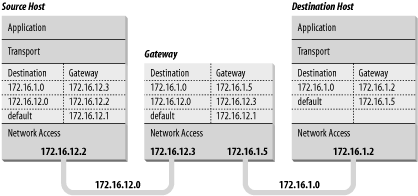
A routing table does not contain end-to-end routes. A route points only to the next gateway, called the next hop, along the path to the destination network.[10] The host relies on the local gateway to deliver the data, and the gateway relies on other gateways. As a datagram moves from one gateway to another, it should eventually reach one that is directly connected to its destination network. It is this last gateway that finally delivers the data to the destination host.
[10] As we'll see in Chapter 7, some routing protocols, such as OSPF and BGP, obtain end-to-end routing information. Nevertheless, the packet is still passed to the next-hop router.
IP uses the network portion of the address to route the datagram between networks. The full address, including the host information, is used to make final delivery when the datagram reaches the destination network.


