Section 3.3. DNS
DNS overcomes both major weaknesses of the host table:
DNS scales well. It doesn't rely on a single large table; it is a distributed database system that doesn't bog down as the database grows. DNS currently provides information on approximately 100,000,000 hosts, while fewer than 10,000 were listed in the host table.
DNS guarantees that new host information will be disseminated to the rest of the network as it is needed.
Information is automatically disseminated, and only to those who are interested. Here's how it works. If a DNS server receives a request for information about a host for which it has no information, it passes on the request to an authoritative server. An authoritative server is any server responsible for maintaining accurate information about the domain being queried. When the authoritative server answers, the local server saves, or caches, the answer for future use. The next time the local server receives a request for this information, it answers the request itself. The ability to control host information from an authoritative source and to automatically disseminate accurate information makes DNS superior to the host table, even for networks not connected to the Internet.
In addition to superseding the host table, DNS also replaces an earlier form of name service. Unfortunately, both the old and new services were called name service. Both are listed in the /etc/services file. In that file, the old software is assigned UDP port 42 and is called nameserver or name; DNS name service is assigned port 53 and is called domain. Naturally, there is some confusion between the two name servers. There shouldn't bethe old name service is outdated. This text discusses DNS only; when we refer to "name service," we always mean DNS.
3.3.1 The Domain Hierarchy
DNS is a distributed hierarchical system for resolving hostnames into IP addresses. Under DNS, there is no central database with all of the Internet host information. The information is distributed among thousands of name servers organized into a hierarchy similar to the hierarchy of the Unix filesystem. DNS has a root domain at the top of the domain hierarchy that is served by a group of name servers called the root servers.
Just as directories in the Unix filesystem are found by following a path from the root directory through subordinate directories to the target directory, information about a domain is found by tracing pointers from the root domain through subordinate domains to the target domain.
Directly under the root domain are the top-level domains. There are two basic types of top-level domainsgeographic and organizational. Geographic domains have been set aside for each country in the world and are identified by a two-letter country code. Thus, this type of domain is called a country code top-level domain (ccTLD). For example, the ccTLD for the United Kingdom is .uk, for Japan it is .jp, and for the United States it is .us. When .us is used as the top-level domain, the second-level domain is usually a state's two-letter postal abbreviation (e.g., .wy.us for Wyoming). U.S. geographic domains are usually used by state governments and K-12 schools but are not widely used for other hosts.
Within the United States, the most popular top-level domains are organizationalthat is, membership in a domain is based on the type of organization (commercial, military, etc.) to which the system belongs.[3] These domains are called generic top-level domains or general-purpose top-level domains (gTLDs).
[3] There is no relationship between the organizational and geographic domains in the U.S. Each system belongs to either an organizational domain or a geographic domain, not both.
The official generic top-level domains are:
- com
-
Commercial organizations
- edu
-
Educational institutions
- gov
-
Government agencies
- mil
-
Military organizations
- net
-
Network support organizations, such as network operation centers
- int
-
International governmental or quasi-governmental organizations
- org
-
Organizations that don't fit into any of the above, such as nonprofit organizations
- aero
-
Organizations involved in the air-transport industry
- biz
-
Businesses
- coop
-
Cooperatives
- museum
-
Museums
- pro
-
Professionals, such as doctors and lawyers
- info
-
Sites providing information
- name
-
Individuals
These are the fourteen current gTLDs. The first seven domains in the list (com, edu, gov, mil, net, int, and org) have been part of the domain system since the beginning. The last seven domains in the list (aero, biz, coop, museum, pro, info, and name) were added in 2000 to increase the number of top-level domains. One motivation for creating the new gTLDs is the huge size of the .com domain. It is so large that it is difficult to maintain an efficient .com database. Whether or not these new gTLDs will be effective in drawing registrations away from the .com domain remains to be seen.
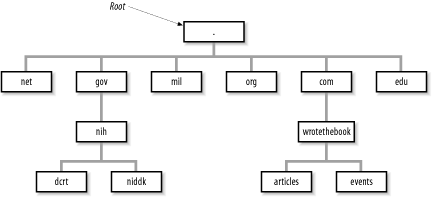
Figure 3-1 illustrates the domain hierarchy using six of the original organizational top-level domains. At the top is the root. Directly below the root domain are the top-level domains. The root servers have complete information only about the top-level domains. No servers, not even the root servers, have complete information about all domains, but the root servers have pointers to the servers for the second-level domains.[4] So while the root servers may not know the answer to a query, they know who to ask.
[4] Figure 3-1 shows two second-level domains: nih under gov and wrotethebook under com.
Figure 3-1. Domain hierarchy
3.3.2 Creating Domains and Subdomains
Several domain name registrars have been authorized by the Internet Corporation for Assigned Names and Numbers (ICANN), a nonprofit organization that was formed to take over the responsibility for allocating domain names and IP addresses. (Previously, the U.S. government oversaw this process.) ICANN has authorized these registrars to allocate domains. To obtain a domain, you apply to a registrar for authority to create a domain under one of the top-level domains. (The details of applying for a domain name are covered in Chapter 4.) Once the authority to create a domain is granted, you can create additional domains, called subdomains, under your domain. Let's look at how this works at our imaginary company.
Our company is a commercial, profit-making (we hope) enterprise. It clearly falls into the com domain. We apply for authority to create a domain named wrotethebook within the com domain. The request for the new domain contains the hostnames and addresses of the servers that will provide name service for the new domain. When the registrar approves the request, it adds pointers in the com domain to the new domain's name servers. Now when queries are received by the root servers for the wrotethebook.com domain, the queries are referred to the new name servers.
The registrar's approval grants us complete authority over our new domain. Any registered domain has authority to divide its domain into subdomains. Our imaginary company can create separate domains for the division that handles special events (events.wrotethebook.com) and for the division that coordinates the preparation of magazine articles (articles.wrotethebook.com) without consulting the registrar or any other "higher authority." The decision to add subdomains is completely up to the local domain administrator. The registrars delegate authority and distribute control over names to individual organizations. Once that authority has been delegated, the individual organization is responsible for managing the names it has been assigned.
A new subdomain becomes accessible when pointers to the servers for the new domain are placed in the domain above it (see Figure 3-1). Remote servers cannot locate the wrotethebook.com domain until a pointer to its server is placed in the com domain. Likewise, the subdomains events and articles cannot be accessed until pointers to them are placed in wrotethebook.com. The DNS database record that points to the name servers for a domain is the NS (name server) record. This record contains the name of the domain and the name of the host that is a server for that domain. Chapter 8 discusses the actual DNS database. For now, let's just think of these records as pointers.
Figure 3-2 illustrates how the NS records are used as pointers. A local server has a request to resolve linuxuser.articles.wrotethebook.com into an IP address. The server has no information on wrotethebook.com in its cache, so it queries a root server (a.root-servers.net in our example) for the address. The root server replies with an NS record that points to crab.wrotethebook.com as the source of information on wrotethebook.com. The local server queries crab, which points it to linuxmag.articles.wrotethebook.com as the server for articles.wrotethebook.com. The local server then queries linuxmag.articles.wrotethebook.com and finally receives the desired IP address. The local server caches the A (address) record and each of the NS records. The next time it has a query for linuxuser.articles.wrotethebook.com, it will answer the query itself. And the next time the server has a query for other information in the wrotethebook.com domain, it will go directly to crab without involving a root server.
Figure 3-2. A DNS query
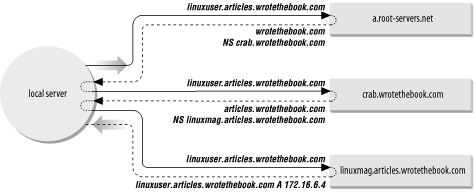
Figure 3-2 provides examples of both recursive and nonrecursive searches. The remote servers are examples of nonrecursive servers. The remote servers tell the local server who to ask next. The local server must follow the pointers itself. The local server is an example of a recursive server. In a recursive search, the server follows the pointers and returns the final answer for the query. The root servers generally perform only nonrecursive searches. Most other servers perform recursive searches.
3.3.3 Domain Names
Domain names reflect the domain hierarchy. They are written from most specific (a hostname) to least specific (a top-level domain), with each part of the domain name separated by a dot.[5] A fully qualified domain name (FQDN) starts with a specific host and ends with a top-level domain. rodent.wrotethebook.com is the FQDN of workstation rodent, in the wrotethebook domain, of the com domain.
[5] The root domain is identified by a single dot; i.e., the root name is a null name written simply as ".".
Domain names are not always written as fully qualified domain names. They can be written relative to a default domain in the same way that Unix pathnames are written relative to the current (default) working directory. DNS adds the default domain to the user input when constructing the query for the name server. For example, if the default domain is wrotethebook.com, a user can omit the wrotethebook.com extension for any hostnames in that domain. crab.wrotethebook.com could be addressed simply as crab; DNS adds the default domain wrotethebook.com.
On most systems, the default domain name is added only if there is no dot in the requested hostname. For example, linuxuser.articles would not be extended and would therefore not be resolved by the name server because articles is not a valid top-level domain. But the hostname crab, which contains no dot, would be extended with wrotethebook.com, giving the valid domain name crab.wrotethebook.com. Like almost everything on a Unix system, this behavior is configurable, as you'll see in Chapter 8.
How the default domain is used and how queries are constructed vary depending on the software configuration. For this reason, you should exercise caution when embedding a hostname in a program. Only a fully qualified domain name or an IP address is immune from changes in the name server software.
3.3.4 BIND, Resolvers, and named
The implementation of DNS used on Unix systems is the Berkeley Internet Name Domain (BIND) software. Descriptions in this text are based on the BIND name server implementation.
DNS software is conceptually divided into two componentsa resolver and a name server. The resolver is the software that forms the query; it asks the questions. The name server is the process that responds to the query; it answers the questions.
The resolver does not exist as a distinct process running on the computer. Rather, the resolver is a library of software routines (called the resolver code) that is linked into any program that needs to look up addresses. This library knows how to ask the name server for host information.
Under BIND, all computers use resolver code, but not all computers run the name server process. A computer that does not run a local name server process and relies on other systems for all name service answers is called a resolver-only system. Resolver-only configurations are common on single-user systems. Larger Unix systems usually run a local name server process.
The BIND name server runs as a distinct process called named (pronounced "name" "d"). Name servers are classified differently depending on how they are configured. The three main categories of name servers are:
- Master
-
The master server (also called the primary server) is the server from which all data about a domain is derived. The master server loads the domain's information directly from a disk file created by the domain administrator. Master servers are authoritative, meaning they have complete information about their domain and their responses are always accurate. There should be only one master server for a domain.
- Slave
-
Slave servers (also known as secondary servers) transfer the entire domain database from the master server. A particular domain's database file is called a zone file; copying this file to a slave server is called a zone file transfer. A slave server assures that it has current information about a domain by periodically transferring the domain's zone file. Slave servers are also authoritative for their domain.
- Caching-only
-
Caching-only servers get the answers to all name service queries from other name servers. Once a caching server has received an answer to a query, it caches the information and will use it in the future to answer queries itself. Most name servers cache answers and use them in this way. What makes the caching-only server unique is that this is the only technique it uses to build its domain database. Caching servers are non-authoritative, meaning that their information is second-hand and incomplete, though usually accurate.
The relationship between the different types of servers is an advantage that DNS has over the host table for most networks, even very small networks. Under DNS, there should be only one primary name server for each domain. DNS data is entered into the primary server's database by the domain administrator. Therefore, the administrator has central control of the hostname information. An automatically distributed, centrally controlled database is an advantage for a network of any size. When you add a new system to the network, you don't need to modify the /etc/hosts files on every node in the network; you modify only the DNS database on the primary server. The information is automatically disseminated to the other servers by full zone transfers or by caching single answers.
3.3.5 Network Information Service
The Network Information Service (NIS)[6] is an administrative database system developed by Sun Microsystems. It provides central control and automatic dissemination of important administrative files. NIS can be used in conjunction with DNS or as an alternative to it.
[6] NIS was formerly called the "Yellow Pages," or yp. Although the name has changed, the abbreviation yp is still used.
NIS and DNS have similarities and differences. Like DNS, the Network Information Service overcomes the problem of accurately distributing the host table, but unlike DNS, it provides service only for local area networks. NIS is not intended as a service for the Internet as a whole. Another difference is that NIS provides access to a wider range of information than DNSmuch more than name-to-address conversions. It converts several standard Unix files into databases that can be queried over the network. These databases are called NIS maps.
NIS converts files such as /etc/hosts and /etc/networks into maps. The maps can be stored on a central server where they can be centrally maintained while still being fully accessible to the NIS clients. Because the maps can be both centrally maintained and automatically disseminated to users, NIS overcomes a major weakness of the host table. But NIS is not an alternative to DNS for Internet hosts because the host table, and therefore NIS, contains only a fraction of the information available to DNS. For this reason DNS and NIS are usually used together.
This chapter has introduced the concept of hostnames and provided an overview of the various techniques used to translate hostnames into IP addresses. This is by no means the complete story. Assigning hostnames and managing name service are important tasks for the network administrator. These topics are revisited several times in this book and discussed in extensive detail in Chapter 8.
Name service is not the only service that you will install on your network. Another service that you are sure to use is electronic mail.


