Section 3.4. Mail Services
Users consider electronic mail the most important network service because they use it for interpersonal communications. Some applications are newer and fancier; others consume more network bandwidth; and others are more important for the continued operation of the network. But email is the application people use to communicate with each other. It isn't very fancy, but it is vital.
TCP/IP provides a reliable, flexible email system built on a few basic protocols. These protocols are Simple Mail Transfer Protocol (SMTP), Post Office Protocol (POP), Internet Message Access Protocol (IMAP), and Multipurpose Internet Mail Extensions (MIME). There are other TCP/IP mail protocols that have some interesting features, but they are not yet widely implemented.
Our coverage concentrates on the four protocols you are most likely to use building your network: SMTP, POP, IMAP, and MIME. We start with SMTP, the foundation of all TCP/IP email systems.
3.4.1 Simple Mail Transfer Protocol
SMTP is the TCP/IP mail delivery protocol. It moves mail across the Internet and across your local network. SMTP is defined in RFC 821, A Simple Mail Transfer Protocol. It runs over the reliable, connection-oriented service provided by Transmission Control Protocol (TCP), and it uses well-known port number 25.[7] Table 3-1 lists some of the simple, human-readable commands used by SMTP.
[7] Most standard TCP/IP applications are assigned a well-known port so that remote systems know how to connect the service.
|
Command |
Syntax |
Function |
|---|---|---|
|
Hello |
HELO <sending-host> EHLO <sending-host> |
Identify sending SMTP |
|
From |
MAIL FROM:<from-address> |
Sender address |
|
Recipient |
RCPT TO:<to-address> |
Recipient address |
|
Data |
DATA |
Begin a message |
|
Reset |
RSET |
Abort a message |
|
Verify |
VRFY <string> |
Verify a username |
|
Expand |
EXPN <string> |
Expand a mailing list |
|
Help |
HELP [string] |
Request online help |
|
Quit |
QUIT |
End the SMTP session |
SMTP is such a simple protocol you can literally do it yourself. telnet to port 25 on a remote host and type mail in from the command line using the SMTP commands. This technique is sometimes used to test a remote system's SMTP server, but we use it here to illustrate how mail is delivered between systems. The example below shows mail that Daniel on rodent.wrotethebook.com manually input and sent to Tyler on crab.wrotethebook.com.
$ telnet crab 25

Trying 172.16.12.1...

Connected to crab.wrotethebook.com.

Escape character is '^]'.

220 crab.wrotethebook.com ESMTP Sendmail 8.9.3+Sun/8.9.3; Thu, 19 Apr 2001 16:28:01-0400 (EDT)

HELO rodent.wrotethebook.com

250 crab.wrotethebook.com Hello rodent [172.16.12.2], pleased to meet you

MAIL FROM:<daniel@rodent.wrotethebook.com>

250 <daniel@rodent.wrotethebook.com>... Sender ok

RCPT TO:<tyler@crab.wrotethebook.com>

250 <tyler@crab.wrotethebook.com>... Recipient ok

DATA

354 Enter mail, end with "." on a line by itself

Hi Tyler!

.

250 QAA00316 Message accepted for delivery

QUIT

221 crab.wrotethebook.com closing connection

Connection closed by foreign host.
The user input is shown in bold type. All of the other lines are output from the system. This example shows how simple it is. A TCP connection is opened. The sending system identifies itself. The From address and the To address are provided. The message transmission begins with the DATA command and ends with a line that contains only a period (.). The session terminates with a QUIT command. Very simple, and very few commands are used.
There are other commands (SEND, SOML, SAML, and TURN) defined in RFC 821 that are optional and not widely implemented. Even some of the commands that are implemented are not commonly used. The commands HELP, VRFY, and EXPN are designed more for interactive use than for the normal machine-to-machine interaction used by SMTP. The following excerpt from a SMTP session shows how these odd commands work.
HELP

214-This is Sendmail version 8.9.3+Sun

214-Topics:

214-    HELO    EHLO    MAIL    RCPT    DATA

214-    RSET    NOOP    QUIT    HELP    VRFY

214-    EXPN    VERB    ETRN    DSN

214-For more info use "HELP <topic>".

214-For local information contact postmaster at this site.

214 End of HELP info

HELP RSET

214-RSET

214-    Resets the system.

214 End of HELP info

VRFY <jane>

250 <jane@brazil.wrotethebook.com>

VRFY <mac>

250 Kathy McCafferty <<mac>>

EXPN <admin>

250-<sara@horseshoe.wrotethebook.com>

250 David Craig <<david>>

250-<tyler@wrotethebook.com>
The HELP command prints out a summary of the commands implemented on the system. The HELP RSET command specifically requests information about the RSET command. Frankly, this help system isn't very helpful!
The VRFY and EXPN commands are more useful but are often disabled for security reasons because they provide user account information that might be exploited by network intruders. The EXPN <admin> command asks for a listing of the email addresses in the mailing list admin, and that is what the system provides. The VRFY command asks for information about an individual instead of a mailing list. In the case of the VRFY <mac> command, mac is a local user account, and the user's account information is returned. In the case of VRFY <jane>, jane is an alias in the /etc/aliases file. The value returned is the email address for jane found in that file. The three commands in this example are interesting but rarely used. SMTP depends on the other commands to get the real work done.
SMTP provides direct end-to-end mail delivery. Other mail systems, like UUCP and X.400, use store and forward protocols that move mail toward its destination one hop at a time, storing the complete message at each hop and then forwarding it on to the next system. The message proceeds in this manner until final delivery is made. Figure 3-3 illustrates both store-and-forward and direct-delivery mail systems. The UUCP address clearly shows the path that the mail takes to its destination, while the SMTP mail address implies direct delivery.[8]
[8] The address doesn't have anything to do with whether a system is store and forward or direct delivery. It just happens that UUCP provides an address that helps to illustrate this point.
Figure 3-3. Mail delivery systems
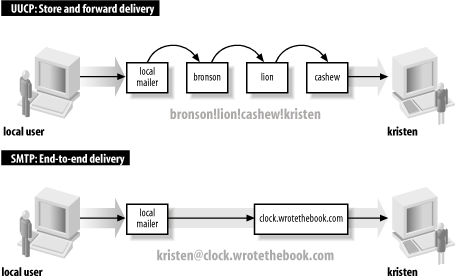
Direct delivery allows SMTP to deliver mail without relying on intermediate hosts. If the delivery fails, the local system knows it right away. It can inform the user that sent the mail or queue the mail for later delivery without reliance on remote systems. The disadvantage of direct delivery is that it requires both systems to be fully capable of handling mail. Some systems cannot handle mail, particularly small systems such as PCs or mobile systems such as laptops. These systems are usually shut down at the end of the day and are frequently offline. Mail directed from a remote host fails with a "cannot connect" error when the local system is turned off or is offline. To handle these cases, features in the DNS system are used to route the message to a mail server in lieu of direct delivery. The mail is then moved from the server to the client system when the client is back online. One of the protocols TCP/IP networks use for this task is POP.
3.4.2 Post Office Protocol
There are two versions of Post Office Protocol: POP2 and POP3. POP2, defined in RFC 937, uses port 109, and POP3, defined in RFC 1725, uses port 110. These are incompatible protocols that use different commands, although they perform the same basic functions. The POP protocols verify the user's login name and password and move the user's mail from the server to the user's local mail reader. POP2 is rarely used anymore, so this section focuses on POP3.
A sample POP3 session clearly illustrates how a POP protocol works. POP3 is a simple request/response protocol, and just as with SMTP, you can type POP3 commands directly into its well-known port (110) and observe their effect. Here's an example with the user input shown in bold type:
% telnet crab 110

Trying 172.16.12.1 ...

Connected to crab.wrotethebook.com.

Escape character is '^]'.

+OK crab POP3 Server Process 3.3(1) at Mon 16-Apr-2001 4:48PM-EDT

USER hunt

+OK User name (hunt) ok. Password, please.

PASS Watts?Watt?

+OK 3 messages in folder NEWMAIL (V3.3 Rev B04)

STAT

+OK 3 459

RETR 1

+OK 146 octets

...The full text of message 1...

DELE 1

+OK message # 1 deleted

RETR 2

+OK 155 octets

...The full text of message 2...

DELE 2

+OK message # 2 deleted

RETR 3

+OK 158 octets

...The full text of message 3...

DELE 3

+OK message # 3 deleted

QUIT

+OK POP3 crab Server exiting (0 NEWMAIL messages left) Connection closed by foreign host.
The USER command provides the username, and the PASS command provides the password for the account of the mailbox that is being retrieved. (This is the same username and password the user would use to log into the mail server.) In response to the STAT command, the server sends a count of the number of messages in the mailbox and the total number of bytes contained in those messages. In the example, there are three messages that contain a total of 459 bytes. RETR 1 retrieves the full text of the first message. DELE 1 deletes that message from the server. Each message is retrieved and deleted in turn. The client ends the session with the QUIT command. Simple! Table 3-2 lists the full set of POP3 commands.
|
Command |
Function |
|---|---|
|
USER username |
The user's account name |
|
PASS password |
The user's password |
|
STAT |
Display the number of unread messages/bytes |
|
RETR n |
Retrieve message number n |
|
DELE n |
Delete message number n |
|
LAST |
Display the number of the last message accessed |
|
LIST [n] |
Display the size of message n or of all messages |
|
RSET |
Undelete all messages; reset message number to 1 |
|
TOP n l |
Print the headers and l lines of message n |
|
NOOP |
Do nothing |
|
QUIT |
End the POP3 session |
The retrieve (RETR) and delete (DELE) commands use message numbers that allow messages to be processed in any order. Additionally, there is no direct link between retrieving a message and deleting it. It is possible to delete a message that has never been read or to retain a message even after it has been read. However, POP clients do not normally take advantage of these possibilities. On an average POP server, the entire contents of the mailbox are moved to the client and either deleted from the server or retained as if never read. Deletion of individual messages on the client is not reflected on the server because all of the messages are treated as a single unit that is either deleted or retained after the initial transfer of data to the client. Email clients that want to remotely maintain a mailbox on the server are more likely to use IMAP.
3.4.3 Internet Message Access Protocol
Internet Message Access Protocol (IMAP) is an alternative to POP. It provides the same basic service as POP and adds features to support mailbox synchronization, which is the ability to read individual mail messages on a client or directly on the server while keeping the mailboxes on both systems completely up to date. IMAP provides the ability to manipulate individual messages on the client or the server and to have those changes reflected in the mailboxes of both systems.
IMAP uses TCP for reliable, sequenced data delivery. The IMAP port is TCP port 143.[9] Like the POP protocol, IMAP is also a request/response protocol with a small set of commands. The IMAP command set is somewhat more complex than the one used by POP because IMAP does more, yet there are still fewer than 25 IMAP commands. Table 3-3 lists the basic set of IMAP commands as defined in RFC 2060, Internet Message Access Protocol - Version 4rev1.
[9] The /etc/services file lists two different ports for IMAP: 143 and 220. Port 220 is used by IMAP 3. IMAP 4 uses port number 143, which is the same port used by IMAP 2
|
Command |
Function |
|---|---|
|
CAPABILITY |
List the features supported by the server |
|
NOOP |
Literally "No Operation" |
|
LOGOUT |
Close the connection |
|
AUTHENTICATE |
Request an alternate authentication method |
|
LOGIN |
Provide the username and password for plain-text authentication |
|
SELECT |
Open a mailbox |
|
EXAMINE |
Open a mailbox as read-only |
|
CREATE |
Create a new mailbox |
|
DELETE |
Remove a mailbox |
|
RENAME |
Change the name of a mailbox |
|
SUBSCRIBE |
Add a mailbox to the list of active mailboxes |
|
UNSUBSCRIBE |
Delete a mailbox name from the list of active mailboxes |
|
LIST |
Display the requested mailbox names from the set of all mailbox names |
|
LSUB |
Display the requested mailbox names from the set of active mailboxes |
|
STATUS |
Request the status of a mailbox |
|
APPEND |
Add a message to the end of the specified mailbox |
|
CHECK |
Force a checkpoint of the current mailbox |
|
CLOSE |
Close the mailbox and remove all messages marked for deletion |
|
EXPUNGE |
Remove from the current mailbox all messages marked for deletion |
|
SEARCH |
Display all messages in the mailbox that match the specified search criterion |
|
FETCH |
Retrieve a message from the mailbox |
|
STORE |
Modify a message in the mailbox |
|
COPY |
Copy the specified messages to the end of the specified mailbox |
|
UID |
Locate a message based on the message's unique identifier |
This command set clearly illustrates the "mailbox" orientation of IMAP. The protocol is designed to remotely maintain mailboxes that are stored on the server. The protocol commands show that. Despite the increased complexity of the protocol, it is still possible to run a simple test of your IMAP server using telnet and a small number of the IMAP commands.
$ telnet localhost 143

Trying 127.0.0.1...

Connected to rodent.wrotethebook.com.

Escape character is '^]'.

* OK rodent.wrotethebook.com IMAP4rev1 v12.252 server ready

a0001 LOGIN craig Wats?Watt?

a0001 OK LOGIN completed

a0002 SELECT inbox

* 3 EXISTS

* 0 RECENT

* OK [UIDVALIDITY 965125671] UID validity status

* OK [UIDNEXT 5] Predicted next UID

* FLAGS (\Answered \Flagged \Deleted \Draft \Seen)

* OK [PERMANENTFLAGS (\* \Answered \Flagged \Deleted \Draft \Seen)] Permanent flags

* OK [UNSEEN 1] first unseen message in /var/spool/mail/craig

a0002 OK [READ-WRITE] SELECT completed

a0003 FETCH 1 BODY[TEXT]

* 1 FETCH (BODY[TEXT] {1440}

... an e-mail message that is 1440 bytes long ...

* 1 FETCH (FLAGS (\Seen))

a0003 OK FETCH completed

a0004 STORE 1 +FLAGS \DELETED

* 1 FETCH (FLAGS (\Seen \Deleted))

a0004 OK STORE completed

a0005 CLOSE

a0005 OK CLOSE completed

a0006 LOGOUT

* BYE rodent.wrotethebook.com IMAP4rev1 server terminating connection

a0006 OK LOGOUT completed

Connection closed by foreign host.
The first three lines and the last line come from telnet; all other messages come from IMAP. The first IMAP command entered by the user is LOGIN, which provides the username and password from /etc/passwd used to authenticate this user. Notice that the command is preceded by the string A0001. This is a tag, which is a unique identifier generated by the client for each command. Every command must start with a tag. When you manually type in commands for a test, you are the source of the tags.
IMAP is a mailbox-oriented protocol. The SELECT command selects the mailbox that will be used. In the example, the user selects a mailbox named "inbox". The IMAP server displays the status of the mailbox, which contains three messages. Associated with each message are a number of flags. The flags are used to manage the messages in the mailbox by marking them as Seen, Unseen, Deleted, and so on.
The FETCH command downloads a message from the mailbox. In the example, the user downloads the text of the message, which is what you normally see when reading a message. It is possible, however, to download only the headers or flags.
After the message is downloaded, the user deletes it. This is done by writing the Deleted flag with the STORE command. The DELETE command is not used to delete messages; it deletes entire mailboxes. Individual messages are marked for deletion by setting the Delete flag. Messages with the Delete flag set are not deleted until either the EXPUNGE command is issued or the mailbox is explicitly closed with the CLOSE command, as is done in the example. The session is then terminated with the LOGOUT command.
Clearly, the IMAP protocol is more complex than POP; it is just about at the limits of what can reasonably be typed in manually. Of course, you don't really enter these commands manually. The desktop system and the server exchange them automatically. They are shown here only to give you a sense of the IMAP protocol. About the only IMAP test you would ever do manually is to test if imapd is up and running. To do that, you don't even need to log in; if the server answers the telnet, you know it is up and running. All you then need to do is send the LOGOUT command to gracefully close the connection.
3.4.4 Multipurpose Internet Mail Extensions
The last email protocol on our quick tour is Multipurpose Internet Mail Extensions (MIME).[10] As its name implies, MIME is an extension of the existing TCP/IP mail system, not a replacement for it. MIME is more concerned with what the mail system delivers than with the mechanics of delivery. It doesn't attempt to replace SMTP or TCP; it extends the definition of what constitutes "mail."
[10] MIME is also an integral part of the Web and HTTP.
The structure of the mail message carried by SMTP is defined in RFC 822, Standard for the Format of ARPA Internet Text Messages. RFC 822 defines a set of mail headers that are so widely accepted they are used by many mail systems that do not use SMTP. This is a great benefit to email because it provides a common ground for mail translation and delivery through gateways to different mail networks. MIME extends RFC 822 into two areas not covered by the original RFC:
Support for various data types. The mail system defined by RFC 821 and RFC 822 transfers only 7-bit ASCII data. This is suitable for carrying text data composed of U.S. ASCII characters, but it does not support several languages that have richer character sets, nor does it support binary data transfer.
Support for complex message bodies. RFC 822 doesn't provide a detailed description of the body of an electronic message. It concentrates on the mail headers.
MIME addresses these two weaknesses by defining encoding techniques for carrying various forms of data and by defining a structure for the message body that allows multiple objects to be carried in a single message. RFC 1521, Multipurpose Internet Mail Extensions Part One: Format of Internet Message Bodies, defines two headers that give structure to the mail message body and allow it to carry various forms of data. These are the Content-Type header and the Content-Transfer-Encoding header.
As the name implies, the Content-Type header defines the type of data being carried in the message. The header has a Subtype field that refines the definition. Many subtypes have been defined since the original RFC was released. A current list of MIME types can be obtained from the Internet.[11] The original RFC defines seven initial content types and a few subtypes:
[11] Go to ftp://ftp.isi.edu/in-notes/iana/assignments/media-types to retrieve the file media-types.
- text
-
Text data. RFC 1521 defines text subtypes plain and richtext. More than 30 subtypes have since been added, including enriched, xml and html.
- application
-
Binary data. The primary subtype defined in RFC 1521 is octet-stream, which indicates the data is a stream of 8-bit binary bytes. One other subtype, PostScript, is defined in the standard. Since then more than 200 subtypes have been defined. They specify binary data formatted for a particular application. For example, msword is an application subtype.
- image
-
Still graphic images. Two subtypes are defined in RFC 1521: jpeg and gif. More than 20 additional subtypes have since been added, including widely used image data standards such as tiff, cgm, and g3fax.
- video
-
Moving graphic images. The initially defined subtype was mpeg, which is a widely used standard for computer video data. A few others have since been added, including quicktime.
- audio
-
Audio data. The only subtype initially defined for audio was basic, which means the sounds are encoded using pulse code modulation (PCM). About 20 additional audio types, such as MP4A-LATM, have since been added.
- multipart
-
Data composed of multiple independent sections. A multipart message body is made up of several independent parts. RFC 1521 defines four subtypes. The primary subtype is mixed, which means that each part of the message can be data of any content type. Other subtypes are alternative, meaning that the same data is repeated in each section in different formats; parallel, meaning that the data in the various parts is to be viewed simultaneously; and digest, meaning that each section is data of the type message. Several subtypes have since been added, including support for voice messages (voice-message) and encrypted messages.
- message
-
Data that is an encapsulated mail message. RFC 1521 defines three subtypes. The primary subtype, rfc822, indicates that the data is a complete RFC 822 mail message. The other subtypes, partial and External-body, are both designed to handle large messages. partial allows large encapsulated messages to be split among multiple MIME messages. External-body points to an external source for the contents of a large message body so that only the pointer, not the message itself, is contained in the MIME message. Two additional subtypes that have been defined are news for carrying network news and http for HTTP traffic formatted to comply with MIME content typing.
The Content-Transfer-Encoding header identifies the type of encoding used on the data. Traditional SMTP systems forward only 7-bit ASCII data with a line length of less than 1000 bytes. Since the data from a MIME system may be forwarded through gateways that support only 7-bit ASCII, the data can be encoded. RFC 1521 defines six types of encoding. Some types are used to identify the encoding inherent in the data. Only two types are actual encoding techniques defined in the RFC. The six encoding types are:
- 7bit
-
U.S. ASCII data. No encoding is performed on 7-bit ASCII data.
- 8bit
-
Octet data. No encoding is performed. The data is binary, but the lines of data are short enough for SMTP transport; i.e., the lines are less than 1000 bytes long.
- binary
-
Binary data. No encoding is performed. The data is binary and the lines may be longer than 1000 bytes. There is no difference between binary and 8bit data except the line length restriction; both types of data are unencoded byte (octet) streams. MIME does not modify unencoded bitstream data.
- quoted-printable
-
Encoded text data. This encoding technique handles data that is largely composed of printable ASCII text. The ASCII text is sent unencoded, while bytes with a value greater than 127 or less than 33 are sent encoded as strings made up of the equals sign followed by the hexadecimal value of the byte. For example, the ASCII form feed character, which has the hexadecimal value of 0C, is sent as =0C. Naturally, there's more to it than thisfor example, the literal equals sign has to be sent as =3D, and the newline at the end of each line is not encoded. But this is the general idea of how quoted-printable data is sent.
- base64
-
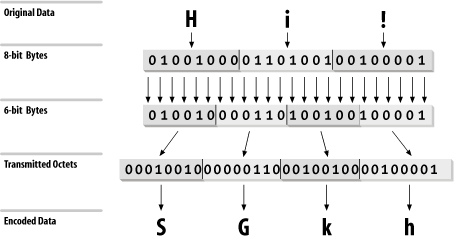
Encoded binary data. This encoding technique can be used on any byte-stream data. Three octets of data are encoded as four 6-bit characters, which increases the size of the file by one-third. The 6-bit characters are a subset of U.S. ASCII, chosen because they can be handled by any type of mail system. The maximum line length for base64 data is 76 characters. Figure 3-4 illustrates this 3-to-4 encoding technique.
- x-token
-
Specially encoded data. It is possible for software developers to define their own private encoding techniques. If they do so, the name of the encoding technique must begin with X-. Doing this is strongly discouraged because it limits interoperability between mail systems.
Figure 3-4. base64 encoding
The number of supported data types and encoding techniques grows as new data formats appear and are used in message transmissions. New RFCs constantly define new data types and encoding. Read the latest RFCs to keep up with MIME developments.
MIME defines data types that SMTP was not designed to carry. To handle these and other future requirements, RFC 1869, SMTP Service Extensions, defines a technique for making SMTP extensible. The RFC does not define new services for SMTP; in fact, the only service extensions mentioned in the RFC are defined in other RFCs. What this RFC does define is a simple mechanism for systems to negotiate which SMTP extensions are supported. The RFC defines a new hello command (EHLO) and the legal responses to that command. One response is for the receiving system to return a list of the SMTP extensions it supports. This response allows the sending system to know what extended services can be used, and to avoid those that are not implemented on the remote system. SMTP implementations that support the EHLO command are called Extended SMTP (ESMTP).
Several ESMTP service extensions have been defined for MIME mailers. Table 3-4 lists some of these. The table lists the EHLO keyword associated with each extension, the number of the RFC that defines it, and its purpose. These service extensions are just an example. Other have been defined to support SMTP enhancements.
|
Keyword |
RFC |
Function |
|---|---|---|
|
8BITMIME |
1652 |
Accept 8bit binary data |
|
CHUNKING |
1830 |
Accept messages cut into chunks |
|
CHECKPOINT |
1845 |
Checkpoint/restart mail transactions |
|
PIPELINING |
1854 |
Accept multiple commands in a single send |
|
SIZE |
1870 |
Display maximum acceptable message size |
|
DSN |
1891 |
Provide delivery status notifications |
|
ETRN |
1985 |
Accept remote queue processing requests |
|
ENHANCEDSTATUSCODES |
2034 |
Provide enhanced error codes |
|
STARTTLS |
2487 |
Use Transport Layer Security to encrypt the email exchange |
|
AUTH |
2554 |
Use strong authentication to identify the email source |
It is easy to check which extensions are supported by your server by using the EHLO command. The following example is from a generic Solaris 8 system, which comes with sendmail 8.9.3:
> telnet localhost 25

Trying 127.0.0.1...

Connected to localhost.

Escape character is '^]'.

220 crab.wrotethebook.com ESMTP Sendmail 8.9.3+Sun/8.9.3; Mon, 23 Apr 2001 11:00:35-0400 (EDT)

EHLO crab

250-crab.wrotethebook.com Hello localhost [127.0.0.1], pleased to meet you

250-EXPN

250 HELP

250-8BITMIME

250-SIZE

250-DSN

250-ETRN

250-VERB

250-ONEX

250-XUSR

QUIT

221 crab.foobirds.org closing connection

Connection closed by foreign host.
The sample system lists nine commands in response to the EHLO greeting. Two of these, EXPN and HELP, are standard SMTP commands that aren't implemented on all systems (the standard commands are listed in Table 3-1). 8BITMIME, SIZE, DSN, and ETRN are ESMTP extensions, all of which are described in Table 3-4. The last three keywords in the response are VERB, ONEX, and XUSR. All of these are specific to sendmail version 8. None is defined in an RFC. VERB simply places the sendmail server in verbose mode. ONEX limits the session to a single message transaction. XUSR is equivalent to the -U sendmail command-line argument.[12] As the last three keywords indicate, the RFCs allow for private ESMTP extensions.
[12] See Appendix E for a list of the sendmail command-line arguments.
The specific extensions implemented on each system are different. For example, on a generic Solaris 2.5.1 system, only three keywords (EXPN, SIZE, and HELP) are displayed in response to EHLO. The extensions available depend on the version of sendmail that is running and on how sendmail is configured.[13] The purpose of EHLO is to identify these differences at the beginning of the SMTP mail exchange.
[13] See Chapter 10 for the details of sendmail configuration.
ESMTP and MIME are important because they provide a standard way to transfer non-ASCII data through email. Users share lots of application-specific data that is not 7-bit ASCII. Many users depend on email as a file transfer mechanism.
SMTP, POP, IMAP, and MIME are essential parts of the mail system, but other email protocols may also be essential in the future. The one certainty is that the network will continue to change. You need to track current developments and include helpful technologies in your planning. Two technologies that users find helpful are file sharing and printer sharing. In the next section we look at file and print servers.


