Section 2.6. Protocols, Ports, and Sockets
Once data is routed through the network and delivered to a specific host, it must be delivered to the correct user or process. As the data moves up or down the TCP/IP layers, a mechanism is needed to deliver it to the correct protocols in each layer. The system must be able to combine data from many applications into a few transport protocols, and from the transport protocols into the Internet Protocol. Combining many sources of data into a single data stream is called multiplexing.
Data arriving from the network must be demultiplexed: divided for delivery to multiple processes. To accomplish this task, IP uses protocol numbers to identify transport protocols, and the transport protocols use port numbers to identify applications.
Some protocol and port numbers are reserved to identify well-known services. Well-known services are standard network protocols, such as FTP and Telnet, that are commonly used throughout the network. The protocol numbers and port numbers are assigned to well-known services by the Internet Assigned Numbers Authority (IANA). Officially assigned numbers are documented at http://www.iana.org. Unix systems define protocol and port numbers in two simple text files.
2.6.1 Protocol Numbers
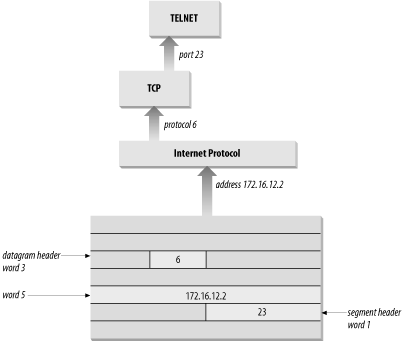
The protocol number is a single byte in the third word of the datagram header. The value identifies the protocol in the layer above IP to which the data should be passed.
On a Unix system, the protocol numbers are defined in /etc/protocols. This file is a simple table containing the protocol name and the protocol number associated with that name. The format of the table is a single entry per line, consisting of the official protocol name, separated by whitespace from the protocol number. The protocol number is separated by whitespace from the "alias" for the protocol name. Comments in the table begin with #. An /etc/protocols file is shown below:
% cat /etc/protocols

#ident  "@(#)protocols  1.5     99/03/21 SMI"   /* SVr4.0 1.1   */


#

# Internet (IP) protocols

#

ip            0     IP            # pseudo internet protocol number

icmp          1     ICMP          # internet control message protocol

ggp           3     GGP           # gateway-gateway protocol

tcp           6     TCP           # transmission control protocol

egp           8     EGP           # exterior gateway protocol

pup           12    PUP           # PARC universal packet protocol

udp           17    UDP           # user datagram protocol

hmp           20    HMP           # host monitoring protocol

xns-idp       22    XNS-IDP       # Xerox NS IDP

rdp           27    RDP           # "reliable datagram" protocol


#

# Internet (IPv6) extension headers

#

hopopt        0     HOPOPT        # Hop-by-hop options for IPv6

ipv6          41    IPv6          # IPv6 in IP encapsulation

ipv6-route    43    IPv6-Route    # Routing header for IPv6

ipv6-frag     44    IPv6-Frag     # Fragment header for IPv6

esp           50    ESP           # Encap Security Payload for IPv6

ah            51    AH            # Authentication Header for IPv6

ipv6-icmp     58    IPv6-ICMP     # IPv6 internet control message protocol

ipv6-nonxt    59    IPv6-NoNxt    # IPv6No next header extension header

ipv6-opts     60    IPv6-Opts     # Destination Options for IPv6
The listing above is the contents of the /etc/protocols file from a Solaris 8 workstation. This list of numbers is by no means complete. If you refer to the Protocol Numbers section of the IANA web site, you'll see many more protocol numbers. However, a system needs to include only the numbers of the protocols that it actually uses. Even the list shown above is more than this specific workstation needed; for example, the second half of this table is used only on systems that run IPv6. Don't worry if your system doesn't use IPv6 or many of these other protocols. The additional entries do no harm.
What exactly does this table mean? When a datagram arrives and its destination address matches the local IP address, the IP layer knows that the datagram has to be delivered to one of the transport protocols above it. To decide which protocol should receive the datagram, IP looks at the datagram's protocol number. Using this table, you can see that if the datagram's protocol number is 6, IP delivers the datagram to TCP; if the protocol number is 17, IP delivers the datagram to UDP. TCP and UDP are the two transport layer services we are concerned with, but all of the protocols listed in the first half of the table use IP datagram delivery service directly. Some, such as ICMP, EGP, and GGP, have already been mentioned. Others haven't, but you don't need to be concerned with the minor protocols in order to configure and manage a TCP/IP network.
2.6.2 Port Numbers
After IP passes incoming data to the transport protocol, the transport protocol passes the data to the correct application process. Application processes (also called network services) are identified by port numbers, which are 16-bit values. The source port number, which identifies the process that sent the data, and the destination port number, which identifies the process that will receive the data, are contained in the first header word of each TCP segment and UDP packet.
Port numbers below 1024 are reserved for well-known services (like FTP and Telnet) and are assigned by the IANA. Well-known port numbers are considered "privileged ports" that should not be bound to a user process. Ports numbered from 1024 to 49151 are "registered ports." IANA tries to maintain a registry of services that use these ports, but it does not officially assign port numbers in this range. The port numbers from 49152 to 65535 are the "private ports." Private port numbers are available for any use.
Port numbers are not unique between transport layer protocols; the numbers are unique only within a specific transport protocol. In other words, TCP and UDP can and do assign the same port numbers. It is the combination of protocol and port numbers that uniquely identifies the specific process to which the data should be delivered.
On Unix systems, port numbers are defined in the /etc/services file. There are many more network applications than there are transport layer protocols, as the size of the /etc/services table shows. A partial /etc/services file from a Solaris 8 workstation is shown here:
rodent% head -22 /etc/services

#ident  "@(#)services   1.25    99/11/06 SMI"   /* SVr4.0 1.8   */

#

#

# Copyright (c) 1999 by Sun Microsystems, Inc.

# All rights reserved.

#

# Network services, Internet style

#

tcpmux          1/tcp

echo            7/tcp

echo            7/udp

discard         9/tcp           sink null

discard         9/udp           sink null

systat          11/tcp          users

daytime         13/tcp

daytime         13/udp

netstat         15/tcp

chargen         19/tcp          ttytst source

chargen         19/udp          ttytst source

ftp-data        20/tcp

ftp             21/tcp

telnet          23/tcp
The format of this file is very similar to the /etc/protocols file. Each single-line entry starts with the official name of the service separated by whitespace from the port number/protocol pairing associated with that service. The port numbers are paired with transport protocol names because different transport protocols may use the same port number. An optional list of aliases for the official service name may be provided after the port number/protocol pair.
The /etc/services file, combined with the /etc/protocols file, provides all of the information necessary to deliver data to the correct application. A datagram arrives at its destination based on the destination address in the fifth word of the datagram header. Using the protocol number in the third word of the datagram header, IP delivers the data from the datagram to the proper transport layer protocol. The first word of the data delivered to the transport protocol contains the destination port number that tells the transport protocol to pass the data up to a specific application. Figure 2-5 shows this delivery process.
Figure 2-5. Protocol and port numbers
Despite its size, the /etc/services file does not contain the port number of every important network service. You won't find the port number of every Remote Procedure Call (RPC) service in the services file. Sun developed a different technique for reserving ports for RPC services that doesn't involve getting a well-known port number assignment from IANA. RPC services generally use registered port numbers, which do not need to be officially assigned. When an RPC service starts, it registers its port number with the portmapper. The portmapper is a program that keeps track of the port numbers being used by RPC services. When a client wants to use an RPC service, it queries the portmapper running on the server to discover the port assigned to the service. The client can find portmapper because it is assigned well-known port 111. portmapper makes it possible to install widely used services without formally obtaining a well-known port.
2.6.3 Sockets
Well-known ports are standardized port numbers that enable remote computers to know which port to connect to for a particular network service. This simplifies the connection process because both the sender and receiver know in advance that data bound for a specific process will use a specific port. For example, all systems that offer Telnet do so on port 23.
Equally important is a second type of port number called a dynamically allocated port. As the name implies, dynamically allocated ports are not pre-assigned; they are assigned to processes when needed. The system ensures that it does not assign the same port number to two processes, and that the numbers assigned are above the range of well-known port numbers, i.e., above 1024.
Dynamically allocated ports provide the flexibility needed to support multiple users. If a telnet user is assigned port number 23 for both the source and destination ports, what port numbers are assigned to the second concurrent telnet user? To uniquely identify every connection, the source port is assigned a dynamically allocated port number, and the well-known port number is used for the destination port.
In the telnet example, the first user is given a random source port number and a destination port number of 23 (telnet). The second user is given a different random source port number and the same destination port. It is the pair of port numbers, source and destination, that uniquely identifies each network connection. The destination host knows the source port because it is provided in both the TCP segment header and the UDP packet header. Both hosts know the destination port because it is a well-known port.
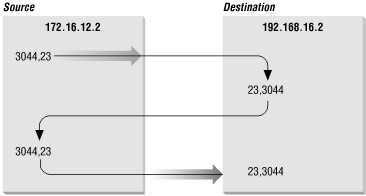
Figure 2-6 shows the exchange of port numbers during the TCP handshake. The source host randomly generates a source port, in this example 3044. It sends out a segment with a source port of 3044 and a destination port of 23. The destination host receives the segment and responds back using 23 as its source port and 3044 as its destination port.
Figure 2-6. Passing port numbers
The combination of an IP address and a port number is called a socket. A socket uniquely identifies a single network process within the entire Internet. Sometimes the terms "socket" and "port number" are used interchangeably. In fact, well-known services are frequently referred to as "well-known sockets." In the context of this discussion, a "socket" is the combination of an IP address and a port number. A pair of sockets, one socket for the receiving host and one for the sending host, define the connection for connection-oriented protocols such as TCP.
Let's build on the example of dynamically assigned ports and well-known ports. Assume a user on host 172.16.12.2 uses Telnet to connect to host 192.168.16.2. Host 172.16.12.2 is the source host. The user is dynamically assigned a unique port number, 3382. The connection is made to the telnet service on the remote host, which is, according to the standard, assigned well-known port 23. The socket for the source side of the connection is 172.16.12.2.3382 (IP address 172.16.12.2 plus port number 3382). For the destination side of the connection, the socket is 192.168.16.2.23 (address 192.168.16.2 plus port 23). The port of the destination socket is known by both systems because it is a well-known port. The port of the source socket is known by both systems because the source host informed the destination host of the source socket when the connection request was made. The socket pair is therefore known by both the source and destination computers. The combination of the two sockets uniquely identifies this connection; no other connection in the Internet has this socket pair.


