Section 4.4. Planning Naming Service
To make your network user-friendly, you need to provide a service to convert hostnames into IP addresses. The Domain Name System (DNS) and the host table, explained in Chapter 3, perform this function. You should plan to use both.
To configure a computer, a network user needs to know the domain name, the system's hostname, and the hostname and address of at least one name server. The network administrator provides this information.
4.4.1 Obtaining a Domain Name
The first item you need for name service is a domain name. Your ISP may be willing to get one for you or to assign you a name within its domain; however, it is likely that you will have to apply for a domain name yourself. You can buy an official domain name from a domain name registrar.
Your domain is not part of the official domain name space until it is registered. Only certain organizations are permitted to officially register a domain name. You need to locate an official registrar and obtain its services to register your domain. The place to start is either http://www.icann.org or http://www.internic.net. Both of these sites provide listings of official registrars.
ICANN is the Internet Corporation for Assigned Names and Numbers, a nonprofit organization created to take over management of some functions previously managed through U.S. government contractors. ICANN oversees the domain name registrars. The ICANN web site provides pointers to various international registrars.
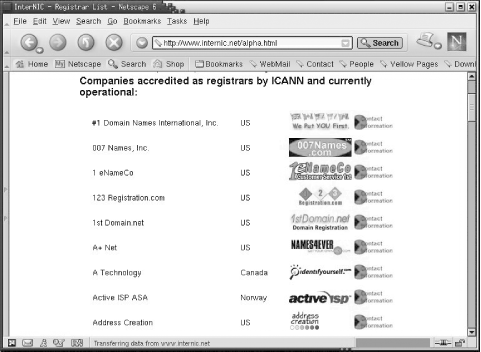
http://www.internic.net is a U.S. government web site designed to point users to official gTLD registrars and to answer any questions Internet users might have about the domain registration process. The imaginary domain used in this book is registered in .com. For .org, .com, or .net domains, this is a good place to start. Figure 4-2 shows part of the alphabetical list of accredited registrars found at http://www.internic.net.
Figure 4-2. The registrar listing
There is not much that differentiates registrars. Domain registration is very inexpensive, usually less than $50 a year, so cost is not much of a factor. Service is also difficult to determine because once a domain is registered, it doesn't usually require any maintenance. Some administrators like to choose a registrar located close to home, but even this is not really significant in a wired world. Use your own judgment. I frankly can't find anything to recommend any individual registrar. In the following examples, I used Network Solutions as the registrar, in part because they are located a stone's throw away from my home. You, however, should choose your own registrar.
4.4.2 Registering a Domain
Once you select a registrar, go to its web site for instructions on registering a domain. At http://www.internic.net, simply clicking the symbol of the registrar should take you to its web site. Most registrars provide an online web form for registering your domain name.
For example, if you select Network Solutions from the list at http://www.internic.net, you go to http://www.netsol.com. There, you are asked to select a domain name. This first step searches the existing domain database system to make sure that the name you want is available. If it isn't, you're asked to choose another name. If the name is available, you must provide information about the servers that will be authoritative for the new domain. Some registrars, including Network Solutions, will provide DNS service for your new domain as an optional, extra-cost service. Because we plan to create our own server for the wrotethebook.com domain, we will provide our own server information.
First, you're asked to provide the name of the person legally responsible for this domain. This information is used by the registrar for billing purposes and is included in the whois database that provides contact information about the people responsible for domains. If you're already in the whois database, you're asked to provide your NIC handle, which is a unique identifier linked to your whois database record. For example, my NIC handle is cwh3.
If you are a new customer, you're asked to provide the names and addresses of the people who will be the administrative, technical, and billing contacts. These can be three different people or the same person, depending on how your business is organized.
Next, the system prompts for the names and IP addresses of two servers that will be authoritative for this domain. Enter the names of the master and slave servers you have configured for your domain. The servers should already be operational when you fill in this form. If they aren't, you can pay a little extra and have Network Solutions host your domain until your servers are ready. You shouldn't enter the names of servers that aren't yet ready to run because that will cause a lame delegation when the root servers use this information to put pointers into the top-level domain to servers that are not really authoritative. Either preconfigure your servers, even with only minimal information, or pay the somewhat higher fee to reserve your domain name until your servers are ready.
Check the information. Pay the bill. Now you're ready to run your own domain.
4.4.3 Choosing a Hostname
Once you have a domain name, you are responsible for assigning hostnames within that domain. You must ensure that hostnames are unique within your domain or subdomain, in the same way that host addresses must be unique within a network or subnet. But there is more to choosing a hostname than just making sure the name is unique; it can be a surprisingly emotional issue. Many people feel very strongly about the name of their computer because they identify their computer with themselves or their work.
RFC 1178 provides excellent guidelines on how to choose a hostname. Some key suggestions from these guidelines are:
Use real words that are short, easy to spell, and easy to remember. The point of using hostnames instead of IP addresses is that they are easier to use. If hostnames are difficult to spell and remember, they defeat their own purpose.
Use theme names. For example, all hosts in a group could be named after human movements: fall, jump, hop, skip, walk, run, stagger, wiggle, stumble, trip, limp, lurch, hobble, etc. Theme names are often easier to choose than unrestricted names and increase the sense of community among network users.
Avoid using project names, personal names, acronyms, numeric names, and technical jargon. Projects and users change over time. If you name a computer after the person who is currently using it or the project it is currently assigned to, you will probably have to rename the computer in the future. Use nicknames to identify the server function of a system, e.g., www, ftp, ns, etc. Nicknames can easily move between systems if the server function moves. See the description of CNAME records in Chapter 8 for information on creating nicknames.
The only requirement for a hostname is that it be unique within its domain. But a well-chosen hostname can save future work and make the user happier.
Name service is the most basic network service, and it is one service that you will certainly run on your network. There are, however, other services that you should also include in your network planning process.


