Section 7.7. Configuring gated
gated is available from http://www.gated.org. Appendix B provides information about downloading and compiling the software. In this section, we use gated release 3.6, the version of gated that is currently available without restrictions. There are other versions of gated available to members of the Gated Consortium. If you plan to build products based on gated or do research on routing protocols using gated, you should join the consortium. For the purposes of this book, release 3.6 is fine.
gated reads its configuration from the /etc/gated.conf file. The configuration commands in the file resemble C code. All statements end with a semicolon, and associated statements are grouped together by curly braces. This structure makes it simple to see what parts of the configuration are associated with each other, which is important when multiple protocols are configured in the same file. In addition to structure in the language, the /etc/gated.conf file also has a structure.
The different configuration statements, and the order in which these statements must appear, divide gated.conf into sections: option statements, interface statements, definition statements, unicast and multicast protocol statements, static statements, control statements, and aggregate statements. Entering a statement out of order causes an error when parsing the file.
Two other types of statements do not fall into any of these categories. They are directive statements and trace statements. These can occur anywhere in the gated.conf file and do not directly relate to the configuration of any protocol. These statements provide instructions to the parser and instructions to control tracing from within the configuration file.
The gated configuration commands are summarized in Table 7-2. The table lists each command by name, identifies the statement type, and provides a very short synopsis of each command's function. The entire command language is covered in detail in Appendix B.
|
Statement |
Type |
Function |
|---|---|---|
|
%directory |
directive |
Sets the directory for include files |
|
%include |
directive |
Includes a file into gated.conf |
|
traceoptions |
trace |
Specifies which events are traced |
|
options |
option |
Defines gated options |
|
interfaces |
interface |
Defines interface options |
|
autonomoussystem |
definition |
Defines the AS number |
|
routerid |
definition |
Defines the originating router for BGP or OSPF |
|
martians |
definition |
Defines invalid destination addresses |
|
multicast |
protocol |
Defines multicast protocol options |
|
snmp |
protocol |
Enables reporting to SNMP |
|
rip |
protocol |
Enables RIP |
|
isis |
protocol |
Enables IS-IS protocol |
|
kernel |
protocol |
Configures kernel interface options |
|
ospf |
protocol |
Enables OSPF protocol |
|
redirect |
protocol |
Removes routes installed by ICMP |
|
egp |
protocol |
Enables EGP |
|
bgp |
protocol |
Enables BGP |
|
icmp |
protocol |
Configures the processing of general ICMP packets |
|
pim |
protocol |
Enables the PIM multicast protocol |
|
dvmrp |
protocol |
Enables the DVMRP multicast protocol |
|
msdp |
protocol |
Enables the MSDP multicast protocol |
|
static |
static |
Defines static routes |
|
import |
control |
Defines what routes are accepted |
|
export |
control |
Defines what routes are advertised |
|
aggregate |
aggregate |
Controls route aggregation |
|
generate |
aggregate |
Controls creation of a default route |
You can see that the gated configuration language has many commands. The language provides configuration control for several different protocols and additional commands to configure the added features of gated itself. All of this can be confusing.
To avoid confusion, don't try to understand the details of everything offered by gated. Your routing environment will not use all of these protocols and features. Even if you are providing the gateway at the border between two anonymous systems, you will probably run only two routing protocols: one interior protocol and one exterior protocol. Only those commands that relate to your actual configuration need to be included in your configuration file. As you read this section, skip the things you don't need. For example, if you don't use the BGP protocol, don't study the bgp statement. When you do need more details about a specific statement, look it up in Appendix B. With this in mind, let's look at some sample configurations.
7.7.1 Sample gated.conf Configurations
The details in Appendix B may make gated configuration appear more complex than it is. gated's rich command language can be confusing, as can its support for multiple protocols and the fact that it often provides a few ways to do the same thing. But some realistic examples will show that individual configurations do not need to be complex.
The basis for the sample configurations is the network in Figure 7-4. We have installed a new router that provides our backbone with direct access to the Internet, and we have decided to install new routing protocols. We'll configure a host to listen to RIP-2 updates, an interior gateway to run RIP-2 and OSPF, and an exterior gateway to run OSPF and BGP.
Figure 7-4. Sample routing topology
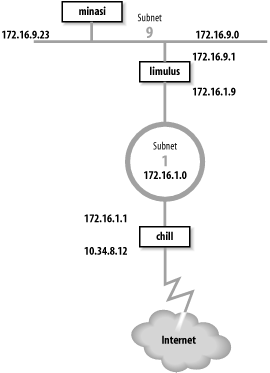
Gateway limulus interconnects subnet 172.16.9.0 and subnet 172.16.1.0. To hosts on subnet 9, it advertises itself as the default gateway because it is the gateway to the outside world. It uses RIP-2 to advertise routes on subnet 9. On subnet 1, gateway limulus advertises itself as the gateway to subnet 9 using OSPF.
Gateway chill provides subnet 1 with access to the Internet through autonomous system 164. Because gateway chill provides access to the Internet, it announces itself as the default gateway to the other systems on subnet 1 using OSPF. To the external autonomous system, it uses BGP to announce itself as the path to the internal networks it learns about through OSPF.
Let's look at the routing configuration of host minasi, gateway limulus, and gateway chill.
7.7.1.1 A host configuration
The host routing configuration is very simple. The rip yes statement enables RIP, and that's all that is really required to run RIP. That basic configuration should work for any system that runs RIP. The additional clauses enclosed in curly braces modify the basic RIP configuration. We use a few clauses to create a more interesting example. Here is the RIP-2 configuration for host minasi:
#

#  enable rip, don't broadcast updates,

#  listen for RIP-2 updates on the multicast address,

#  check that the updates are authentic.

#

rip yes {

        nobroadcast ;

        interface 172.16.9.23

             version 2

             multicast

             authentication simple "REAL stuff" ;

 } ;
This sample file shows the basic structure of gated.conf configuration statements. Lines beginning with a sharp sign (#) are comments.[11] All statements end with semicolons. Clauses associated with a configuration statement can span multiple lines and are enclosed in curly braces ({}). In the example, the nobroadcast and interface clauses apply directly to the rip statement. The version, multicast, and authentication keywords are part of the interface clause.
[11] Comments can also be enclosed between \* and *\.
The keyword nobroadcast prevents the host from broadcasting its own RIP updates. The default is nobroadcast when the system has one network interface, and broadcast when it has more than one. The nobroadcast keyword performs the same function as the -q command-line option does for routed. However, gated can do much more than routed, as the next clause shows.
The interface clause defines interface parameters for RIP. The parameters associated with this clause say that RIP-2 updates will be received via the RIP-2 multicast address on interface 172.16.9.23 and that authentic updates will contain the password REAL^stuff. For RIP-2, simple authentication is a clear-text password up to 16 bytes long. This is not intended to protect the system from malicious actions; it is intended only to protect the routers from a configuration accident. If a user mistakenly sets his system up as a RIP supplier, he is very unlikely to accidentally enter the correct password into his configuration. Stronger authentication is available in the form of a Message Digest 5 (MD5) cryptographic checksum by specifying md5 in the authentication clause.
7.7.1.2 Interior gateway configurations
Gateway configurations are more complicated than the simple host configuration shown above. Gateways always have multiple interfaces and occasionally run multiple routing protocols. Our first sample configuration is for the interior gateway between subnet 9 and the central backbone, subnet 1. It uses RIP-2 on subnet 9 to announce routes to the Unix hosts. It uses OSPF on subnet 1 to exchange routes with the other gateways. Here's the configuration of gateway limulus:
#  Don't time-out subnet 9

interfaces {

    interface 172.16.9.1 passive ;

} ;

# Define the OSPF router id

routerid 172.16.1.9 ;

# Enable RIP-2; announce OSPF routes to

# subnet 9 with a cost of 5.

rip yes {

    broadcast ;

    defaultmetric 5 ;

    interface 172.16.9.1

         version 2

         multicast

         authentication simple "REAL stuff" ;

} ;

# Enable OSPF; subnet 1 is the backbone area;

# use password authentication.

ospf yes {

     backbone {

          interface 172.16.1.9 {

              priority 5 ;

              auth simple "It'sREAL" ;

              } ;

          } ;

} ;
The interfaces statement defines routing characteristics for the network interfaces. The keyword passive in the interface clause is used here, just as we have seen it used before, to create a permanent static route that will not be removed from the routing table. In this case, the permanent route is through a directly attached network interface. Normally when gated thinks an interface is malfunctioning, it increases the cost of the interface by giving it a high-cost preference value (120) to reduce the probability of a gateway routing data through a non-operational interface. gated determines that an interface is malfunctioning when it does not receive routing updates on that interface. We don't want gated to downgrade the 172.16.9.1 interface, even if it does think the interface is malfunctioning, because our router is the only path to subnet 9. That's why this configuration includes the clause interface 172.16.9.1 passive.
The routerid statement defines the router identifier for OSPF. Unless it is explicitly defined in the configuration file, gated uses the address of the first interface it encounters as the default router identifier address. Here we specify the address of the interface that actually speaks OSPF as the OSPF router identifier.
In the previous example we discussed all the clauses on the rip statement except onethe defaultmetric clause. The defaultmetric clause defines the RIP metric used to advertise routes learned from other routing protocols. This gateway runs both OSPF and RIP-2. We wish to advertise the routes learned via OSPF to our RIP clients, and to do that, a metric is required. We choose a RIP cost of 5. If the defaultmetric clause is not used, routes learned from OSPF are not advertised to the RIP clients.[12] This statement is required for our configuration.
[12] This is not strictly true. The routes are advertised with a cost of 16, meaning that the destinations are unreachable.
The ospf yes statement enables OSPF. The first clause associated with this statement is backbone. It states that the router is part of the OSPF backbone area. Every ospf yes statement must have at least one associated area clause. It can define a specific area, e.g., area 2, but at least one router must be in the backbone area. While the OSPF backbone is area 0, it cannot be specified as area 0; it must be specified with the keyword backbone. In our sample configuration, subnet 1 is the backbone, and all routers attached to it are in the backbone area. It is possible for a single router to attach to multiple areas with a different set of configuration parameters for each area. Notice how the nested curly braces group the clauses together. The remaining clauses in the configuration file are directly associated with the backbone area clause.
The interface that connects this router to the backbone area is defined by the interface clause. It has two associated subclauses, the priority clause and the auth clause.
The priority 5 ; clause defines the priority used by this router when the backbone is electing a designated router. The higher the priority number, the less likely a router will be elected as the designated router. Use priority to steer the election toward the most capable routers.
The auth simple "It'sREAL" ; clause says that simple, password-based authentication is used in the backbone area and defines the password used for simple authentication. Three choices, none, simple, and md5, are available for authentication in GateD 3.6. none means no authentication is used. simple means that the correct eight-character password must be used or the update will be rejected. Password authentication is used only to protect against accidents; it is not intended to protect against malicious actions. Stronger authentication based on MD5 is used when md5 is selected.
7.7.1.3 Exterior gateway configuration
The configuration for gateway chill is the most complex because it runs both OSPF and BGP. Here's the configuration file for gateway chill:
# Defines our AS number for BGP

autonomoussystem 249;


# Defines the OSPF router id

routerid 172.16.1.1;


# Disable RIP

rip no;


# Enable BGP

bgp yes {

   group type external peeras 164 {

        peer 10.6.0.103 ;

        peer 10.20.0.72 ;

        };

};


# Enable OSPF; subnet 1 is the backbone area;

# use password authentication.

ospf yes {

     backbone {

         interface 172.16.1.1 {

              priority 10 ;

              auth simple "It'sREAL" ;

              } ;

          } ;

};


# Announce routes learned from OSPF and route

# to directly connected network via BGP to AS 164

export proto bgp as 164 {

     proto direct ;

     proto ospf ;

};


# Announce routes learned via BGP from

# AS number 164 to our OSPF area.

export proto ospfase type 2  {

     proto bgp autonomoussystem 164  {

          all ;

          };

};
This configuration enables both BGP and OSPF and sets certain protocol-specific parameters. BGP needs to know the AS number, which is 249 for books-net. OSPF needs to know the router identifier address. We set it to the address of the router interface that runs OSPF. The AS number and the router identifier are defined early in the configuration because autonomoussystem and routerid are definition statements and therefore must occur before the first protocol statement. Refer back to Table 7-2 for the various statement types.
The first protocol statement is the one that turns RIP off. We don't want to run RIP, but the default for gated is to turn RIP on. Therefore we explicitly disable RIP with the rip no ; statement.
BGP is enabled by the bgp yes statement, which also defines a few additional BGP parameters. The group clause sets parameters for all of the BGP peers in the group. The clause defines the type of BGP connection being created. The example is a classic external routing protocol connection, and the external autonomous system we are connecting to is AS number 164. gated can create five different types of BGP sessions, but only one, type external, is used to directly communicate with an external autonomous system. The other four group types are used for internal BGP (IBGP).[13] IBGP is simply an acronym for BGP when it is used to move routing information around inside an autonomous system. In our example we use it to move routing information between autonomous systems.
[13] See Appendix B for information on all group types.
The BGP neighbors from which updates are accepted are indicated by the peer clauses. Each peer is a member of the group. Everything related to the group, such as the AS number, applies to every system in the group. To accept updates from any system with ASN 164, use allow in place of the list of peers.
The OSPF protocol is enabled by the ospf yes statement. The configuration of OSPF on this router is the same as it is for other routers in the backbone area. The only parameter that has been changed from the previous example is the priority number. Because this route has a particularly heavy load, we have decided to make it slightly less preferred for the designated router election.
The export statements control the routes that gated advertises to other routers. The first export statement directs gated to use BGP (proto bgp) to advertise to autonomous system 164 (as 164) any directly connected networks (proto direct) and any routes learned from OSPF (proto ospf). Notice that the AS number specified in this statement is not the AS number of books-net; it is the AS number of the external system. The first line of the export statement defines to whom we are advertising. The proto clauses within the curly braces define what we are advertising.
The second export statement announces the routes learned from the external autonomous system. The routes are received via BGP and are advertised via OSPF. Because these are routes from an external autonomous system, they are advertised as autonomous system external (ASE) routes. That's why the export statement specifies ospfase as the protocol through which the routes are announced. The type 2 parameter defines the type of external routes that are being advertised. There are two types supported by gated. Type 2 routes are those learned from an exterior gateway protocol that does not provide a routing metric comparable to the OSPF metric. These routes are advertised with the cost of reaching the border router. In this case, the routes are advertised with the OSPF cost of reaching gateway chill. Type 1 routes are those learned from an external protocol that does provide a metric directly comparable to the OSPF metric. In that case, the metric from the external protocol is added to the cost of reaching the border router when routes are advertised.
The source of the routes advertised in the second export statement is the BGP connection (proto bgp) to autonomous system 164 (autonomoussystem 164). The proto clause is qualified with an optional route filter. A route filter is used to select the routes from a specific source. The filter can list networks with associated netmasks to select an individual destination. In the example, the keyword all is used to select all routes received via BGP, which is, in fact, the default. As the default, the keyword all does not need to be specified. However, it does no harm, and it provides clear documentation of our intentions.
All of the routes received from an external autonomous system could produce a very large routing table. Individual routes are useful when you have multiple border routers that can reach the outside world. However, if you have only one border router, a default route may be all that is needed. To export a default route, insert an options gendefault ; statement at the beginning of the configuration file.[14] This tells gated to generate a default route when the system peers with a BGP neighbor. Next, replace the second export statement in the sample file with the following export statement:
[14] The generate statement is an alternative way to create a default route. See Appendix B for details.
# Announce a default route when peering

# with a BGP neighbor.

export proto ospfase type 2  {

     proto default ;

};
This export statement tells gated to advertise the border router as the default gateway, but only when it has an active connection to the external system.
These few examples show that gated.conf files are usually small and easy to read. Use gated if you need to run a routing protocol on your computer. It allows you to use the same software and the same configuration language on all of your hosts, interior gateways, and exterior gateways.
7.7.2 Testing the Configuration
Test the configuration file before you try to use it; the gated configuration syntax is complex and it is easy to make a mistake. Create your new configuration in a test file, test the new configuration, and then move the test configuration to /etc/gated.conf. Here's how.
Assume that a configuration file called test.conf has already been created. It is tested using -f and -c on the command line:
% gated -c -f test.conf trace.test
The -f option tells gated to read the configuration from the named file instead of from /etc/gated.conf. In the sample it reads the configuration from test.conf. The -c option tells gated to read the configuration file and check for syntax errors. When gated finishes reading the file, it terminates; it does not modify the routing table. The -c option turns on tracing, so specify a trace file or the trace data will be displayed on your terminal. In the sample we specified trace.test as the trace file. The -c option also produces a snapshot of the state of gated after reading the configuration file, and writes the snapshot to /usr/tmp/gated_dump.[15] You don't need to be superuser or to terminate the active gated process to run gated when the -c option is used.
[15] /usr/tmp is the default for this file and for the gated_parse file described later; however, some systems place these files in /var/tmp.
The dump and the trace file (trace.test) can then be examined for errors and other information. When you're confident that the configuration is correct, become superuser and move your new configuration (test.conf) to /etc/gated.conf.
An alternative command for testing the configuration file is gdc, though it must be run by the root user or as a setuid root program. It includes features for checking and installing a new configuration. gdc uses three different configuration files. The current configuration is /etc/gated.conf. The previous configuration is stored in /etc/gated.conf-. The "next" configuration is stored in /etc/gated.conf+, which is normally the configuration that needs to be tested. Here's how gdc tests a configuration:
# cp test.conf /etc/gated.conf+

# gdc checknew

configuration file /etc/gated.conf+ checks out okay

# gdc newconf

# gdc restart

gated not currently running

gdc: /etc/gated was started
In this sample, the test configuration is copied to /etc/gated.conf+ and tested with the gdc checknew command. If syntax problems are found in the file, a warning message is displayed and detailed error messages are written to /usr/tmp/gated_parse. There are no syntax errors in the example, so we make the test file the current configuration with the gdc newconf command. This command moves the current configuration to gated.conf- and moves the new configuration (gated.conf+) to the current configuration. The gdc restart command terminates gated if it is currently runningit was not in the exampleand starts a new copy of gated using the new configuration.
7.7.2.1 Running gated at startup
As with any routing software, gated should be included in your startup file. Some systems come with the code to start gated included in the startup file. If your system doesn't, you'll need to add it. If you already have code in your startup file that runs routed, replace it with code to run gated. gated and routed should not be running at the same time.
Our imaginary gateway, crab, is a Solaris system with code in the /etc/init.d/inetinit file that starts routed. We comment out those lines, and add these lines:
if [ -f /usr/sbin/gated -a -f /etc/gated.conf ]; then

     /usr/sbin/gated;      echo -n 'gated' > /dev/console

fi
This code assumes that gated is installed in /usr/sbin and that the configuration file is named /etc/gated.conf. The code checks that gated is present and that the configuration file /etc/gated.conf exists. If both files are found, gated begins.
The code checks for a configuration file because gated usually runs with one. If gated is started without a configuration file, it checks the routing table for a default route. If it doesn't find one, it starts RIP; otherwise, it just uses the default route. Create an /etc/gated.conf file even if you only want to run RIP. The configuration file documents your routing configuration and protects you if the default configuration of gated changes in the future.


