Section 5.1. Kernel Configuration
Kernel configuration is not really a network administration taskrather, it is a basic part of Unix system administration, whether or not the computer is connected to a network. But TCP/IP networking, like other system functions, is integrated into the kernel.
There are two very different approaches to kernel configuration. Some systems are designed to eliminate the need for you to recompile the kernel, while others encourage you to compile your own custom kernel. Linux is an example of the latter philosophy: its documentation encourages you to create your own configuration. Solaris is an example of the former.
The Solaris system comes with a generic kernel that supports all basic system services. When a Solaris system boots, it detects all system hardware and uses dynamically loadable modules to support that hardware. Solaris can rely on this technique because Sun is primarily a hardware vendor. Sun designs its hardware to work with the Solaris kernel, and has a well-defined device driver interface so that third-party hardware vendors can design hardware that clearly identifies itself to the kernel.
5.1.1 Using Dynamically Loadable Modules
Most versions of Unix support dynamically loadable modules, which are kernel modules that can be dynamically linked into the kernel at runtime. These modules provide the system with a great deal of flexibility because the kernel is able to load support for new hardware when the hardware is detected. Dynamically loadable modules are used to add new features to the system without requiring the system administrator to perform a manual reconfiguration.
Solaris depends on dynamically loadable modules. Solaris does have a kernel configuration file, defined in the /etc/system file, but this file is very small, has only limited applicability, and is not directly edited by the system administrator. When a new software package is added to the system, the script that installs that package makes any changes it requires to the /etc/system file. But even that is rare. Most drivers that are delivered with third-party hardware carry their own configuration files.
On a Solaris system, optional device drivers are installed using the pkgadd command. The syntax of the command is:
pkgadd -d device packagename
device is the device name. packagename is the name of the driver software package provided by the vendor.
The device driver installation creates the proper entry in the /dev directory as well as in the /kernel/drv directory. As an example, look at the Ethernet device driver for adapters that use the DEC 21140 chipset. The name of the driver is dnet.[1] There is a device named /dev/dnet defined in the device directory. There is a dynamically loadable module named /kernel/drv/dnet in the kernel driver directory, and there is a configuration file for the driver named /kernel/drv/dnet.conf. dnet is a standard driver, but the installation of an optional driver will create similar files.
[1] dnet is not an optional device. It is a standard part of Solaris and it is the Ethernet device we use in all of our Solaris examples.
After installing a new device driver, create an empty file named /reconfigure. Shut down the system and install the new hardware. Then restart the system. The /reconfigure file is a flag to the system to check for new hardware. When the Solaris system reboots, it will detect the new hardware and load the dynamic module that provides the device driver for that hardware.
The Solaris ifconfig command, which is covered in extensive detail in Chapter 6, provides the modlist option to let you see the kernel modules that are associated with a TCP/IP network interface. For example:
# ifconfig dnet0 modlist

0 arp

1 ip

2 dnet
The purpose of each kernel module in this list is clear. arp provides the ARP protocol for the Ethernet interface. ip provides the TCP/IP protocols used for this network. Each of these modules has a configuration file in the /kernel/drv directory. There is an arp.conf file, an ip.conf file, and a dnet.conf file. However, these files provide very limited capacity for controlling the function of the modules. On Solaris systems, use the ndd command to control the module.
To see what configuration options are available for a module, use the ndd command with a ? as an argument. For example, use the following command to see the variables available for the arp module:
# ndd /dev/arp ?

?                             (read only)

arp_cache_report              (read only)

arp_debug                     (read and write)

arp_cleanup_interval          (read and write)

arp_publish_interval          (read and write)

arp_publish_count             (read and write)
The arp module offers six values:
- ?
-
A read-only value that displays this list.
- arp_cache_report
-
A read-only value that displays the permanent values in the ARP cache. The arp command gives a better display of the cache. See the description of the arp command in Chapter 2.
- arp_debug
-
A variable that enables ARP protocol debugging. By default, it is set to 0 and debugging is disabled. Setting it to 1 enables debugging. The ARP protocol is very old and very reliable. ARP debugging is never needed.
- arp_cleanup_interval
-
A variable that defines how long temporary entries are kept in the cache.
- arp_publish_interval
-
A variable that defines how long the system waits between broadcasts of an Ethernet address that it is configured to publish.
- arp_publish_count
-
A variable that defines how many ARP broadcasts are sent in response to a query for an address that this system publishes.
The default configuration values set for the arp module have worked well for every Solaris system I have ever worked with. I have never had a need to change any of these settings. The second module displayed by modlist provides a slightly more interesting example.
Use the ndd /dev/ip ? command to list the configuration options for the ip module. There are almost 60 of them! Of all of these, there is only one that I have ever needed to adjust: ip_forwarding.
The ip_forwarding variable specifies whether the ip module should act as if the system is a router and forward packets to other hosts. By default, systems with one network interface are hosts that do not forward packets, and systems with more than one interface are routers that do forward packets. Setting ip_forwarding to 0 turns off packet forwarding, even if the system has more than one network interface. Setting ip_forwarding to 1 turns on packet forwarding, even if the system has only one network interface.
On occasion you will have a multi-homed host, which is a host connected to more than one network. Despite multiple network connections, the system is a host, not a router. To prevent that system from acting as a router and potentially interfering with the real routing configuration, disable IP forwarding as follows:
# ndd /dev/ip ip_forwarding

1

# ndd -set /dev/ip ip_forwarding 0

# ndd /dev/ip ip_forwarding

0
The first ndd command in this example queries the ip module for the value set in ip_forwarding. In this example it is set to 1, which enables forwarding. The second ndd command uses the -set option to write the value 0 into the ip_forwarding variable. The last command in the example redisplays the variable to show that it has indeed been changed.
The pkgadd command, the ifconfig modlist option, and the ndd command are all specific to Solaris. Other systems use dynamically loadable modules but use a different set of commands to control them.
Linux also uses loadable modules. Linux derives the same benefit from loadable modules as Solaris does, and like Solaris usually you have very little involvement with loadable modules. Generally the Linux system detects the hardware and determines the correct modules needed during the initial installation without any input from the system administrator. But not always. Sometimes hardware is not detected during the installation, and other times new hardware is added to a running system. To handle these situations, you need to know the Linux commands used to work with loadable modules.
Use the lsmod command to check which modules are installed in a Linux system. Here's an example from a Red Hat system:
# lsmod

Module                  Size  Used by

ide-cd                 26848   0  (autoclean)

cdrom                  27232   0  (autoclean) [ide-cd]

autofs                 11264   1  (autoclean)

smc-ultra               6048   1  (autoclean)

8390                    6816   0  (autoclean) [smc-ultra]

ipchains               38976   0  (unused)

nls_iso8859-1           2880   1  (autoclean)

nls_cp437               4384   1  (autoclean)

vfat                    9392   1  (autoclean)

fat                    32672   0  (autoclean) [vfat]
Loadable modules perform a variety of tasks. Some modules are hardware device drivers, such as the smc-ultra module for the SMC Ultra Ethernet card. Other modules provide support for the wide array of filesystems available in Linux, such as the ISO8859 filesystem used on CD-ROMs or the DOS FAT filesystem with long filename support (vfat).
Each entry in the listing produced by the lsmod command begins with the name of the module followed by the size of the module. As the size field indicates, modules are small. Often modules depend on other modules to get the task done. The interrelationships of modules are called module dependencies, which are shown in the listing. In the sample, the smc-ultra driver depends on the 8390 module, as indicated by the 8390 entry ending with the string "[smc-ultra]". The 8390 entry lists the modules that depend on it under the heading Used by. The listing shows other dependencies, including that vfat depends on fat and cdrom depends on ide-cd.
Most of the lines in the sample include the string "(autoclean)". This indicates that the specified module can be removed from memory automatically if it is unused. autoclean is an option. You can select different options by manually loading modules with the insmod command.
Modules can be manually loaded using the insmod command. This command is very straightforwardit's just the command and the module name. For example, to load the 3c509 device driver, enter insmod 3c509. This does not install the module with the autoclean option. If you want this driver removed from memory when it is not in use, add the -k option to the insmod command: insmod -k 3c509.
A critical limitation with the insmod command is that it does not understand module dependencies. If you used it to load the smc-ultra module, it would not automatically load the required 8390 module. For this reason, modprobe is a better command for manually loading modules. As with the insmod command, the syntax is simple. To load the smc-ultra module, simply enter modprobe smc-ultra.
modprobe reads the module dependencies file that is produced by the depmod command. Whenever the kernel or the module libraries are updated, run depmod to produce a new file containing the module dependencies. The command depmod -a searches all of the standard module libraries and creates the necessary file. After it is run, you can use modprobe to install any modules and have the other modules it depends on automatically installed.
Use the rmmod command to remove unneeded modules. Again, the syntax is simple: rmmod appletalk removes the appletalk driver from your system. There is rarely any need to remove unneeded modules because, as noted in the discussion of autoclean, the system automatically removes unused modules.
The smc-ultra module is an Ethernet device driver. It is in fact the device driver used for the network interface on our sample Linux system. Device drivers can be compiled into the kernel, as described later, or they can be dynamically loaded from a module. Most Ethernet device drivers are handled as dynamically loadable modules. The Ethernet driver modules are found in the /lib/modules directory. On a Red Hat 7.2 system, Ethernet device drivers are in the /lib/modules/2.4.7-10/kernel/drivers/net directory, as the following listing shows:
# ls /lib/modules/2.4.7-10/kernel/drivers/net

3c501.o             atp.o       eexpress.o  ni5010.o       smc-ultra.o

3c503.o             bcm         epic100.o   ni52.o         starfire.o

3c505.o             bonding.o   eql.o       ni65.o         strip.o

3c507.o             bsd_comp.o  es3210.o    pcmcia         sundance.o

3c509.o             cipe        eth16i.o    pcnet32.o      sunhme.o

3c515.o             cs89x0.o    ethertap.o  plip.o         tlan.o

3c59x.o             de4x5.o     ewrk3.o     ppp_async.o    tokenring

8139too.o           de600.o     fc          ppp_deflate.o  tulip

82596.o             de620.o     hamachi.o   ppp_generic.o  tun.o

8390.o              defxx.o     hp100.o     ppp_synctty.o  via-rhine.o

ac3200.o            depca.o     hp.o        rcpci.o        wan

acenic.o            dgrs.o      hp-plus.o   sb1000.o       wavelan.o

aironet4500_card.o  dmfe.o      irda        shaper.o       wd.o

aironet4500_core.o  dummy.o     lance.o     sis900.o       winbond-840.o

aironet4500_proc.o  e1000.o     lne390.o    sk98lin        yellowfin.o

appletalk           e100.o      natsemi.o   skfp

arlan.o             e2100.o     ne2k-pci.o  sk_g16.o

arlan-proc.o        eepro100.o  ne3210.o    slip.o

at1700.o            eepro.o     ne.o        smc-ultra32.o
All loadable network device drivers are listed here. Some, such as plip.o, are not for Ethernet devices. Most are easily identifiable as Ethernet drivers, such as the 3COM drivers, the SMC drivers, the NE2000 drivers, and the Ethernet Express drivers.
The Linux system detects the Ethernet hardware during the initial installation, and if Linux has the correct driver for that hardware, it installs the appropriate driver. If the Ethernet adapter is not detected during the operating system installation or if it is added after the system is installed, use the modprobe command to load the device driver manually. If the correct driver for the adapter is not included with your Linux system, you may need to compile the module yourself.
For a device driver to operate correctly, it must be compiled with the correct libraries for your kernel. Sometimes this means downloading the driver source code and compiling it yourself on your system. Ethernet driver source code is available for many adapters from http://www.scyld.com, which has a great repository of Linux network driver software. The comments in the driver source code includes the correct compiler command to compile the module.
After compiling, copy the object file to the correct /lib/modules directory. Then use modprobe to load and test the driver. Alternatively, most device drivers are now available in RPM format, eliminating the need for compilation.
Linux frequently uses dynamically loadable modules for device drivers. But most other components of TCP/IP are not loaded at runtime; they are compiled into the kernel. Next we look at how Unix kernels are recompiled.
5.1.2 Recompiling the Kernel
This text uses Linux and FreeBSD as examples of systems that encourage you to compile a custom kernel.[2] This chapter's examples of kernel configuration statements come from these two Unix systems. While kernel configuration involves all aspects of system configuration, we include only statements that directly affect TCP/IP configuration.
[2] The kernel configuration process of other BSD systems, such as SunOS 4.1.3, is similar to the FreeBSD example.
Both of the Unix systems used in the examples come with a kernel configuration file preconfigured for TCP/IP. During the initial installation, you may need to select a preconfigured kernel that includes network support, but you probably won't need to modify the kernel configuration for networking. The kernel configuration file is normally changed only when you wish to:
Produce a smaller, more efficient kernel by removing unneeded items
Add a new device
Modify a system parameter
While there is rarely any need to modify the kernel network statements, it is useful to understand what these statements do. Looking into the kernel configuration file shows how Unix is tied to the hardware and software of the network.
|

5.1.3 Linux Kernel Configuration
The source code for the Linux kernel is normally delivered with a Linux distribution. If your system does not have the source code or you want a newer version of the Linux kernel, it can be downloaded from http://www.kernel.org as a compressed tar file. If you already have a directory named /usr/src/linux, rename it before you unpack the tarball:
# cd /usr/src

# tar -zxvf linux-2.1.14.tar.gz
The Linux kernel is a C program compiled and installed by make. The make command customizes the kernel configuration and generates the files (including the Makefile) needed to compile and link the kernel. There are three variations of the command:
- make config
-
This form of the make command is entirely text-based. It takes you through a very long sequence of questions that ask about every aspect of the kernel configuration. Because it asks every question in a sequential manner, this can be the most cumbersome way to reconfigure the kernel, particularly if you wish to change only a few items.
- make menuconfig
-
This form of the make command uses curses to present a menu of configuration choices. It provides all of the capabilities of the make config command but is much easier to use because it allows you to jump to specific areas of interest. The make menuconfig command works from any terminal and on any system, even one that does not support X Windows.
- make xconfig
-
This form of the make command uses X Windows to provide a "point and click" interface for kernel configuration. It has all the power of the other commands and is very easy to use.
Choose the form of the command you like best. In this example we use make xconfig.
On Linux systems, the kernel source is found in /usr/src/linux. To start the configuration process, change to the source directory and run make xconfig:
# cd /usr/src/linux

# make xconfig
The make xconfig command displays the screen shown in Figure 5-1.
Figure 5-1. Linux xconfig main menu
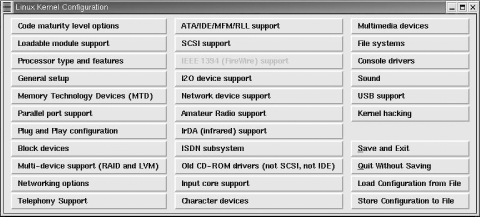
The menu displays more than 30 buttons that represent different configuration categories. Click on a button to view and set the configuration options in that category. Because our focus is on the kernel configuration options that affect TCP/IP, the two menu items we're interested in are Networking options and Network device support. Figure 5-2 shows the window that appears if the Network device support button is selected.
Figure 5-2. Linux kernel network device support
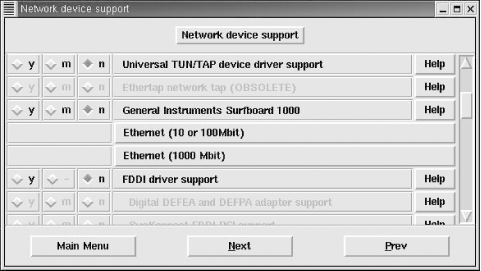
This window lists the network device drivers that can be compiled into or loaded by the kernel and shows the three choices for most configuration options:
- y
-
Selecting y compiles the option into the new kernel.
- m
-
Selecting m causes the option to be loaded as a dynamically loadable module by the kernel. Not every option is available as a loadable module. When a configuration question must be answered yes or no, the module selection is not available. Notice the FDDI driver support option. Choosing y for that option enables FDDI driver support and highlights a selection of possible FDDI interface adapters, which are "grayed-out" in Figure 5-2. Frequently, interface support must be selected before an individual adapter can be selected.
- n
-
Selecting n tells the kernel not to use the configuration option.
Each configuration option also has a Help button. Clicking on the Help button provides additional information about the option and advice about when the option should be set. Even if you think you know what the option is about, you should read the description displayed by the Help button before you change the default setting.
Two items shown in Figure 5-2, Ethernet (10 or 100 Mbit) and Ethernet (1000 Mbit), open separate windows with extensive menu selections because Linux supports a very large number of Ethernet adapters. The Ethernet adapters available through those windows are selected using the same y, m, and n settings described above.
The Network device support window and the Ethernet adapter windows show that it is possible to compile specific adapter support into the kernel, but it is not necessary. As we saw in the previous section on dynamically loadable modules, network interfaces are usually controlled by loadable modules. All Linux systems need a network interface to run TCP/IP, but that interface does not need to be compiled into the kernel.
Selecting Networking options from the main menu in Figure 5-1 opens the Network options window, which contains over 60 menu selections because Linux supports a wide range of network services. Some of these are experimental and some relate to protocols other than IPv4. Here we limit ourselves to those options that directly relate to IPv4. Yet there are still a substantial number of options. They are:
- Packet socket
-
This service allows applications to communicate directly with the network device. It is required for applications such as tcpdump that do packet capture and packet filtering. If Packet socket is enabled, Packet socket: mmapped IO can be selected to use memory-mapped I/O for the packet socket service. Packet socket service is usually enabled while packet socket memory mapped I/O is usually disabled.
- Kernel/User netlink socket
-
This service provides communication between the kernel and user space programs. If enabled, Routing messages and Netlink device emulation can also be selected. Netlink sockets permit user space programs to interface with IPv4 routing and ARP tables and with kernel firewall code.
- Network packet filtering
-
This service provides the IP packet filtering services that are required to make the system function as a firewall or a network address translation box. If Network packet filtering is enabled, Network packet filtering debugging can also be selected. Network packet filtering is normally enabled on routers and disabled on hosts, although it can be used to improve server security as described in the iptables section of Chapter 12.
- TCP/IP networking
-
This selection installs kernel support for TCP/IP. It provides all basic TCP/IP transport and datagram protocols. Once TCP/IP networking is selected, many other optional TCP/IP services become available, listed below:
- IP: multicasting
-
This provides IP multicasting support. Multicasting is described in Chapter 2.
- IP: advanced router
-
This menu selection highlights several options that configure the kernel for advanced routing protocols. Advanced routing does not need to be enabled for basic routing to work, and is not needed for a host or a small interior router. Advanced routing is used only if the Linux system is configured as the primary router or an exterior router between autonomous systems. Chapter 7 describes how gated is used to run advanced routing protocols on Unix systems. The kernel configuration advanced routing options are:
IP: policy routing enables kernel-level policy-based routing, which is discussed in Chapter 7 in relationship to the BGP routing protocol, and in Chapter 2 in relationship to the Policy Routing Database (PRDB). This option is not needed by gated, which implements policy-based routing at the user level.
IP: equal cost multipath enables kernel support for multiple routes to the same destination. Multipath routing is described in Chapter 7 in relationship to the OSPF routing protocol.
IP use TOS value as routing key enables a type of tag switching (also called label switching) that uses the Type of Service (TOS) field of the IP header to hold the tag. Both OSPF and RIP version 2 can use a tag field. Appendix B touches upon the gated syntax used for tag fields.
IP: verbose route monitoring increases the number and length of the routing table update messages.
IP: large routing tables increases the memory reserved for the routing table.
- IP: kernel level autoconfiguration
-
This service is used on diskless clients. When selected, two additional selections become available, IP: BOOTP support and IP: RARP support, that are used to specify whether the configuration comes from BOOTP or RARP. See Chapter 3 for a description of BOOTP and RARP.
- IP: tunneling
-
This service encapsulates IPv4 datagrams within an IP tunnel, which makes a host appear to be on a different network than the one to which it is physically connected. This service is occasionally used on laptop machines to facilitate mobility.
- IP: GRE tunnels over IP
-
This enables the Generic Routing Encapsulation (GRE) protocol that is used to encapsulate IPv4 or IPv6 datagrams in an IPv4 tunnel. Selecting this option makes the IP: broadcast GRE over IP option available, which provides support for multicasting with the tunnel. GRE is the preferred encapsulation protocol when dealing with Cisco routers.
- IP: multicast routing
-
This selection provides support for multicast routing. It is needed only if your system acts as a multicast router, i.e., runs mrouted. When selected, you are given the options IP: PIM-SM version 1 support and IP: PIM-SM version 2 support that set the level of the PIM-SM protocol used by your system.
- IP: TCP Explicit Congestion Notification support
-
This enables Explicit Congestion Notification (ECN). ECN messages are sent from a router to a client to alert the client of congestion. This would be enabled only if the Linux system is a router. Because many firewalls are incompatible with ECN, it is recommended that ECN not be enabled.
- IP: TCP syncookie support
-
This enables support for SYN cookies, which are used to counteract SYN flooding denial-of-service attacks.
- IP: Netfilter Configuration
-
Selecting this menu item opens a window that allows you to select a range of services for the kernel's Netfilter firewall. The iptables discussion in Chapter 12 describes how the Netfilter service is used.
- QoS and/or fair queueing
-
This specifies options that change the way network packets are handled by the server. Because it is experimental, this option should be set to n for an operational server. The optional packet handlers require special software to administer them.
After completing the network configuration, run make dep; make clean to build the dependencies and clean up the odds and ends. When the makes are complete, compile the kernel. The make bzImage command builds a compressed kernel and puts it into the /usr/src/linux/i386/boot directory.[3] When you're sure that the new kernel is ready to run, simply copy the new kernel file, bzImage, to the vmlinuz file your system uses to boot.
[3] Most Linux systems use a compressed kernel that is automatically decompressed during the system boot.
Linux's list of network configuration options is long.[4] Linux is yin to the Solaris yang: Linux permits the system administrator to configure everything while Solaris configures everything for the administrator. BSD kernel configuration lies somewhere between these two extremes.
[4] Not only is this list long, it is bound to change. Always check the system documentation before starting a kernel reconfiguration.
5.1.4 The BSD Kernel Configuration File
Like Linux, the BSD Unix kernel is a C program compiled and installed by make. The config command reads the kernel configuration file and generates the files (including the Makefile) needed to compile and link the kernel. On FreeBSD systems, the kernel configuration file is located in the directory /usr/src/sys/i386/conf.[5]
[5] /usr/src/sys is symbolically linked to /sys. We use /usr/src/sys only as an example. Your system may use another directory.
A large kernel configuration file named GENERIC is delivered with the FreeBSD system. The GENERIC kernel file configures all of the standard devices for your systemincluding everything necessary for TCP/IP. In this section, we look at just those items found in the GENERIC file that relate to TCP/IP. No modifications are necessary for the GENERIC kernel to run basic TCP/IP services. The reasons for modifying the BSD kernel are the same as those discussed for the Linux kernel: to make a smaller, more efficient kernel, or to add new features.
There is no standard name for a BSD kernel configuration file. When you create a configuration file, choose any name you wish. By convention, BSD kernel configuration filenames use uppercase letters. To create a new configuration, copy GENERIC to the new file and then edit the newly created file. The following creates a new configuration file called FILBERT:
# cd /usr/src/sys/i386/conf

# cp GENERIC FILBERT
If the kernel has been modified on your system, the system administrator will have created a new configuration file in the /usr/src/sys/i386/conf directory. The kernel configuration file contains many configuration commands that cover all aspects of the system configuration. This text discusses only those parameters that directly affect TCP/IP configuration. See the documentation that comes with the FreeBSD system for information about the other configuration commands.[6]
[6] The book The Complete FreeBSD by Greg Lehey (published by Walnut Creek CDROM Books) is a good source for information on recompiling a BSD kernel.
5.1.5 TCP/IP in the BSD Kernel
For a network administrator, it is more important to understand which kernel statements are necessary to configure TCP/IP than to understand the detailed structure of each statement. Three types of statements are used to configure TCP/IP in the BSD kernel: options, pseudo-device, and device statements.
5.1.5.1 The options statement
The options statement tells the kernel to compile a software option into the system. The options statement that is most important to TCP/IP is:
options INET # basic networking support--mandatory
Every BSD-based system running TCP/IP has an options INET statement in its kernel configuration file. The statement produces a -DINET argument for the C compiler, which in turn causes the IP, ICMP, TCP, UDP, and ARP modules to be compiled into the kernel. This single statement incorporates the basic transport and IP datagram services into the system. Never remove this statement from the configuration file.
options ICMP_BANDLIM #Rate limit bad replies
This option limits the amount of bandwidth that can be consumed by ICMP error messages. Use it to protect your system from denial-of-service attacks that deliberately cause errors to overload your network.
options "TCP_COMPAT_43" # Compatible with BSD 4.3 [KEEP THIS!]
This option prevents connections between BSD 4.3 and FreeBSD systems from hanging by adjusting FreeBSD to ignore mistakes made by 4.3. In addition, setting this parameter prevents some applications from malfunctioning. For these reasons, keep this parameter as is.
5.1.5.2 The pseudo-device statement
The second statement type required by TCP/IP in all BSD configurations is a pseudo-device statement. A pseudo-device is a device driver not directly associated with an actual piece of hardware. The pseudo-device statement creates a header (.h) file that is identified by the pseudo-device name in the kernel directory. For example, the statement shown below creates the file loop.h:
pseudo-device loop # loopback network--mandatory
The loop pseudo-device is necessary to create the loopback device (lo0). This device is associated with the loopback address 127.0.0.1; it is defined as a pseudo-device because it is not really a piece of hardware.
Another pseudo-device that is used on many FreeBSD TCP/IP systems is:
pseudo-device ether # basic Ethernet support
This statement is necessary to support Ethernet. The ether pseudo-device is required for full support of ARP and other Ethernet specific functions. While it is possible that a system that does not have Ethernet may not require this statement, it is usually configured and should remain in your kernel configuration.
Other commonly configured pseudo-devices used by TCP/IP are those that support SLIP and PPP.
pseudo-device sl 2 # Serial Line IP
This statement defines the interface for the Serial Line IP protocol. The number, 2 in the example, defines the number of SLIP pseudo-devices created by the kernel. The two devices created here would be addressed as devices sl0 and sl1.
pseudo-device ppp 2 # Point-to-point protocol
The ppp pseudo-device is the interface for the Point-to-Point Protocol. The number, 2 in the example, defines the number of PPP pseudo-devices created by the kernel. The two devices created here would be addressed as devices ppp0 and ppp1. One other pseudo-device is directly related to PPP.
pseudo-device tun 1 # Tunnel driver(user process ppp)
The tun pseudo-device is a tunnel driver used by user-level PPP software. Tunneling is when a system passes one protocol through another protocol; tun is a FreeBSD feature for doing this over PPP links. The number, 1 in the example, is the number of tunnels that will be supported by this kernel.
One pseudo-device is used for troubleshooting and testing.
pseudo-device bpfilter 4 # Berkeley packet filter
The bpfilter statement adds the support necessary for capturing packets. Capturing packets is an essential part of protocol analyzers such as tcpdump; see Chapter 13. When the bpfilter statement is included in the BSD kernel, the Ethernet interface can be placed into promiscuous mode.[7] An interface in promiscuous mode passes all packets, not just those addressed to the local system, up to the software at the next layer. This feature is useful for a system administrator troubleshooting a network. But it can also be used by intruders to steal passwords and compromise security. Use the bpfilter pseudo-device only if you really need it. The number, 4 in the example, indicates the maximum number of Ethernet interfaces that can be monitored by bpfilter.
[7] This assumes that the Ethernet hardware is capable of functioning in promiscuous mode. Not all Ethernet boards support this feature.
5.1.5.3 The device statement
Real hardware devices are defined using the device statement. Every host connected to a TCP/IP network requires some physical hardware for that attachment. The hardware is declared with a device statement in the kernel configuration file. There are many possible network interfaces for TCP/IP, but the most common are Ethernet interfaces. The device statements for Ethernet interfaces found in the GENERIC kernel are listed below:
device de     # DEC/Intel DC21x4x (``Tulip'')

device fxp    # Intel EtherExpress PRO/100B (82557, 82558)

device tx     # SMC 9432TX (83c170 ``EPIC'')

device vx     # 3Com 3c590, 3c595 (``Vortex'')

device wx     # Intel Gigabit Ethernet Card (``Wiseman'')

device dc     # DEC/Intel 21143 and various workalikes

device rl     # RealTek 8129/8139

device sf     # Adaptec AIC-6915 (``Starfire'')

device sis    # Silicon Integrated Systems SiS 900/SiS 7016

device ste    # Sundance ST201 (D-Link DFE-550TX)

device tl     # Texas Instruments ThunderLAN

device vr     # VIA Rhine, Rhine II

device wb     # Winbond W89C840F

device xl     # 3Com 3c90x (``Boomerang'', ``Cyclone'')

device ed0 at isa? port 0x280 irq 10 iomem 0xd8000

device ex

device ep

device wi      # WaveLAN/IEEE 802.11 wireless NIC

device an      # Aironet 4500/4800 802.11 wireless NICs

device ie0 at isa? port 0x300 irq 10 iomem 0xd0000

device fe0 at isa? port 0x300

device le0 at isa? port 0x300 irq 5 iomem 0xd0000

device lnc0 at isa? port 0x280 irq 10 drq 0

device cs0 at isa? port 0x300

device sn0 at isa? port 0x300 irq 10
The device statement used to configure an Ethernet interface in the FreeBSD kernel comes in two general formats:
device ed0 at isa? port 0x280 net irq 10 iomem 0xd8000

device de0
The format varies depending on whether the device is an ISA device or a PCI device. The ed0 device statement defines the bus type (isa), the I/O base address (port 0x280), the interrupt number (irq 10) and the memory address (iomem 0xd8000). These values should match the values configured on the adapter card. All of these are standard items for configuring PC ISA hardware. On the other hand, the de0 device statement requires very little configuration because it configures a card attached to the PCI bus. The PCI is an intelligent bus that can determine the configuration directly from the hardware.
Ethernet is not the only TCP/IP network interface supported by FreeBSD. It supports several other interfaces. The serial line interfaces necessary for SLIP and PPP are shown below:
device sio0 at isa? port IO_COM1 flags 0x10 irq 4

device sio1 at isa? port IO_COM2 irq 3

device sio2 at isa? disable port IO_COM3 irq 5

device sio3 at isa? disable port IO_COM4 irq 9
The four serial interfaces, sio0 through sio3, correspond to the MS-DOS interfaces COM1 to COM4. These are needed for SLIP and PPP. Chapter 6 covers other aspects of configuring PPP.
The device statement varies according to the interface being configured. But how do you know which hardware interfaces are installed in your system? Remember that the GENERIC kernel that comes with your FreeBSD system is configured for a large number of devices. A simple way to tell which hardware interfaces are installed in your system is to look at the messages displayed on the console at boot time. These messages show all of the devices, including network devices, that the kernel found during initialization. Look at the output of the dmesg command. It displays a copy of the console messages generated during the last boot. Customizing the kernel for your network device more often than not means removing unneeded devices from the kernel configuration.
The options, pseudo-device, and device statements found in the kernel configuration file tell the system to include the TCP/IP hardware and software in the kernel. The statements in your configuration may vary somewhat from those shown in the previous examples. But you have the same basic statements in your kernel configuration file. With these basic statements, FreeBSD Unix is ready to run TCP/IP.
You may never change any of the variables discussed in this section. Like everything else in the kernel configuration file, they usually come correctly configured to run TCP/IP. You will, however, frequently be called upon to control the network services your server runs over TCP/IP. We'll now look at how network services are started and how you control which ones are started.


