Section 3.6. Configuration Servers
The powerful features that add to the utility and flexibility of TCP/IP also add to its complexity. TCP/IP is not as easy to configure as some other networking systems. TCP/IP requires that the configuration provide hardware, addressing, and routing information. It is designed to be independent of any specific underlying network hardware, so configuration information that can be built into the hardware in some network systems cannot be built in for TCP/IP. The information must be provided by the person responsible for the configuration. This assumes that every system is run by people who are knowledgeable enough to provide the proper information to configure the system. Unfortunately, this assumption does not always prove correct.
Configuration servers make it possible for the network administrator to control TCP/IP configuration from a central point. This relieves the end user of some of the burden of configuration and improves the quality of the information used to configure systems.
TCP/IP has used three protocols to simplify the task of configuration: RARP, BOOTP, and DHCP. We begin with RARP, the oldest and most basic of these configuration tools.
3.6.1 Reverse Address Resolution Protocol
RARP, defined in RFC 903, is a protocol that converts a physical network address into an IP address, which is the reverse of what Address Resolution Protocol (ARP) does. A Reverse Address Resolution Protocol server maps a physical address to an IP address for a client that doesn't know its own IP address. The client sends out a broadcast using the broadcast services of the physical network.[14] The broadcast packet contains the client's physical network address and asks if any system on the network knows what IP address is associated with the address. The RARP server responds with a packet that contains the client's IP address.
[14] Like ARP, RARP is a Network Access Layer protocol that uses physical network services residing below the Internet Layer. See the discussion of TCP/IP protocol layers in Chapter 1.
The client knows its physical network address because it is encoded in the Ethernet interface hardware. On most systems, you can easily check the value with a command. For example, on a Solaris 8 system, the superuser can type:
# ifconfig dnet0

dnet0: flags=1000843<UP,BROADCAST,RUNNING,MULTICAST,IPv4> mtu 1500 index 2

        inet 172.16.12.1 netmask ffffff00 broadcast 172.16.12.255

        ether 0:0:c0:dd:d4:da
The ifconfig command can set or display the configuration values for a network interface.[15] dnet0 is the device name of the Ethernet interface. The Ethernet address is displayed after the ether label. In the example, the address is 0:0:c0:dd:d4:da.
[15] See Chapter 6 for information about the ifconfig command.
The RARP server looks up the IP address that it uses in its response to the client in the /etc/ethers file. The /etc/ethers file contains the client's Ethernet address followed by the client's hostname. For example:
2:60:8c:48:84:49        clock

0:0:c0:a1:5e:10         ring

0:80:c7:aa:a8:04        24seven

8:0:5a:1d:c0:7e         limulus

8:0:69:4:6:31           arthropod
To respond to a RARP request, the server must also resolve the hostname found in the /etc/ethers file into an IP address. DNS or the hosts file is used for this task. The following hosts file entries could be used with the ethers file shown above:
clock           172.16.3.10

ring            172.16.3.16

24seven         172.16.3.4

limulus         172.16.3.7

arthropod       172.16.3.21
Given these sample files, if the server receives a RARP request that contains the Ethernet address 0:80:c7:aa:a8:04, it matches it to 24seven in the /etc/ethers file. The server uses the name 24seven to look up the IP address. It then sends the IP address 172.16.3.4 out as its ARP response.
RARP is a useful tool, but it provides only the IP address. There are still several other values that need to be manually configured. Bootstrap Protocol (BOOTP) is a more flexible configuration tool that provides more values than just the IP address and can deliver those values via the network.
BOOTP is defined in RFCs 951 and 1532. The RFCs describe BOOTP as an alternative to RARP; when BOOTP is used, RARP is not needed. BOOTP, however, is a more comprehensive configuration protocol than RARP. It provides much more configuration information and has the potential to offer still more. The original specification allowed vendor extensions as a vehicle for the protocol's evolution. RFC 1048 first formalized the definition of these extensions, which have been updated over time and are currently defined in RFC 2132. BOOTP and its extensions became the basis for the Dynamic Host Configuration Protocol (DHCP). DHCP has superseded BOOTP, so DHCP is the configuration protocol that you will use on your network.
3.6.2 Dynamic Host Configuration Protocol
Dynamic Host Configuration Protocol (DHCP) is defined in RFCs 2131 and 2132. It's designed to be compatible with BOOTP. RFC 1534 outlines interactions between BOOTP clients and DHCP servers and between DHCP clients and BOOTP servers. DHCP is the correct configuration protocol for your network because DHCP exceeds the capabilities of BOOTP while maintaining support for existing BOOTP clients.
DHCP uses the same UDP ports as BOOTP (67 and 68) and the same basic packet format. But DHCP is more than just an update of BOOTP. The new protocol expands the function of BOOTP in two areas:
The configuration parameters provided by a DHCP server include everything defined in the Requirements for Internet Hosts RFC. DHCP provides a client with a complete set of TCP/IP configuration values.
DHCP permits automated allocation of IP addresses.
DHCP expands the original BOOTP packet in order to indicate the DHCP packet type and to carry a complete set of configuration information. DHCP calls the values in this part of the packet options. To handle the full set of configuration values from the Requirements for Internet Hosts RFC, the Options field is large and has a variable format.
You don't usually need to use the full set of configuration values. Don't get me wrong; it's not that the values are unnecessaryall the parameters are needed for a complete TCP/IP configuration. It's just that you don't need to define values for them. Default values are provided in most TCP/IP implementations, and the defaults need to be changed only in special circumstances. The expanded configuration parameters of DHCP make it a more complete protocol than BOOTP, but they are not the most useful features of DHCP.
For most network administrators, automatic allocation of IP addresses is a more interesting feature. DHCP allows addresses to be assigned in four ways:
- Permanent fixed addresses
-
As always, the administrator can continue to assign addresses without using the DHCP system. While this happens completely outside of DHCP, DHCP makes allowances for it by permitting addresses to be excluded from the range of addresses under the control of the DHCP server. Most networks have some permanently assigned addresses.
- Manual allocation
-
The network administrator keeps complete control over addresses by specifically assigning them to clients in the DHCP configuration. This is exactly the same way that addresses are handled under BOOTP. Manual allocation fails to take full advantage of the power of DHCP but might be needed if you have BOOTP clients.
- Automatic allocation
-
The DHCP server permanently assigns an address from a pool of addresses. The administrator is not involved in the details of assigning a client an address. This technique fails to take advantage of the DHCP server's ability to collect and reuse addresses.
- Dynamic allocation
-
The server assigns an address to a DHCP client for a limited period of time. The limited life of the address is called a lease. The client can return the address to the server at any time but must request an extension from the server to retain the address longer than the time permitted. The server automatically reclaims the address after the lease expires if the client has not requested an extension. Dynamic allocation uses the full power of DHCP.
Dynamic allocation is useful in any network, particularly a large distributed network where many systems are being added and deleted. Unused addresses are returned to the pool of addresses without relying on users or system administrators to deliberately return them. Addresses are used only when and where they're needed. Dynamic allocation allows a network to make the maximum use of a limited set of addresses. It is particularly well suited to mobile systems that move from subnet to subnet and therefore must be constantly reassigned addresses appropriate for their current network location. Even in the smallest network, dynamic allocation simplifies the network administrator's job.
Dynamic address allocation does not work for every system. Name servers, email servers, login hosts, and other shared systems are always online, and they are not mobile. These systems are accessed by name, so a shared system's domain name must resolve to the correct address. Shared systems are manually allocated permanent, fixed addresses.
Dynamic address assignment has major repercussions for DNS. DNS is required to map hostnames to IP addresses. It cannot perform this job if IP addresses are constantly changing and DNS is not informed of the changes. To make dynamic address assignment work for all types of systems, we need a DNS that can be dynamically updated by the DHCP server. Dynamic DNS (DDNS) is available, but it is not yet widely used.[16] When fully deployed, it will help make dynamic addresses available to systems that provide services and to those that use them.
[16] See Chapter 8 for more information about DDNS.
Given the nature of dynamic addressing, most sites assign permanent fixed addresses to shared servers. This happens through traditional system administration and is not handled by DHCP. In effect, the administrator of the shared server is given an address and puts that address in the shared server's configuration. Using DHCP for some systems doesn't mean it must be used for all systems.
DHCP servers can support BOOTP clients. However, a DHCP client is needed to take full advantage of the services offered by DHCP. BOOTP clients do not understand dynamic address leases. They do not know that an address can time out and that it must be renewed. BOOTP clients must be manually or automatically assigned permanent addresses. True dynamic address assignment is limited to DHCP clients.
Therefore, most sites that use DHCP have a mixture of:
Permanent addresses assigned to systems that can't use DHCP
Manual addresses assigned to BOOTP clients
Dynamic addresses assigned to all DHCP clients
All of this begs the question of how a client that doesn't know its own address can communicate with a server. DHCP defines a simple packet exchange that allows the client to find a server and obtain a configuration.
3.6.2.1 How DHCP works
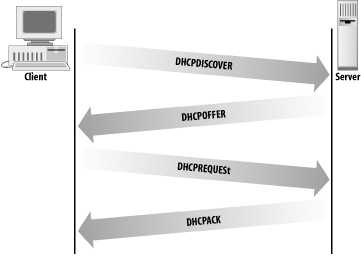
The DHCP client broadcasts a packet called a DHCPDISCOVER message that contains, at a minimum, a transaction identifier and the client's DHCP identifier, which is normally the client's physical network address. The client sends the broadcast using the address 255.255.255.255, which is a special address called the limited broadcast address.[17] The client waits for a response from the server. If a response is not received within a specified time interval, the client retransmits the request. DHCP uses UDP as a transport protocol and, unlike RARP, does not require any special Network Access Layer protocols.
[17] This address is useful because, unlike the normal broadcast address, it doesn't require the system to know the address of the network it is on.
The server responds to the client's message with a DHCPOFFER packet. DHCP uses two different well-known port numbers. UDP port number 67 is used for the server, and UDP port number 68 is used for the client. This is very unusual. Most software uses a well-known port on the server side and a randomly generated port on the client side. (How and why random source port numbers are used is described in Chapter 1.) The random port number ensures that each pair of source/destination ports identifies a unique path for exchanging information. A DHCP client, however, is still in the process of booting. It probably does not know its IP address. Even if the client generates a source port for the DHCPDISCOVER packet, a server response that is addressed to that port and the client's IP address won't be read by a client that doesn't recognize the address. Therefore, DHCP sends the response to a specific port on all hosts. A broadcast sent to UDP port 68 is read by all hosts, even by a system that doesn't know its specific address. The system then determines if it is the intended recipient by checking the transaction identifier and the physical network address embedded in the response.
The server fills in the DHCPOFFER packet with the configuration data it has for the client. A DHCP server can provide every TCP/IP configuration value a client needs, provided the server is properly configured. Chapter 9 is a tutorial on setting up a DHCP server, and Appendix D is a complete list of all of the DHCP configuration parameters.
As the name implies, the DHCPOFFER packet is an offer of configuration data. That offer has a limited lifetimetypically 120 seconds. The client must respond to the offer before the lifetime expires. This is done because more than one server may hear the DHCPDISCOVER packet from the client and respond with a DHCPOFFER. If the servers did not require a response from the client, multiple servers might commit resources to a single client, thus wasting resources that could be used by other clients. If a client receives multiple DHCPOFFER packets, it responds to only one and ignores the others.
The client responds to the DHCPOFFER with a DHCPREQUEST message. The DHCPREQUEST message asks the server to assign the client the configuration information that was offered. The server checks the information in the DHCPREQUEST to make sure that the client got everything right and that all of the offered data is still available. If everything is correct, the server sends the client a DHCPACK message letting the client know that it is now configured to use all of the information from the original DHCPOFFER packet. Figure 3-5 shows the normal packet flow when DHCP is used to configure a client.
Figure 3-5. DHCP client/server protocol